1. Киришүү
Thank you for choosing the AENO RC2S Robot Vacuum Cleaner. This intelligent device is designed to provide efficient and convenient cleaning for your home, combining vacuuming and mopping functionalities. Equipped with advanced laser scanning technology, it maps your living space for thorough and systematic cleaning. Please read this manual carefully before using the product to ensure proper operation and maintenance.
2. Коопсуздук маалыматы
To reduce the risk of injury or damage, read these safety instructions carefully and keep them for future reference.
- Бул шайманды 8 жаштан жогорку балдар жана физикалык, сезүү же акыл-эс жөндөмү начар же тажрыйбасы жана билими жок адамдар колдонсо болот, эгерде алар көзөмөлгө алынган же шайманды коопсуз колдонуу боюнча нускама алган болсо жана келтирилген коркунучтарды түшүнсө. .
- Тазалоо жана колдонуучу тейлөөнү балдар көзөмөлсүз жасабашы керек.
- Do not use the robot in environments with high humidity or near heat sources.
- Ensure the charging station is placed on a flat surface against a wall, with adequate clear space around it.
- Do not allow the robot to pick up large objects, liquids, or burning/smoking materials.
- Оптималдуу иштеши үчүн щеткаларды жана сенсорлорду дайыма тазалаңыз.
- Use only the original power adapter and charging station provided with the robot.
3. Пакеттин мазмуну
Пакетте бардык компоненттер бар экенин текшериңиз:
- AENO RC2S робот чаң соргуч
- Кубаттоочу станция
- Кубаттуу адаптер
- контейнери
- Суу цистернасы (шабба менен)
- Каптал щеткалары (x2)
- Тазалоо куралы
- User Manual
4. Продукт бүтүп калдыview
Familiarize yourself with the main components of your AENO RC2S robot vacuum cleaner.
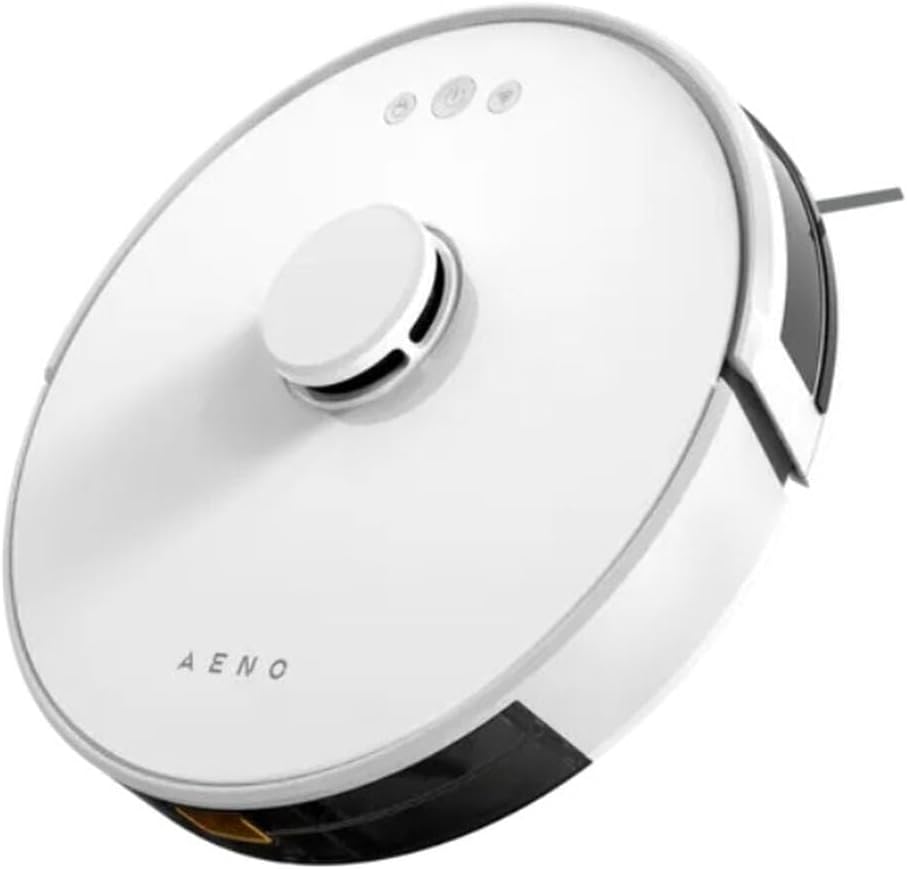
4.1-сүрөт: Жогорку view of the AENO RC2S Robot Vacuum Cleaner. The image displays the sleek white circular design of the robot, featuring a central raised laser navigation turret and three control buttons on the top surface. The AENO logo is visible towards the front.
Жогорку View:
- Laser Navigation Turret: Houses the LDS (Laser Distance Sensor) for precise mapping and navigation.
- Башкаруу баскычтары: Power/Clean, Home/Recharge, Spot Clean.
- Таштанды челекти чыгаруу баскычы: Таштанды челекти алып салуу үчүн.
Төмөнкү View:
- Негизги щетка: Килемдерди жана катуу полдорду терең тазалоо үчүн.
- Каптал щеткалар: Sweep debris from edges and corners into the main brush path.
- Айдоо дөңгөлөктөрү: Роботко ар кандай беттерде жылышына уруксат бериңиз.
- Заряддоо байланыштары: Connect with the charging station.
- Cliff сенсорлору: Роботтун тепкичтен кулап түшүшүнө жол бербеңиз.
- Универсал дөңгөлөк: Provides 360-degree movement.
5. Орнотуу
5.1 Заряддоо станциясын жайгаштыруу
Place the charging station on a hard, level surface against a wall. Ensure there is at least 0.5 meters (1.6 feet) of clear space on both sides and 1.5 meters (4.9 feet) in front of the charging station. Connect the power adapter to the charging station and plug it into a power outlet. Ensure the indicator light on the charging station is on.
5.2 Алгачкы заряддоо
Place the robot on the charging station, ensuring the charging contacts align. The robot will automatically begin charging. For first-time use, fully charge the robot for approximately 5 hours. The battery capacity is 3000 mAh, providing up to 130 minutes of runtime.
5.3 Колдонмону орнотуу жана туташуу
Download the "AENO" app from your mobile device's app store (iOS or Android). Follow the in-app instructions to connect your robot vacuum cleaner to your home Wi-Fi network. The app allows for advanced control, scheduling, and mapping features.
6. Иштөө
6.1 Тазалоо циклин баштоо
- Автоматтык тазалоо: Press the Power/Clean button on the robot or in the app. The robot will automatically clean your home using its laser navigation system.
- Таза так: Place the robot in a specific dirty area and press the Spot Clean button. The robot will clean a concentrated area.
- Edge Clean: Select Edge Clean mode in the app. The robot will clean along the walls and edges of your rooms.
6.2 Чыпкалоо функциясы
The AENO RC2S features a 0.35 L water tank for wet cleaning. Fill the water tank with clean water and attach the mop pad. Insert the water tank into the robot. You can control the water flow electronically via the app (low, medium, high) to suit different floor types and cleaning needs. The robot can clean up to 150 square meters at once.
6.3 Smart Room Mapping and Restricted Zones
The robot uses LiDAR technology to create detailed maps of your home. Through the AENO app, you can:
- View жана карталарды түзөтүү: See the generated map of your home.
- Барууга тыюу салынган аймактарды коюу: Draw virtual boundaries on the map to prevent the robot from entering specific areas.
- Set No-Mop Zones: Define areas where the robot should vacuum but not mop (e.g., carpeted areas).
- Select Specific Room Cleaning: Choose which rooms to clean.
If the battery is low during a cleaning cycle, the robot will automatically return to the charging station, recharge, and then resume cleaning from where it left off.
7. Техникалык тейлөө
Үзгүлтүксүз тейлөө оптималдуу иштешин камсыз кылат жана робот чаң соргучуңуздун иштөө мөөнөтүн узартат.
7.1 Чаң челектерин жана чыпкаларды тазалоо
- Бош таштанды челек: Press the dustbin release button and remove the dustbin. Empty its contents after each cleaning cycle.
- Таза чыпка: Remove the filter from the dustbin. Tap it gently to remove dust. The filter can be rinsed with water, but ensure it is completely dry before reinserting.
7.2 Негизги щетка жана каптал щеткалар
- Негизги щетка: Щетканын негизги капкагын алып, щетканы көтөрүп алыңыз. Щетканын айланасында чырмалышып калган түктөр менен таштандыларды тазалоо үчүн тазалоочу куралды колдонуңуз.
- Каптал щеткалар: Check side brushes for tangled hair or debris. If damaged, replace them.
7.3 Сенсорлор жана заряддоо контакттары
Wipe all sensors (cliff sensors, wall sensor) and charging contacts on both the robot and the charging station with a clean, dry cloth regularly to ensure proper functionality.
7.4 Суу багы жана швабра
After each mopping session, empty any remaining water from the tank. Remove and clean the mop pad. The mop pad can be hand-washed or machine-washed. Allow it to air dry completely before reattaching.
8. Кыйынчылыктарды
If you encounter issues with your AENO RC2S, refer to the following common problems and solutions:
| Көйгөй | Мүмкүн себеп | Чечим |
|---|---|---|
| Робот күйбөйт. | Батареянын аздыгы; Кубат өчүрүү. | Роботту кубаттаңыз; Негизги кубат которгучу күйүк экенин текшериңиз. |
| Робот заряддоо станциясын таба албайт. | Charging station obstructed; Robot too far. | Clear obstacles around the station; Manually place robot closer. |
| Cleaning performance is poor. | Таштанды челек толуп калган; Бүтөлүп калган чыпка; Чаташкан щеткалар. | Empty dustbin; Clean/replace filter; Clean main and side brushes. |
| Робот бат-баттан тыгылып калат. | Obstacles; Dirty sensors. | Remove cables/small objects; Clean cliff sensors. |
| Колдонмого туташуу маселелери. | Incorrect Wi-Fi password; Router issues. | Verify Wi-Fi password; Restart router and robot; Ensure 2.4GHz Wi-Fi. |
9. Техникалык шарттар
| Модель аты | RC2S |
| Бренд | AENO |
| Түс | Ак |
| Өлчөмдөрү (Диаметри x Бийиктиги) | 33 см х 9.6 см |
| Салмагы | 2.7 кг |
| Чаң контейнеринин сыйымдуулугу | 0.6 Л |
| Суу резервуарынын сыйымдуулугу | 0.35 Л |
| Ызы-чуу деңгээли | 65 дБ |
| Батарея сыйымдуулугу | 3000 мАч (Литий-ион) |
| Runtime | 130 мүнөткө чейин |
| Заряддоо убактысы | Болжол менен 5 саат |
| Номиналдуу кубаттуулук | 28 Ватт |
| Максималдуу тазалоо аянты | 150 м² |
| Өзгөчөлүктөр | Laser Navigation (LiDAR), App Control, Smart Room Mapping, Virtual Walls, Auto-resume cleaning |
10. Кепилдик жана колдоо
AENO products are manufactured to the highest quality standards. For warranty information and technical support, please refer to the warranty card included in your package or visit the official AENO webсайт. Сатып алганыңыздын далили катары сатып алуу дүмүрчөгүңүздү сактаңыз.
For further assistance, please contact AENO customer service.


