1. Киришүү
Сатып алганыңыз үчүн рахматasing the 4DRC V8 Mini Drone. This manual provides essential information for the safe operation, maintenance, and troubleshooting of your new drone. Please read this manual thoroughly before operating the drone to ensure proper use and to maximize your flying experience. This drone is designed for beginners and children, offering easy controls and stable flight characteristics.
2. Продукт бүтүп калдыview
2.1 Пакеттин мазмуну
- 4DRC V8 мини-дрон
- Remote Controller
- Rechargeable Lithium-Ion Batteries (2 included)
- USB заряддоо кабели
- Запастык пропеллер
- User Manual

Figure 2.1: Complete package contents of the 4DRC V8 Mini Drone.
2.2 Негизги өзгөчөлүктөрү
- 720P HD камера: Real-time FPV (First Person View) video transmission for immersive flight.
- Жеңил башкаруу: Features like Altitude Hold, Headless Mode, and One-Key Take-off/Landing simplify operation for beginners.
- Multifunctional Flight: Includes custom flight path (Trajectory Flight), 360° Flips, Gesture Control for selfies, and 3-speed settings.
- Узартылган учуу убактысы: Comes with two rechargeable batteries, providing up to 20 minutes of flight time.
- Коопсуз жана бышык дизайн: Propellers are protected by four frames, and the high-quality ABS shell protects against impacts.
- Тартылуу күчү индукциясы: Allows control by tilting your smartphone.
3. Орнотуу
3.1 Дрондун батареясын кубаттоо
- Дрондун батареясын USB заряддоо кабелине туташтырыңыз.
- Plug the USB cable into a 5V/1A USB adapter (not included) or a computer USB port.
- The indicator light on the USB cable will show charging status (refer to cable instructions for specific light behavior).
- Кубаттоо, адатта, болжол менен 60-90 мүнөткө созулат. Ашыкча кубаттабаңыз.
3.2 Дрон батареясын орнотуу
- Дрондун өчүрүлгөнүн текшериңиз.
- Carefully insert the charged battery into the battery compartment on the drone.
- Ensure the battery is securely latched to prevent dislodging during flight.
3.3 Алыстан башкаруу пультунун батареяларын орнотуу
- Пульттун артындагы батарея бөлүкчөсүн ачыңыз.
- Insert 3 AAA batteries (not included) according to the polarity markings (+/-).
- Батарея отсегин жабыңыз.
3.4 Propeller Installation/Replacement
The drone comes with pre-installed propellers. If replacement is needed:
- Identify the correct propeller type (A or B) by checking the marking on the propeller and the drone arm.
- Gently pull off the damaged propeller.
- Press the new propeller firmly onto the motor shaft, ensuring it is fully seated.
4. Иштөө нускамалары
4.1 Pairing the Drone with the Remote Controller
- Дронду тегиз, тегиз жерге орнотуңуз.
- Power on the drone. The drone's indicator lights will flash.
- Алыстан башкаруучуну күйгүзүңүз.
- Push the left joystick (throttle) all the way up, then pull it all the way down. The drone's lights will stop flashing and become solid, indicating successful pairing.
4.2 One-Key Take-off and Landing
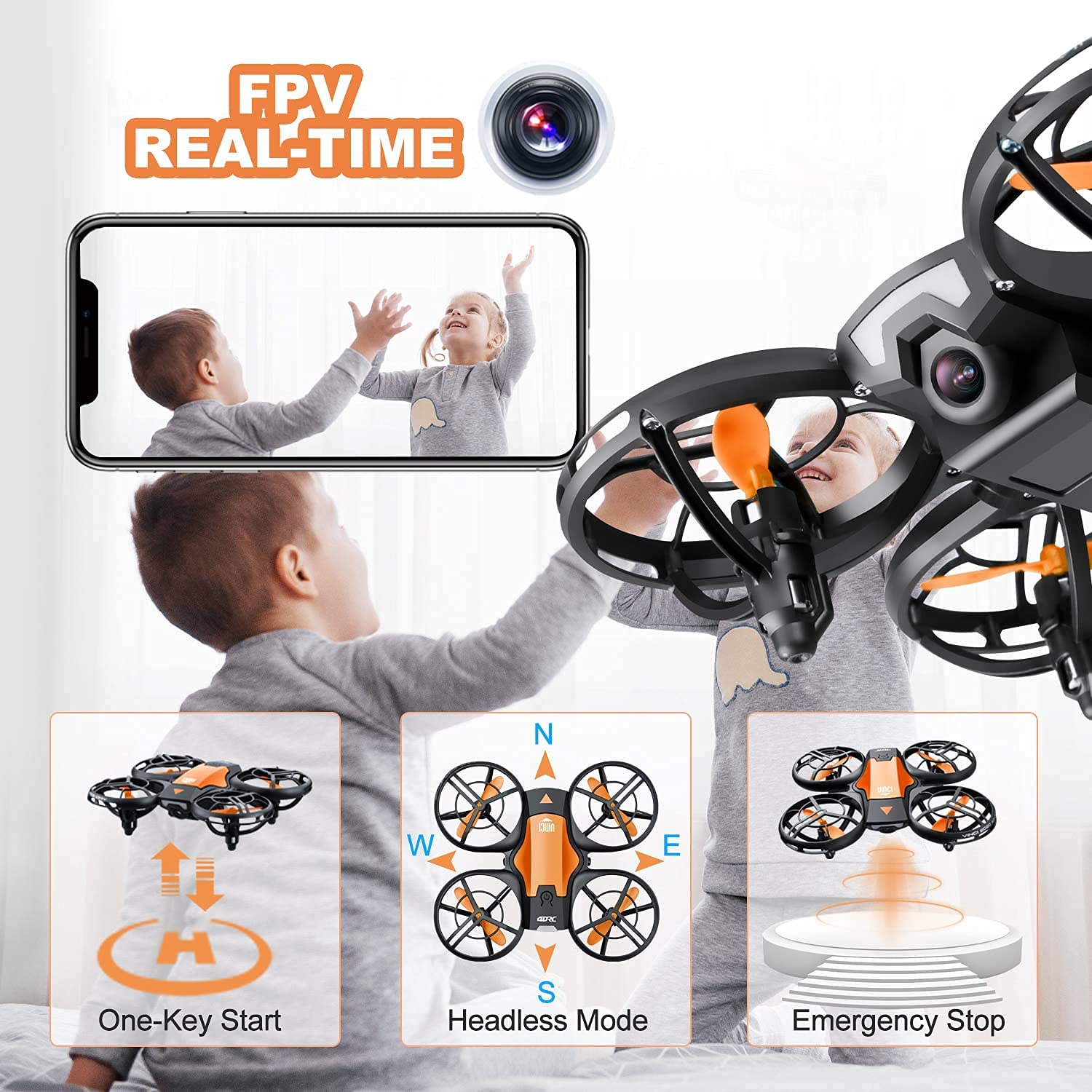
Figure 4.2: Visual representation of One-Key Start, Headless Mode, and Emergency Stop functions.
- Учуп чыгуу: After pairing, press the One-Key Take-off button (usually indicated by an upward arrow or drone icon). The drone will automatically ascend to a stable hovering height.
- Конуу: Press the One-Key Landing button (usually indicated by a downward arrow or drone icon). The drone will slowly descend and land automatically.
4.3 Учууну башкаруунун негизги каражаттары
| Control Stick | Акция | Дрон кыймылы |
|---|---|---|
| Left Joystick (Throttle) - Up/Down | Push up/down | Өтүү/Төмөн |
| Left Joystick (Yaw) - Left/Right | Солго/оңго басыңыз | Солго/Оңго айлантуу |
| Right Joystick (Pitch) - Up/Down | Push up/down | Алдыга/артка учуу |
| Right Joystick (Roll) - Left/Right | Солго/оңго басыңыз | Солго/Оңго учуу (каптал) |
4.4 Башсыз режим
In Headless Mode, the drone's orientation is irrelevant. The drone will move relative to the pilot's position. For example, pushing the right joystick forward will always make the drone fly away from the pilot, regardless of which way the drone's "head" (front) is facing.
- Жандандыруу: Press the Headless Mode button on the remote (refer to remote diagram if available). The drone will beep to confirm activation.
- Өчүрүү: Press the Headless Mode button again.
4.5 360° айлануу

Figure 4.5: The drone executing a 360-degree flip maneuver.
360° оодарууну аткаруу үчүн:
- Дрондун жетиштүү бийиктикте (жок дегенде 2-3 метр) учуп жатканын текшериңиз.
- Press the 360° Flip button (usually indicated by a circular arrow icon).
- Immediately push the right joystick in the desired flip direction (forward, backward, left, or right). The drone will perform a flip in that direction.
4.6 Trajectory Flight (Tap Fly)

Figure 4.6: Using the mobile application to set a custom flight path for the drone.
This feature allows you to draw a flight path on your smartphone screen, and the drone will automatically follow it.
- Download and install the 4DRC companion app (refer to packaging or quick start guide for QR code/app name).
- Connect your smartphone to the drone's Wi-Fi network (usually named "4DRC_XXXXXX").
- Open the app and select the Trajectory Flight mode.
- Draw your desired path on the screen. The drone will then fly along the specified route.
4.7 FPV Camera and App Usage

Figure 4.7: The 720P HD camera provides real-time FPV view to a connected smartphone.
The drone's 720P HD camera transmits live video to your smartphone via Wi-Fi.
- Смартфонуңуздун дрондун Wi-Fi тармагына туташкандыгын текшериңиз.
- Open the 4DRC app. The live video feed from the drone's camera will appear on your screen.
- Use the app interface to take photos or record videos. Files are typically saved directly to your phone's gallery.
4.8 Авариялык токтотуу
In case of an emergency or loss of control, press the Emergency Stop button on the remote controller. This will immediately cut power to the motors, causing the drone to fall. Use this function only when necessary to prevent damage or injury.
5. Коопсуздук боюнча көрсөтмөлөр
- Дронду ар дайым ачык жерлерде, адамдардан, жаныбарлардан, имараттардан жана тоскоолдуктардан алыс айдаңыз.
- Дрон менен ар дайым визуалдык сызыкты сактаңыз.
- Катуу шамалда, жамгырда же башка жагымсыз аба ырайында учпаңыз.
- Манжаларды жана чачты айлануучу пропеллерлерден алыс кармаңыз.
- Ар бир учуудан мурун батарейкалардын толук заряддалганын текшериңиз.
- Do not attempt to modify or disassemble the drone or its components.
- Дрон менен иштөө учурунда балдарды көзөмөлдөңүз.
- Adhere to local regulations regarding drone usage.
6. Техникалык тейлөө
- Тазалоо: Use a soft, dry cloth to clean the drone after each use. Avoid water or harsh chemicals.
- Пропеллер: Regularly inspect propellers for damage (bends, cracks). Replace damaged propellers immediately using the spare parts provided.
- Батареялар: Store batteries in a cool, dry place. Do not store fully charged or completely depleted for long periods. Charge them periodically if not in use.
- Сактагыч: When not in use, store the drone and remote controller in a safe, dry place, away from direct sunlight and extreme temperatures.
7. Кыйынчылыктарды
| Көйгөй | Мүмкүн себеп | Чечим |
|---|---|---|
| Дрон пультка жооп бербейт. | Жупташтырылган эмес; батареясы аз (дрон/пульт). | Re-pair the drone and remote; charge/replace batteries. |
| Учуу учурунда учкучсуз учат. | Not calibrated on a flat surface; strong wind. | Recalibrate the drone; fly in calm conditions. |
| Poor FPV video quality or no feed. | Weak Wi-Fi signal; app not connected. | Ensure strong Wi-Fi connection; restart app and drone. |
| Кыска учуу убактысы. | Батарея толук заряддалган эмес; эски батарея. | Ensure full charge; consider replacing battery if old. |
| Пропеллерлер айланбай жатат. | Obstruction; motor damage; low battery. | Check for obstructions; charge battery. If problem persists, contact support. |
8. Техникалык шарттар
| Өзгөчөлүк | Деталь |
|---|---|
| Бренд | 4DRC |
| Модел | V8 Mini Drone |
| Башкаруу түрү | Gesture control, Remote control |
| Максималдуу диапазон | 120 Фут |
| Материал | ABS |
| Зымсыз байланыш | Wi-Fi |
| Батарея түрү | Литий ион |
| Учуу убактысы | 20 мүнөткө чейин (2 батарейка менен) |
| Продукциянын өлчөмдөрү | 13L x 11W x 4H Сантиметр |
| Элемент Салмагы | 430 г |
9. Кепилдик жана колдоо
For warranty information or technical support, please refer to the contact details provided on the product packaging or the official 4DRC webсайт. Сатып алганыңыздын далили катары сатып алуу дүмүрчөгүңүздү сактаңыз.


