Introduction
This manual provides comprehensive instructions for the operation, maintenance, and troubleshooting of your DXPICR Smart Watch. Please read this manual carefully before using the device to ensure proper functionality and to maximize your user experience.

Image: The DXPICR Smart Watch, featuring a light pink band and a vibrant display showing various app icons.
Орнотуу жана баштапкы жупташтыруу
Before using your DXPICR Smart Watch, ensure it is adequately charged. The watch comes with a Lithium Polymer battery (included). Follow these steps to set up and pair your watch with your smartphone:
- Колдонмону жүктөп алыңыз: Download the official DXPICR companion application from your mobile app store (compatible with Android and iOS).
- Bluetooth иштетүү: Смартфонуңузда Bluetooth'ду күйгүзүңүз.
- Саатты жупташтыруу: Open the DXPICR app on your phone. Navigate to the "Add a device" section and search for "Y20 GT" to connect.
- Enable Call Function (for calling features): On your watch, swipe down the screen to access quick settings and turn on the 'call' function switch.
- Чалуулар үчүн Bluetooth туташтыруу: Open your phone's Bluetooth settings page. Find and connect to "Y20 GT_Phone" to enable call answering and dialing directly from your watch.
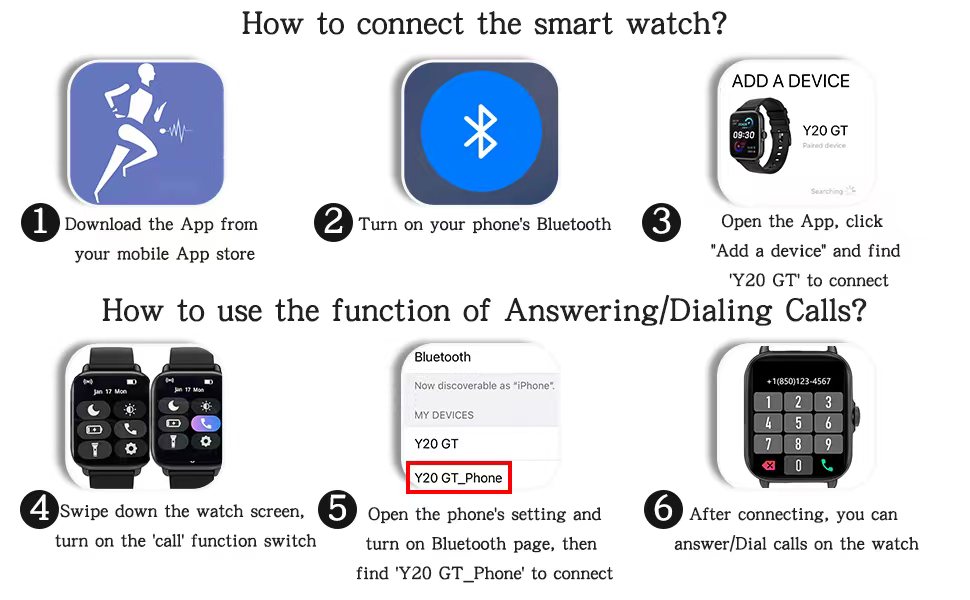
Image: A visual guide illustrating the six steps for connecting the smart watch and enabling its call answering/dialing functions via the mobile app and Bluetooth settings.

Image: A woman using her DXPICR Smart Watch to answer or dial calls directly from her wrist, demonstrating the Bluetooth call function.
Акылдуу саатыңызды иштетүү
Your DXPICR Smart Watch features a 1.7-inch TFT color full touch screen (240x280 pixels) for intuitive navigation. Use the touchscreen and the physical dial/button for interaction.
Негизги өзгөчөлүктөрү жана функциялары:
- Call Receive/Dial: Once paired, you can make and receive calls directly from your watch using the dial pad, call records, or contacts.
- Акылдуу эскертмелер: Receive notifications for calls, messages, and social media apps directly on your wrist.

Image: A user interacting with their laptop while their DXPICR Smart Watch displays various notifications, including calls, messages, and social media alerts.
- Ден соолук мониторинги:
- Жүрөктүн кагышын көзөмөлдөөчү: Built-in optical heart rate sensor provides real-time heart rate data.

Image: A woman meditating, with her DXPICR Smart Watch displaying her heart rate, illustrating the heart rate monitoring feature.
- Уйку монитору: Tracks awake time, light sleep, and deep sleep patterns to help you understand your sleep quality.

Image: A person sleeping, with the DXPICR Smart Watch displaying detailed sleep monitoring data, including awake time, light sleep, and deep sleep.
- Кандагы кычкылтек (SpO2) Монитор: Сиздин кандын кычкылтек менен каныккандыгын өлчөйт.
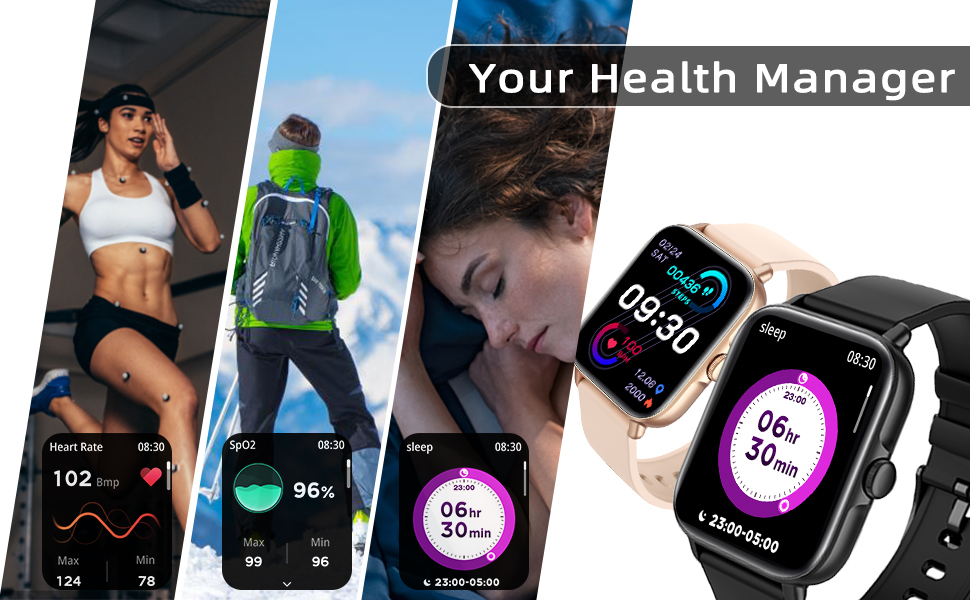
Сүрөт: Коллаж көрсөтүүasing the health management features of the DXPICR Smart Watch, including heart rate, SpO2, and sleep tracking.
- Жүрөктүн кагышын көзөмөлдөөчү: Built-in optical heart rate sensor provides real-time heart rate data.
- Activity Tracking & Sports Modes: Built-in activity tracker records steps, calories burned, distance, and active hours. It supports 28 sports modes with GPS connectivity (via phone).

Image: A woman celebrating after a workout, with her DXPICR Smart Watch displaying activity data such as steps, calories, distance, and active minutes, highlighting the 28 sports modes.

Image: A dynamic image illustrating various sports modes available on the DXPICR Smart Watch, including walking, cycling, and swimming, with corresponding activity data.
- Практикалык куралдар: Your watch includes various useful tools:
- Үн жардамчысы: Access AI voice commands.
- Дем алуу тренинги: Эс алуу үчүн дем алуу көнүгүүлөрүн жасоо.
- Музыкалык башкаруу: Жупташкан смартфонуңузда музыка ойнотууну башкарыңыз.
- Камераны башкаруу: Саатыңызды телефонуңуздун камерасы үчүн алыстан жапкыч катары колдонуңуз.
- Отуруучу эскертүүлөр: Кыймылсыз мезгилден кийин кыймыл-аракетти стимулдаштыруучу эскертүүлөр.
- Ойготкуч саат: Ойготкучтарды түз саатыңыздан коюңуз.
- Аба ырайы дисплей: Реалдуу убакытта аба ырайы жаңыртууларын алыңыз.
- Кол чырак: A basic flashlight function.

Image: A compilation of icons representing the DXPICR Smart Watch's practical functions, including weather display, blood oxygen monitoring, music control, call features, and alarm clock.
- Personalized Watch Face: Customize your watch face with your favorite pictures or photos through the app.
Техникалык тейлөө жана кам көрүү
Proper care will extend the life and performance of your DXPICR Smart Watch.
- Тазалоо: Сааттын экранын жана боосун жумшак, d менен үзгүлтүксүз сүртүп туруңузamp кездеме. Катуу химиялык заттарды же абразивдүү материалдарды колдонуудан алыс болуңуз.
- Суу каршылык: The watch is designed to be waterproof. However, avoid prolonged submersion in water, hot water, or steam. It is suitable for daily use and light water exposure like hand washing or rain.
- Заряддоо: Use the provided charging cable. Ensure the charging contacts on the watch and cable are clean and dry before charging.
- Сактагыч: Саатты көпкө чейин колдонбогон учурда, салкын, кургак жерде сактаңыз.
Проблемаларды чечүү
If you encounter issues with your DXPICR Smart Watch, refer to the following common solutions:
| Көйгөй | Мүмкүн чечим |
|---|---|
| Саат күйбөй/кубатталбай жатат. | Ensure the charging cable is properly connected to both the watch and a power source. Check if the charging contacts are clean. Allow the watch to charge for at least 30 minutes before attempting to turn it on. |
| Bluetooth ажыратуу. | Ensure the watch and phone are within Bluetooth range. Restart both the watch and your phone. Unpair and re-pair the devices through the app and phone's Bluetooth settings. Check if the app is running in the background and has necessary permissions. |
| Эскертмелер көрүнбөй жатат. | Verify that notification permissions are enabled for the DXPICR app in your phone's settings. Ensure notifications are enabled within the DXPICR app itself. Check if "Do Not Disturb" mode is active on either the watch or phone. |
| Heart rate/SpO2 readings are inaccurate. | Ensure the watch is worn snugly on your wrist, not too tight or too loose. Keep the sensor clean and free from debris. Remain still during measurements. |
| Колдонмо бузулат же катып калат. | Update the DXPICR app to the latest version. Clear the app's cache and data (this may require re-pairing). Reinstall the app if the issue persists. Ensure your phone's operating system is up to date. |
Продукт спецификациялары
| Өзгөчөлүк | Деталь |
|---|---|
| Бренд | DXPICR |
| Модель аты | DXPICR Smart Watch |
| Элемент моделинин номери | SMWACTH42 |
| Продукциянын өлчөмдөрү | 3.7 x 3.4 x 1.7 дюйм |
| Элемент Салмагы | 3.84 унция |
| Түс | Ачык кызгылт |
| Дисплей технологиясы | TFT |
| Screen Size | 1.7 дюйм |
| Резолюция | 240 x 280 пиксель |
| Операция системасы | Android, iOS менен шайкеш келет |
| Байланыш технологиясы | Bluetooth |
| Батарея түрү | 1 Литий Полимердик батарейка (кошулган) |
| Өзгөчөлүктөр | Phone Call, Heart Rate Monitor, Sleep Monitor, Blood Oxymeter (SpO2), Music Player, Camera, Sedentary Reminder, Alarm Clock, Calorie Tracker, Time Display, Voice Call, Waterproof, Multisport Tracker, Notifications, Activity Tracker, Breath Monitor |
| Адам интерфейсинин киргизүү | Dial, Touchscreen |
Кепилдик жана колдоо
For warranty information or technical support, please refer to the contact details provided with your product packaging or visit the official DXPICR website. Our customer service team is available to assist you with any questions or concerns regarding your smart watch.