1. Киришүү
This manual provides comprehensive instructions for the setup, operation, and maintenance of your Cherry MW 9100 Wireless Rechargeable Mouse. The MW 9100 is a compact, versatile mouse offering dual connectivity options (Bluetooth or 2.4 GHz USB receiver) and a convenient rechargeable battery.
Негизги өзгөчөлүктөр төмөнкүлөрдү камтыйт:
- Compact design with charging functionality.
- Flexible operation: use while charging via USB-C cable.
- Dual connectivity: Bluetooth or 2.4 GHz USB receiver.
- Magnetic storage for the USB receiver, ideal for travel.
- Adjustable DPI settings for varied usage.
2. Пакеттин мазмуну
Пакетте бардык буюмдар бар экенин текшериңиз:
- Cherry MW 9100 Wireless Rechargeable Mouse
- USB-C заряддоо кабели
- 2.4 ГГц USB кабыл алгыч
- Коргоочу баштык
- Көрсөтмө (бул документ)
3. Орнотуу
3.1 Чычканды заряддоо
The Cherry MW 9100 mouse features a built-in rechargeable battery. Before initial use, or when the battery is low, connect the included USB-C cable to the mouse and to a USB power source (e.g., computer USB port, USB wall adapter). The mouse can be used normally while charging.

Сүрөт 3.1: Жогорку view of the Cherry MW 9100 mouse, showing the charging indicator light.
3.2 Чычканды туташтыруу
The MW 9100 offers two connection methods: 2.4 GHz wireless via USB receiver or Bluetooth.
3.2.1 2.4 ГГц зымсыз байланыш
- Locate the USB receiver. It is magnetically stored in a compartment on the underside of the mouse.
- USB ресиверди компьютериңиздеги жеткиликтүү USB портуна салыңыз.
- On the underside of the mouse, slide the switch to the "RF" position.
- Чычкан компьютериңизге автоматтык түрдө туташуу керек.
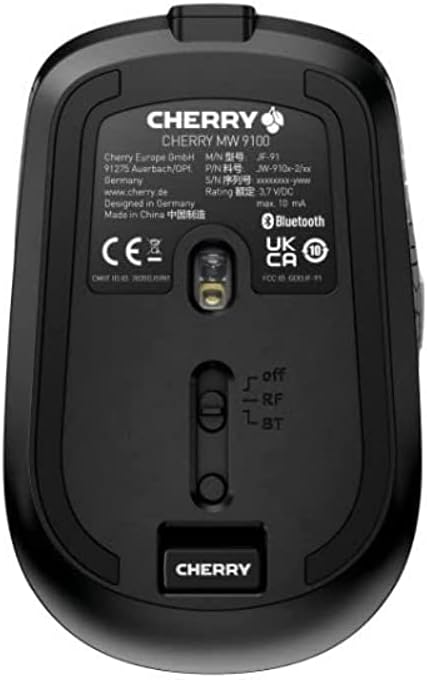
Сүрөт 3.2: Underside of the Cherry MW 9100 mouse, highlighting the USB receiver storage and the connection mode switch.
3.2.2 Bluetooth байланышы
- On the underside of the mouse, slide the switch to the "BT" (Bluetooth) position.
- Press and hold the small pairing button located near the connection switch on the underside of the mouse until the LED indicator on the mouse starts blinking, indicating pairing mode.
- Компьютериңизде же түзмөгүңүздө Bluetooth жөндөөлөрүн ачып, жаңы түзмөктөрдү издеңиз.
- Select "Cherry MW 9100" from the list of available devices to complete the pairing process.
4. Иштөө нускамалары
4.1 Негизги функциялар
The Cherry MW 9100 mouse features standard left and right click buttons, a scroll wheel (which also functions as a middle click button), and two side buttons for navigation (typically forward/back).
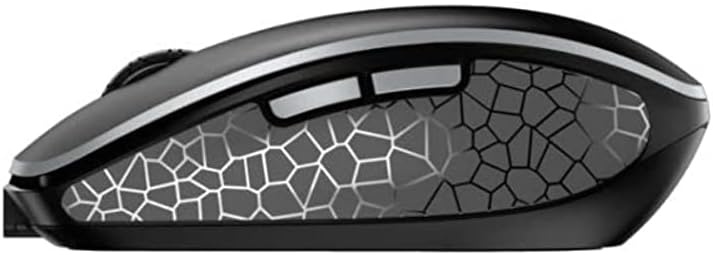
Сүрөт 4.1: Side view of the Cherry MW 9100 mouse, illustrating the ergonomic design and side buttons.
4.2 DPI жөндөө
The mouse includes a DPI (Dots Per Inch) button, usually located near the scroll wheel, allowing you to adjust the cursor sensitivity. Press this button to cycle through different DPI settings to match your preference or task requirements.

Сүрөт 4.2: A hand demonstrating the comfortable grip on the Cherry MW 9100 mouse during use.
5. Техникалык тейлөө
To ensure optimal performance and longevity of your Cherry MW 9100 mouse:
- Тазалоо: Чычкандын бетин тазалоо үчүн жумшак, кургак чүпүрөктү колдонуңуз. өжөр кир үчүн, бир аз гamp cloth can be used, but ensure no moisture enters the device. Avoid harsh chemicals or abrasive materials.
- Сактагыч: When not in use, especially during travel, store the mouse in the provided protective pouch to prevent scratches and damage.
- Батареяга кам көрүү: Avoid fully discharging the battery frequently. Recharge the mouse when the low battery indicator appears.
6. Кыйынчылыктарды
| Көйгөй | Мүмкүн себеп | Чечим |
|---|---|---|
| Чычкан жооп бербей жатат | Low battery, incorrect connection mode, USB receiver not connected, Bluetooth not paired. |
|
| Intermittent connection (Bluetooth) | Interference, device driver issues, distance from device. |
|
| Курсордун кыймылы туура эмес же жай | Dirty optical sensor, low battery, incorrect DPI setting. |
|
7. Техникалык шарттар
| Өзгөчөлүк | Деталь |
|---|---|
| Бренд | Cherry |
| Модель номери | JW-9100US-2 |
| Байланыш технологиясы | Bluetooth, 2.4 GHz USB Wireless |
| Кыймылды аныктоо | Оптикалык |
| Өзгөчөлүктөр | Жеңил, көчмө, кайра заряддалуучу |
| Продукциянын өлчөмдөрү | 4 x 3 x 2 дюйм |
| Элемент Салмагы | 6.4 унция |
| Түс | Кара |
8. Кепилдик жана колдоо
For warranty information and technical support, please refer to the official Cherry website or contact Cherry customer service directly. Keep your proof of purchase for warranty claims.
Өндүрүүчү: CHERRY
Webсайт: www.cherry.de


