ProForm 325 CSX Exercise Bike User Manual
Model: 325 CSX
Introduction
This manual provides essential information for the safe and effective use, assembly, operation, and maintenance of your ProForm 325 CSX Exercise Bike. Please read this manual thoroughly before using the equipment and retain it for future reference.

Image: The ProForm 325 CSX Exercise Bike, showcasing its full design including the console, seat, and pedals.
Орнотуу жана чогултуу
Before assembly, ensure all parts are present and undamaged. Assembly typically requires two people. Refer to the included assembly guide for detailed, step-by-step instructions and diagrams.
Пакеттен чыгаруу жана жайгаштыруу:
- Бардык компоненттерди таңгактан кылдаттык менен алып салыңыз.
- Place the exercise bike on a level surface with adequate clearance around it for safe operation and maintenance.
- Ensure the area is free from obstructions and has proper ventilation.
Баштапкы чогултуу кадамдары:
- Алдыңкы жана арткы стабилизаторлорду негизги рамкага бекитиңиз.
- Secure the seat post and seat assembly.
- Install the console mast and handlebars.
- Attach the pedals, ensuring they are tightened securely (left pedal is reverse-threaded).
- Connect any necessary wiring for the console.
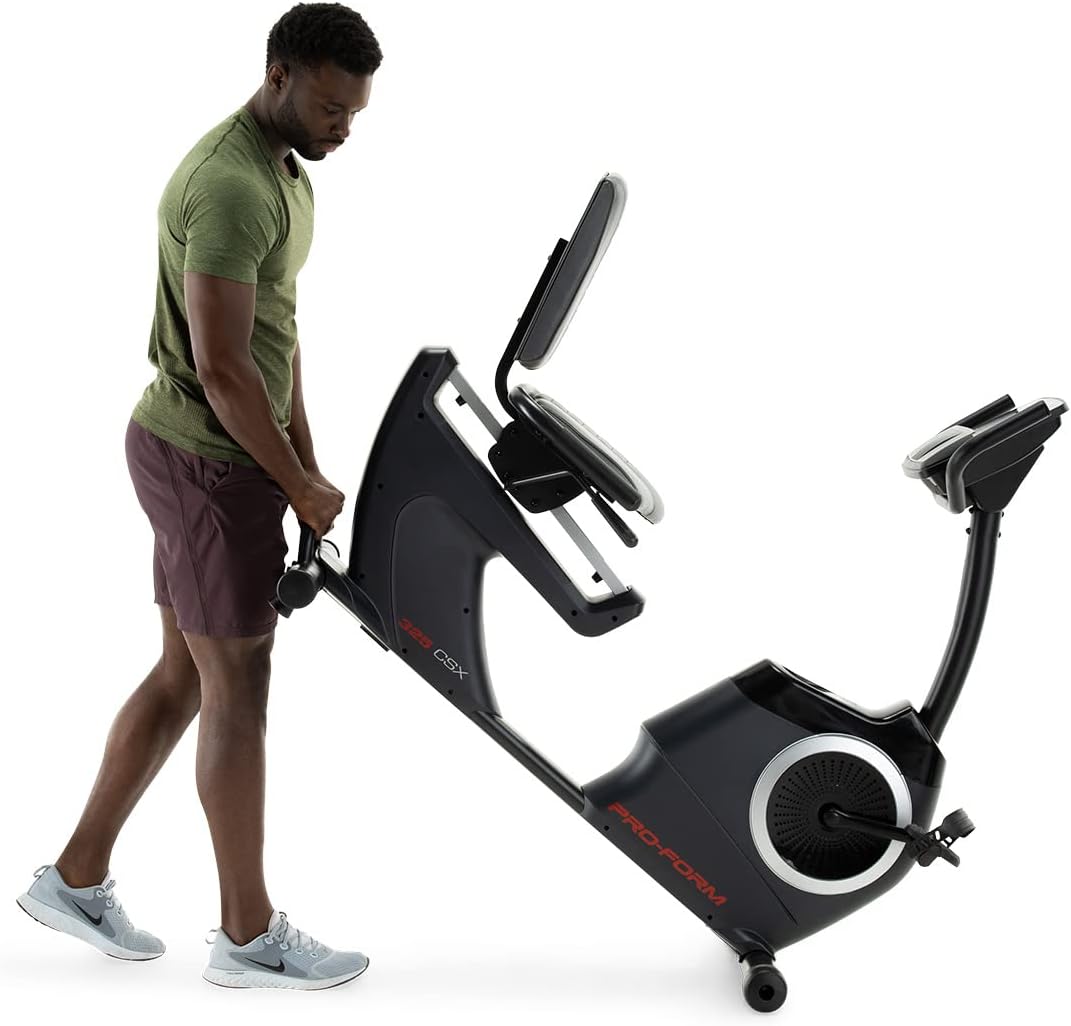
Image: Moving the exercise bike. The bike features transport wheels for easier relocation after assembly.
Иштөө нускамалары
Орундукту тууралоо:
The cushioned seat is adjustable to accommodate various user heights. To adjust, locate the adjustment lever beneath the seat. Pull the lever, slide the seat to the desired position, and release the lever to lock it in place. Ensure the seat is securely locked before use.

Image: A user demonstrating the correct riding position on the ProForm 325 CSX Exercise Bike, highlighting the adjustable seat.
Console Features and iFIT Connectivity:
The 5-inch high-contrast display provides real-time workout statistics. The bike features 22 digital resistance levels, allowing for precise intensity control. The console also supports iFIT connectivity for interactive workouts.
- Күйгүзүү: Press any button on the console or begin pedaling to activate the display.
- Каршылык жөнгө салуу: Use the '+' and '-' buttons on the console to increase or decrease resistance. Quick resistance buttons (2, 4, 6, etc.) are also available.
- Машыгуу программалары: Select from 24 built-in workout programs. Refer to the console manual for navigation.
- iFIT Connection: Connect your own device (tablet/smartphone) via Bluetooth to access iFIT's global outdoor workouts and hands-free intensity adjustments. A 30-day iFIT membership is typically included with purchase.

Сүрөт: деталдуу view of the console, showing the digital display, resistance controls, and integrated fan.

Image: A user engaging with the iFIT application on a tablet, demonstrating the bike's connectivity features.

Image: An illustration of the iFIT connection, highlighting how a personal device can enhance the workout experience.
Техникалык тейлөө
Үзгүлтүксүз техникалык тейлөө тренажердук велосипедиңиздин узак жана оптималдуу иштешин камсыз кылат.
- Тазалоо: Ар бир колдонгондон кийин велосипедди жарнама менен сүртүп туруңузamp терди жана чаңды тазалоо үчүн кездеме. Абразивдүү тазалагычтардан алыс болуңуз.
- Текшерүүлөр: Periodically check all bolts and nuts for tightness. Retighten as necessary.
- Педальдар: Педальдардын бекем бекитилгенин жана эркин айланганын текшериңиз.
- Майлоо: The internal magnetic resistance system and belt drive are generally maintenance-free and do not require lubrication.
Проблемаларды чечүү
| Көйгөй | Мүмкүн себеп | Чечим |
|---|---|---|
| Консоль дайындарды көрсөтпөйт. | Loose wire connection; batteries low/dead (if applicable). | Check all console wire connections. Replace console batteries if battery-powered. |
| Каршылык өзгөрбөйт. | Loose connection to resistance motor; console malfunction. | Ensure all connections are secure. If using iFIT, ensure the app is properly connected and controlling the bike. |
| Иш учурунда адаттан тыш ызы-чуу. | Loose hardware; component friction. | Inspect all bolts and nuts and tighten any loose ones. Ensure no parts are rubbing. |
| Педаалдар бош же солкулдап сезилет. | Pedals not tightened sufficiently. | Retighten pedals. Remember the left pedal is reverse-threaded. |
Техникалык шарттар
| Өзгөчөлүк | Деталь |
|---|---|
| Модель аты | 325 CSX |
| Бренд | ProForm |
| Түс | Кара |
| Каршылык көрсөтүү механизми | Магниттик |
| Каршылык деңгээлдердин саны | 22 санариптик деңгээл |
| Drive System | кур |
| Максималдуу Колдонуучу Салмагы | 300 фунт (болжол менен 136 кг) |
| Элемент Салмагы | 50.8 килограмм (болжол менен 112 фунт) |
| Материал | Эритме болот |
| Power Source | Pedal-powered (non-electric for main operation, console may use batteries) |
| Сунушталган колдонуу | Indoor |
| Консолдук дисплей | 5-inch High-Contrast Display |
| Байланыш | iFIT (Bluetooth compatible) |
| UPC | 043619106961 |
| Өндүрүүчү | iFIT Ден соолук жана Фитнес |
Кепилдик жана колдоо
ProForm products are manufactured with high-quality materials and craftsmanship. For specific warranty details, please refer to the warranty card included with your product or visit the official ProForm website. Warranty coverage typically includes the frame, parts, and labor for a specified period from the date of purchase.
For technical assistance, replacement parts, or customer service inquiries, please contact ProForm customer support. Have your model number (325 CSX) and serial number ready when contacting support.
Сиз ошондой эле пайдалуу ресурстарды жана көп берилүүчү суроолорду таба аласыз Amazon'догу ProForm дүкөнү же өндүрүүчүнүн расмий адамы webсайт.


