1. Продукт бүтүп калдыview
The Loolinn Z3 Drone is designed for beginners, offering stable flight and ease of use. It features optical flow positioning technology for intelligent hovering and includes a 720p camera for capturing aerial photos and videos. With three included batteries, users can enjoy extended flight times.

Image 1.1: The Loolinn Z3 Drone, its remote control, and three rechargeable batteries.
2. Пакеттин мазмуну
Төмөндө тизмеленген нерселердин баары пакетиңизде бар экенин текшериңиз:
- 1 x Loolinn Z3 Drone
- 1 x Алыстан башкаруу
- 1 x User Manual
- 1 x Смартфон кармагыч
- 3 x Drone Batteries
- 2 x USB заряддоо кабелдери
- 4 x Rotor Blade Protectors
- 4 x Кошумча пропеллерлер
- 1 x Screwdriver

Image 2.1: Contents of the Loolinn Z3 Drone package, including the drone, remote, batteries, and accessories.
3. Коопсуздук боюнча көрсөтмөлөр
Before operating the Loolinn Z3 Drone, please read and adhere to the following safety guidelines to ensure a safe and enjoyable experience:
- Always fly in open areas, away from people, animals, buildings, and obstacles.
- Катуу шамалда же жагымсыз аба ырайынын шарттарында учуудан качыңыз.
- Дрон менен ар дайым визуалдык көрүү сызыгын сактаңыз.
- Ensure the drone batteries and remote control batteries are fully charged before each flight.
- Манжаларды жана кенен кийимдерди айлануучу пропеллерлерден алыс кармаңыз.
- Do not operate the drone near airports or restricted airspace.
- This product is suitable for ages 14 and up. Adult supervision is recommended for younger users.
4. Орнотуу
4.1 Батареяны заряддоо жана орнотуу
The drone comes with three 1500mAh Lithium Ion batteries. Each battery provides approximately 20 minutes of flight time. Use the provided USB charging cables to charge the drone batteries. A full charge typically takes about 35 minutes per battery.
- Connect the USB charging cable to a power source (e.g., computer USB port, USB wall adapter).
- Connect the battery to the charging cable. The indicator light on the cable will show charging status.
- Толук заряддалгандан кийин, батареяны ажыратыңыз.
- Insert a charged battery into the drone's battery compartment.
The remote control requires 4 AA batteries (not included). Open the battery compartment on the back of the remote and insert the batteries, observing correct polarity.

Image 4.1: The three 1500mAh Lithium Ion batteries included with the Loolinn Z3 Drone.
4.2 Пропеллерди жана коргоочу түзүлүштөрдү орнотуу
Attach the propeller guards to the drone's arms by snapping them into place. Ensure they are securely fastened. If replacing propellers, match the propellers marked 'A' with motor 'A' and 'B' with motor 'B'.
4.3 Smartphone Holder Attachment
Attach the smartphone holder to the top of the remote control. This allows you to mount your smartphone to view the drone's camera feed.
4.4 Дронду жана пультту жупташтыруу
- Дронду тегиз, тегиз жерге орнотуңуз.
- Turn on the drone by pressing the power button. The drone's indicator lights will flash.
- Алыстан башкарууну күйгүзүңүз.
- Push the left joystick (throttle) all the way up, then all the way down. The drone's lights will stop flashing and remain solid, indicating successful pairing.
4.5 Гироскопту калибрлөө
After pairing, calibrate the gyroscope for stable flight:
- Ensure the drone is on a flat, level surface.
- Push both joysticks on the remote control down and to the right simultaneously.
- Дрондун жарыктары тез жаркылдап, андан кийин катуу болуп калат, бул ийгиликтүү калибрлөөнү билдирет.
5. Иштөө нускамалары
5.1 Учууну башкаруунун негизги каражаттары
- Бир ачкыч менен учуп чыгуу/конуу: Press the one-key take-off/landing button (usually marked with an arrow) to automatically take off or land.
- Дроссель (сол жактагы джойстик): Өйдө көтөрүлүү үчүн түртүңүз, ылдый түшүү үчүн ылдый тартыңыз.
- Багыттоо башкаруусу (оң жактагы джойстик): Push forward to fly forward, pull back to fly backward, push left to fly left, push right to fly right.
- Яв (Сол джойстикти солго/оңго бураңыз): Push left to rotate left, push right to rotate right.
5.2 Оптикалык агымдын жайгашуусу
The Loolinn Z3 Drone is equipped with an optical flow positioning sensor on its underside. This technology helps the drone maintain its position and hover stably, especially in indoor environments or areas with minimal wind. This feature contributes to easier control and clearer image capture.

Image 5.1: The Loolinn Z3 Drone utilizing its optical flow positioning technology for stable flight.
5.3 Камеранын иштеши
The drone features a 720p camera for capturing photos and videos. To access the camera feed and control, download the dedicated Loolinn drone app on your smartphone and connect via Wi-Fi.
- Download the Loolinn drone app from your smartphone's app store.
- Дронду күйгүзүңүз.
- Connect your smartphone to the drone's Wi-Fi network (usually named 'Loolinn_XXXX').
- колдонмону ачуу view жандуу камера берүү.
- Use the app interface to take photos or start/stop video recording.

Image 5.2: A smartphone displaying the 720p live video feed from the drone's camera.
5.4 Special Features: 3D Flip
The Loolinn Z3 Drone can perform 3D flips. To execute a flip:
- Fly the drone to a height of at least 2 meters (6.5 feet).
- Press the 3D flip button on the remote control (refer to your remote diagram for exact location).
- Immediately push the right joystick in the desired direction (forward, backward, left, or right) to perform the flip.

Image 5.3: The Loolinn Z3 Drone executing a 3D flip, demonstrating its acrobatic capabilities.
5.5 Flight Environment Considerations
The Loolinn Z3 Drone is lightweight (approximately 4.65 ounces) and can be sensitive to wind. For optimal performance and control, fly in calm conditions. The maximum control range is approximately 262 feet (80 meters).
6. Техникалык тейлөө
6.1 Батареяга кам көрүү
- Always use the provided charging cables.
- Батареяларды ашыкча заряддабаңыз же ашыкча разрядтабаңыз.
- Батареяларды күн нурунан жана экстремалдык температурадан алыс салкын, кургак жерде сактаңыз.
- If not used for an extended period, charge batteries to about 50% capacity.
6.2 Пропеллерди алмаштыруу
In case of propeller damage, use the included extra propellers and screwdriver for replacement. Ensure the correct 'A' and 'B' propellers are installed on their respective motors.
6.3 Тазалоо
Use a soft, dry cloth to clean the drone and remote control. Avoid using water or chemical cleaners, which can damage electronic components.
7. Кыйынчылыктарды
- Дрон күйбөй жатат: Батарея толук заряддалганын жана туура салынганын текшериңиз.
- Жупташтыруунун кыйынчылыгы: Make sure the drone and remote are turned on and within range. Repeat the pairing steps (Section 4.4).
- Туруксуз учуу: Perform gyroscope calibration (Section 4.5). Avoid flying in windy conditions. Check for damaged propellers.
- Камера сапаты начар: The camera records at 720p resolution. Ensure good lighting conditions for best results.
- Кыска учуу убактысы: Батареялардын толук заряддалганын текшериңиз. Учуу убактысына катуу учуу же катуу шамал таасир этиши мүмкүн.
- Propeller damage: Replace damaged propellers immediately using the spare parts provided.
- Байланыштын жоголушу: If the drone loses connection with the remote, it will typically descend and land automatically. Ensure you are within the maximum range of 262 feet.
8. Техникалык шарттар
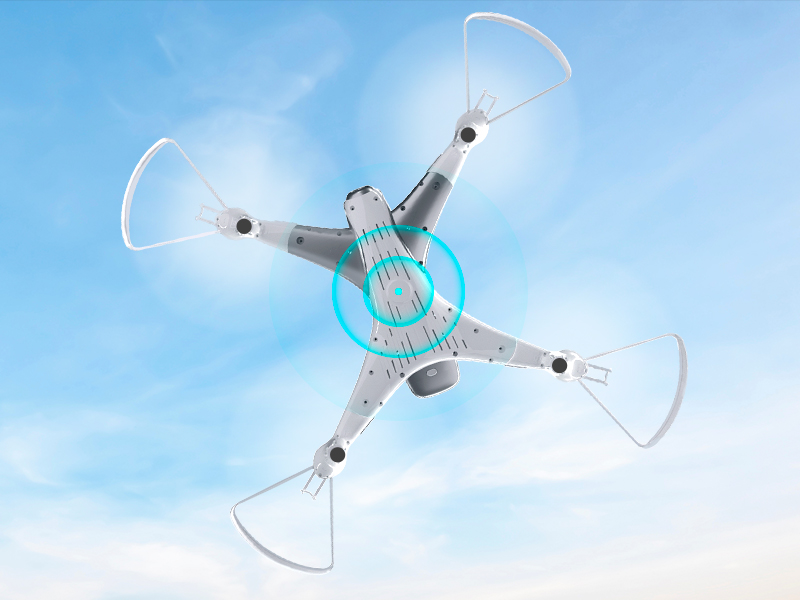
Image 8.1: The Loolinn Z3 Drone's weight measured on an electronic scale.
| Өзгөчөлүк | Спецификация |
|---|---|
| Бренд | loolinn |
| Модель аты | Z3 дрон |
| Өзгөчөлүктөр | 3 Batteries, 3D Flip, 60 Minutes Long Flight Time (total), Optical Flow Positioning Technology, Stable Flight |
| Жаш аралыгы (сүрөттөө) | Kids, Teenagers |
| Түс | Ак |
| Видео тартуунун резолюциясы | 720p |
| Байланыш технологиясы | Wi-Fi |
| Skill Level | Beginner |
| Элемент Салмагы | 4.65 унция (болжол менен 131.7 грамм) |
| Батарея сыйымдуулугу | 1500 миллионamp Сааттар (ар бир батарея үчүн) |
| Видео тартуу форматы | MP4 |
| Алыстан башкаруу технологиясы | Wi-Fi |
| Максималдуу диапазон | 262 Фут (болжол менен 80 метр) |
| Материал | Металл, пластик |
| Батарея клеткасынын курамы | Литий ион |
| Колдоого алынган сүрөт форматы | JPEG |
| Продукциянын өлчөмдөрү | 12.6"L x 12.6"W x 1.97"H |
| UPC | 768492333128 |
9. Кепилдик жана колдоо
Loolinn is committed to providing quality products and customer satisfaction. For any inquiries or support needs, please refer to the following:
- Кайтаруу саясаты: A full refund is available within 30 days of purchase.
- Кардарларды тейлөө: Loolinn offers responsive customer service, typically providing replies within 12 hours.
- Алмаштыруучу бөлүктөрү: For replacement parts such as propellers, please contact Loolinn customer support or visit their official webсайт.
Кошумча жардам алуу үчүн, сураныч, баш багыңыз Loolinn Store on Amazon.


