1. Киришүү
Thank you for choosing the Shadowhawk S2800 LED Flashlight. This manual provides detailed instructions for the safe and effective use, maintenance, and troubleshooting of your new flashlight. Please read this manual thoroughly before operating the device and keep it for future reference.

Figure 1: The Shadowhawk S2800 LED Flashlight, showcasing its robust design, included battery, and USB charging cables.
2. Продукт бүтүп калдыview
2.1 Негизги өзгөчөлүктөрү
- Өтө жарыктык: Equipped with the updated 2024 XHP160.2-Chip, producing up to 550,000 lumens.
- Узак аралык: Capable of focusing objects up to 1000 meters away.
- USB кайра заряддалуучу: Built-in USB charging port for convenient charging via power banks, outlets, or laptops.
- Узак мөөнөттүү батарея: Up to 12 hours of runtime in low mode on a single charge.
- 5 жарык режимдери: High, Medium, Low, Strobe, and SOS.
- Жөнгө салынуучу Фокус: Stretch the flashlight head to switch between spotlight (long-range) and floodlight (wide area) illumination.
- IP67 Суу өткөрбөйт: Designed to withstand harsh handling and temporary submersion (not for prolonged immersion).
- Дээрлик бузулгус: Can withstand a 10-foot drop.
- Натыйжалуу жылуулук диссипациясы: Special design on the handle for rapid heat dispersion.
- Power Bank функциясы: Can be used to charge other USB-powered devices.
2.2 Пакеттин мазмуну
Кутудан чыгарылганда бардык буюмдар бар экенин текшериңиз:
- 1x Shadowhawk S2800 USB Rechargeable Flashlight
- 1x Shadowhawk Rechargeable Battery
- 1x USB кубаттоо кабели
- 1x Колдонуучунун колдонмосу
2.3 Компонентти идентификациялоо
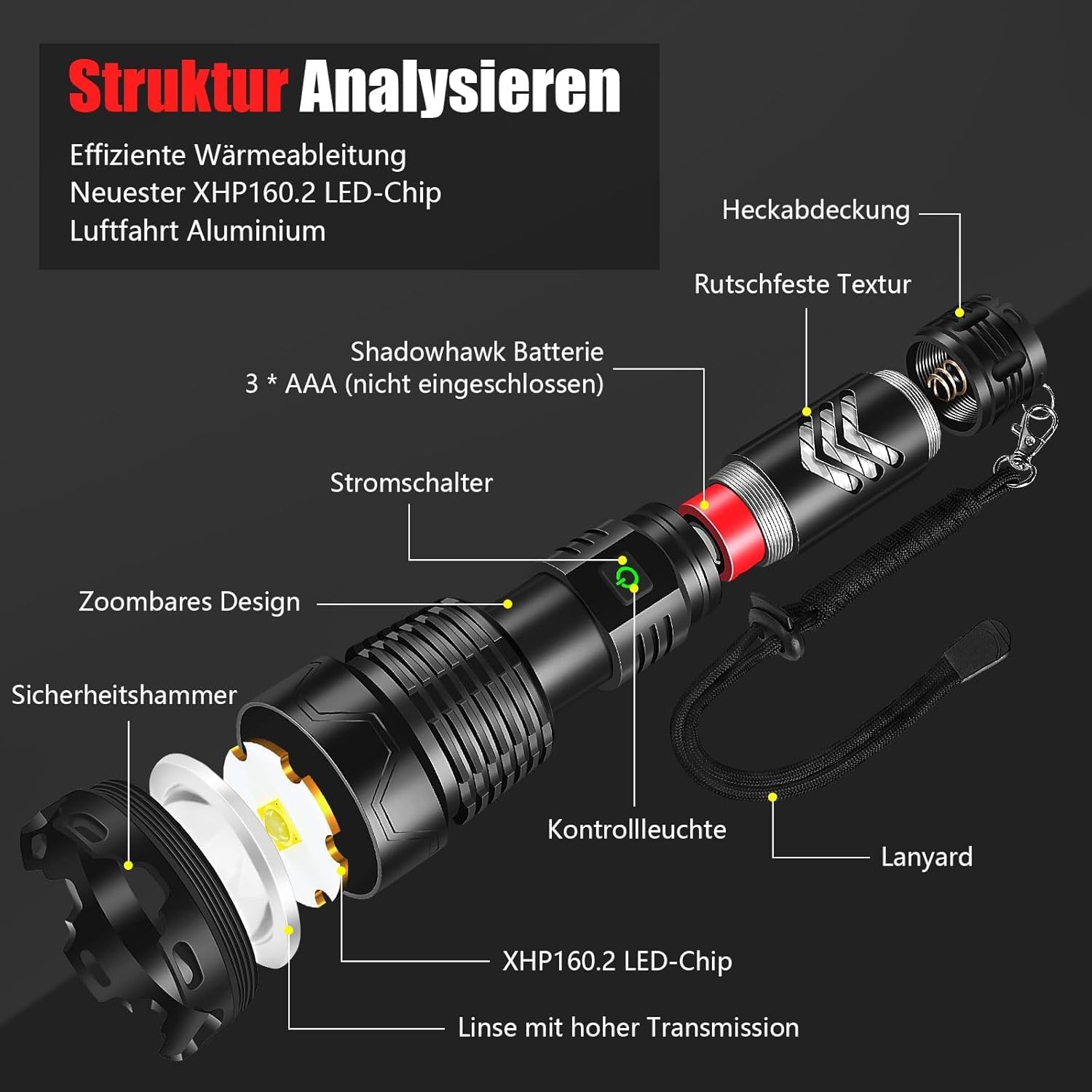
Figure 2: Detailed breakdown of the flashlight's components, including the XHP160.2 LED chip, high transmission lens, power switch, control light, zoomable design, safety hammer, anti-slip texture, and tail cap.
- XHP160.2 LED Chip: Негизги жарык булагы.
- High Transmission Lens: Optimizes light output.
- Кубат которгучу: Controls power and mode selection.
- Башкаруу жарыгы: Indicates battery status and charging.
- Чоңойтуучу дизайн: Прожектор менен прожектордун ортосунда жөнгө салууга мүмкүндүк берет.
- Safety Hammer: Integrated into the head for emergency use.
- Тайгаланбай турган текстура: Provides a secure grip.
- Куйрук капкагы: Батарея бөлүмүн бекитет.
- USB кубаттоо порту: For charging the flashlight and external devices.
3. Орнотуу
3.1 Батареяны орнотуу
The Shadowhawk S2800 flashlight uses a rechargeable Lithium-Ion battery. Follow these steps to install it:
- Кол чырактын куйрук капкагын сааттын жебесине каршы буруп чечиңиз.
- Маанилүү: Before first use, gently peel off and remove the transparent plastic protective film from the battery surface.
- Insert the Shadowhawk rechargeable battery into the flashlight with the positive (+) end facing towards the head of the flashlight.
- Куйруктун капкагын сааттын жебеси боюнча кайра бекем орнотулганга чейин бураңыз.

Figure 3: Visual guide for battery installation, emphasizing the removal of the protective film and correct polarity.
3.2 Алгачкы заряддоо
For optimal performance, fully charge the flashlight before its first use.
- Locate the USB charging port on the flashlight body. It is usually covered by a rubber flap for water resistance.
- Резина капкагын ачыңыз.
- Кошумча USB кубаттоочу кабелин фонарьдын портуна туташтырыңыз.
- Connect the other end of the USB cable to a USB power source (e.g., wall adapter, power bank, computer USB port).
- The control light on the flashlight will indicate charging status (e.g., red for charging, green for fully charged).
- Once fully charged, disconnect the cable and securely close the rubber flap to maintain water resistance.

Figure 4: The flashlight's USB-C charging port and its versatility for charging from various USB sources.
4. Иштөө нускамалары
4.1 Күйгүзүү/өчүрүү
- Кол чыракты буруш үчүн ON, press the power button located on the body of the flashlight.
- Кол чыракты буруш үчүн ӨЧҮРҮҮ каалаган режимден кубат баскычын басып, болжол менен 3 секунд кармап туруңуз.
4.2 Жарык режимдерин өзгөртүү
The Shadowhawk S2800 features 5 distinct lighting modes:
- Жогорку: Maximum brightness for powerful illumination.
- Орточо: Жалпы колдонуу үчүн тең салмактуу жарык.
- Төмөн: Reduced brightness for extended battery life or close-range tasks.
- Строб: Сигнал берүү же багытын жоготуу үчүн жаркылдаган жарык.
- SOS: International Morse code signal for emergencies.
To cycle through the modes, briefly press the power button repeatedly after turning the flashlight on. Each press will advance to the next mode in the sequence (High > Medium > Low > Strobe > SOS).

Figure 5: Depiction of the five available lighting modes and their visual effects.
4.3 Adjusting Focus (Zoom)
The flashlight's head can be extended or retracted to adjust the beam focus:
- Floodlight (Zoom In): Push the head of the flashlight inwards to achieve a wide, diffused beam, ideal for illuminating large areas.
- Spotlight (Zoom Out): Pull the head of the flashlight outwards to create a narrow, concentrated beam, perfect for long-distance viewing.

Figure 6: Visual comparison of the floodlight (wide beam) and spotlight (focused beam) functions.
4.4 Power Bank катары колдонуу
Your Shadowhawk S2800 flashlight can also serve as a portable power bank to charge other devices:
- Open the rubber flap covering the USB port.
- Connect your device's charging cable to the flashlight's USB output port.
- Фонарь түзмөгүңүздү кубаттай баштайт.
- Түзмөгүңүздүн кубаттоо индикаторун көзөмөлдөңүз.
- Once charging is complete, disconnect the cable and securely close the rubber flap.
5. Техникалык тейлөө
5.1 Тазалоо
- Кол чырактын корпусун жумшак менен сүртүңүз, гamp кездеме.
- Абразивдүү тазалагычтарды же эриткичтерди колдонбоңуз, алар финишке зыян келтириши мүмкүн.
- Оптималдуу жарык чыгаруу үчүн линзаны таза кармаңыз. Керек болсо линзаны тазалоочу чүпүрөктү колдонуңуз.
5.2 Батареяга кам көрүү
- Recharge the battery regularly, even if the flashlight is not frequently used, to maintain battery health.
- Заряддоодон мурун батарейканы толугу менен түгөтүп жибербеңиз.
- If storing the flashlight for an extended period (more than a few weeks), it is recommended to remove the battery to prevent potential parasitic drain and preserve battery life.
5.3 Сактоо
- Кол чыракты салкын, кургак жерде күндүн тике тийген нурунан жана экстремалдык температурадан алыс сактаңыз.
- Балдар жетпеген жерде сактаңыз.
6. Кыйынчылыктарды
If you encounter issues with your Shadowhawk S2800 flashlight, please refer to the table below for common problems and solutions:
| Көйгөй | Мүмкүн себеп | Чечим |
|---|---|---|
| Кол чырак күйбөйт. | Battery is dead or low. Battery installed incorrectly. Protective film on battery not removed. | Charge the battery. Check battery polarity (+/-). Remove the transparent protective film from the battery. |
| Жарык күңүрт же бүлбүлдөп турат. | Low battery. Loose connections. Dirty lens. | Recharge the battery. Ensure tail cap and head are tightened. Clean the lens. |
| Battery drains quickly when off. | Parasitic drain (rare). | If storing for extended periods or experiencing rapid discharge when off, remove the battery from the flashlight. |
| Кол чырак заряддалбай жатат. | Charging cable faulty. USB port dirty. Power source issue. | Try a different USB cable. Clean the USB port. Try a different USB power source. |
| Режимдерди өзгөртүү мүмкүн эмес. | Баскычтын иштебей калышы. | Ensure the button is pressed firmly. If issue persists, contact customer service. |
7. Техникалык шарттар
| Өзгөчөлүк | Спецификация |
|---|---|
| Модель номери | DE-S2800 |
| Жарык булагы | XHP160.2 LED Chip |
| Light Output | 550,000 люменге чейин |
| Beam Distance | 1000 метрге чейин |
| Батарея түрү | Литий-ион (кошулган) |
| Иштөө убактысы (Төмөнкү режим) | 12 саатка чейин |
| Заряддоо порту | USB |
| Суу өткөрбөйт рейтинги | IP67 |
| Drop Resistance | 10 фут (болжол менен 3 метр) |
| Өлчөмдөр | 19 x 3.5 x 6 см (болжол менен 7.48 x 1.38 x 2.36 дюйм) |
| Салмагы | 560 грамм (болжол менен 1.23 фунт) |
| Материал | Пластик (турак) |
| Сертификаттар | CE, RoHS, WEEE |
8. Кепилдик жана колдоо
Shadowhawk is committed to providing high-quality products. If you experience any quality issues with your Shadowhawk S2800 flashlight, please contact our customer service. We strive to provide the most satisfactory service within 24 hours.
For support, please refer to the contact information provided with your purchase or visit the official Shadowhawk store on Amazon.
8.1 Кайра иштетүү жөнүндө маалымат
Please dispose of the flashlight and its battery responsibly according to local regulations. Information regarding the recycling of lamps and the disposal of broken or damaged lamps can be found through your local waste management services.


