Introduction
This manual provides detailed instructions for the FACOI Smart Watch, Model 206. It covers setup, operation, maintenance, and troubleshooting to help you maximize your device's potential. This smart watch is designed for both men and women, offering comprehensive features including call management, activity tracking, and health monitoring, compatible with both Android phones and iPhones.
Кутуда эмне бар
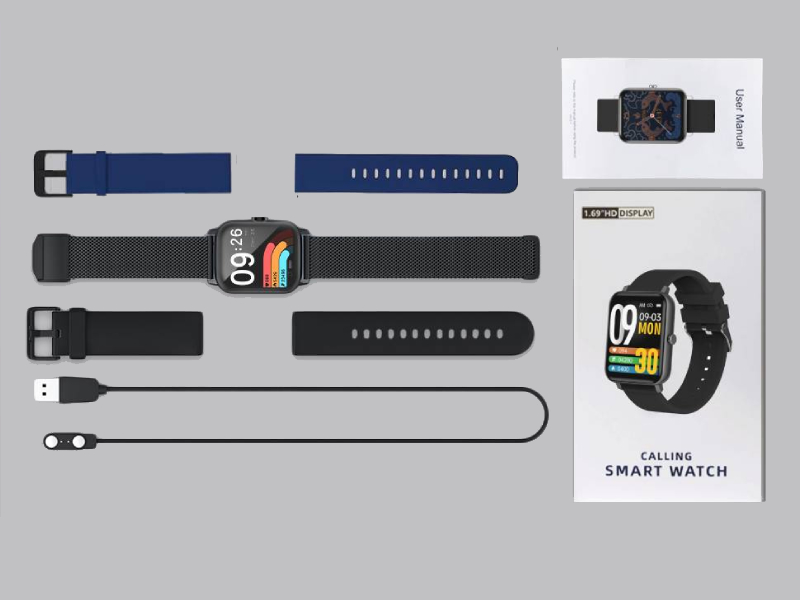
Image: The FACOI Smart Watch package contents, showing the smartwatch unit, a blue silicone strap, a black silicone strap, a black mesh strap, a magnetic charging cable, and the user manual.
- FACOI Smart Watch Unit
- Silicone Watch Straps (typically 2-3, e.g., black, blue)
- Магниттик кубаттоочу кабель
- User Manual
Жайгашуу
1. Акылдуу саатты кубаттоо
Before first use, fully charge your smart watch. Connect the magnetic charging cable to the charging points on the back of the watch. Plug the USB end into a standard USB power adapter (not included) or a computer USB port. The watch display will indicate charging status. A full charge typically takes about 2 hours.
2. Installing Watch Straps
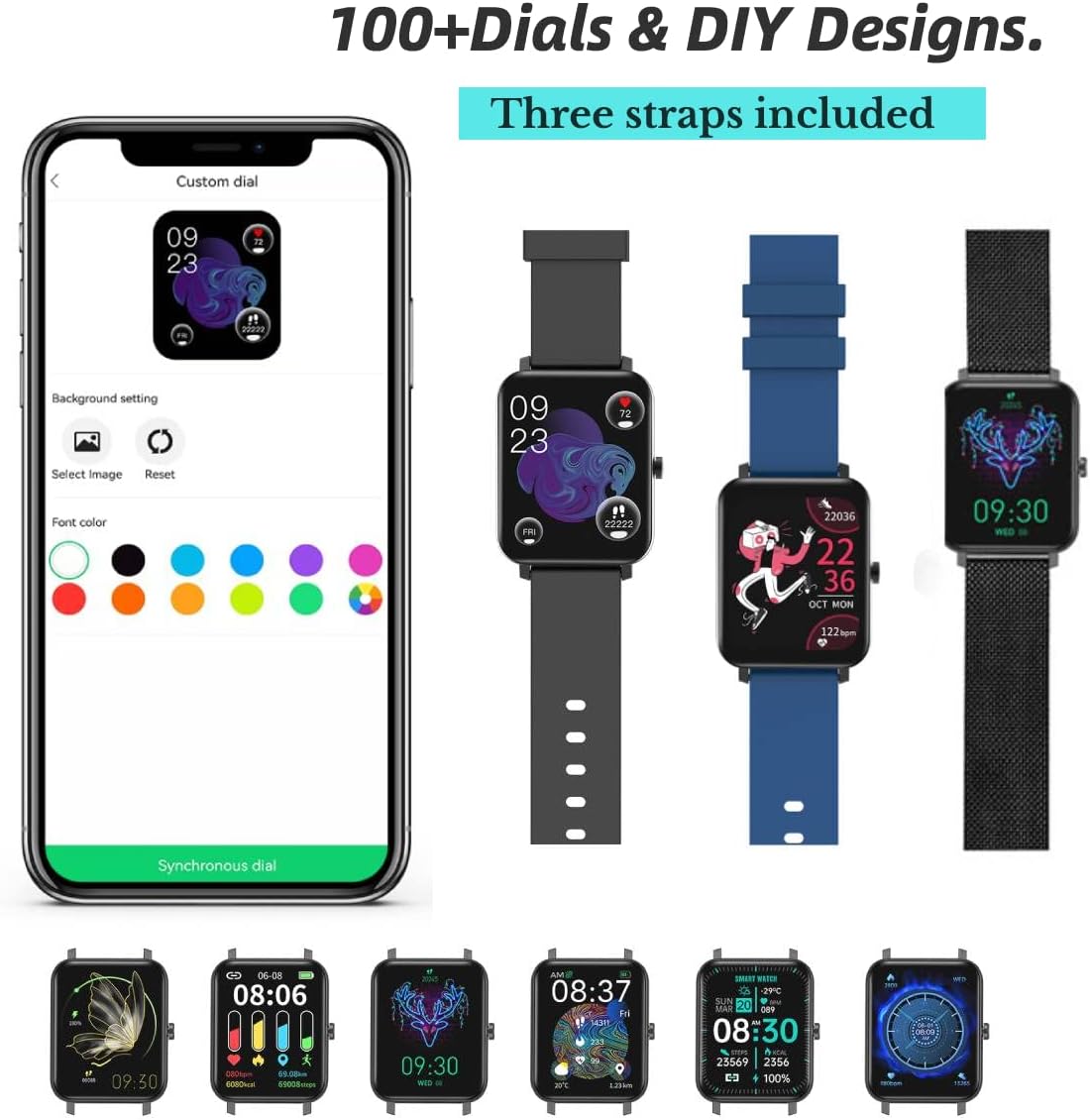
Image: The FACOI Smart Watch with multiple strap options, demonstrating how different straps can be attached to the watch body.
The FACOI Smart Watch comes with interchangeable straps. To attach a strap, align the spring bar with the lug holes on the watch body and push the pin inward to secure it. Release the pin once aligned in the hole. Ensure both ends of the strap are securely fastened before wearing.
3. Смартфонуңуз менен жупташуу
- Колдонмону жүктөп алыңыз: Scan the QR code provided in the quick start guide or search for "Glory Fit" in your smartphone's app store (App Store for iOS, Google Play Store for Android). Install the application.
- Bluetooth иштетүү: Смартфонуңузда Bluetooth иштетилгенин текшериңиз.
- Open Glory Fit App: Glory Fit колдонмосун ишке киргизип, аккаунт түзүү же кирүү үчүн экрандагы көрсөтмөлөрдү аткарыңыз.
- Түзмөк кошуу: In the app, navigate to the "Device" or "My Device" section and select "Add Device." The app will search for nearby smart watches.
- Туташуу: Select "FACOI Smart Watch" or the corresponding device name from the list. Confirm the pairing request on both your phone and the watch if prompted.
- Уруксаттар: Колдонмонун толук иштеши үчүн ага керектүү уруксаттарды (мисалы, эскертмелер, жайгашкан жер, байланыштар) бериңиз.
Ийгиликтүү жупташтырылгандан кийин, саат смартфонуңуз менен убакытты жана маалыматтарды шайкештештирет.
Иштөө нускамалары
Негизги навигация

Image: A visual representation of the smart watch's user interface, displaying different screens for various functions.
- Сенсордук экран: Swipe left/right to navigate between main screens (e.g., activity data, heart rate). Swipe up/down to access quick settings or notifications. Tap to select an icon or option.
- Каптал баскычы: Press the side button to wake the screen, return to the main watch face, or access the app menu.
Bluetooth Call and Message Reminders

Image: The smart watch displaying an incoming call, a dialpad for making calls, and notifications from social media applications.
- Чалууларды жасоо: Once paired via Bluetooth, you can dial numbers directly from the watch's dialpad or select contacts synchronized from your phone.
- Чалууларды кабыл алуу: When an incoming call arrives, the watch will display the caller ID. You can answer or reject calls directly from the watch. The watch features a built-in speaker and microphone for hands-free communication.
- Билдирүү эскертмелери: The watch will display notifications from various apps (e.g., SMS, WhatsApp, Facebook, Twitter) once enabled in the Glory Fit app.
Саат жүздөрүн ыңгайлаштыруу
The Glory Fit app offers over 100 watch faces and allows for DIY designs. In the app, navigate to the "Dial Settings" or "Watch Face" section to browse and apply new watch faces. You can also upload your own photos to create custom backgrounds.
Ден соолук мониторинги

Image: The smart watch displaying real-time health metrics such as blood pressure, blood oxygen saturation, heart rate, and sleep duration, along with a graph of heart rate recording.
- Жүрөктүн кагышын көзөмөлдөө: Саат жүрөктүн кагышын тынымсыз көзөмөлдөйт. View саат боюнча реалдуу убакыт дайындары же колдонмодогу деталдуу тарыхый маалыматтар.
- Кандагы кычкылтектин (SpO2) мониторинги: Кандагы кычкылтектин деңгээлин талап боюнча өлчөңүз.
- Кан басымынын мониторинги: Provides an estimate of your blood pressure. Эскертүү: Бул аппарат медициналык аппарат эмес жана медициналык диагноз коюу же дарылоо үчүн колдонулбашы керек.
- Уйкуга көз салуу: The watch automatically tracks your sleep patterns, including deep sleep, light sleep, and awake time. Review your sleep quality and duration in the Glory Fit app.
- Отуруучу эстеткич: Эгер сиз көпкө чейин кыймылсыз жүрсөңүз, саат сизге кыймылдоону эскертип турат.
Активдүүлүккө көз салуу жана спорт режимдери

Image: The smart watch being used during various activities, highlighting its waterproof capabilities and the extensive list of supported sports modes.
- жөө: Tracks your daily steps, distance covered, and calories burned.
- Спорт режимдери: The watch supports 24 different sports modes, including Running, Walking, Cycling, Jump Rope, Badminton, Table Tennis, Tennis, Mountain Climbing, Basketball, Football, Baseball, Volleyball, Cricket, Rugby, Hockey, Dancing, Spinning, Yoga, Sit-ups, Indoor Run, Gymnastics, Rowing, Jumping Jacks, and Free Training. Select the appropriate mode before starting your workout for accurate tracking.
Башка өзгөчөлүктөр
- Секундомер: Access the stopwatch function from the watch menu for timing activities.
Image: The stopwatch interface on the smart watch.
- Камераны алыстан башкаруу: Саатты телефонуңуздун камерасы үчүн алыстан жапкыч катары колдонуңуз.

Image: The smart watch displaying the camera shutter icon, used to remotely trigger a phone's camera.
- Аба ырайы: View current weather conditions and forecasts directly on your watch after synchronization with the app.
Image: The smart watch screen showing the current temperature and weather conditions.
- Музыкалык башкаруу: Смартфонуңуздагы музыканы ойнотууну (ойнотуу, тындыруу, тректерди өткөрүп жиберүү) түздөн-түз сааттан башкарыңыз.
Техникалык тейлөө
- Сууга туруктуулук (IP67): The watch is IP67 waterproof, meaning it is resistant to splashes, rain, and brief immersion in water (up to 1 meter for 30 minutes). It is suitable for daily use and activities like washing hands or light rain. It is not recommended for hot showers, saunas, or diving. Avoid prolonged exposure to water.
- Тазалоо: Regularly clean the watch and straps with a soft, dry cloth. If necessary, use a slightly damp кездеме жана жумшак самын менен сүртүп, андан кийин жакшылап кургатыңыз. Катуу химиялык заттардан же абразивдүү материалдардан алыс болуңуз.
- Батареяга кам көрүү: Батареянын иштөө мөөнөтүн узартуу үчүн, сааттын зарядын тез-тез толук бошотуп коюудан алыс болуңуз. Батареянын деңгээли төмөн болгондо кубаттаңыз. Саатты узак убакыт бою колдонбогондо салкын, кургак жерде сактаңыз.
Проблемаларды чечүү
| Көйгөй | Мүмкүн чечим |
|---|---|
| Саат күйбөйт же жооп бербейт. | Ensure the watch is fully charged. Connect it to the charger for at least 30 minutes. If unresponsive, try a soft reset by pressing and holding the side button for 10-15 seconds. |
| Смартфон менен жупташтыруу мүмкүн эмес. |
|
| Inaccurate health data (HR, BP, SpO2). | Ensure the watch is worn snugly on your wrist, about one finger's width from the wrist bone. Avoid excessive movement during measurements. Remember, this device is not a medical instrument. |
| Билдирмелер алынган жок. |
|
| Батареянын иштөө мөөнөтү кыска. | Frequent use of features like Bluetooth calls, continuous heart rate monitoring, and bright screen settings can drain the battery faster. Reduce screen brightness, disable unnecessary notifications, and turn off continuous monitoring if not needed. |
Техникалык шарттар
| Өзгөчөлүк | Деталь |
|---|---|
| Модель аты | T8pro (Item model number: 206) |
| Бренд | FACOI |
| Screen Size | 1.69 дюйм (Көрүнүүчү экран диагоналы: 2 дюйм/5 см) |
| Операция системасы | Android (Compatible with Android and iOS) |
| Байланыш технологиясы | Bluetooth |
| Өзгөчөлүктөр | Sleep Monitor, 3 Watch Straps, Multisport Tracker, Sedentary Reminder, Phone Call |
| Суу каршылык | IP67 |
| Батарея түрү | Литий-ион (1 керек, камтылган) |
| Продукциянын өлчөмдөрү | 9.64 x 1.38 x 0.46 дюйм |
| Элемент Салмагы | 0.176 унция / 5 грамм |
Кепилдик жана колдоо
For warranty information and technical support, please refer to the official FACOI website or contact their customer service directly. You may also find additional resources and FAQs on the product's Amazon listing page or within the Glory Fit application.
Колдонуучунун нускамасынын санариптик версиясын жүктөп алууга болот: Колдонуучунун колдонмосу (PDF)


