1. Киришүү
This manual provides detailed instructions for the installation, operation, and maintenance of your RCYAGO WiFi Smart 6-in-1 Water Quality Monitor. This device is designed for continuous monitoring of pH, EC, TDS, Salt, S.G, and Temperature in various water environments. It features WiFi connectivity for remote monitoring via the Tuya Smart App.
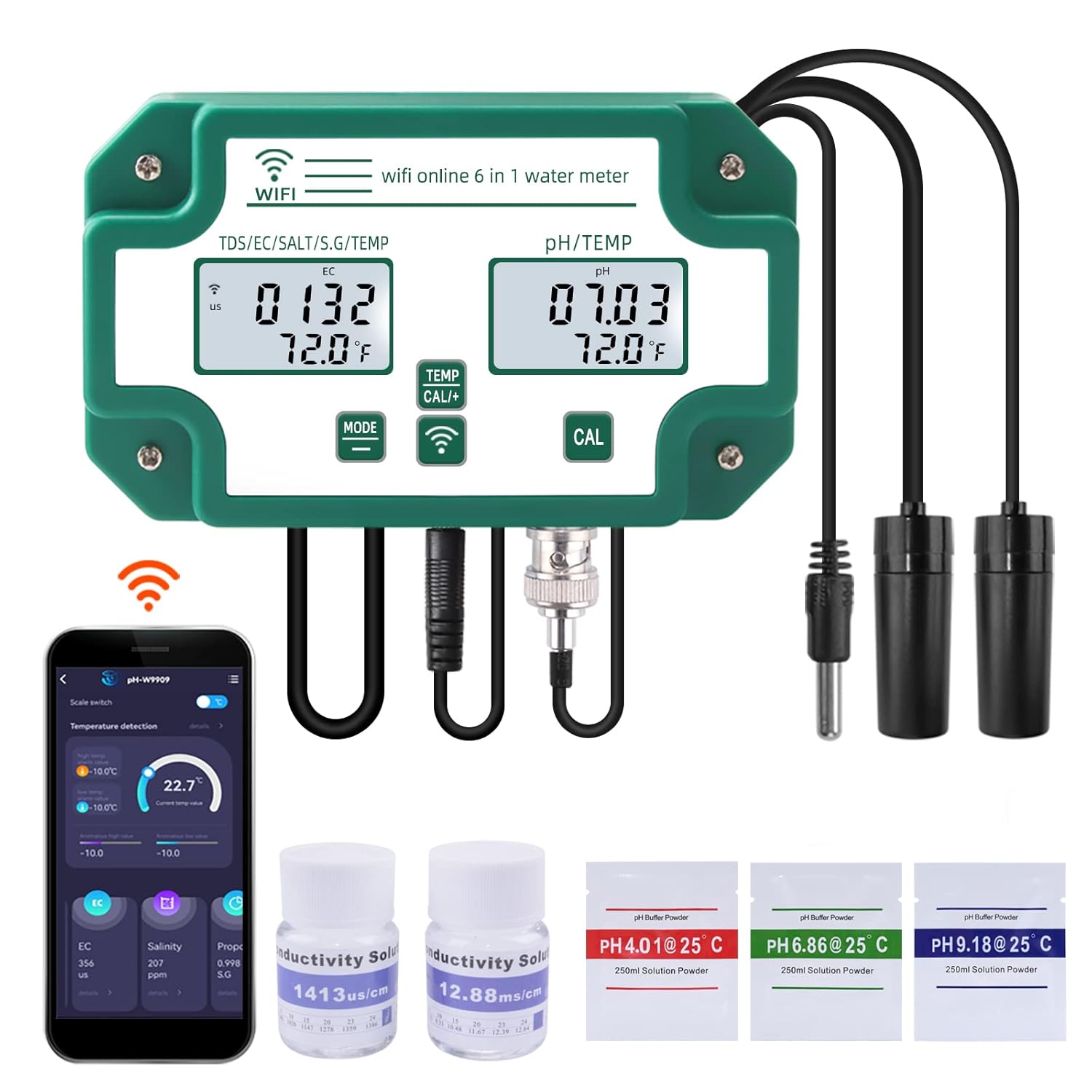
Figure 1: RCYAGO WiFi Smart 6-in-1 Water Quality Monitor with included accessories.
2. Пакеттин мазмуну
Төмөндө тизмеленген нерселердин баары пакетиңизде бар экенин текшериңиз:
- RCYAGO WiFi Smart 6-in-1 Water Quality Monitor (Main Unit)
- рН пробеги
- TDS/EC/Salt/S.G Probe
- Температура проба
- Кубаттуу адаптер
- USB кубат кабели
- Wall-Mount Bracket and Suction Cups
- pH Buffer Powders (pH 4.01, pH 6.86, pH 9.18)
- Conductivity Calibration Solutions (1413 us/cm, 12.88 mS/cm)
- User Manual

2-сүрөт: Продукт пакетине камтылган мазмун.
3. Продукт бүтүп калдыview
Familiarize yourself with the main components and controls of the water quality monitor.

Figure 3: Main unit with labeled parts and dimensions.
- Кубат киргизүү: USB port for connecting the power cable.
- TDS/EC/Salt/S.G/TEMP Display: Digital display for conductivity, salinity, specific gravity, and temperature readings.
- PH/ТЕМП дисплейи: рН жана температура көрсөткүчтөрү үчүн санариптик дисплей.
- Режим ачкычы: Дисплей режимдерин же жөндөөлөрүн алмаштыруу үчүн колдонулат.
- Temperature Unit Conversion/Calibration Key: Used to switch temperature units or initiate calibration.
- WiFi Signal Key: WiFi байланыш абалын көрсөтөт.
- PH Calibration Key: Dedicated button for pH calibration.
- TDS/EC/Salt/S.G Probe Input: Port for the multi-parameter probe.
- Temperature Probe Input: Port for the dedicated temperature probe.
- PH Probe Input: BNC connector for the pH probe.

4-сүрөт: Детальдуу view of the individual probes.
4. Техникалык шарттар
| Параметр | Диапазон | Толук маалымат |
|---|---|---|
| pH | 0.00 - 14.00 рН | |
| EC | 0 - 19900 µS/cm, 0 - 199.0 mS/cm | Электр өткөргүчтүк |
| TDS | 0 - 19990 ppm, 0 - 199.0 ppt | Жалпы эриген катуу заттар |
| туз | 0 - 199.9 ppt, 0 - 20% | туздуулук |
| SG | 0.990 - 1.400 | Салыштырмалуу тартылуу |
| Температура | 0°C - 50.0°C (32°F - 122°F) | |
| Байланыш | WiFi (Tuya Smart App) | |
| Модель номери | pH-W3988 | |
| Өлчөмдөр | 10.67 x 7.2 x 2.68 дюйм | Main unit package dimensions |
| Салмагы | 1.62 фунт |
5. Орнотуу
5.1 Initial Assembly and Power-Up
- Бардык компоненттерди таңгактан чыгарып, кандайдыр бир бузулууларды текшериңиз.
- Connect the pH probe to the BNC connector (10) on the main unit.
- Connect the TDS/EC/Salt/S.G probe to its designated input (8).
- Connect the temperature probe to its designated input (9).
- Connect the USB power cable to the power input (1) on the main unit and then to the power adapter. Plug the adapter into a suitable power outlet. The device display should illuminate.
- Mount the main unit using the provided wall-mount bracket or place it in a stable location. Use suction cups to secure the probes in the water source, ensuring they are fully submerged but not touching the bottom or sides of the container.
5.2 Tuya Smart App Installation and WiFi Connection
- жүктөп алыңыз Туя Смарт мобилдик түзмөгүңүздүн колдонмолор дүкөнүнөн (iOS же Android) колдонмону жүктөп алыңыз.
- Катталыңыз же Tuya Smart аккаунтуңузга кириңиз.
- Мобилдик түзмөгүңүз 2.4 ГГц WiFi тармагына туташкандыгын текшериңиз.
- In the app, tap "Add Device" or the "+" icon. Select the appropriate device category (e.g., "Sensors" or "Water Quality Monitor").
- Follow the on-screen instructions to put the device into pairing mode. This usually involves pressing and holding a button on the monitor until the WiFi indicator (6) flashes.
- Enter your WiFi network password in the app to complete the connection. Once connected, the WiFi indicator on the monitor will become solid.

Figure 5: WiFi connection and Tuya Smart App interface.
6. Калибрлөө
Regular calibration is essential for accurate readings. Use the provided buffer powders and conductivity solutions.
6.1 рН калибрлөө
- Prepare 250ml of distilled water for each pH buffer powder (pH 4.01, pH 6.86, pH 9.18). Dissolve one packet of powder into each 250ml of distilled water.
- Rinse the pH probe with distilled water and gently blot dry.
- Submerge the pH probe into the pH 6.86 buffer solution.
- басып, кармап туруңуз PH КАЛ key (7) until the display shows a stable reading matching 6.86. Release the button.
- Rinse the pH probe with distilled water.
- Submerge the pH probe into the pH 4.01 buffer solution.
- басып, кармап туруңуз PH КАЛ key (7) until the display shows a stable reading matching 4.01. Release the button.
- For high pH ranges, repeat the process with the pH 9.18 buffer solution.
- Rinse the pH probe thoroughly with distilled water after calibration.
6.2 EC/TDS/Salt Calibration
- Prepare the conductivity calibration solutions (1413 µS/cm and 12.88 mS/cm).
- Rinse the TDS/EC/Salt/S.G probe with distilled water and gently blot dry.
- Submerge the probe into the 1413 µS/cm solution.
- басып, кармап туруңуз TEMP CAL+ key (5) until the display shows a stable reading matching 1413 µS/cm. Release the button.
- Зондду дистилденген суу менен чайкаңыз.
- Submerge the probe into the 12.88 mS/cm solution.
- басып, кармап туруңуз TEMP CAL+ key (5) until the display shows a stable reading matching 12.88 mS/cm. Release the button.
- Rinse the probe thoroughly with distilled water after calibration.
7. Иштөө нускамалары
7.1 Түзмөктүн негизги иштеши
- Күйгүзүү/өчүрүү: The device powers on automatically when connected to power. Disconnect power to turn off.
- Mode Key (4): Press briefly to cycle through different display modes for TDS/EC/Salt/S.G.
- Temperature Unit Conversion (5): Press briefly to switch between Celsius (°C) and Fahrenheit (°F) for temperature display.
- Ensure probes are fully submerged in the water to be tested for accurate continuous readings.
7.2 Tuya Smart App Features
The Tuya Smart App provides enhanced monitoring and control capabilities:
- Реалдуу убакыттагы маалыматтар: View current readings for all 6 parameters directly on your mobile device.
- Тарыхый дата: Access daily, weekly, and monthly historical data to track trends and changes in water quality.
- Ойготкуч орнотуулары: Set custom high and low alarm thresholds for each parameter. Receive notifications on your phone if readings exceed or fall below these thresholds.
- Маалыматтарды экспорттоо: Some app versions may offer data export functionality for further analysis.

Figure 6: Tuya Smart App interface displaying temperature and other water quality parameters.

Figure 7: Tuya Smart App displaying historical data trends.

Figure 8: Tuya Smart App interface for setting alarm thresholds.
8. Техникалык тейлөө
8.1 Зондду тазалоо
To ensure accurate and consistent readings, regularly clean the probes:
- Тазалоодон мурун аппаратты кубаттан ажыратыңыз.
- Rinse all probes thoroughly with distilled or deionized water after each use or periodically during continuous monitoring.
- For stubborn deposits, gently wipe the probes with a soft cloth or cotton swab. Avoid abrasive materials that could scratch the probe surfaces.
- For pH probes, if readings become sluggish or erratic, soak the probe tip in a pH electrode storage solution or a mild cleaning solution specifically designed for pH electrodes for 15-30 minutes, then rinse.
8.2 Сактоо
- When not in use for extended periods, ensure probes are clean and properly stored.
- The pH probe tip should always be kept moist. Store it in a pH electrode storage solution or a small amount of pH 4.01 buffer solution. Never store dry.
- Store the main unit and probes in a cool, dry place away from direct sunlight and extreme temperatures.
9. Кыйынчылыктарды
Жалпы көйгөйлөр жана аларды чечүү жолдору үчүн төмөнкү таблицага кайрылыңыз.
| Көйгөй | Мүмкүн болгон себеп жана чечим |
|---|---|
| Түзмөк күйбөйт |
|
| Так эмес же туруксуз көрсөткүчтөр |
|
| WiFi туташуусу катасы |
|
| Колдонмо реалдуу убакыттагы маалыматтарды көрсөтпөй жатат |
|
| Temperature readings are inconsistent |
|
10. Коопсуздук маалыматы
- Do not immerse the main unit in water. It is not waterproof.
- Keep the device and probes out of reach of children.
- Берилген кубат адаптерин жана кабелин гана колдонуңуз.
- Аппаратты экстремалдык температурага, тике күн нуруна же коррозиялык чөйрөлөргө тийгизүүдөн сактаңыз.
- Handle probes with care. The glass bulb of the pH probe is fragile.
- Түзмөктү өз алдынча бөлүктөргө бөлүүгө же оңдоого аракет кылбаңыз. Көйгөйлөр жаралса, колдоо кызматына кайрылыңыз.
11. Кепилдик жана колдоо
For warranty information, technical support, or service inquiries, please contact the seller or manufacturer directly through your purchase platform. Please have your model number (pH-W3988) and purchase date available when contacting support.


