1. Киришүү
The EMEET OfficeCore M1A is a Zoom Certified USB speakerphone designed for clear and efficient audio conferencing. Featuring AI-powered microphones with 360° voice pickup, noise reduction, and echo cancellation, it ensures all participants are heard clearly. Its plug-and-play functionality and broad compatibility make it suitable for various professional and personal communication needs.
2. Кутуда эмне бар
- EMEET OfficeCore M1A USB Speakerphone
- USB Type C-A Cable
- User Manual
3. Негизги өзгөчөлүктөрү
- Zoom Certified: Officially recognized for compatibility with Zoom, and works seamlessly with other platforms like Skype, Microsoft Teams, Google Hangout, and more.
- 360° Smart Voice Pickup: Equipped with EMEET's exclusive VoiceIA Tech, featuring 2 omnidirectional microphones for 360° voice coverage.
- AI-Powered Audio Enhancement: Includes noise reduction, echo cancellation, voice amplification, and full duplex audio for crystal-clear communication.
- Smart Speaker: Delivers sound in 9 adjustable volumes, indicated by blue LED lights on the control panel.
- Plug & Play туташуусу: Connects easily via USB-C or USB-A adapter for a stable wired connection.
- Купуялыкты коргоо: Fast mute function for microphone and speaker to ensure privacy during calls.
- Жалпы шайкештик: Supports various operating systems including Windows, Mac OS, Vista, and Linux.
4. Орнотуу нускамалары
4.1 Connecting the Speakerphone
The EMEET OfficeCore M1A is designed for simple plug-and-play setup. No driver installation is typically required.
- Locate the USB-C connector on the speakerphone.
- Connect the provided USB-C cable to the speakerphone.
- Plug the other end of the USB cable into an available USB-C port on your computer. If your computer only has USB-A ports, use the included USB-A adapter.
- The device will automatically be recognized by your operating system.

Image: EMEET OfficeCore M1A connected to a laptop via USB-C cable, illustrating the plug-and-play setup with an optional USB-A adapter.
4.2 Баштапкы күйгүзүү
Once connected, the speakerphone should power on automatically. Indicators on the device will confirm its status.

Image: The convenient control panel of the EMEET OfficeCore M1A, showing blue/red indicators for various operations like calls, volume adjustment, and microphone mute.
5. Иштөө нускамалары
5.1 Чалууларды кабыл алуу жана кабыл алуу
After connecting, select the EMEET OfficeCore M1A as your audio input and output device in your preferred conferencing software (e.g., Zoom, Skype, Teams).
5.2 Үндү тууралоо
Use the '+' and '-' buttons on the control panel to adjust the speaker volume. The blue LED lights will indicate the current volume level (9 levels available).
5.3 Микрофондун үнүн өчүрүү
Press the microphone mute button on the control panel to mute or unmute your microphone. Red LED indicators will light up when the microphone is muted, ensuring your privacy.
5.4 VoiceIA Technology
The integrated VoiceIA technology automatically handles noise reduction, echo cancellation, and voice amplification to provide clear audio for all participants, even in noisy environments.

Image: Visual representation of the VoiceIA technology's benefits, including noise reduction, echo cancellation, voice enhancing, and full duplex capabilities.
5.5 360° Voice Pickup
The two omnidirectional microphones ensure that voices are picked up from all directions within a 360° radius, making it ideal for huddle rooms and small to medium-sized meetings.
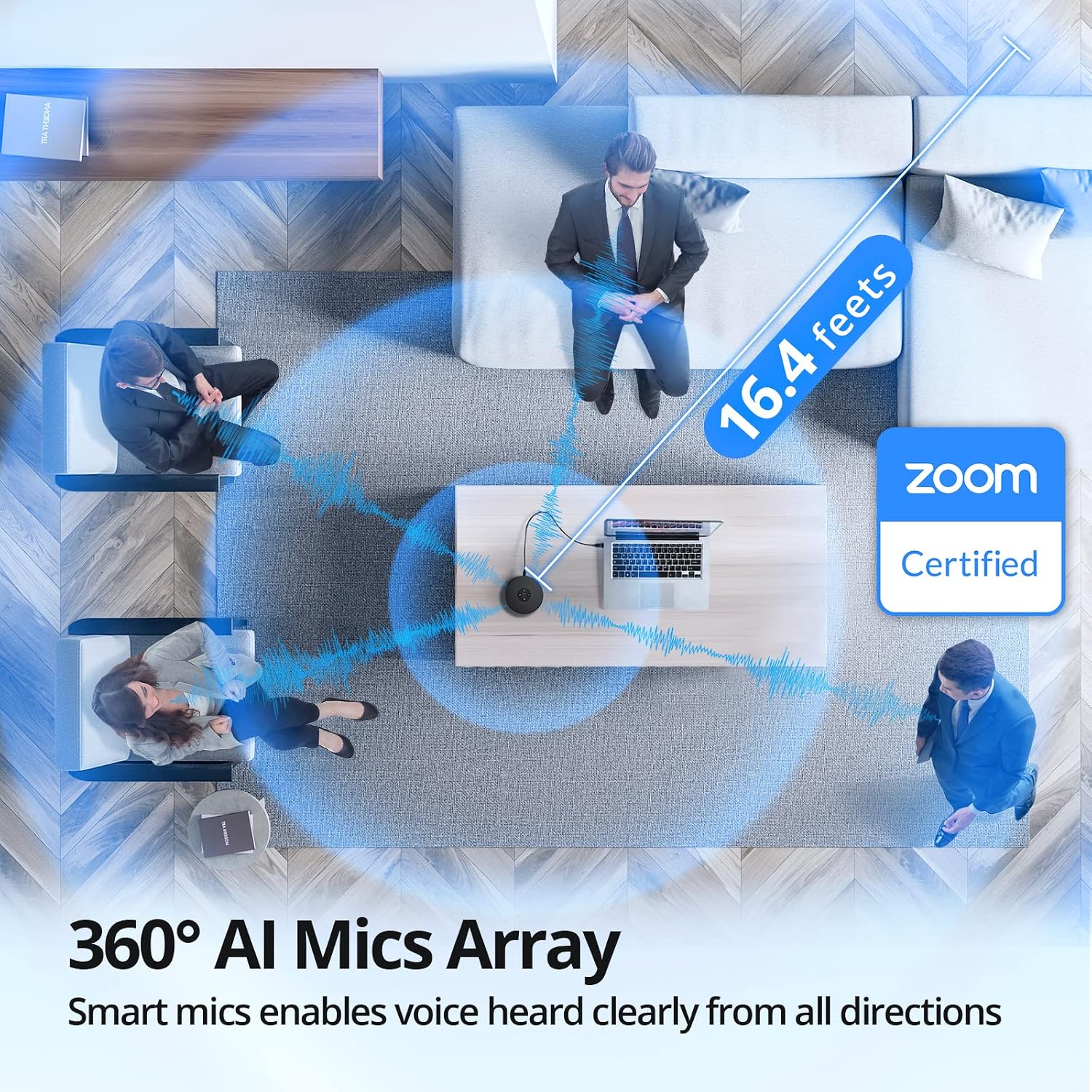
Сүрөт: антенна view demonstrating the 360° AI Mics Array of the EMEET OfficeCore M1A, capturing voices clearly from all directions within a 16.4 feet range, Zoom Certified.
6. Техникалык тейлөө
To ensure the longevity and optimal performance of your EMEET OfficeCore M1A speakerphone, follow these simple maintenance guidelines:
- Тазалоо: Use a soft, dry cloth to clean the exterior of the device. Avoid using liquid cleaners or aerosols, as they may damage the components.
- Сактагыч: When not in use, store the speakerphone in a cool, dry place, away from direct sunlight and extreme temperatures.
- Колдонуу: Handle the device with care to prevent drops or impacts that could damage internal components.
7. Кыйынчылыктарды
7.1 Audio Issues with Docking Station
Some users may experience audio disconnection issues when the EMEET OfficeCore M1A is connected via a docking station, particularly when both speaker and microphone functions are active during calls.
Чечим:
- Connect the EMEET OfficeCore M1A to your laptop via Bluetooth.
- Ensure the USB cable is also connected to the docking station.
- On Windows, navigate to System > Sound > Output.
- You should see two EMEET sources: one labeled
Тектеш документтер - E1102

eMeet Luna Wireless Speakerphone User Manual
Comprehensive user manual for the eMeet Luna wireless speakerphone. Learn about its AI Noise Reduction, Bluetooth connectivity, USB/AUX ports, Daisy Chain feature, and 360° voice pickup for clear conference calls in home office environments.
eMeet OfficeCore M2 MAX Portable USB/Bluetooth Speakerphone Колдонуучунун колдонмосу
eMeet OfficeCore M2 MAX портативдик USB/Bluetooth динамикасы үчүн колдонуучу колдонмосу, анын өзгөчөлүктөрү, иштеши, туташуу мүмкүнчүлүгү жана техникалык мүнөздөмөлөрү.
EMEET SmartCam C960 4K Quick Start Guide - Enhance Your Video Calls
Get started quickly with the EMEET SmartCam C960 4K webcam. This guide provides essential setup and usage instructions for optimal video conferencing performance.
EMEET OfficeCore M1A USB Speakerphone User Manual
Comprehensive user manual for the EMEET OfficeCore M1A USB speakerphone, detailing product functions, setup, LED indicators, parameters, and troubleshooting.
M3 eMeetLink User Manual - EMEET
User manual for the M3 eMeetLink device, covering device settings, software updates, FAQs, and contact information for EMEET customer support.
eMeet M2 Max конференциясынын спикери - колдонуучунун колдонмосу жана функциялары
eMeet M2 Max конференциясынын спикери боюнча анын баскычтарын камтыган толук колдонмоview, кубаттуулукту башкаруу, VoiceIA жана MIC үнсүз кылуу функциялары, чалууларды башкаруу, үндү башкаруу, Bluetooth жана USB туташуусу, ачкычты колдонуу, гарнитураны интеграциялоо, чынжыр функциясы, кулпу порту, кубаттоо жана тиркемени жүктөп алуу.