1. Киришүү
Thank you for choosing the USX MOUNT TV Wall Mount. This manual provides essential information for the safe and correct installation, operation, and maintenance of your new TV wall mount. Please read these instructions thoroughly before installation and retain them for future reference.
2. Коопсуздук маалыматы
ЭСКЕРТҮҮ: Failure to read and follow these instructions may result in serious personal injury, property damage, or voiding of your warranty. If you have any questions, please contact customer service.
- Монтаждоо бети монтаждын жана телевизордун биргелешкен салмагын коопсуз көтөрө аларын текшериңиз.
- 35 кг (77 фунт) жүк көтөрүмдүүлүгүнөн ашпаңыз.
- This product is designed for installation on wood studs or solid concrete walls only. Do not install on drywall alone.
- Жыгач мыктарды так табуу үчүн ар дайым мык издегичти колдонуңуз.
- Орнотуу учурунда тиешелүү коопсуздук каражаттарын, анын ичинде көздү коргоочу каражаттарды колдонуңуз.
- Коопсуздукту камсыз кылуу үчүн орнотуу үчүн эки адам сунушталат.
3. Пакеттин мазмуну
Verify that all components are present and undamaged before beginning installation. If any parts are missing or defective, contact customer service.
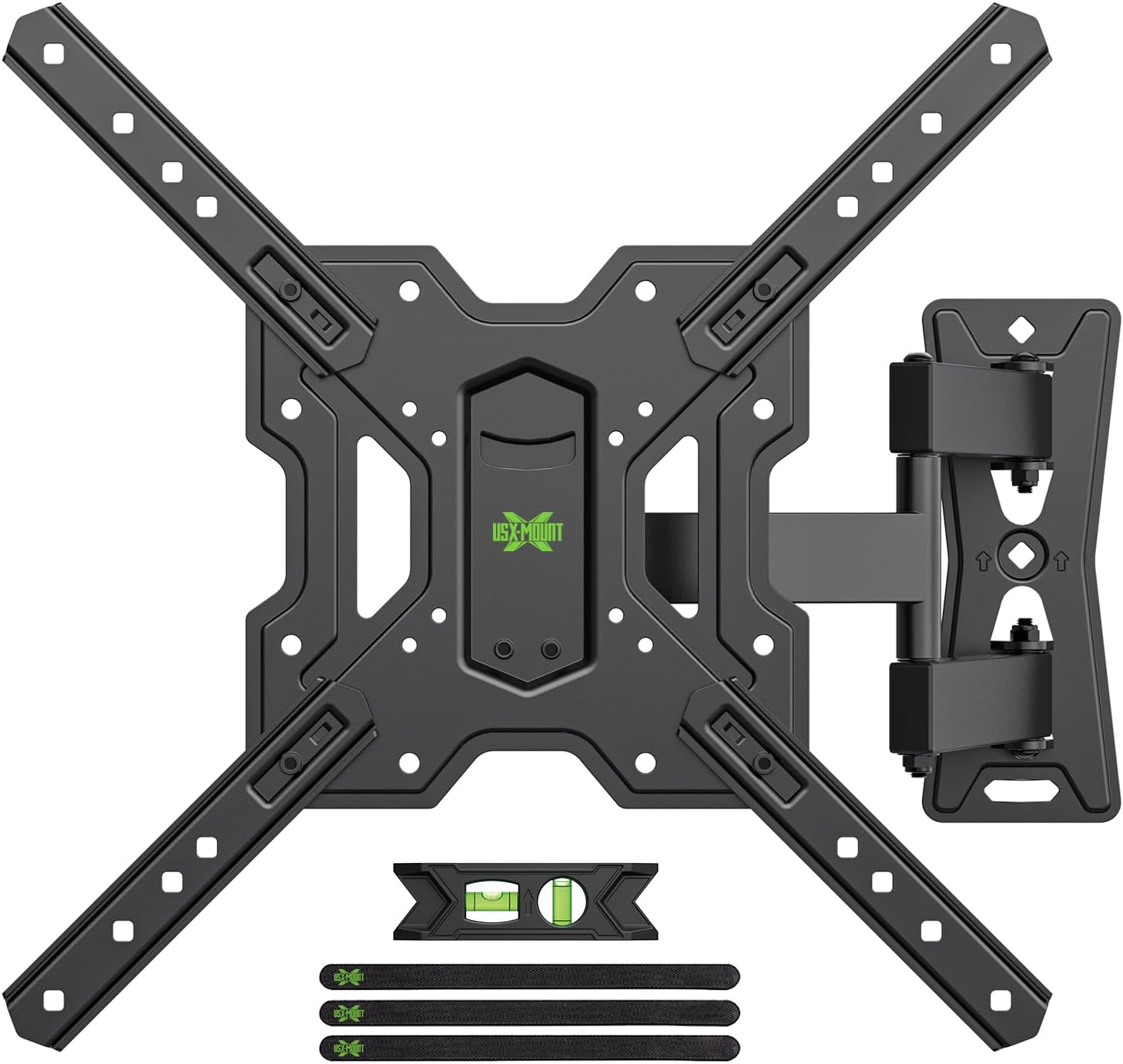
3.1-сүрөт: Бүттүview of the USX MOUNT TV Wall Mount and all included accessories, such as the main mount assembly, VESA extension arms, bubble level, and cable ties.
Камтылган жабдык:
- Дубал плитасынын жыйындысы
- TV Plate (VESA Adapter)
- Various screws, washers, and spacers for TV attachment
- Lag bolts and concrete anchors for wall attachment
- көбүк деңгээли
- Кабель байламталары
- Hex ачкычы
4. Техникалык шарттар
| Өзгөчөлүк | Спецификация |
|---|---|
| Туура келген сыналгы өлчөмдөрү | 26-55 дюйм |
| Максималдуу жүктөө жөндөмдүүлүгү | 35 кг (77 фунт) |
| VESA шайкештиги | 75x75mm, 100x100mm, 100x200mm, 200x100mm, 200x200mm, 150x150mm, 200x300mm, 200x400mm, 300x200mm, 300x300mm, 400x200mm, 400x300mm, 400x400mm |
| Тит бурч | +5°тан -15°ка чейин |
| Swivel Angle | ±90° (depending on TV size) |
| Деңгээлди тууралоо | ±4° |
| Дубалга чейинки аралык | 70мм (мин)дан 480ммге чейин (макс) |
| Материал | Болот |
| Түс | Кара |

4.1-сүрөт: VESA compatibility chart and maximum load capacity for the mount. Always check your TV's VESA pattern before installation.

4.2-сүрөт: Visual representation of various VESA mounting patterns supported by the mount, indicating horizontal and vertical screw hole distances.
5. Орнотуу боюнча нускамалар
Step 1: Attach TV Plate to TV
- Экрандын бузулуп калышына жол бербөө үчүн, телевизоруңуздун бетин ылдый каратып жумшак, таза бетке этияттык менен коюңуз.
- Сыналгыңыздын артындагы VESA орнотуу тешиктерин аныктаңыз.
- Select the appropriate screws, washers, and spacers from the provided hardware kit that fit your TV's mounting holes.
- Attach the TV plate (VESA adapter) to the back of your TV using the selected hardware. Ensure it is securely fastened but do not overtighten.
2-кадам: Дубал плитасын дубалга бекитиңиз
МААНИЛҮҮ: Determine your wall type before proceeding. This mount is suitable for wood stud walls and solid concrete walls.

5.1-сүрөт: Illustration of compatible wall types for installation: wood stud and solid concrete. Ensure your wall matches one of these types.
Жыгачтан жасалган дубалдар үчүн:
- Use a stud finder to locate the edges and center of the wood stud. Mark the center of the stud.
- Position the wall plate at your desired height and use the integrated bubble level to ensure it is perfectly horizontal. Mark the pilot hole locations.
- Drill pilot holes into the center of the stud at the marked locations. The drill bit size should be 5/32" (4 mm) and the depth approximately 2.36" (60 mm).
- Attach the wall plate to the wall using the provided lag bolts. Tighten securely with a wrench.
Катуу бетон дубалдар үчүн:
- Position the wall plate at your desired height and use the integrated bubble level to ensure it is perfectly horizontal. Mark the pilot hole locations.
- Drill pilot holes into the concrete at the marked locations. The drill bit size should be 3/8" (10 mm) and the depth approximately 2.36" (60 mm).
- Insert the concrete anchors into the drilled holes. Tap them gently with a hammer until they are flush with the wall surface.
- Attach the wall plate to the wall using the provided lag bolts. Tighten securely with a wrench.
Step 3: Hang and Secure TV to Wall Plate
- With assistance, carefully lift the TV (with the TV plate attached) and hook it onto the wall plate.
- Ensure the TV is properly seated and centered on the wall plate.
- Телевизорду берилген коопсуздук бурамаларын же бекитүүчү механизмдерди колдонуп, дубалга орнотулган пластинага бекитиңиз. Бул кокусунан ордунан жылып кетишинин алдын алат.
Видео 5.1: A short demonstration of the installation process, including attaching the TV plate, mounting the wall plate, and hanging the TV. This video also briefly shows the leveling and tilting adjustments.
6. Колдонуу боюнча нускамалар (Оңдоолор)
Your USX MOUNT TV Wall Mount offers various adjustments for optimal viewing.
Эңкейүүнү тууралоо:
The mount allows for a tilt range of +5° to -15°. To adjust the tilt:
- Locate the tilt adjustment knobs on the TV plate.
- Loosen the knobs to allow the TV to tilt freely.
- Adjust the TV to your desired vertical angle.
- Tighten the knobs to secure the TV in place.
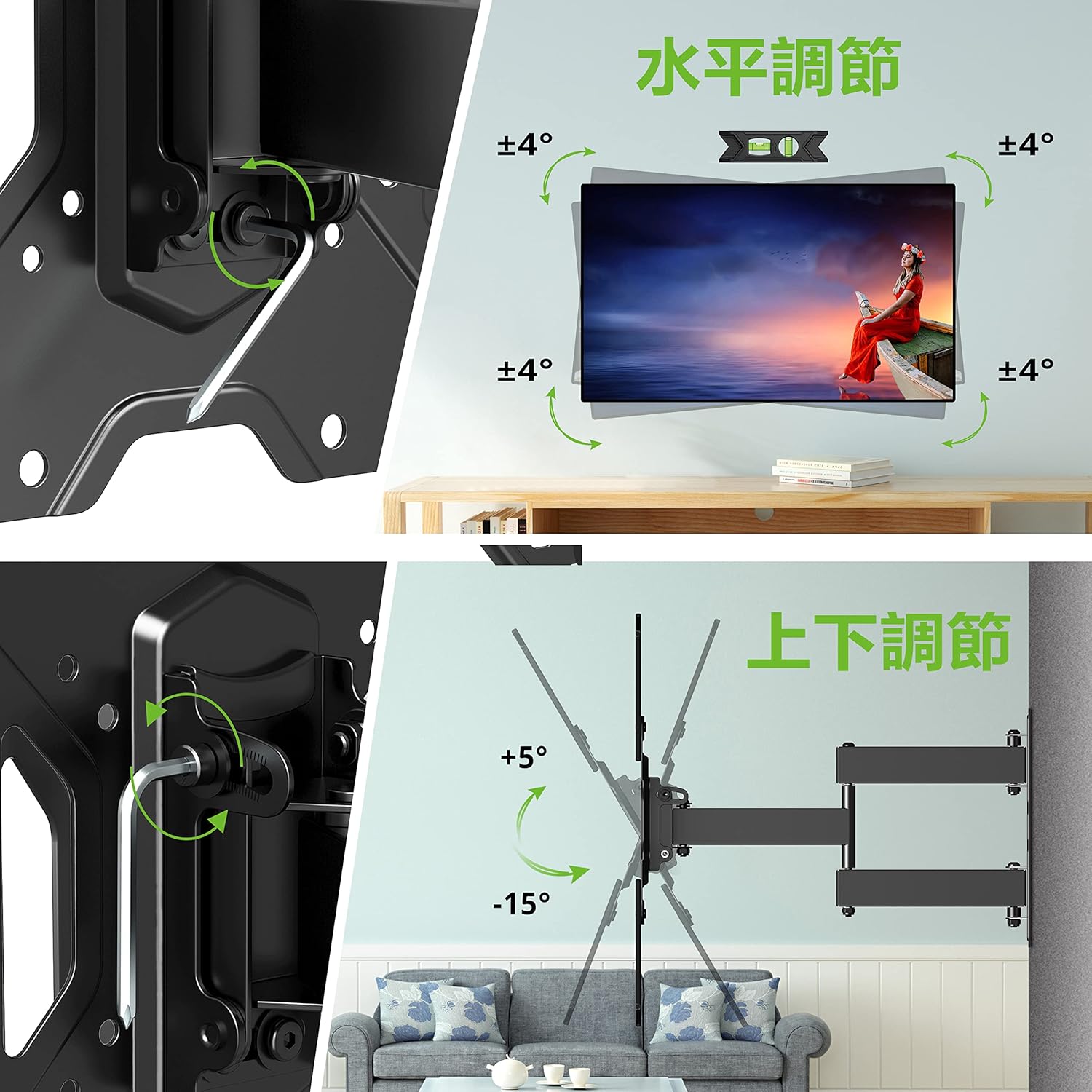
6.1-сүрөт: Visual guide for adjusting the horizontal level and vertical tilt of the TV. The top panel shows ±4° leveling, and the bottom panel shows +5° to -15° tilt.

6.2-сүрөт: This image illustrates the adjustable distance from the wall (70mm to 426mm) and the tilt angles (+5° backward, -15° forward) of the TV mount.
Айланууну жөндөө:
The mount allows for a swivel of up to ±90° (left/right), depending on the size of your TV. To adjust the swivel:
- Gently push or pull the TV to the desired left or right angle.
- The friction joints will hold the TV in position.

6.3-сүрөт: This diagram demonstrates the ±90° swivel capability of the TV mount, allowing for flexible viewбөлмөдө ар кандай позициялардан бурчтарды көрүү.
Деңгээлди тууралоо:
The mount allows for a level adjustment of ±4° after installation. To adjust the level:
- Use the provided hex key to loosen the leveling screws on the TV plate.
- Adjust the TV until it is perfectly level using the bubble level.
- Tighten the leveling screws to secure the TV in the desired horizontal position.
7. Техникалык тейлөө
- Мезгил-мезгили менен бардык бурамалар менен болтторду текшерип туруңуз, алар бекем бойдон калууда. Керек болсо кайра тартыңыз.
- Монтажды жумшак, кургак чүпүрөк менен тазалаңыз. Абразивдүү тазалагычтардан же эриткичтерден качыңыз.
- Ensure cables are managed neatly using the provided cable ties to prevent strain or damage.
8. Кыйынчылыктарды
If you encounter any issues during or after installation, please refer to the following common solutions:
- Телевизордун деңгээли жок: Use the level adjustment feature as described in Section 6.
- Тоо бошоп калгандай сезилет: Recheck all wall and TV attachment points and tighten any loose fasteners. Ensure the wall type is appropriate for installation.
- Эңкейүүнү/бурулууну тууралоодогу кыйынчылык: Ensure all adjustment knobs/screws are sufficiently loosened before attempting to move the TV.
If the problem persists, contact USX MOUNT customer support.
9. Кепилдик жана колдоо
USX MOUNT provides a 10-year quality guarantee from the date of purchase. This warranty covers manufacturing defects and ensures the product's structural integrity under normal use.
For any questions, missing parts, or support needs, please contact USX MOUNT customer service. Our team is dedicated to providing assistance and ensuring your satisfaction.
Байланыш маалыматы: Please refer to the contact details provided with your purchase or visit the official USX MOUNT webсайт.


