1. Киришүү
The Beghelli Salvavita Pocket is a compact, portable emergency telecare device designed to provide personal safety and peace of mind. It integrates GSM communication for rapid emergency calls and SMS, GPS for precise location tracking, and an automatic fall detection sensor. This manual provides essential instructions for setting up, operating, and maintaining your device.

Image 1.1: The Beghelli Salvavita Pocket device, a compact black square with a red emergency button.
2. Пакеттин мазмуну
Пакетте бардык буюмдар бар экенин текшериңиз:
- Beghelli Salvavita Pocket Device
- Rechargeable Lithium Battery (pre-installed)
- Магниттик кубаттоочу кабель
- USB дубал адаптери
- Multi-purpose Lanyard
- Колдонуучунун Колдонмосу (бул документ)
Note: A Nano SIM card with voice and SMS traffic is required for the device to function and is NOT included in the package.
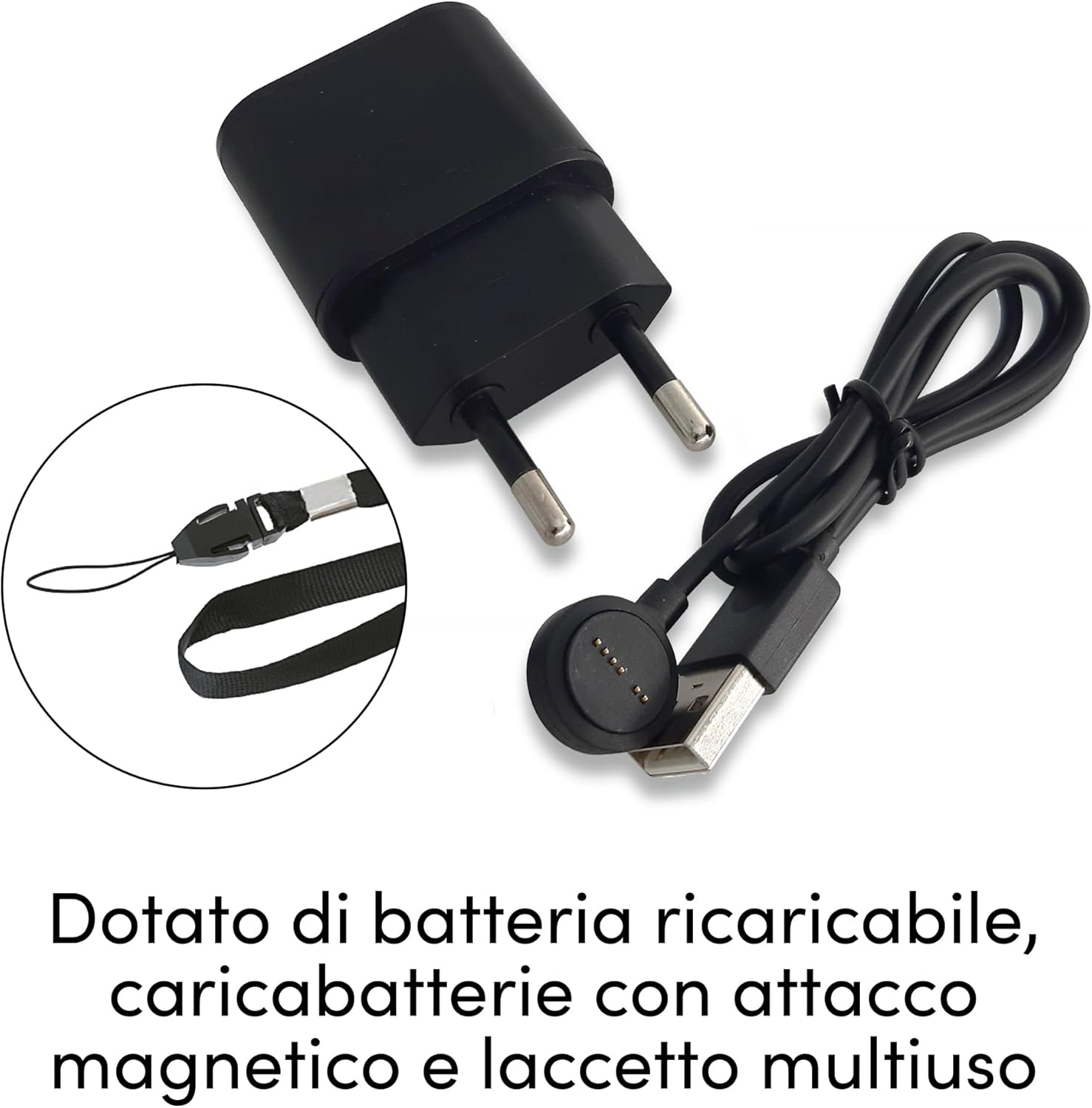
Image 2.1: Included accessories: magnetic charging cable, USB wall adapter, and multi-purpose lanyard.
3. Орнотуу
3.1. SIM картаны орнотуу
- Аппараттын өчүрүлгөнүн текшериңиз.
- SIM карта уячасын түзмөктүн капталынан табыңыз.
- Insert a Nano SIM card (not included) with active voice and SMS services into the slot, ensuring correct orientation.
- Close the SIM card slot cover securely to maintain water and dust resistance.

Image 3.1: The device requires a Nano SIM card for communication, which is not supplied.
3.2. Баштапкы заряддоо
- Connect the magnetic charging cable to the charging port on the device. The magnetic connector will snap into place.
- Connect the USB end of the cable to the provided USB wall adapter, then plug the adapter into a power outlet.
- Allow the device to charge fully before first use. The LED indicator will show charging status.
3.3. Түзмөктүн конфигурациясы
The device is configured by sending specific SMS commands from a registered phone number to the device's SIM card number. Refer to the detailed instructions provided in the quick start guide for a list of commands to:
- Set emergency contact numbers (up to 3-5 numbers typically).
- Adjust fall sensor sensitivity.
- Check device status (battery level, GPS signal).
For assistance with configuration, contact Beghelli customer support.
4. Иштөө нускамалары
4.1. Emergency Call Activation
Өзгөчө кырдаалдарда:
- Press and hold the large red emergency button on the device for approximately 2 seconds.
- The device will automatically initiate calls to the pre-programmed emergency numbers in sequence until an answer is received.
- Simultaneously, an SMS message containing the device's GPS location will be sent to all emergency contacts.

Image 4.1: Pressing the red button activates emergency calls and notifications.
4.2. Hands-Free Communication
Once an emergency call is established, the device functions as a hands-free speakerphone, allowing two-way communication with the emergency contact.

Image 4.2: The device supports hands-free communication during emergency calls.
4.3. GPS Localization
The integrated GPS module allows the device to determine its precise location. In an emergency, this location data is sent via SMS to your pre-set contacts, enabling rapid assistance.

Image 4.3: GPS localization allows emergency contacts to view the device's position on a map.
4.4. Fall Sensor
The device features an automatic fall detection sensor. If a fall is detected, the device will automatically trigger an emergency alert, initiating calls and sending location SMS to your contacts without requiring manual activation.
- The sensitivity of the fall sensor can be adjusted via SMS commands (refer to configuration section).
- False alarms can occur; adjust sensitivity as needed.

Image 4.4: The device's fall sensor automatically detects falls and triggers an alert.
5. Техникалык тейлөө
5.1. Батареяны заряддоо
The device is powered by a rechargeable lithium battery with an autonomy of up to 5 days. Regular charging is recommended to ensure continuous operation.
- Connect the magnetic charging cable as described in Section 3.2.
- A low battery LED indicator will alert you when charging is required.

Image 5.1: The device features a magnetic charging port for easy recharging.
5.2. Тазалоо жана кам көрүү
The device is resistant to water and dust, but it is not suitable for immersion. To clean the device:
- Аппаратты жумшак менен сүртүңүз, гamp кездеме.
- Катуу химиялык заттарды же абразивдүү тазалоочу каражаттарды колдонбоңуз.
- Ensure the SIM card slot cover is always securely closed.
6. Кыйынчылыктарды
| Көйгөй | Мүмкүн себеп | Чечим |
|---|---|---|
| Device not making calls/sending SMS | No active SIM card; SIM card incorrectly inserted; No GSM network coverage; Incorrectly programmed emergency numbers. | Ensure SIM card is active and correctly inserted. Check for GSM network signal. Verify emergency numbers via SMS commands or Beghelli support. |
| GPS жайгашкан жери так эмес | Poor GPS signal (indoors, dense urban areas); Device not outdoors. | Ачык асманы бар ачык жерге көчүңүз view. GPS accuracy can vary. |
| False fall alarms | Fall sensor sensitivity too high; Sudden movements misinterpreted as falls. | Adjust fall sensor sensitivity to a lower setting via SMS commands. |
| Түзмөк заряддалбай жатат | Magnetic connector not making proper contact; Faulty cable/adapter; Device malfunction. | Ensure magnetic connector is firmly attached. Try a different USB port or adapter. Contact Beghelli support if problem persists. |
| Батареянын иштөө мөөнөтү кыска | Frequent emergency calls/GPS requests; Old battery; Constant searching for signal. | Ensure device is in an area with good signal. Reduce frequency of manual GPS requests. Battery degradation is normal over time. |
If you encounter issues not listed here or require further assistance, please contact Beghelli customer support.
7. Техникалык шарттар
- Модел: 0589180
- Dimensions (Device): Болжол менен 45 x 45 x 14 мм
- Салмагы (түзмөк): 130 грамм
- Байланыш: GSM (for calls/SMS), GPS (for location)
- SIM карта түрү: Nano SIM (киргизилген эмес)
- Батарея: Rechargeable Lithium, up to 5 days standby
- Заряддоо: Магниттик USB кабели
- Өзгөчөлүктөрү: Emergency button, Hands-free speakerphone, GPS tracking, Automatic fall sensor, Water and dust resistant (not suitable for immersion).
- Шайкеш келген перифериялык түзүлүштөр: Smartphone (for receiving alerts and managing settings via SMS)
8. Кепилдик жана колдоо
For warranty information and technical support, please refer to the official Beghelli webсайтка же түздөн-түз кардарларды тейлөөгө кайрылыңыз. Кепилдик дооматтар үчүн сатып алганыңыздын далилин сактаңыз.
Beghelli Customer Support: Visit Beghelli Contact Page
For issues related to your purchase on Amazon, please refer to Amazon's return and support policies.


