Introduction
This user manual provides essential information for the safe and efficient operation, maintenance, and troubleshooting of your SnapFresh 20V Cordless Impact Drill. Please read this manual thoroughly before using the tool to ensure proper handling and to maximize its lifespan. Keep this manual for future reference.
Коопсуздук маалыматы
Өрт, электр тогуна урунуу жана жеке жаракат алуу коркунучун азайтуу үчүн электр куралдарын колдонууда ар дайым негизги коопсуздук чараларын сактаңыз.
- Тиешелүү жеке коргоочу шаймандарды, анын ичинде коопсуздук көз айнектерин, угууну коргоону жана кол каптарды кийиңиз.
- Жумуш аймагыңыз жакшы жарыктандырылсын жана тоскоолдуктар жок болсун.
- Куралды иштетип жатканда балдарды жана жанында жүргөндөрдү алыс кармаңыз.
- Жарылуучу чөйрөдө, мисалы, күйүүчү суюктуктар, газдар же чаң бар жерде электр шаймандарын иштетпеңиз.
- Кандайдыр бир жөндөөлөрдү жасоодон, аксессуарларды алмаштыруудан же куралды сактоодон мурун ар дайым батарея топтомун куралдан ажыратыңыз.
- Use only the specified battery pack and charger for this tool.
- Do not expose battery packs or tools to fire or excessive temperature.
- Кокусунан баштоодон алыс болуңуз. Батарея пакетин салуудан, аспапты көтөрүүдөн же алып жүрүүдөн мурун өчүргүч өчүк абалда экенин текшериңиз.
- Maintain tools with care. Check for misalignment or binding of moving parts, breakage of parts and any other condition that may affect the tool’s operation.
Камтылган компоненттер
Your SnapFresh 20V Cordless Impact Drill kit includes the following items:
- 1 x SnapFresh 20V Cordless Impact Drill
- 1 x 2.0Ah Lithium-ion Battery
- 1 x Rapid Charger
- 34 х бурагыч биттери
- 9 х Бургулоочу бит

Figure 1: Complete SnapFresh 20V Cordless Impact Drill kit, showing the drill, battery, charger, and various drill and screwdriver bits.
Жайгашуу
1. Батареяны заряддоо
The 2.0Ah Lithium-ion battery requires charging before first use. The rapid charger can fully charge the battery in approximately 1 hour.
- Тез кубаттагычты стандарттуу розеткага туташтырыңыз.
- Батарея таңгагын заряддагычка ал чыкылдагыча жылдырыңыз.
- The charger's indicator light will show the charging status. Refer to the charger's specific instructions for light indications (e.g., red for charging, green for fully charged).
- Толук заряддалгандан кийин, батареяны заряддагычтан чыгарыңыз.

Figure 2: The rapid charger for the 20V Lithium-ion battery. Ensure the battery is properly seated for charging.
2. Батарея блогун орнотуу жана алып салуу
- To install: Align the battery pack with the base of the drill handle and slide it in until it locks securely into place with a click.
- To remove: Press the battery release button (usually located on the front or sides of the battery pack) and slide the battery pack out of the tool.
3. Installing Drill Bits and Screwdriver Bits
The drill features a 1/2" keyless chuck for easy bit changes.
- Бургу өчүрүлгөнүн жана алдыга/артка которгучтун борбордук (кулпуланган) абалында экенин текшериңиз.
- Патрондун арткы жарымын кармап, алдыңкы жарымын сааттын жебеси боюнча тескери буруңуз, патрондун жаактары битти киргизүү үчүн кенен ачылганга чейин.
- Каалаган бургулоочу битти же бурагычты патронго толугу менен киргизиңиз.
- Rotate the front half of the chuck clockwise to tighten the jaws firmly around the bit. Ensure the bit is centered and secure.
- To remove a bit, reverse the process: rotate the front half counter-clockwise to loosen the jaws and pull the bit out.
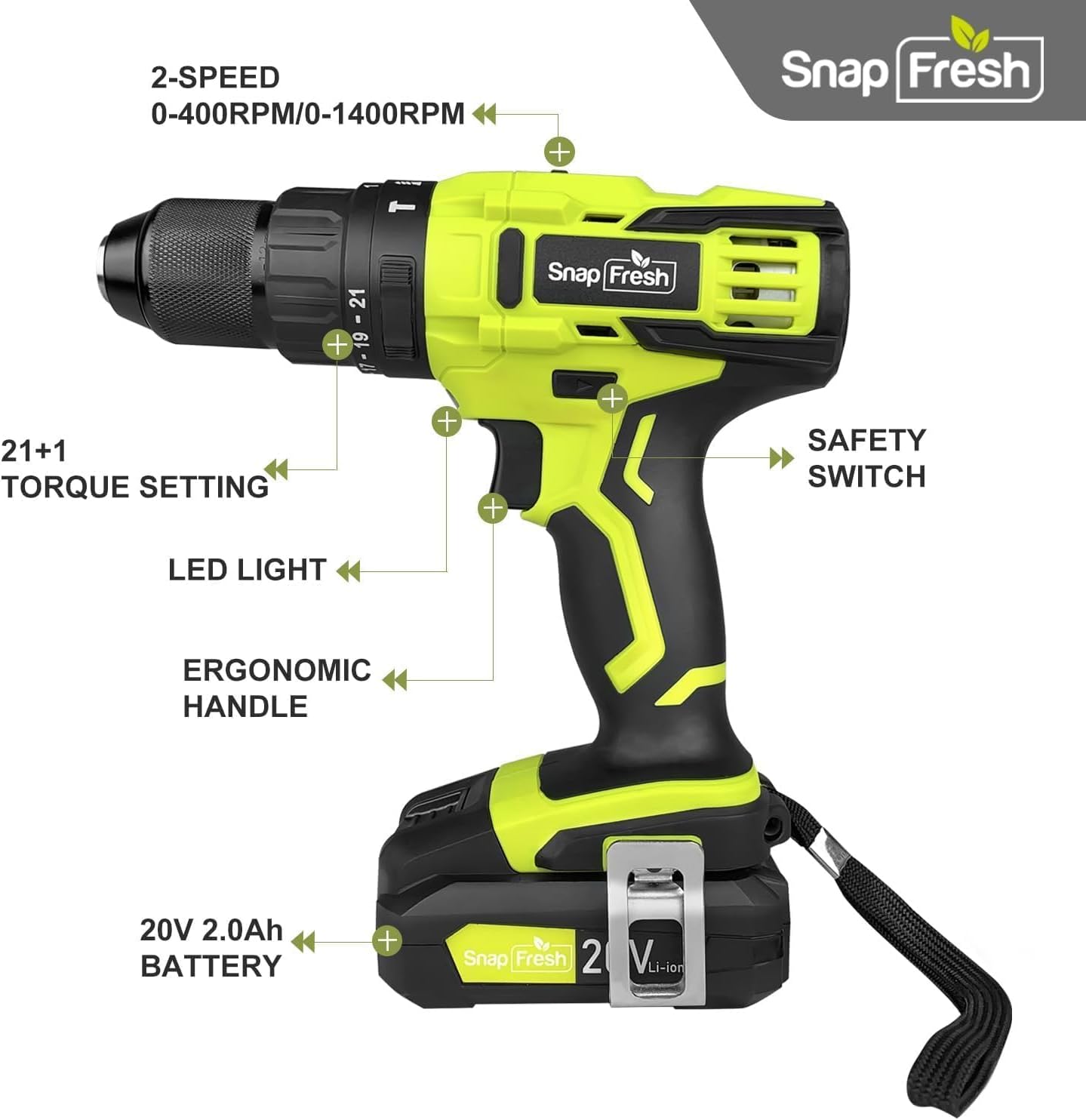
Figure 3: The drill features a durable 1/2" all-metal chuck for maximum durability and compatibility with various bits.
Иштөө нускамалары
1. Power On/Off жана Variable Speed Trigger
The drill is activated by pressing the trigger switch. The speed of the drill is variable, controlled by how much you depress the trigger. Pressing lightly results in lower speed, while pressing fully results in maximum speed.
2. Режимди тандоо
Your drill offers three powerful modes, selected by rotating the collar behind the chuck:
- Drilling Mode (Drill Bit Icon): For drilling holes in wood, metal, and plastic. Provides up to 445 in-lbs of torque.
- Driving Mode (Screw Icon): For driving screws. Provides 0-445 in-lbs of torque, adjustable with the torque control collar.
- Hammer Mode (Hammer Icon): For drilling into masonry and concrete. Provides up to 445 in-lbs of torque with added hammering action.

Figure 4: The mode selection collar allows you to switch between Driving, Drilling, and Hammer modes for various applications.
3. Torque Control
The torque control collar allows you to adjust the amount of torque applied, preventing over-driving screws or damaging materials. Rotate the collar to select the desired torque setting (from 0 to 445 in-lbs). Lower numbers are for softer materials or smaller screws, higher numbers for harder materials or larger screws.
4. Ылдамдыкты тандоо
The drill features a 2-speed transmission switch located on top of the tool:
- Төмөн ылдамдык (0-400 RPM): Ideal for high-torque applications like driving large screws or drilling large holes.
- Жогорку ылдамдык (0-1500 RPM): Suitable for faster drilling in wood, metal, or for smaller screws.

Figure 5: The 2-speed transmission switch allows you to select between low speed (0-400 RPM) for high torque and high speed (0-1500 RPM) for faster drilling.
5. LED Work Light
A built-in LED light illuminates the work area when the trigger is pressed, improving visibility in dimly lit spaces.
6. Алга/Артка которуу
The forward/reverse switch is located above the trigger. Push it to the left for forward rotation (drilling/driving) and to the right for reverse rotation (removing screws). When centered, the switch acts as a lock-off to prevent accidental starting.
Техникалык тейлөө
Үзгүлтүксүз тейлөө оптималдуу иштешин камсыз кылат жана куралыңыздын иштөө мөөнөтүн узартат.
- Тазалоо: Ашыкча ысып кетүүнүн алдын алуу үчүн шаймандын аба желдеткичтерин таза жана таштандылардан таза кармаңыз. Жумшак,amp тазалоо үчүн кездеме. Катуу химиялык заттарды же абразивдүү тазалагычтарды колдонбоңуз.
- Батареяга кам көрүү: Батарея таңгактарын салкын, кургак жерде күн нурунан жана экстремалдык температурадан алыс сактаңыз. Батарея пакеттерин заряды түгөнгөн абалда узак убакытка сактабаңыз.
- Сактагыч: Колдонулбаган учурда, бургулоочу түтүктү жана анын кошумча жабдууларын балдар жетпеген, кургак, коопсуз жерде сактаңыз.
Проблемаларды чечүү
Бургулоодо көйгөйлөргө туш болсоңуз, төмөнкү жалпы көйгөйлөрдү жана чечимдерди караңыз:
| Көйгөй | Мүмкүн себеп | Чечим |
|---|---|---|
| Бургулоо башталбайт. | Battery not charged or not properly installed. Forward/reverse switch in locked position. | Ensure battery is fully charged and securely inserted. Move forward/reverse switch out of the center position. |
| Кыскартылган күч же ылдамдык. | Батареянын заряды аз. Тапшырма үчүн ылдамдык туура эмес коюлган. | Recharge the battery. Switch to the appropriate speed setting (low speed for higher torque). |
| Bit wobbles or falls out. | Чак жетиштүү тартылбаган. Биттин сабы кир же бузулган. | Ensure the chuck is tightened firmly around the bit. Clean or replace the bit if necessary. |
| Initial sparks from motor. | Normal for new carbon brush drills. | This is typical for new DC motor tools and will diminish over time. If sparks persist or are excessive, contact support. |
If the problem persists after attempting these solutions, please contact SnapFresh customer support.
Техникалык шарттар
| Өзгөчөлүк | Спецификация |
|---|---|
| Бренд | SnapFresh |
| Модель номери | JOZ-YFT51 |
| Power Source | Батарея менен иштейт |
| Тtage | 20V |
| Батарея сыйымдуулугу | 2.0Ah Литий-ион |
| Максималдуу момент | 445 дюйм фунт |
| Жүк жок ылдамдык (төмөн) | 0-400 RPM |
| Жүк жок ылдамдык (жогорку) | 0-1500 RPM |
| Чак Size | 1/2 Inch (Keyless) |
| Ылдамдыктын саны | 2 |
| Drill Modes | Drilling, Driving, Hammer |
| Элемент Салмагы | 2.8 фунт (курал үчүн гана) / 6.4 фунт (батарея менен) |
| Продукциянын өлчөмдөрү | 8.67"L x 3.15"W x 9"H |
Кепилдик жана колдоо
SnapFresh products are designed for reliability and performance. For warranty information, technical support, or service inquiries, please contact SnapFresh Official customer service. Refer to your purchase documentation for specific warranty terms and contact details.
You can often find support information on the official SnapFresh webсайт же продукт сатылып алынган сатуучу аркылуу.


