
1. Киришүү
This manual provides detailed instructions for the installation, operation, and maintenance of your Roinvou Android Car Stereo, Model 1+32G Mirror Link, designed specifically for Toyota Corolla vehicles manufactured between 2009 and 2013. Please read this manual thoroughly before using the product to ensure proper function and safety.
2. Коопсуздук маалыматы
- Орнотуу же техникалык тейлөө иштерин жүргүзүүдөн мурун, унаанын токтоп турганын жана кыймылдаткычы өчүрүлгөнүн текшериңиз.
- Орнотууну баштоодон мурун, электрдик кыска туташуулардын алдын алуу үчүн унаанын аккумуляторун сууруп алыңыз.
- Professional installation is recommended for optimal performance and to avoid damage to your vehicle or the product.
- Аппаратты айдоодон алаксыта тургандай иштетпеңиз. Ар дайым жол коопсуздугун биринчи орунга коюу.
- Ensure all wiring is properly insulated and secured to prevent interference or damage.
3. Пакеттин мазмуну
Төмөндө тизмеленген нерселердин баары пакетиңизге камтылганын текшериңиз:
- 1 x Roinvou Android Double Din Car Stereo
- 1 x Car Stereo Power Cable
- 1 x 9 Inch Toyota Corolla 2009-2013 Special Frame
- 1 x Power Cable for Toyota Corolla 2009-2013
- 1 x USB Adapter Cable for Toyota Corolla 2009-2013
- 1 x GPS антеннасы
- 1 x Камера киргизүү
- 1 x RCA киргизүү жана чыгаруу
- 2 x USB кабели
- 1 x 12 LEDs Backup Camera
- 1 х тышкы микрофон
- 2 х Монтаждык кашаа
- 1 x Орнотуу куралы
- 4 x Screw
- 1 x User Manual
4. Унаа шайкештиги
This Roinvou Android Car Stereo is designed for Toyota Corolla models from 2009 to 2013. Please note the following important compatibility details:
- Vehicle compatibility may vary depending on specific vehicle options, production dates, and installation application.
- The provided wire harness is ЖОК compatible with vehicles equipped with a premium factory sound system, including premium BOSE, ampлифификацияланган үн системалары же Onstar.

Image: A visual guide showing compatible and incompatible Toyota Corolla dashboard configurations for the car radio, highlighting that premium sound systems are not supported.
5. Продукциянын өзгөчөлүктөрү
- Android 13 системасы: Features 1GB RAM + 32GB ROM for smooth operation, 1080P video playback, split-screen functionality, and support for external devices.
- Capacitive HD Touch Screen: A 9-inch high-definition touch screen for intuitive control.
- Phone Mirror шилтемеси: Connect your smartphone via WiFi hotspot or USB cable to mirror its screen. Supports bidirectional control for Android and unidirectional control for iPhone.
- GPS Navigation & WiFi: Built-in GPS module with support for offline maps (e.g., Waze) and online maps via WiFi/hotspot. Download apps like YouTube, TikTok, and Spotify from the Play Store.
- Bluetooth байланышы: Integrated Bluetooth with an external microphone for hands-free calling, music streaming, voice functions, and contact synchronization.
- FM радио кабыл алгычы: Stable FM radio with 18 preset stations, offering manual, semi-automatic, and fully automatic channel search.
- Арткы View Камераны колдоо: Automatically displays the reversing image when the car is in reverse gear (backup camera included).
- Рулду башкаруу (SWC) колдоосу: Allows control of desired functions directly from your vehicle's steering wheel buttons.
- Multiple EQ Sound Options: Аудио тажрыйбаңызды ар кандай эквалайзер жөндөөлөрү менен ыңгайлаштырыңыз.

Сүрөт: Бөлүнгөн сүрөттүн көргөзмөсүasing the 2.5D curved edge screen design and various user interface layouts for music, phone, and settings on the Roinvou car stereo.
6. Орнотуу боюнча колдонмо
Бул бөлүмдө жалпы маалымат берилетview of the installation process. For a detailed visual guide, please refer to the embedded video below.
6.1. Video Installation Guide: A7098 Center Console Disassembly Wiring Method
Video: This official Roinvou video demonstrates the process of disassembling the center console and wiring for the A7098 car stereo model, which is applicable to this unit's installation in a Toyota Corolla.
6.2. Step-by-Step Installation Overview
- Даярдоо: Ensure the vehicle is off and the battery is disconnected. Gather all necessary tools (installation tool, screwdrivers, etc.).
- Remove Bezel Pieces: Carefully pry off the four bezel pieces around the existing radio using the provided installation tool. These are typically clipped in.
- Remove Screws/Bolts: Locate and remove any Phillips screws and 10mm bolts securing the existing radio unit.
- Extract Old Radio: Gently pull out the old radio unit from the dashboard.
- Зымдарды ажыратыңыз: Disconnect all wiring harnesses, antenna cables, and any other connections from the old radio.
- Жаңы блокту туташтырыңыз: Connect the provided wiring harnesses from the Roinvou Android Car Stereo to your vehicle's existing wiring. Ensure all plugs are securely connected. This includes the main power harness, speaker wires, GPS antenna, USB cables, camera input, and RCA jacks.
- Сыноо функциясы: Before fully reassembling, temporarily connect the battery and turn on the accessory power to test the new stereo. Verify the screen powers on, is responsive, and basic functions like radio and audio playback work.
- Маршруттук зымдар: Carefully route any additional wires (e.g., USB cables to the glove box, external microphone) to their desired locations, ensuring they are tucked away and do not interfere with moving parts or get pinched.
- Жаңы блокту орнотуу: Position the new Roinvou Android Car Stereo into the dashboard opening. The unit typically clips into place using the existing mounting points.
- Башкаруу панелин кайра чогултуу: Reattach the bezel pieces and any screws/bolts removed earlier. Ensure all components are securely fastened.
7. Баштапкы орнотуу
- Күйгүзүү: After installation, reconnect the vehicle battery. Turn the ignition key to the ACC or ON position. The stereo should power on automatically.
- Language & Time Settings: Follow the on-screen prompts to select your preferred language and set the correct date and time.
- WiFi туташуусу: Navigate to the Settings menu, then to WiFi. Select your home or mobile hotspot network and enter the password to connect. This enables online features, app downloads, and online navigation.
- GPS Configuration: The built-in GPS module should automatically detect satellites. Ensure the GPS antenna is placed in a clear location (e.g., on the dashboard) for optimal signal reception.
8. Иштөө нускамалары
8.1. Сенсордук экрандын иштеши
The 9-inch capacitive HD touch screen allows for intuitive control. Tap, swipe, and pinch-to-zoom gestures are supported for navigating menus, maps, and media.
8.2. FM радиосу
Access the "Radio" application from the main menu. Use the on-screen controls to scan for stations, save presets, and adjust frequency. The unit supports 18 preset stations.
8.3.Bluetooth

Image: An illustration depicting the Bluetooth chip and its connectivity to smartphones for calls and music streaming.
Телефонуңузду жупташтыруу үчүн:
- Go to the "Bluetooth" app on the stereo.
- Смартфонуңузда Bluetooth'ду иштетип, жеткиликтүү түзмөктөрдү издеңиз.
- Select the stereo's Bluetooth name (usually "CarBT" or similar) from your phone's list.
- Жупташтыруу кодун эки түзмөктө тең ырастаңыз.
Once paired, you can make/receive hands-free calls, stream audio, and synchronize contacts.
8.4. Mirror Link
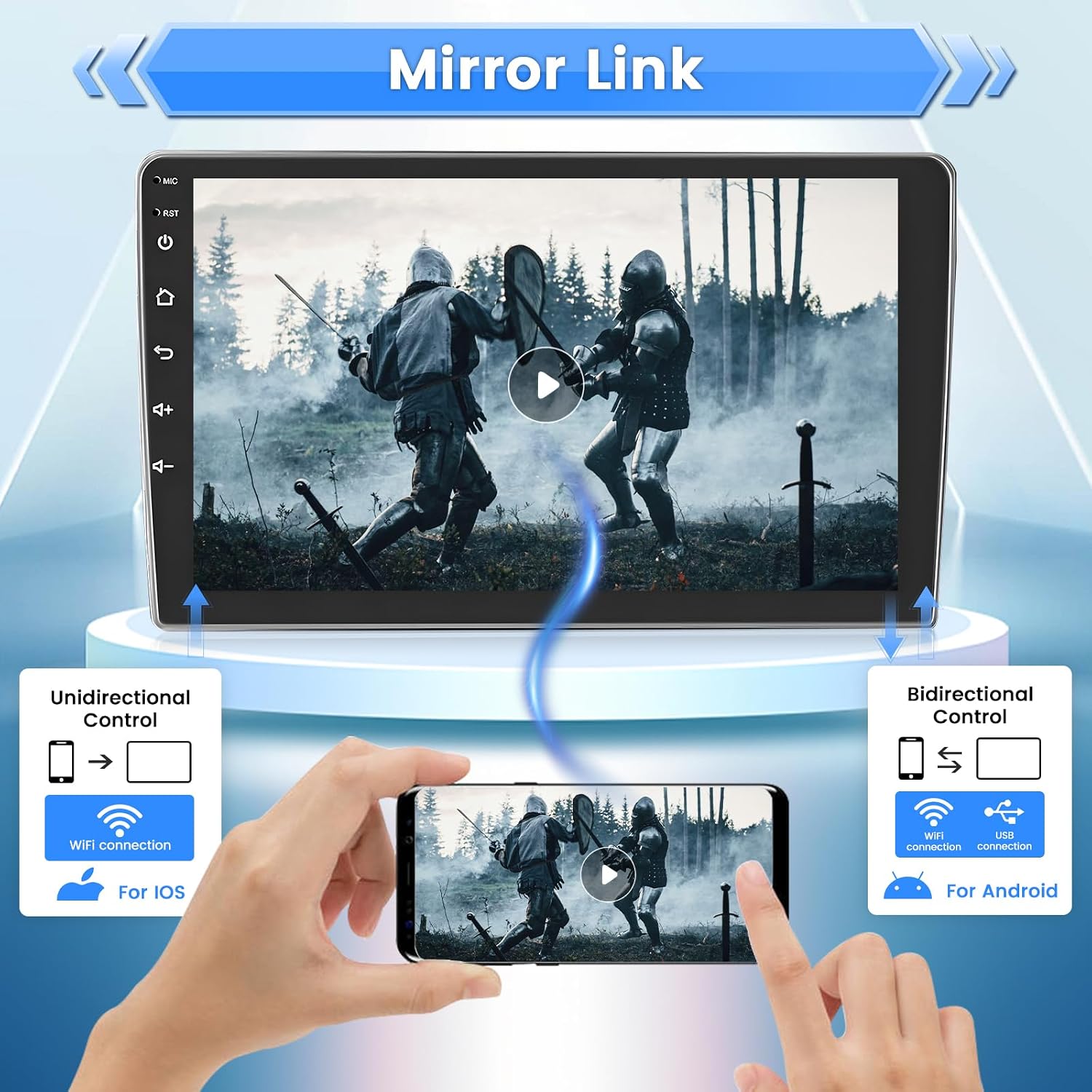
Image: A diagram illustrating the Mirror Link function, showing unidirectional control for iOS devices and bidirectional control for Android devices via WiFi or USB.
The Mirror Link feature allows you to display your smartphone's screen on the car stereo. Connect via WiFi hotspot or your phone's original USB cable. Android devices support bidirectional control (stereo controls phone), while iPhones support unidirectional control (phone controls stereo).
8.5. GPS навигациясы

Image: An illustration showing the WiFi signal and GPS satellite connectivity, with various app icons like YouTube, TikTok, and Spotify, indicating online functionality and navigation.
Use the pre-installed navigation app or download your preferred navigation software from the Play Store. Connect to WiFi for real-time traffic updates and online map features. The unit supports built-in offline maps for North America.
8.6. USB медиа ойнотуу
Connect USB drives to the provided USB interfaces to play audio and video files. The unit supports various formats including APE, FLAC, WAV, MP3, WMA for audio and MKV, RMVB, AVI, MP4, MDV for video.
8.7. Арткы View Камера

Image: A graphic highlighting the features of the included backup camera: HD image, waterproof design, 170° wide angle, and night vision capabilities, with a car reversing into a parking spot.
When the vehicle is shifted into reverse gear, the stereo will automatically display the feed from the connected backup camera, enhancing parking safety.
8.8. Рулду башкаруу элементтери (SWC)
If your vehicle is equipped with steering wheel controls, the stereo supports integration. This allows you to control functions such as volume, track skipping, and mode switching directly from your steering wheel.
9. Техникалык тейлөө
- Экранды тазалоо: Сенсордук экранды тазалоо үчүн жумшак, түксүз чүпүрөктү колдонуңуз. өжөр тактар үчүн, жеңил гampкездемени экран тазалагыч эритме менен сүртүңүз. Күчтүү химиялык заттардан алыс болуңуз.
- Программалык камсыздоо жаңыртуулары: Оптималдуу иштешин жана жаңы функцияларга жетүүнү камсыз кылуу үчүн программанын жаңыртууларын мезгил-мезгили менен текшерип туруңуз. Жаңыртууларды, адатта, өндүрүүчүнүн сайтынан тапса болот website or through the device's settings.
- Жалпы кам көрүү: Avoid exposing the unit to extreme temperatures or direct sunlight for prolonged periods. Ensure proper ventilation around the unit.
10. Кыйынчылыктарды
- Кубат жок: Check all power connections and fuses. Ensure the vehicle battery is properly connected.
- Үн жок: Динамиктердин туташууларын текшериңиз. Үн деңгээлин жана эквалайзер жөндөөлөрүн текшериңиз. Туура аудио булагынын тандалганын текшериңиз.
- Сенсордук экран жооп бербейт: Try restarting the unit. If the issue persists, a factory reset might be necessary (Factory Setting Keyword: 8888).
- GPS сигналын жоготуу: Ensure the GPS antenna has a clear line of sight to the sky. Check antenna connection.
- Bluetooth жупташтыруу маселелери: Ensure Bluetooth is enabled on both devices. Delete previous pairings and try again.
- Күзгү шилтемеси иштебей жатат: Verify stable WiFi or USB connection. Ensure the correct Mirror Link app is running on both devices. Some Samsung phones may have restrictions.
- Radio Not Working: Check antenna connection. Ensure the antenna is properly extended or positioned.
- Жалпы бузулуулар: If the radio stops working or experiences persistent issues, contact Roinvou customer service for assistance. They may provide software updates or specific troubleshooting steps.
11. Техникалык шарттар
| Өзгөчөлүк | Спецификация |
|---|---|
| Система | Android 9.0 |
| Чипсет | 8227L-DEMO |
| Эстутум (RAM + ROM) | 1 ГБ (RAM) + 16 ГБ (ROM) |
| Screen Resolution | 1024 x 600 |
| Power Output | 4 x 45W |
| Радио чип | NXP6851 |
| Иш температурасы | -40℃ - 80℃ |
| Карталар | Built-in Offline Maps (North America) |
| USB интерфейси | Double USB Interface |
| Тышкы микрофон | Колдоо |
| Factory Setting Keyword | 8888 |
| Аудио форматтары | APE, FLAC, WAV, MP3, WMA ж.б. |
| Видео форматтары | MKV, RMVB, AVI, MP4, MDV ж.б. |
| Picture Жылдар | PNG, JPEG, JPG, GIF, WBMP, BNP ж.б. |
| Продукциянын өлчөмдөрү | 11.06 x 2.05 x 10.43 дюйм |
| Элемент Салмагы | 3.58 фунт |
| Screen Size | 9 дюйм |
| Байланыш технологиясы | Bluetooth, USB |
| Аудио чыгаруу режими | Стерео |
| Монтаж түрү | Куралдар тактасы |
12. Кепилдик жана колдоо
Roinvou is committed to providing quality products and customer satisfaction. For any inquiries or support, please use the following resources:
- Кепилдигиңизди иштетиңиз: Please message the Roinvou Facebook Page with your order ID to activate your warranty.
- Кардарларды колдоо Email: binizeofficial@gmail.com
- Официалдуу Webсайт: www.Binize.com
- Facebook баракчасы: https://www.facebook.com/BinizeOfficial/
- Roinvou offers 24-hour customer support.


