
1. Киришүү
Сатып алганыңыз үчүн рахматasing the SHARP 8K Smart LED TV 70 Inch, Model 8T-C70DW1X. This television features an 8K resolution display, Android 10.0 operating system, Wi-Fi connectivity, and multiple HDMI and USB inputs. This manual provides essential information for the safe and efficient use of your new television. Please read these instructions thoroughly before operating the TV and retain them for future reference.

Сүрөт 1.1: Алдыңкы view of the SHARP 8K Smart LED TV 70 Inch with a vibrant display.
2. Коопсуздук маалыматы
Always observe the following safety precautions to prevent electric shock, fire, or damage to the TV.
- Кубат булагы: Телевизорду 100-240 В, 50/60 Гц жыштыктагы AC кубат булагына гана туташтырыңыз.
- Вентиляция: Телевизордун айланасында жетиштүү желдетүүнү камсыз кылыңыз. Вентиляция тешиктерин жаап албаңыз.
- Суу жана ным: Телевизорду жамгырга же нымга тийгизбеңиз. Сыналгыга ваза сыяктуу суюктуктар толтурулган нерселерди койбоңуз.
- Тазалоо: Тазалоодон мурун сыналгыдан ажыратыңыз. Жумшак, кургак чүпүрөктү колдонуңуз. Суюк тазалагычтарды же аэрозоль тазалагычтарды колдонбоңуз.
- Жайгашкан жери: Place the TV on a stable, level surface or mount it securely to a wall. Avoid placing it in direct sunlight or near heat sources.
- Тейлөө: Телевизорду өзүңүз тейлөөгө аракет кылбаңыз. Бардык тейлөөлөрдү квалификациялуу тейлөө кызматкерлерине тапшырыңыз.
3. Пакеттин мазмуну
Before setting up your TV, please check that all the following items are included in the package:
- SHARP 8K Smart LED TV 70 Inch (Model: 8T-C70DW1X)
- Алыстан башкаруу
- Электр кабели
- Сыналгы стенди (негизги)
- Стенд орнотуу үчүн бурамалар
- Колдонуучунун Колдонмосу (бул документ)
4. Орнотуу
4.1 Стендди орнотуу
If you are not wall-mounting the TV, attach the included stand to the bottom of the television. Ensure the TV is placed face down on a soft, clean surface to prevent screen damage during installation.
- Телевизорду жумшак, тегиз жерге бетин ылдый каратып этияттык менен коюңуз.
- Стенд негизин телевизордун астындагы монтаждоо тешиктери менен тууралаңыз.
- Secure the stand to the TV using the provided screws. Tighten firmly but do not overtighten.

Сүрөт 4.1: View of the TV stand base, illustrating its design for stable placement.
4.2 Дубалга орнотуу
For wall mounting, a VESA-compatible wall mount kit (not included) is required. Please consult a professional for wall mounting installation to ensure safety and proper setup. Refer to the wall mount kit's instructions for specific details.
4.3 Түзмөктөрдү туташтыруу
Your SHARP TV offers various connection ports for external devices. Ensure the TV is unplugged before making any connections.
- HDMI: Connect Blu-ray players, game consoles, or set-top boxes to the HDMI ports (HDMI 1-4). This TV supports 4 HDMI inputs.
- USB: Connect USB storage devices for media playback or software updates to the USB ports (USB 1-3). This TV supports 3 USB inputs.
- Антенна/кабель: Connect an antenna or cable TV signal to the ANT input.
- Ethernet: Туруктуу зымдуу интернет байланышы үчүн, Ethernet кабелин LAN портуна туташтырыңыз.
- Күч: Кубат кабелин телевизордун кубат киресине, андан кийин розеткага туташтырыңыз.
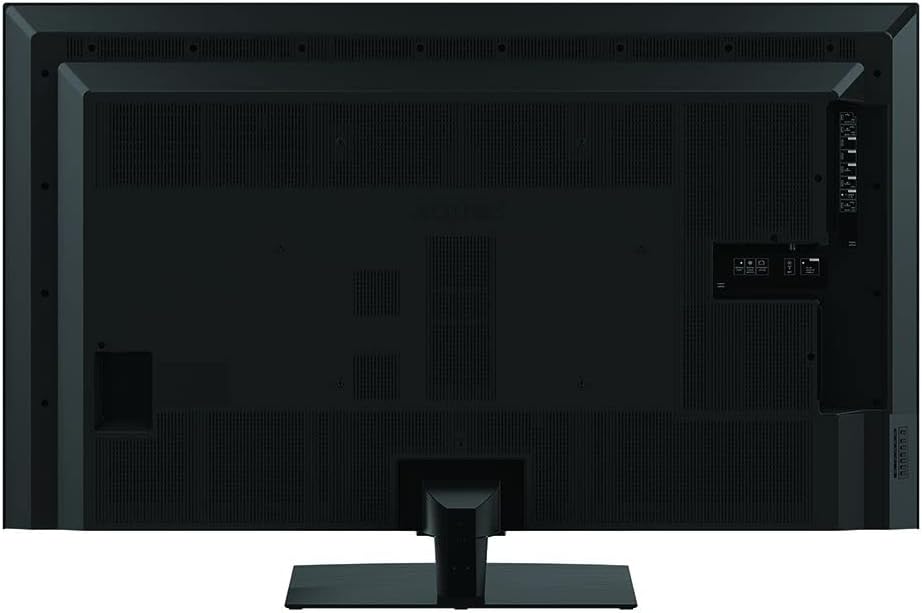
Image 4.2: Rear panel of the TV, highlighting the location of various input and output ports.

Сүрөт 4.3: Детальдуу view of the connectivity panel, showing HDMI, USB, and other essential ports.
4.4 Алгачкы күйгүзүү жана биринчи жолу орнотуу
After connecting all necessary cables, plug the TV into a power outlet. The TV will power on and guide you through the initial setup process.
- Тил тандоо: Өзүңүзгө жаккан тилди тандаңыз.
- Тармак туташуусу: Wi-Fi тармагыңызга туташыңыз же зымдуу Ethernet байланышын колдонуңуз.
- Google аккаунту: Android TV функцияларына жана колдонмолоруна кирүү үчүн Google каттоо эсебиңиз менен кириңиз.
- Каналды сканерлөө: Perform an automatic channel scan if you have an antenna connected.
- Убакыт алкагы: Set your time zone and other basic settings.
5. Сыналгыңызды иштетүү
5.1 Алыстан башкаруу
The included remote control allows you to navigate the TV's functions. Familiarize yourself with the button layout for easy operation.
- Кубат баскычы: Телевизорду күйгүзөт же өчүрөт.
- Үнүн жогорулатуу/төмөндөтүү: Үн деңгээлин тууралайт.
- Канал өйдө/төмөн: Телеканалдарды өзгөртөт.
- Чабыттоо баскычтары: Менюлар боюнча жылдыруу жана параметрлерди тандоо үчүн колдонулат.
- Үй баскычы: Android TV башкы экранына кайтып келет.
- Киргизүү баскычы: Киргизүү булагын тандайт (HDMI, USB ж.б.).
- Netflix баскычы: Netflix колдонмосуна түздөн-түз жетүү.
5.2 Негизги функциялар
To turn the TV on, press the Power button on the remote control. To turn it off, press the Power button again. Adjust volume using the Volume Up/Down buttons. Change channels using the Channel Up/Down buttons.
5.3 Smart TV өзгөчөлүктөрү (Android 10.0)
Your SHARP TV runs on Android 10.0, providing access to a wide range of apps and services. Connect to the internet via Wi-Fi or Ethernet to utilize these features.
- App Store: Google Play дүкөнүнөн колдонмолорду жүктөп алып, орнотуңуз.
- Агым кызматтары: Access pre-installed apps like Netflix, and download others.
- Үн менен башкаруу: Use Google Assistant for voice commands (if supported by remote).
- Chromecast камтылган: Cast content from your mobile devices to the TV.
5.4 Киргизүүнү тандоо
To switch between connected devices, press the Input button on your remote control. A menu will appear, allowing you to select the desired HDMI input, USB input, or other sources.
5.5 Сүрөт жана үн орнотуулары
Access the TV's settings menu to customize picture and sound preferences. You can adjust brightness, contrast, color, sound modes, and more to suit your viewчөйрө.
6. Техникалык тейлөө
6.1 Телевизорду тазалоо
Телевизордун экранын жана корпусун тазалоо үчүн:
- Электр шнурунун розеткадан сууруп алыңыз.
- Экранды жумшак, түксүз чүпүрөк менен акырын сүртүңүз. өжөр белгилери үчүн, жеңил гampчүпүрөккө суу же атайын экран тазалагыч (экранга түздөн-түз чачпаңыз).
- Корпусту жумшак, кургак чүпүрөк менен сүртүңүз.
Caution: Do not use abrasive cleaners, waxes, or solvents as they can damage the TV's finish.
6.2 Программалык камсыздоо жаңыртуулары
Your TV may receive software updates to improve performance and add new features. Ensure your TV is connected to the internet to receive automatic updates. You can also check for updates manually through the TV's settings menu.
7. Кыйынчылыктарды
Телевизоруңузда көйгөйлөргө туш болсоңуз, төмөнкү жалпы көйгөйлөрдү жана аларды чечүү жолдорун караңыз:
| Көйгөй | Мүмкүн чечим |
|---|---|
| Күч жок | Кубат кабелинин телевизорго жана дубалдагы розеткага бекем туташтырылганын текшериңиз. Розетканын иштеп жатканын текшериңиз. |
| Сүрөт жок, бирок үн бар | Киргизүү булагынын тандоосун текшериңиз. Тышкы түзмөктөрдүн туура сайылып, туташтырылганын текшериңиз. |
| Үн жок, бирок сүрөт бар | Check the volume level and mute status. Verify audio settings in the TV menu. |
| Пульт иштебей жатат | Пульттагы батарейкаларды алмаштырыңыз. Пульт менен сыналгынын ортосунда эч кандай тоскоолдук жок экенин текшериңиз. |
| Wi-Fi'га туташпай жатат | Ensure your Wi-Fi router is on and functioning. Re-enter the Wi-Fi password. Try restarting the TV and router. |
8. Техникалык шарттар
The following are the key specifications for the SHARP 8K Smart LED TV 70 Inch, Model 8T-C70DW1X:
| Өзгөчөлүк | Спецификация |
|---|---|
| Модель номери | 8T-C70DW1X |
| Screen Size | 70 дюйм |
| Дисплей технологиясы | LED |
| Резолюция | 8K |
| Жаңыртуу ылдамдыгы | 60 Гц |
| Операция системасы | Android 10.0 |
| Байланыш | Wi-Fi, Ethernet |
| HDMI кириштери | 4 |
| USB кириштери | 3 |
| Колдоого алынган Интернет кызматтары | Netflix |
| Аспект катышы | 16:9 |
| Product Dimensions (Without Base) | 1564 x 916.3 x 104 мм |
| Product Dimensions (With Base) | 1564 x 990 x 361 мм |
| Таза Салмак | 40 кг |
| Жалпы салмак | 55 кг |
| Келип чыккан өлкө | Малайзия |
9. Кепилдик жана колдоо
Your SHARP 8K Smart LED TV 70 Inch (Model: 8T-C70DW1X) comes with a 3 жылдык толук акысыз кепилдик. For warranty claims, technical support, or service inquiries, please contact your local authorized Sharp service center or refer to the contact information provided with your purchase documentation.
For additional support and resources, you may visit the official Sharp website or the Sharp Store on Amazon: