EKids LY-157 Buzz Disney Pixar Lightyear Steering Wheel
Instruction Manual
Introduction
Welcome to the instruction manual for the EKids LY-157 Buzz Disney Pixar Lightyear Steering Wheel. This interactive toy is designed to immerse young fans in the world of Disney Pixar's Lightyear, allowing them to embark on exciting space missions with Buzz Lightyear. Featuring kid-friendly controls, authentic sound effects, and a vibrant light-up display, this device provides an engaging and imaginative play experience.
Кутуда эмне бар
Пакетиңизди ачканда, бардык компоненттер бар экенин текшериңиз:
- Starship mission controller
Эгерде кандайдыр бир нерселер жок болсо же бузулса, кардарларды колдоо менен байланышыңыз.
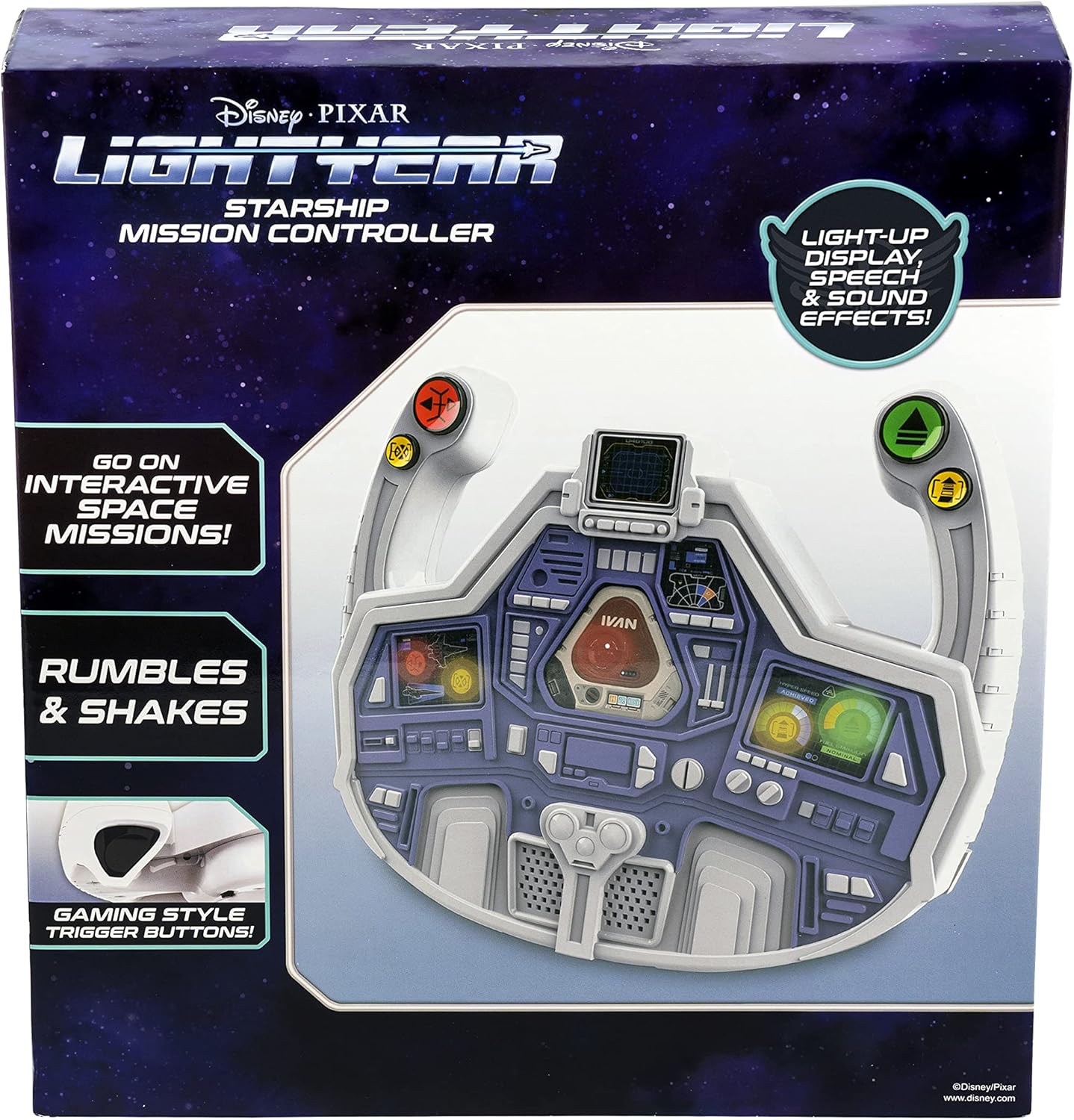
Image: The EKids LY-157 Buzz Lightyear Steering Wheel as packaged in its retail box.
Өзгөчөлүктөрү
The EKids LY-157 Buzz Disney Pixar Lightyear Steering Wheel is equipped with several features designed for an interactive play experience:
- Steering Wheel Toy: Ready for lift-off, this controller allows for interactive space missions with Buzz Lightyear using kid-friendly, easy-to-use controls and gaming-style trigger buttons.
- Light Up Display: Enjoy hours of pretend play as you follow prompts from the colorful light-up 'dashboard'. The Starship Mission Controller reacts to your movements with vibration feedback as you navigate missions.
- Камтылган үн эффекттери: Press buttons on the dashboard to activate a variety of action-packed sound effects while you play!
- Buzz Lightyear Design: The cool Lightyear design is sure to please any fan of the popular character. Durable and lightweight, this toy is ideal for car seats for toddlers aged 4 and up.
- Official Disney Pixar Lightyear Licensed Product: Ensures authenticity and quality.

Image: A visual representation of the steering wheel highlighting its key features, including the light-up display, gaming-style trigger buttons, and shaking action.
Жайгашуу
Before beginning your space missions, ensure the steering wheel is properly set up.
Батарея орнотуу
The EKids LY-157 Buzz Disney Pixar Lightyear Steering Wheel requires 3 AA batteries, which are included with the product. To install or replace batteries:
- Бирдиктин артындагы батарея отсегин табыңыз.
- Using a Phillips head screwdriver, carefully open the battery compartment cover.
- Insert 3 AA batteries, ensuring the positive (+) and negative (-) terminals align with the indicators inside the compartment.
- Батарея уясынын капкагын ордуна коюңуз жана аны бурама менен бекитиңиз.
For optimal performance, use new alkaline batteries. Do not mix old and new batteries, or different types of batteries.

Сүрөт: деталдуу view of the steering wheel, showing the location of the battery compartment, power/volume switches, and various control buttons.
Иштөө нускамалары
Once batteries are installed, you are ready to begin your mission!
Кубатты күйгүзүү / өчүрүү жана үнүн көзөмөлдөө
- Locate the 'Demo/Off/On' slide switch, typically found on the top or back of the unit. Slide it to the 'On' position to power on the device.
- To adjust the sound volume, use the 'Hi/Med/Low' slide switch. Select 'Hi' for maximum volume, 'Med' for moderate, or 'Low' for quieter play.
Интерактивдүү ойноо
- The steering wheel features a light-up dashboard that provides visual prompts for various missions and actions. Follow these prompts to engage in interactive space missions.
- The controller reacts to your movements and mission progress with vibration feedback, enhancing the immersive experience.
Баскыч функциялары
Utilize the various buttons on the steering wheel to control your mission:
- 'Stop' Button (Red): Used to halt actions or missions.
- 'Repair' Button (Yellow): Activates repair sequences or fixes issues during a mission.
- 'Go' Button (Green): Initiates movement or mission progression.
- 'Boost' Button (Yellow): Provides a temporary speed or power boost for critical moments.
- Press the gaming-style trigger buttons (located on the handles) for additional action-packed sound effects and interactive responses.

Image: A child demonstrating the use of the steering wheel, highlighting its interactive nature.
Техникалык тейлөө
Proper care will ensure the longevity of your EKids LY-157 Buzz Disney Pixar Lightyear Steering Wheel.
Тазалоо
- Wipe the surface of the steering wheel with a soft, dry cloth.
- Do not use abrasive cleaners, solvents, or harsh chemicals, as these may damage the plastic or electronic components.
- Avoid submerging the unit in water or exposing it to excessive moisture.
Сактагыч
- When not in use for extended periods, store the steering wheel in a cool, dry place, away from direct sunlight and extreme temperatures.
- Remove batteries if the unit will not be used for several weeks or months to prevent battery leakage and potential damage.
Проблемаларды чечүү
If you encounter any issues with your EKids LY-157 Buzz Disney Pixar Lightyear Steering Wheel, please refer to the following common solutions:
| Көйгөй | Мүмкүн себеп | Чечим |
|---|---|---|
| No power, lights, or sound. | Batteries are depleted or incorrectly installed. Power switch is off. | Ensure batteries are correctly installed with proper polarity. Replace with fresh AA batteries. Check that the 'Demo/Off/On' switch is in the 'On' position. |
| Үн өтө төмөн же такыр угулбайт. | Volume switch is set to 'Low' or 'Off'. | Adjust the 'Hi/Med/Low' slide switch to 'Hi' or 'Med'. |
| Limited or no vibration feedback. | Батареянын кубаттуулугу төмөн. | Replace batteries with fresh ones. Ensure the toy is being used on a stable surface. |
| Buttons are not responding. | Temporary electronic glitch. Debris obstructing buttons. | Turn the unit off and then on again to reset. Check for any foreign objects obstructing the buttons and carefully remove them. |
Техникалык шарттар
| Атрибут | Деталь |
|---|---|
| Продукциянын өлчөмдөрү | 7 x 26.3 x 27.9 см; 581 г |
| Батареялар талап кылынат | 3 AA батарейка (кошулган) |
| Өндүрүүчүнүн сунуш кылган курагы | 3 жаш жана андан жогору |
| Элемент моделинин номери | LY-157 |
| Билим берүү максаттары(лары) | Literacy |
| Оюнчулардын саны | 1 |
| Ассамблея талап кылынат | Жок |
| Материалдын түрлөрү | Пластик |
| Түс | Ак |
| ASIN | B09XZCQT73 |
| Дата биринчи жеткиликтүү | 23-апрель 2022-жыл |
Кепилдик жана колдоо
For product support, warranty information, or to inquire about replacement parts, please refer to the contact information provided on the product packaging or visit the official eKids webсайт. Сатып алуу квитанциясын кепилдик дооматтары үчүн сатып алуунун далили катары сактаңыз.


