1. Киришүү
This manual provides detailed instructions for the setup, operation, maintenance, and troubleshooting of your Ducky One 3 Mini 60% Mechanical Keyboard. Please read this manual thoroughly to ensure proper use and to maximize your keyboard's performance and longevity.

Image: The Ducky One 3 Mini 60% Mechanical Keyboard, showcasinанын компакттуу жайгашуусу жана жандуу RGB арткы жарыгы.
2. Пакеттин мазмуну
Орнотууну улантуудан мурун, төмөндө көрсөтүлгөн бардык буюмдар пакетте бар экенин текшериңиз:
- Ducky One 3 Mini 60% Mechanical Keyboard
- Detachable Braided USB-C Cable
- Баскыч капкагын тарткыч
- Ducky Channel Sticker
- Accent Keycaps (additional colored keycaps for customization)
3. Орнотуу колдонмосу
3.1 Баскычтопту туташтыруу
- Locate the USB-C port on the back of your Ducky One 3 Mini keyboard.
- Берилген USB-C кабелинин кичирээк учун клавиатуранын USB-C портуна туташтырыңыз.
- Кабелдин чоңураак USB-A учун компьютериңиздеги жеткиликтүү USB портуна туташтырыңыз.
- The keyboard will automatically be detected by your operating system. No additional drivers are typically required for basic functionality.

Image: The detachable braided USB-C cable being connected to the keyboard's port, illustrating the connection process.
3.2 Баскычтоптун бийиктигин тууралоо
The Ducky One 3 Mini features 3-level adjustable feet to customize the typing angle for optimal comfort.
- Төмөнкү жагындагы буттарга жетүү үчүн баскычтопту оодарыңыз.
- Extend the feet to your preferred height. There are two sets of feet for three different angles.

Image: The underside of the Ducky One 3 Mini keyboard, highlighting the adjustable feet that allow for three different typing angles.
4. Иштөө нускамалары
4.1 Негизги баскычтоп функциялары
The Ducky One 3 Mini is a 60% layout keyboard, meaning some keys share functions. The Fn key is used to access secondary functions printed on the front or side of keycaps.
- Primary Keys: Standard alphanumeric keys function as labeled.
- Экинчи функциялар: басып туруңуз Fn key and press the desired key to activate its secondary function (e.g., arrow keys, F-row keys, Home, End, Page Up/Down).
4.2 RGB жарыкты башкаруу
The keyboard features per-key programmable RGB lighting. Specific key combinations (often involving Fn and other keys) are used to cycle through lighting modes, adjust brightness, and change colors. Refer to the Ducky official website or included quick guide for detailed RGB control commands.
4.3 Макро программалоо
The Ducky One 3 Mini supports macro programming, allowing you to assign complex sequences of key presses to a single key. The remapped macro layout provides flexibility for custom commands. Detailed instructions for macro recording and assignment can be found in the comprehensive Ducky software or online resources.
4.4 Ыкчам алмаштыруучу которгучтар
This keyboard is equipped with hot-swappable Kailh Yellow Sockets, allowing you to change mechanical switches without soldering. This feature enables customization of typing feel and sound.
- Use the included keycap puller to remove the keycap.
- Use a switch puller (not included, but often bundled with switches) to gently remove the switch from its socket.
- Align the pins of the new switch with the holes in the socket and press firmly until it clicks into place. Ensure pins are not bent.
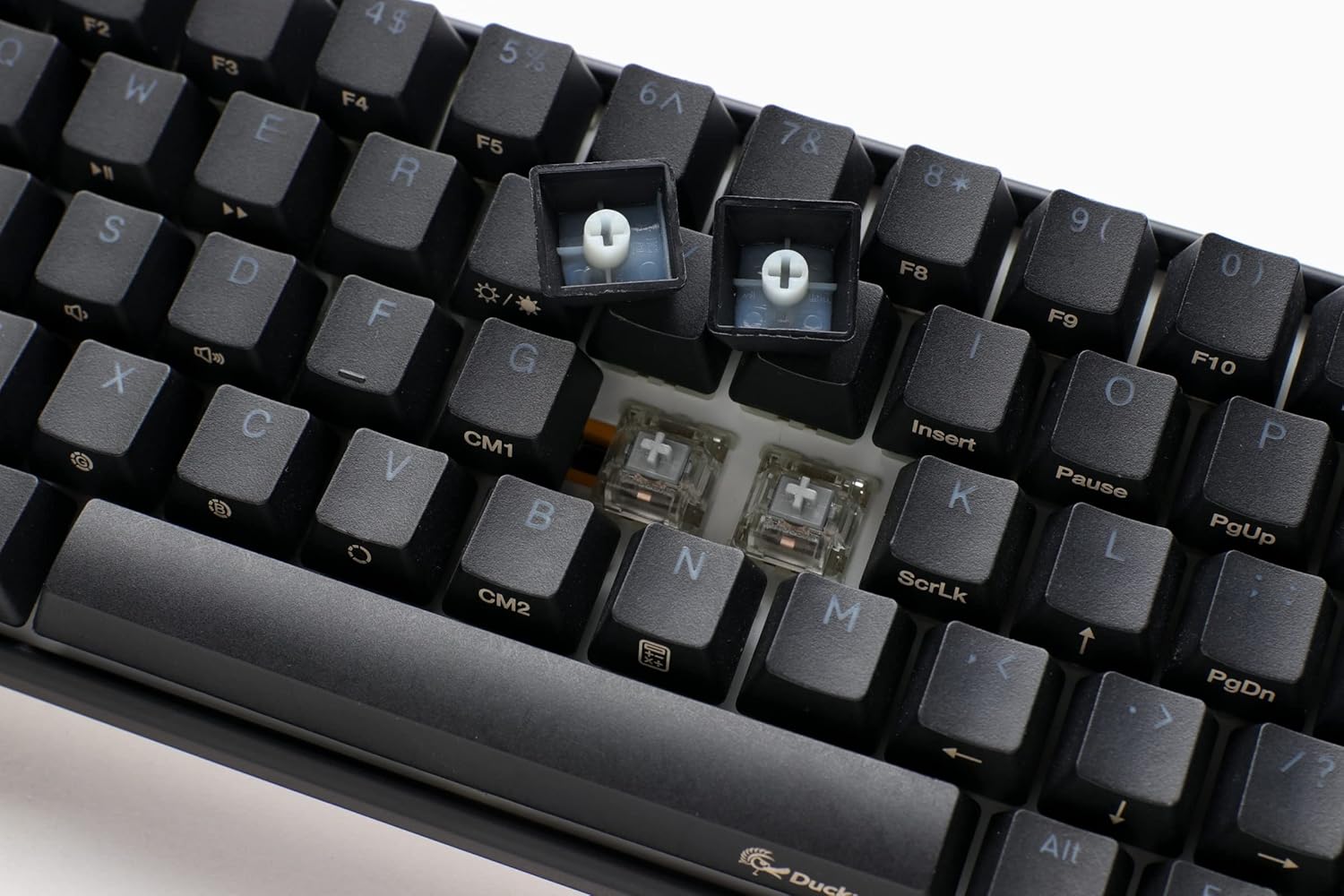
Сүрөт: жакын план view of the keyboard with several keycaps removed, revealing the hot-swappable mechanical switches beneath, ready for replacement or customization.
4.5 Продукт бүттүview Video
Көрүү үчүнview of the Ducky One 3 series features and design philosophy, please watch the official product video below.
Видео: Аткаминерview of the Ducky One 3 keyboard series, detailing its design, features, and the 'QUACK Mechanics' philosophy. This video provides a visual guide to the product's capabilities.
5. Техникалык тейлөө
5.1 Баскычтопту тазалоо
Үзгүлтүксүз тазалоо клавиатуранын көрүнүшүн жана функционалдуулугун сактоого жардам берет.
- Баскыч капкактары: Use the included keycap puller to carefully remove keycaps. Clean them with a mild soap solution and a soft cloth, then ensure they are completely dry before reattaching.
- Клавиатуранын корпусу: Жумшак, түксүз кездемени колдонуңуз, бир аз dampened with water or a mild cleaning solution, to wipe down the keyboard body. Avoid excessive moisture.
- Between Switches: Кысылган абаны өчүргүчтөрдүн ортосундагы чаңды жана калдыктарды тазалоо үчүн колдонуңуз.

Image: The Ducky One 3 Mini keyboard featuring a custom spacebar with an intricate design, highlighting the potential for aesthetic customization and the ease of keycap removal for cleaning.
5.2 Коммутаторго жана стабилизаторго кам көрүү
The Ducky One 3 Mini features V2 stabilizers for improved stability and sound. While hot-swappable, proper care of switches and stabilizers can prevent issues.
- Клавиатурага суюктуктарды төгүп алуудан алыс болуңуз.
- When replacing switches, ensure they are inserted straight to prevent bending pins.
6. Кыйынчылыктарды
If you encounter issues with your Ducky One 3 Mini keyboard, refer to the following common troubleshooting steps:
- Баскычтоп жооп бербейт:
- USB-C кабели клавиатурага жана компьютерге бекем туташып турганын текшериңиз.
- Баскычтопту компьютериңиздин башка USB портуна туташтырууга аракет кылыңыз.
- Мүмкүн болсо, системага тиешелүү көйгөйдү жокко чыгаруу үчүн клавиатураны башка компьютерде сынап көрүңүз.
- RGB жарыктандыруу иштебейт:
- Check the keyboard's manual or Ducky's website for the correct key combinations to activate and adjust RGB lighting.
- Жарыкты башкаруу элементтерине эч кандай программалык карама-каршылыктар тоскоол болбогонун текшериңиз.
- Keys Not Registering or Double-Typing (Chatter):
- Due to the hot-swappable design, try removing and re-inserting the affected switch to ensure proper seating.
- If the issue persists, consider replacing the switch with a new one.
- Ensure the keyboard is clean and free of debris that might obstruct switch operation.
- N-Key Rollover (NKRO) Issues:
- The Ducky One 3 Mini supports N-key rollover, meaning all key presses are registered simultaneously. If you experience issues, ensure your operating system and any gaming software are not interfering with this feature.
Көбүрөөк жардам алуу үчүн, Ducky компаниясынын расмий колдоо кызматына кайрылыңыз webсайтка же кардарларды тейлөөгө кайрылыңыз.
7. Техникалык шарттар
| Өзгөчөлүк | Деталь |
|---|---|
| Модель номери | DKON2161ST-SUSPDCLAWSC1 |
| Макет | 60% |
| Которуу түрү | Cherry MX Silent Red (Hot-Swappable) |
| Баскыч капкактары | Жогорку тыгыздыктагы PBT эки жолу басылуучу үзгүлтүксүз баскычтоп капкактары |
| Арткы жарыктандыруу | Ар бир баскыч үчүн программалануучу RGB |
| Байланыш | Detachable USB-C |
| Өзгөчөлүктөр | QUACK Mechanics Design, Silicone Plate Dampener, EVA Foam Case Dampener, Ducky V2 Stabilizers, 3-Level Adjustable Feet, N-Key Rollover |
| Продукциянын өлчөмдөрү | 12.2 x 4.33 x 1.57 дюйм |
| Элемент Салмагы | 1.31 фунт |
8. Кепилдик жана колдоо
Ducky products are manufactured to high-quality standards. This product is covered by a limited warranty against manufacturing defects. The specific terms and duration of your warranty may vary by region and retailer. Please retain your proof of purchase for warranty claims.
For technical support, warranty information, or service inquiries, please visit the official Ducky website or contact your local Ducky distributor or retailer. You can often find FAQs, driver downloads, and contact information on the official Ducky support pages.
Онлайн ресурстар:
- Ducky Official Webсайт: www.duckychannel.com.tw
- Ducky Store on Amazon: Ducky дүкөнүнө барыңыз


