Продукт бүттүview
This document provides essential information and instructions for the ACEKOOL Air Purifier HEPA Filter Replacement, specifically designed for the Acekool AF2 Air Purifier. This filter is crucial for maintaining optimal air quality by capturing various airborne particles.

Image: The ACEKOOL Air Purifier HEPA Filter Replacement, a cylindrical filter with white pleated material and black top/bottom rings.
Негизги өзгөчөлүктөрү
The ACEKOOL Air Purifier HEPA Filter Replacement features a comprehensive 3-stage purification system designed to effectively clean the air in your home.
- Ultra-fine Nylon Pre-Filter: Captures larger particles such as lint, hair, and pet dander.
- H13 Чыныгы HEPA чыпкасы: Traps 99.97% of airborne pollutants as small as 0.3 micrometers, including dust, pollen, pet dander, and other allergens.
- Активдештирилген көмүр чыпкасы: Absorbs peculiar odors from smoke, cooking, and other sources, leaving the air fresh.
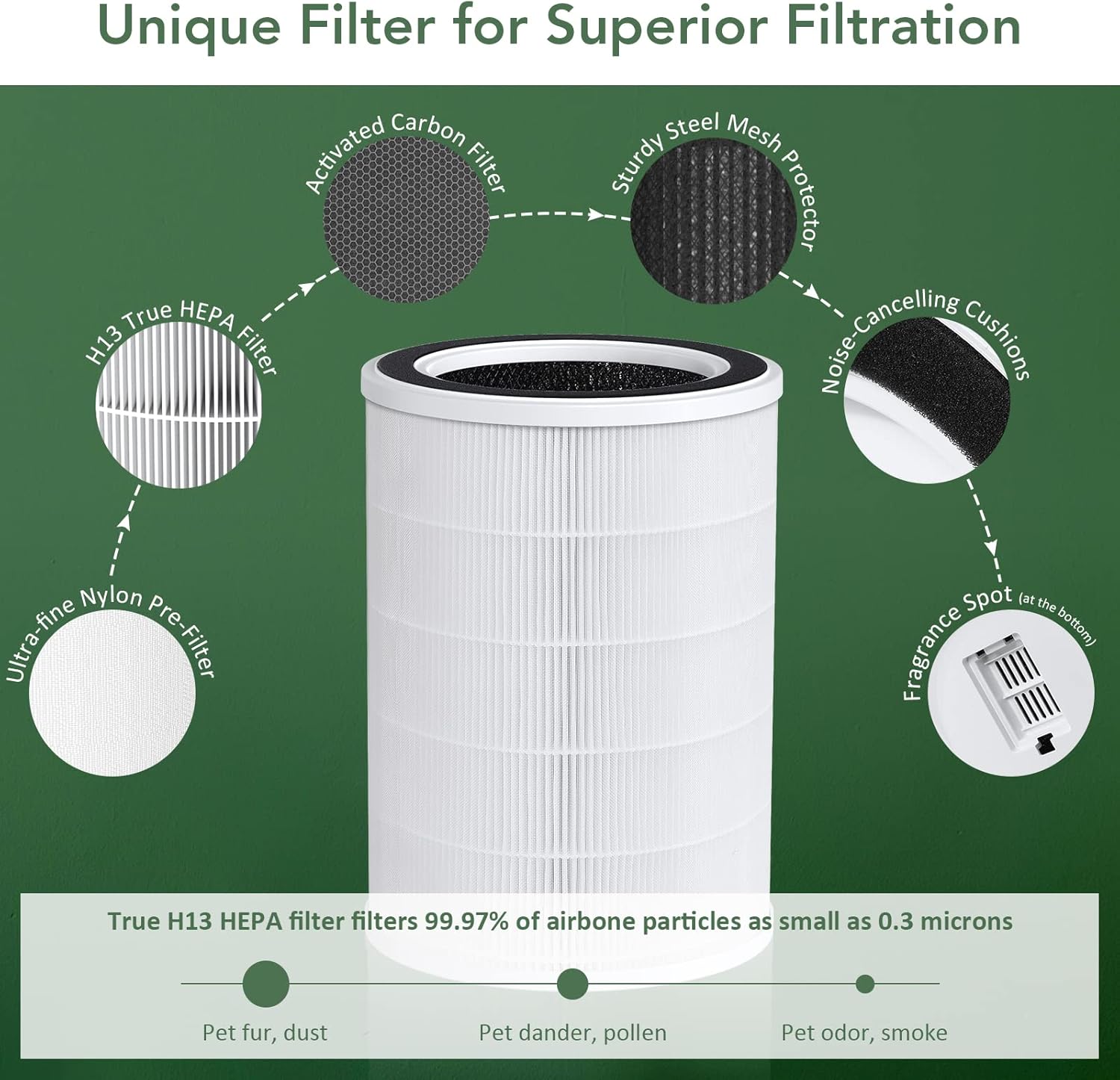
Image: A diagram illustrating the different layers of the 3-in-1 filter, including the pre-filter, H13 True HEPA filter, and activated carbon filter, with descriptions of what each layer targets.
Шайкештик
This filter is specifically designed for and compatible with the Acekool AF2 Air Purifier. Ensure your air purifier model is AF2 before purchasing this replacement filter.

Image: An Acekool AF2 air purifier placed in a living room setting with people and a dog, emphasizing its compatibility.
Орнотуу (Чыпканы алмаштыруу)
Follow these steps to replace the filter in your Acekool AF2 Air Purifier:
- Электрди өчүрүү жана розеткадан ажыратыңыз: Before beginning, ensure the air purifier is turned off and unplugged from the power outlet to prevent any electrical hazards.
- Чыпка капкагын ачуу: Locate the filter cover on the air purifier. Gently open or remove the cover according to your air purifier's specific design. Refer to your Acekool AF2 Air Purifier's main manual if you are unsure.
- Эски чыпканы алып салуу: Carefully grasp the old filter and pull it out from the air purifier. Dispose of the used filter responsibly.
- Жаңы чыпка киргизүү: Unpack the new ACEKOOL Air Purifier HEPA Filter Replacement. Insert the new filter into the air purifier, ensuring it is seated correctly and securely. The filter should fit snugly.
- Close Filter Cover: Replace the filter cover, ensuring it is properly closed and latched.
- Күчтү калыбына келтирүү: Аба тазалагычты кайра розеткага сайып, аны күйгүзүңүз.

Image: A hand demonstrating the process of removing or inserting the cylindrical filter into the side compartment of the Acekool AF2 air purifier.
Техникалык тейлөө
For optimal performance and air purification efficiency, it is recommended to replace the ACEKOOL Air Purifier HEPA Filter every 3 айдан 6 айга чейин. The exact replacement frequency may vary depending on your air quality, usage habits, and the presence of pets or allergens in your environment.
Regular replacement ensures the air purifier continues to effectively capture pollutants and maintain healthy indoor air.
Техникалык шарттар
| Атрибут | Деталь |
|---|---|
| Модель номери | KJ410 |
| Продукциянын өлчөмдөрү | 10 x 10 x 12 дюйм |
| Элемент Салмагы | 2.04 фунт |
| Материал | HEPA |
| Камтылган компоненттер | HEPA filter, Activated Carbon Filter, Pre-Filter |
| Шайкеш түзмөктөр | Acekool AF2 Air Purifier |
| Келип чыккан өлкө | CN |
Проблемаларды чечүү
If you experience issues after replacing the filter, consider the following:
- Аба тазалагыч күйбөй жатат: Ensure the filter cover is securely closed. Some air purifiers have a safety switch that prevents operation if the cover is not properly latched.
- Reduced Airflow/Efficiency: Verify that the new filter is correctly seated and not obstructed. Ensure the filter is the correct model for your Acekool AF2 Air Purifier.
- Өзгөчө жыттар: If new odors are present, ensure all packaging materials were removed from the new filter before installation.
For further assistance, refer to the main user manual for your Acekool AF2 Air Purifier or contact Acekool customer support.
Кепилдик жана колдоо
This replacement filter is covered by a limited warranty provided by Acekool. For detailed warranty terms and conditions, please refer to the documentation included with your original Acekool AF2 Air Purifier or visit the official Acekool webсайт.
For technical support or inquiries regarding this filter, please contact Acekool customer service through their official channels.


