Introduction
This manual provides comprehensive instructions for the FANTECH MAXFIT61 RGB 60% Mechanical Keyboard. It covers setup, operation, maintenance, and troubleshooting to ensure optimal performance and user experience.

Image: The FANTECH MAXFIT61 RGB 60% Mechanical Keyboard, showcasinанын компакттуу дизайны жана жандуу RGB арткы жарыгы.
Кутуда эмне бар
Таңгакта бардык буюмдар бар экенин текшериңиз:
- FANTECH MAXFIT61 Механикалык клавиатура
- Switch Puller
- Баскыч капкагын тарткыч
- Чыгырылуучу Type-C кабели
- Instruction Manual
- Кепилдик картасы

Image: All components included with the FANTECH MAXFIT61 keyboard: the keyboard itself, a switch puller, a keycap puller, a detachable Type-C cable, and documentation.
Жайгашуу
- Баскычтопту туташтыруу: Use the provided detachable Type-C cable to connect the keyboard to an available USB port on your computer.
- Драйверди орнотуу: The keyboard is plug-and-play. For advanced customization, download the MAXFIT61 software from the official FANTECH webсайт.
- Жайгашкан жери: Position the keyboard comfortably on your desk. The 60% layout is designed to maximize desk space for mouse movement.

Сүрөт: деталдуу view of the detachable Type-C cable connection point on the keyboard, highlighting its secure design. Also shown is a graphical user interface for the MAXFIT61 software, indicating customization options for button assignments and macros.
Иштөө нускамалары
Негизги функциялар
The FANTECH MAXFIT61 is a 60% keyboard, meaning some functions are accessed via the FN key in combination with other keys. Refer to the keycap legends for secondary functions.
RGB жарыктандыруу
The keyboard features 18 RGB backlight modes. Adjust brightness and flowing modes using the FN key combinations. Specific key combinations for lighting control are detailed in the included instruction manual.

Image: The FANTECH MAXFIT61 keyboard showcasing its RGB lighting capabilities, with icons indicating lighting control, detachable Type-C cable, and hot-swappable switches.
Ыкчам алмаштыруучу которгучтар
The MAXFIT61 is designed with universal hot-swappable Outemu switches, supporting both 5-pin and 3-pin switches from various brands. This allows for easy customization of your typing experience.

Image: A FANTECH MAXFIT61 keyboard with several keycaps and switches removed, illustrating the hot-swappable switch design. Loose keycaps and switches are scattered around the keyboard.
Magic FN Key
The Magic FN key provides quick access to multimedia controls, home functions, and custom key assignments. Press FN + CAPS to activate these features.
Техникалык тейлөө
- Тазалоо: Use a soft, dry cloth to clean the keyboard surface. For deeper cleaning, remove keycaps using the provided keycap puller and use compressed air to clear debris.
- Которуу алмаштыруу: To replace a switch, gently remove the keycap with the keycap puller. Then, use the switch puller to carefully extract the switch. Align the pins of the new switch with the sockets on the PCB and press firmly until it clicks into place.
Проблемаларды чечүү
- Баскычтоп жооп бербейт:
- Type-C кабелинин клавиатурага да, компьютерге да бекем туташтырылганын текшериңиз.
- Баскычтопту башка USB портуна туташтырууга аракет кылыңыз.
- Компьютериңизди өчүрүп күйгүзүңүз.
- RGB жарыктары иштебейт:
- Check FN key combinations for lighting control.
- Ensure the MAXFIT61 software is installed and running correctly.
- Катталбаган ачкычтар:
- Remove the keycap and switch for the affected key.
- Inspect the switch for any damage or debris. Replace the switch if necessary.
- Ensure the switch is properly seated in its socket.
Техникалык шарттар
| Бренд | FANTECH |
| Модель аты | MAXFIT61 |
| Модель номери | MK857 |
| Ачкычтардын саны | 61 Ачкычтар |
| Которуу түрү | Mechanical (Outemu Red Switch) |
| Байланыш | Зымдуу (USB-C) |
| Арткы жарыктандыруу | RGB (18 режим) |
| Ыкчам алмаштырылуучу | Ооба (5 жана 3 пиндүү уячалар менен шайкеш келет) |
| Материалдын түрү | Acrylonitrile бутадиен Styrene |
| Шайкеш түзмөктөр | PC |
| Операция системасы | Windows 10 |
| Өлчөмдөрү (L x W x Y) | 294 x 103 x 42 мм |
| Салмагы | 566г |
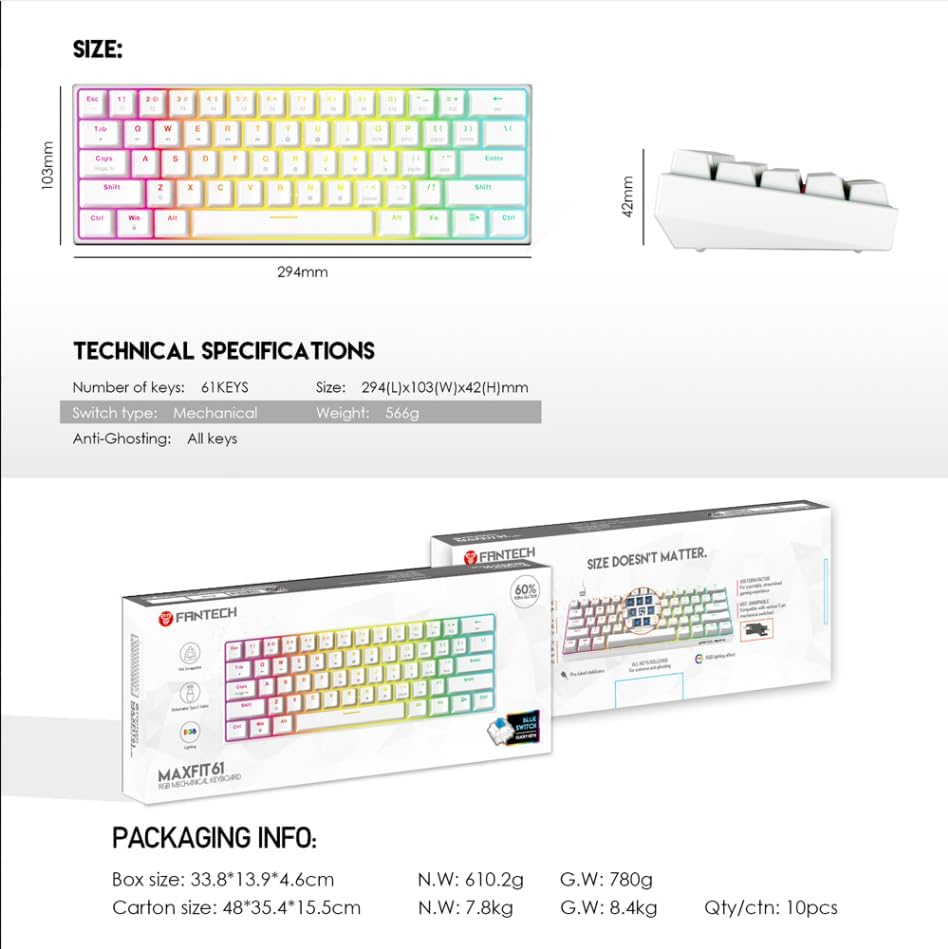
Image: A visual representation of the FANTECH MAXFIT61 keyboard's dimensions and a table listing its technical specifications, including number of keys, switch type, size, and weight.
Кепилдик жана колдоо
The FANTECH MAXFIT61 Mechanical Keyboard comes with a 1 жылдык кепилдик сатып алынган күндөн тартып. Кепилдик дооматтары үчүн сатып алганыңыздын далилин сактап коюңуз.
For technical support, troubleshooting assistance, or warranty inquiries, please visit the official FANTECH website or contact their customer service department. Contact information can be found on the warranty card included in your product packaging.


