1. Киришүү
This manual provides essential instructions for setting up, operating, and maintaining your ZTE Cymbal U Link II Z2335CA flip phone. Please read this guide thoroughly to ensure proper use and to maximize the performance of your device.
The ZTE Cymbal U Link II Z2335CA is an unlocked 4G flip phone designed for straightforward communication. It features a 2.8-inch main display, a 1.7-inch external display, a 2MP camera, and 8GB of internal storage, expandable via microSD.
2. Пакеттин мазмуну
Продукцияңыздын таңгагында бардык элементтер бар экенин текшериңиз:
- ZTE Cymbal U Link II Z2335CA Flip Phone
- USB кабели
- Батарея (1 литий-иондук батарея)
3. Түзмөк бүттүview
Familiarize yourself with the physical features of your ZTE Cymbal U Link II Z2335CA.

Figure 3.1: Phone Open - Main Screen and Keypad
This image displays the ZTE Cymbal U Link II Z2335CA flip phone in its open position, revealing the main 2.8-inch color display at the top and the full alphanumeric keypad with navigation buttons below. The screen shows the time '5:03 PM' and 'Thu, Apr 1', with options for 'Contacts', 'Menu', and 'Messages' at the bottom. The keypad includes standard number keys, call/end buttons, a central navigation pad, and function keys.

Figure 3.2: Phone Closed - External Display
This image shows the ZTE Cymbal U Link II Z2335CA flip phone in its closed state. The external 1.7-inch TFT display is visible, showing '4:55 PM' and 'Thu, Apr 1', along with a 'No SIM card' indicator. The textured outer casing is also visible.
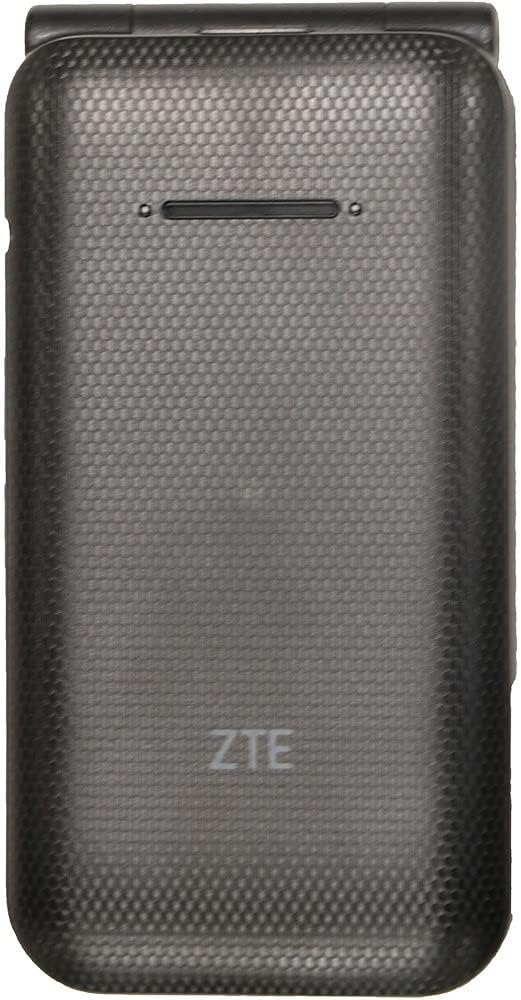
Figure 3.3: Phone Closed - Back View
This image presents the rear view of the ZTE Cymbal U Link II Z2335CA flip phone when closed. The textured black casing is prominent, featuring the ZTE logo embossed near the bottom. A speaker grille is visible at the top.

Figure 3.4: Phone Open - Top-Down View
This image provides a top-down perspective of the ZTE Cymbal U Link II Z2335CA flip phone in its open configuration. It highlights the hinge mechanism connecting the two halves of the phone. The internal 2MP camera lens is visible on the upper half, just above the hinge.

Figure 3.5: Phone Open - Left Side View
This image shows the left side of the ZTE Cymbal U Link II Z2335CA flip phone when open. It reveals the volume up and down buttons located on the side of the upper half of the phone. The phone's slim profile да көрүнүп турат.

Figure 3.6: Phone Open - Right Side View
This image displays the right side of the ZTE Cymbal U Link II Z2335CA flip phone when open. It shows the power/lock button and the MicroUSB 2.0 charging port located on the side of the lower half of the phone.
4. Орнотуу
4.1. SIM картаны орнотуу
- Телефонду өчүрүп, арткы капкакты алып салыңыз.
- SIM картанын уячасын табыңыз.
- Insert your Nano-SIM card into the designated slot with the gold contacts facing down, ensuring it clicks into place.
- Арткы жапкычты ордуна коюңуз.
4.2. Батареяны орнотуу
- With the back cover removed, align the battery's gold contacts with the terminals in the battery compartment.
- Батареяны акырын басып, ордуна коюңуз.
- Арткы жапкычты ордуна коюңуз.
4.3. Телефонду заряддоо
- Connect the USB cable to the MicroUSB port on the right side of the phone.
- Connect the other end of the USB cable to a compatible USB power adapter or a computer's USB port.
- Батареянын индикатору толук заряддалганын көрсөткөнгө чейин телефонду заряддап коюңуз.
5. Иштөө нускамалары
5.1. Күйгүзүү / Өчүрүү
- Күйгүзүү үчүн: Экран күйгөнгө чейин Күйгүзүү/Чалууну бүтүрүү баскычын басып, кармап туруңуз.
- Өчүрүү үчүн: Press and hold the Power/End Call button, then select 'Power Off' from the options on the screen.
5.2. Чалууларды кабыл алуу жана кабыл алуу
- Чалуу үчүн: Open the phone, dial the number using the keypad, and press the Green Call button.
- Чалууга жооп берүү үчүн: Телефон шыңгыраганда, кулпуну ачып, жашыл чалуу баскычын басыңыз.
- Чалууну аяктоо үчүн: Кызыл "Чакыруу аяктоо" баскычын басыңыз же оодарманы жабыңыз.
5.3. Кабарларды жөнөтүү жана кабыл алуу
- Кабар жөнөтүү үчүн: From the main menu, navigate to 'Messages', select 'New Message', enter the recipient's number and your message, then send.
- Билдирүүнү окуу үчүн: New messages will typically appear as a notification. Navigate to 'Messages' from the main menu to view сиздин почтаңыз.
5.4. Камераны колдонуу
- Негизги менюдан "Камера" тандаңыз.
- Frame your shot using the main display.
- Press the designated camera button or the center navigation button to capture a photo.
6. Техникалык тейлөө
- Тазалоо: Телефондун экранын жана корпусун тазалоо үчүн жумшак, кургак чүпүрөктү колдонуңуз. Суюк тазалоочу каражаттарды колдонбоңуз.
- Сактагыч: Телефонду түз күн нурунан жана экстремалдык температурадан алыс салкын, кургак жерде сактаңыз.
- Батареяга кам көрүү: Do not expose the battery to high temperatures or puncture it. Use only approved chargers.
- Суу каршылык: Бул телефон сууга чыдамдуу эмес. Суюктуктардын таасиринен алыс болуңуз.
7. Кыйынчылыктарды
| Көйгөй | Мүмкүн чечим |
|---|---|
| Телефон күйбөйт | Батарея туура орнотулганын жана заряддалганын текшериңиз. Кубаттоочу түзүлүштү туташтырып, кайра аракет кылыңыз. |
| Тармак сигналы жок | SIM карта туура салынганын текшериңиз. Тармактык камтуусу жакшыраак аймакка көчүңүз. Кызмат көрсөтүүчүңүзгө кайрылыңыз. |
| Чалууларды кабыл алуу же жасоо мүмкүн эмес | Verify network signal. Check if your SIM card is active and has sufficient credit/plan. |
| Батарея бат эле түгөнөт | Экран жарыктыгын азайтыңыз. Колдонулбаган колдонмолорду жабуу. Фондук дайындарды колдонууну чектөө. |
| Phone is unresponsive | Жумшак баштапкы абалга келтирүү үчүн батареяны чыгарып, кайра салыңыз. |
8. Техникалык шарттар
- Модел: Z2335CA
- Негизги дисплей: 2.8 дюйм, 240 x 320 пиксел токтому
- Тышкы дисплей: 1.7 дюйм TFT
- Процессор: Qualcomm QM 215, 1.1 GHz CPU Speed
- RAM: 1 ГБ
- Ички сактагыч: 8 ГБ ROM
- Кеңейтүүчү сактагыч: MicroSD 32 ГБ чейин
- Камера: 2MP (Rear)
- Батарея: 1600mAh Removable Lithium Ion
- Байланыш: 4G LTE (B2, 4, 5, 12, 66, 71, 41), 3G UMTS (B2, 4, 5), 2G GSM (850, 1900), Bluetooth 4.2, MicroUSB 2.0
- Операция системасы: Proprietary (Linux 3.18.71)
- Аудио Jack: 3.5 мм
- Өлчөмдөрү: 6 x 4 x 2 дюйм
- Салмагы: 9.1 унция
- Түсү: Кара
9. Кепилдик жана колдоо
For warranty information and customer support, please refer to the documentation provided at the time of purchase or contact your retailer. As this is a renewed product, warranty terms may vary. Please consult the specific warranty details provided by the seller.