Introduction
The Elektron Syntakt is a powerful and versatile 12-track drum computer and synthesizer, designed for both studio production and live performance. It combines four analog and eight digital tracks, offering a wide range of sound-generating capabilities. With its intuitive interface, robust build, and comprehensive feature set, the Syntakt provides a dynamic platform for creating intricate rhythms and rich melodic textures.
This manual provides essential information for setting up, operating, maintaining, and troubleshooting your Elektron Syntakt, ensuring you get the most out of this advanced musical instrument.
Жайгашуу
1. Кутудан чыгаруу жана алгачкы текшерүү
Carefully remove your Syntakt from its packaging. Ensure all included components are present:
- Elektron Syntakt Unit
- Power Supply (PSU-3c)
- Elektron USB cable
- Quick колдонмо
Inspect the unit for any signs of damage during transit. If any issues are found, contact your retailer immediately.
2. Connecting the Syntakt
The Syntakt offers various connectivity options for integration into your studio or live setup. Refer to the back panel diagram below for connection points.
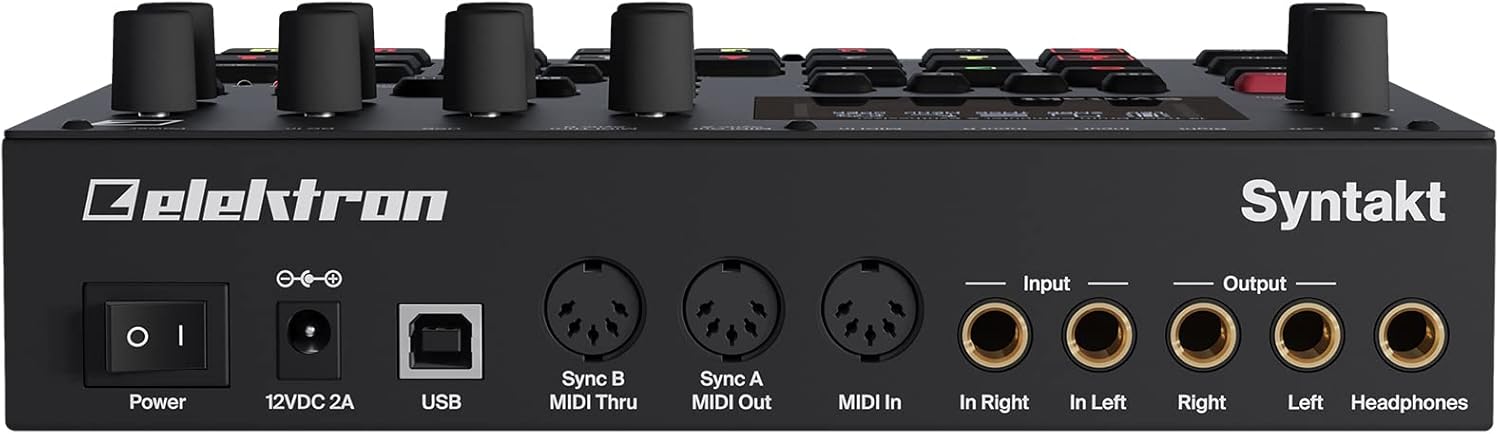
1-сүрөт: Rear panel connections of the Elektron Syntakt. This view highlights the Power input, USB port, MIDI In/Out/Thru ports (Sync A/B), and the audio Input (L/R) and Output (L/R) jacks, along with the Headphone output.
- Күч: Connect the included PSU-3c power supply to the DC In port (12V DC, 2A) and plug it into a suitable power outlet.
- USB: Use the Elektron USB cable to connect the Syntakt to your computer for MIDI over USB, audio streaming via Overbridge, and firmware updates.
- MIDI: Connect external MIDI devices using the MIDI In, MIDI Out, and MIDI Thru ports. These also support DIN Sync out.
- Аудио киргизүү: Connect external audio sources to the Input L and Input R jacks.
- Аудио чыгаруу: Connect the Output L and Output R jacks to your mixer, audio interface, or ampөмүрлүү.
- Наушник: Plug your headphones into the dedicated headphone jack for monitoring.
3. Баштапкы күйгүзүү
Once all connections are secure, press the Power button on the rear panel to turn on your Syntakt. The OLED screen will illuminate, and the unit will boot up, ready for use.
Operating the Syntakt
The Elektron Syntakt features a robust interface designed for hands-on control and deep sound design. Below is an overview of its key operational aspects.

2-сүрөт: Front panel of the Elektron Syntakt, displaying the OLED screen, rotary encoders, and the grid of 16 backlit buttons for sequencing and track control.
1. Колдонуучу интерфейси бүттүview
- OLED экраны: The 128x64 pixel OLED screen provides clear visual feedback for parameters, menus, and sequencing information.
- High-Resolution Encoders: Eight rotary encoders (A-H) and the Main Volume knob allow for precise control over various parameters.
- Арткы жарык баскычтары: Durable backlit buttons provide tactile feedback for sequencing, track selection, and function access.

3-сүрөт: Деталдаштырылган view of the Syntakt's OLED screen, showing the 'MACHINES' menu, which allows selection from 35 different sound-generating engines.
2. Sound Generation and Tracks
The Syntakt features 12 tracks, combining four analog and eight digital tracks, each capable of generating a wide range of drum and melodic sounds. It includes 35 sound-generating machines, offering diverse sonic possibilities from classic drum machine sounds to complex synthesizers.
- Analog Tracks: Provide rich, warm, and punchy sounds, ideal for drums and basslines.
- Digital Tracks: Offer versatile sound exploration with various synthesis methods.
- Sound Machines: Access different sound engines for each track to sculpt your desired timbre.
3. Sequencing and Performance
Elektron's renowned sequencer is at the heart of the Syntakt's workflow. The 64-step sequencer allows for intricate pattern creation and dynamic performance.
- Parameter Locks: Automate any parameter per step, allowing for highly detailed and evolving sequences.
- Conditional Trigs: Add probability and logic to your patterns, creating variations and generative sequences.
- Түз эфирде жаздыруу: Record sequences in real-time or step-by-step.
4. Effects and Sound Shaping
Each track is equipped with multimode filters and assignable LFOs for advanced sound shaping. The Syntakt also includes high-quality master effects.
- Чыпкалар: Sculpt the tone of your sounds with various filter types.
- LFOs: Modulate parameters to create movement and evolving textures.
- Мастер эффекттер: Apply delay, reverb, and other effects to your overall mix.

4-сүрөт: The Syntakt's screen displaying the routing options for tracks and effects, illustrating the flexible signal flow within the unit.
5. Overbridge Integration
The Syntakt is Overbridge enabled, allowing for seamless integration with Digital Audio Workstation (DAW) environments. Overbridge provides multi-track audio streaming, MIDI control, and total recall of your Syntakt projects directly within your DAW.
Техникалык тейлөө
Proper maintenance ensures the longevity and optimal performance of your Elektron Syntakt.
- Тазалоо: Use a soft, dry, lint-free cloth to clean the unit. For stubborn marks, a slightly damp кездемени колдонсо болот, бирок аппараттын ичине суюктуктун кирбешин текшериңиз. Абразивдүү тазалоочу каражаттардан же эриткичтерден алыс болуңуз.
- Программалык камсыздоо жаңыртуулары: Regularly check the Elektron website for firmware updates. Updates often include new features, bug fixes, and performance improvements. Follow the instructions provided by Elektron for safe updating.
- Сактагыч: When not in use, store the Syntakt in a cool, dry place, away from direct sunlight, extreme temperatures, and excessive dust. Consider using a dust cover or a dedicated case for protection.
- Электр камсыздоо: Always use the original Elektron PSU-3c power supply. Using an incorrect power supply can damage the unit and void your warranty.
Проблемаларды чечүү
If you encounter issues with your Syntakt, refer to the following common troubleshooting steps. For more detailed assistance, consult the full Elektron Syntakt manual available on the Elektron website or contact Elektron support.
| Көйгөй | Мүмкүн болгон себеп / Чечим |
|---|---|
| Үн чыгышы жок | Check audio cable connections, ensure volume levels are up on the Syntakt and connected devices, verify correct audio routing within the Syntakt. |
| MIDI иштебей жатат | Verify MIDI cable connections, check MIDI settings on the Syntakt and external devices, ensure correct MIDI channels are selected. |
| Аппарат иштетилбей жатат | Ensure power supply is correctly connected and plugged into a working outlet. Use only the original Elektron PSU-3c. |
| Unexpected behavior / Freezing | Try restarting the unit. If persistent, perform a factory reset (refer to the full manual for instructions, as this will erase user data). Ensure firmware is up to date. |
| Overbridge connectivity issues | Ensure Overbridge software is installed and up to date on your computer. Check USB cable connection and try a different USB port. Restart both Syntakt and computer. |
Эскертүү: The Elektron Syntakt has a learning curve due to its deep functionality. Many resources, including online forums and video tutorials, are available to help users master the instrument's full potential.
Техникалык шарттар
Detailed technical specifications for the Elektron Syntakt (Model 117007).
| Өзгөчөлүк | Деталь |
|---|---|
| Модель номери | 117007 |
| Өлчөмдөрү (L x W x Y) | 11.42 x 11.42 x 4.72 дюйм (29 x 29 x 12 см) |
| Элемент Салмагы | 4.77 фунт (2.17 кг) |
| Дене материалы | Эритме болот |
| Туташтыргыч түрү | USB, MIDI (In/Out/Thru), 1/4" Audio (Input L/R, Output L/R, Headphones) |
| Аудио конвертерлер | 48 kHz, 24-bit D/A and A/D |
| Дисплей | 128x64 pixel OLED screen |
| Тректер | 12 (4 Analog, 8 Digital) |
| Sound Machines | 35 |
| Камтылган компоненттер | Power Supply PSU-3c, Elektron USB cable, Quick Guide |
Кепилдик жана колдоо
Elektron products are built to high standards and are designed for durability. For specific warranty information, please refer to the warranty card included with your product or visit the official Elektron website. Elektron provides premium support for its products.
For technical assistance, troubleshooting beyond this manual, or service inquiries, please contact Elektron customer support through their official website. Ensure you have your product's serial number and proof of purchase ready when contacting support.
Elektron Official Webсайт: www.elektron.se


