1. Киришүү
The JOYO AVALLON R-19 is a compressor effect pedal designed for electric guitar and bass. It features a classic compressor circuit with independent input and output signal controls, offering precise dynamic feedback and tone shaping. This manual provides detailed instructions for setup, operation, and maintenance of your AVALLON R-19 pedal.
2. Продукт бүтүп калдыview
2.1 Негизги өзгөчөлүктөрү
- Precise compression circuit with dynamic feedback.
- Independent control knobs for INPUT signal and OUTPUT signal.
- Three main control knobs: RATIO, ATTACK, and RELEASE for detailed tone adjustment.
- Integrated GAIN REDUCTION indicators for visual monitoring of compression.
- Durable metal aluminum alloy casing.
- Innovative R-series ambience LED lights for visual feedback.
- True Bypass design to maintain signal integrity when the effect is disengaged.
2.2 Башкаруу каражаттары жана көрсөткүчтөр
Familiarize yourself with the pedal's layout and controls:
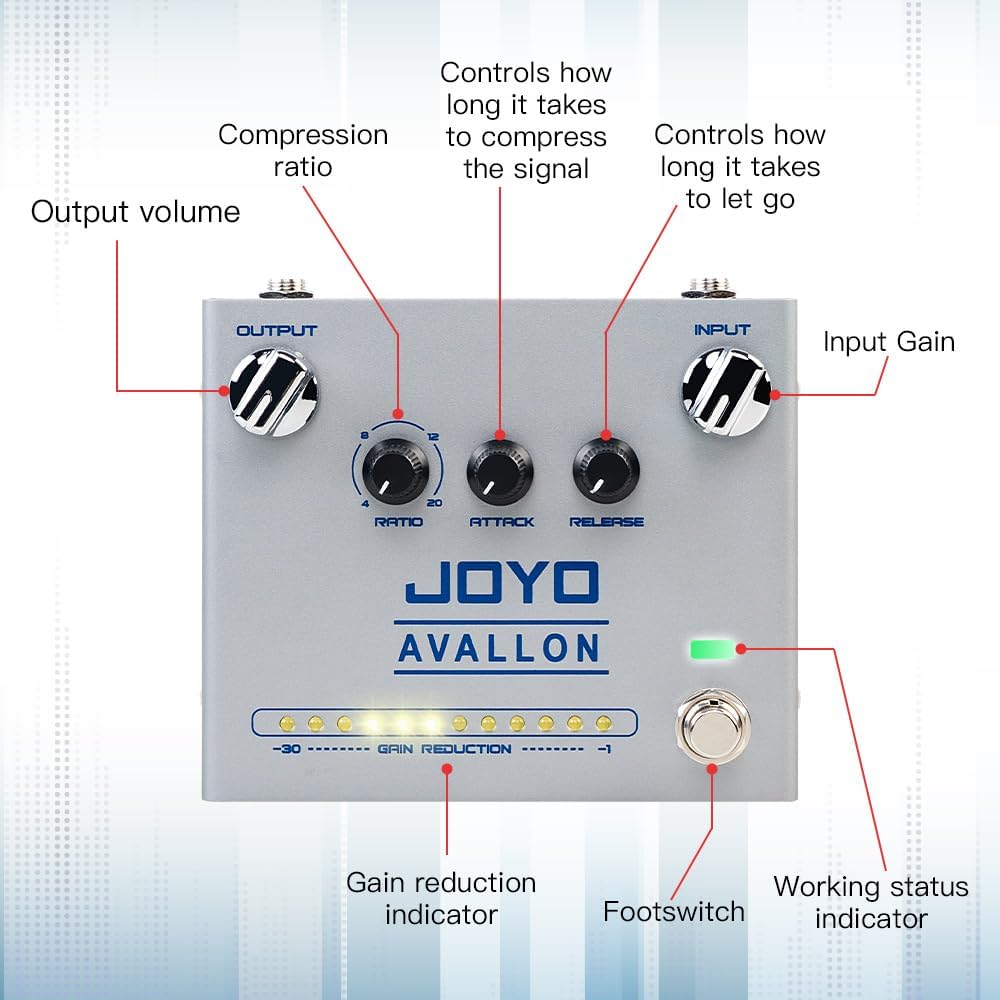
Сүрөт: алдыңкы view of the JOYO AVALLON R-19 pedal with labels for Input Gain, Output Volume, Compression Ratio, Attack, Release, Gain Reduction Indicator, Footswitch, and Working Status Indicator.
- INPUT баскычы: Adjusts the input gain of the signal entering the compressor.
- OUTPUT баскычы: Adjusts the overall output volume of the compressed signal.
- ПАРАЦИЯ ТҮЙМӨГҮ: Controls the compression ratio, determining how much the signal is compressed once it exceeds the threshold. Settings range from subtle to heavy compression.
- ЧАБУУ ТҮЙМӨГҮ: Sets how quickly the compressor reacts to the input signal exceeding the threshold. A faster attack (lower setting) will compress transients more quickly.
- ЧЫГАРУУ ТҮЙМӨГҮ: Determines how long it takes for the compressor to return to its uncompressed state after the signal falls below the threshold.
- GAIN REDUCTION Indicators: A series of LEDs that visually display the amount of gain reduction being applied by the compressor in real-time.
- Бут өчүргүч: Engages or disengages the effect. True Bypass ensures your signal remains unaffected when the pedal is off.
- Иш абалынын көрсөткүчү: An LED that shows if the pedal is active or bypassed.
2.3 Rear Panel and LED Modes

Image: Rear panel of the JOYO AVALLON R-19 pedal, highlighting the Output Socket, DC Power Input, Input Socket, and the LED mode switch with SYNC, ALWAYS, and OFF settings.
- Киргизүү розеткасы: Connect your instrument (guitar/bass) here.
- Чыгуу розеткасы: Сиздин байланышыңыз ampкөтөргүч же сигнал чынжырыңыздагы кийинки педаль.
- Туруктуу кубат киргизүү: Connect a 9V DC power adapter (center negative).
- Rear Ambience LED Light: Provides additional visual feedback.
- LED Mode Switch:
- синхрондоштуруу: All LEDs (including ambience lights) are controlled by the footswitch. They turn on when the effect is engaged and off when bypassed.
- ДАЙЫМА: The ambience LEDs on both sides are always on. The top LED (working status indicator) is controlled by the footswitch.
- ӨЧҮК: All LEDs, including the ambience lights, are off. The top LED (working status indicator) is controlled by the footswitch.
3. Орнотуу
3.1 Электр энергиясы
The AVALLON R-19 pedal requires a 9V DC power supply with a center-negative plug. The working current is above 120mA. Using a power supply that meets these specifications is crucial for proper and quiet operation. A dedicated pedal power supply with noise reduction technology is recommended.
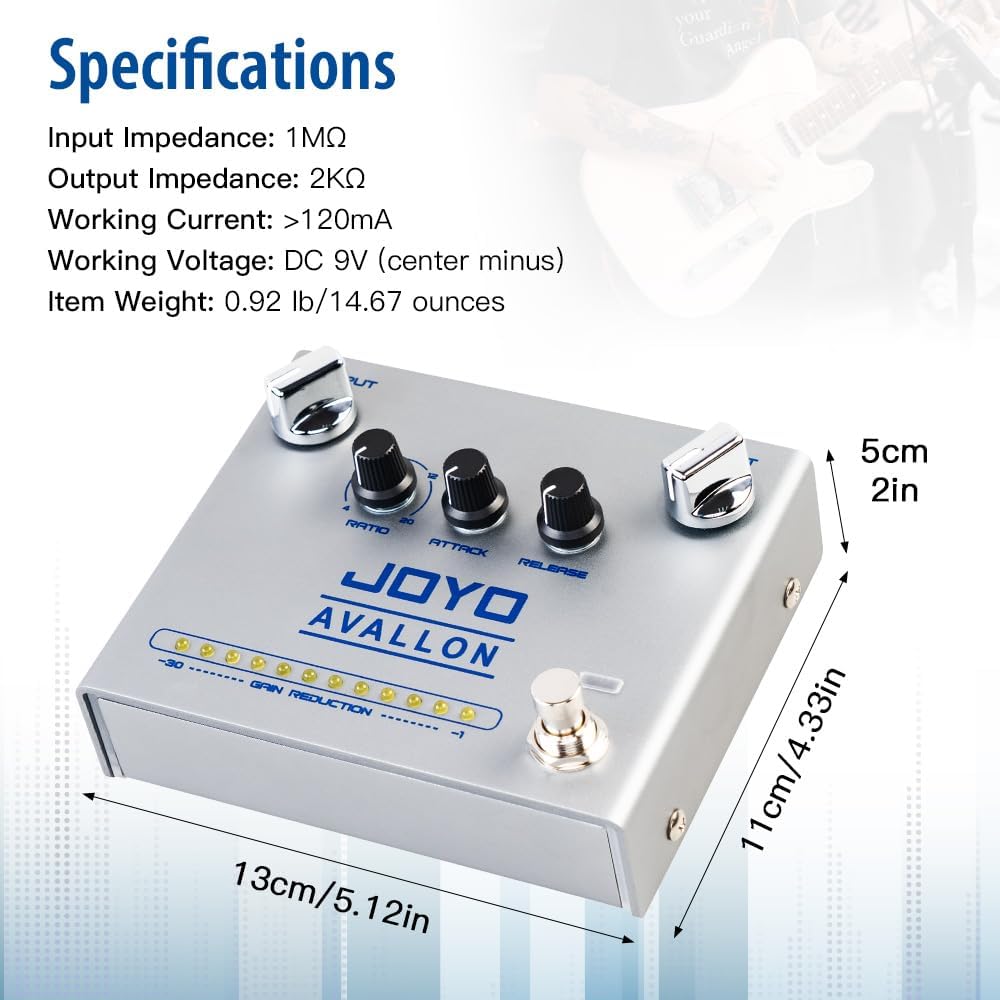
Image: Close-up of the DC 9V power input on the JOYO AVALLON R-19 pedal, showing the center-negative polarity symbol.
3.2 Connecting the Pedal
Follow these steps to connect your AVALLON R-19 pedal:
- Сиздин камсыз кылуу amplifier is turned off or its volume is set to minimum.
- Электр гитараңызды же бас гитараңызды туташтырыңыз INPUT socket of the AVALLON R-19 pedal using a standard 1/4-inch instrument cable.
- туташтыруу OUTPUT socket of the AVALLON R-19 pedal to your amplifier's input (or the input of the next pedal in your signal chain) using another 1/4-inch instrument cable.
- Connect the 9V DC center-negative power adapter to the pedal's DC Power Input.
- Бардык туташуулар коопсуз болгондон кийин, сиз өзүңүздүн amplifier and adjust its volume.
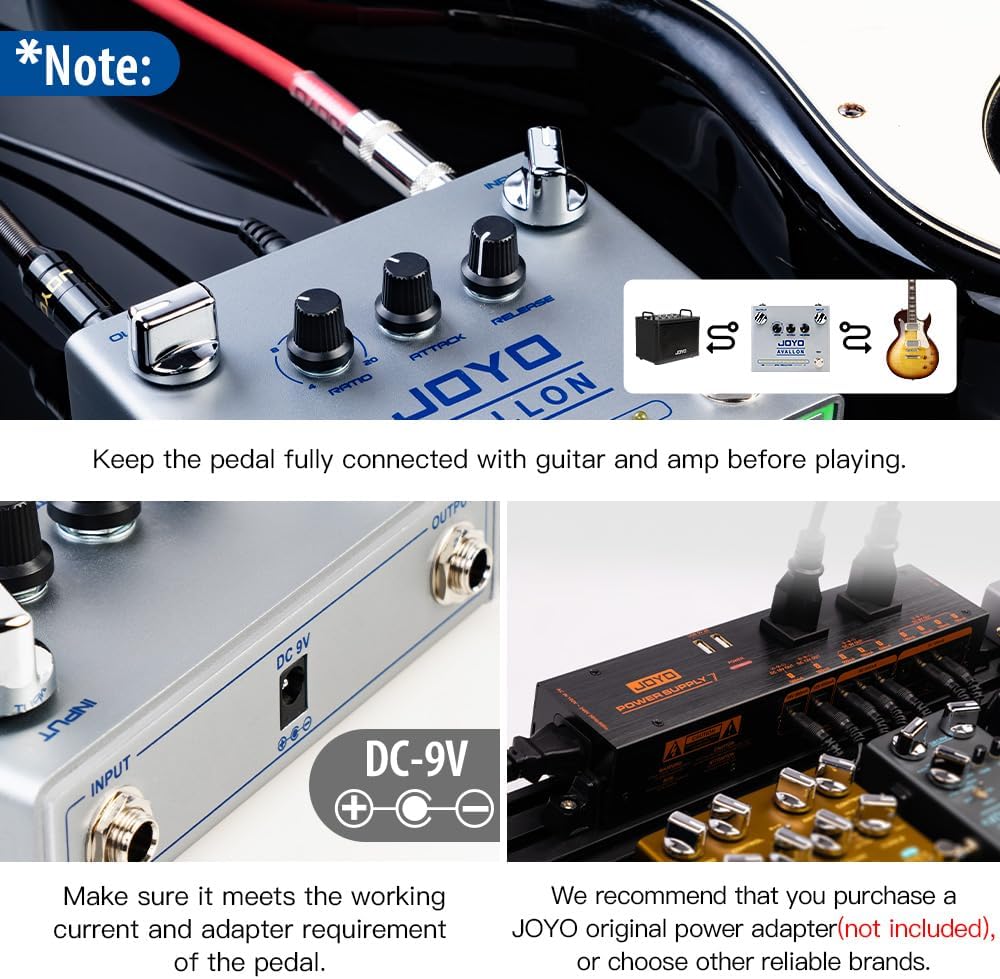
Image: Connection diagram illustrating the JOYO AVALLON R-19 pedal placed in the signal chain between a guitar and an ampөмүрлүү.
4. Иштөө нускамалары
4.1 Негизги операция
- Press the footswitch to engage the compressor effect. The Working Status Indicator LED will illuminate.
- тууралаңыз INPUT knob to set the sensitivity of the compressor to your instrument's signal. Higher settings will make the compressor react to quieter signals.
- колдонуу OUTPUT knob to control the overall volume of the pedal. This can be used to compensate for any perceived volume drop due to compression or to boost your signal.
- Байкоо GAIN REDUCTION Indicators to see how much compression is being applied in real-time. More illuminated LEDs indicate greater gain reduction.
4.2 Shaping Your Tone with Compression
The three main compression knobs (RATIO, ATTACK, RELEASE) allow for detailed control over your sound:
- КАТЫШТЫГЫ:
- A lower ratio (e.g., 4:1) provides subtle, transparent compression, ideal for evening out dynamics without drastically altering your tone.
- A higher ratio (e.g., 20:1) results in more aggressive compression, often used for sustain or to create a more uniform sound.
- ЧАБУУЛ:
- A slower attack (higher setting) allows the initial transient (the "pick attack") of your notes to pass through uncompressed, resulting in a punchier sound.
- A faster attack (lower setting) compresses the initial transient, smoothing out the attack and increasing sustain.
- ЧЫГАРЫЛУУ:
- A faster release (lower setting) makes the compressor disengage quickly, which can be good for maintaining dynamic response but can also lead to "pumping" if too fast.
- A slower release (higher setting) keeps the compression engaged longer, providing smoother sustain but potentially reducing dynamic range.
Experiment with these controls to find the ideal compression settings for your playing style and desired sound.
5. Техникалык тейлөө
To ensure the longevity and optimal performance of your JOYO AVALLON R-19 pedal, follow these maintenance guidelines:
- Тазалоо: Use a soft, dry cloth to clean the pedal's exterior. Avoid using abrasive cleaners, solvents, or excessive moisture, as these can damage the finish or internal components.
- Сактагыч: Педальды көпкө чейин колдонбогондо, аны салкын, кургак жерде, күндүн түз нурунан жана өтө жогорку температурадан алыс сактаңыз.
- Күч: Always use the specified 9V DC center-negative power supply. Incorrect power can damage the unit and void the warranty.
- Байланыштары: Periodically check all cable connections for wear and tear. Ensure plugs are clean and securely seated in their respective jacks.
6. Кыйынчылыктарды
If you encounter issues with your AVALLON R-19 pedal, refer to the following common troubleshooting steps:
- Үн жок:
- Check all cable connections between your instrument, pedal, and amplifier. Ensure they are fully inserted.
- Verify the power supply is correctly connected and providing the specified 9V DC (center-negative) power.
- камсыз кылуу amplifier is on and its volume is up.
- Test with different cables and a different power supply if possible.
- Bypass the pedal to see if sound returns, indicating an issue with the pedal itself.
- Алсыз же бурмаланган үн:
- текшерүү INPUT жана OUTPUT knob settings. Adjust them to appropriate levels.
- Review the РАТИО, АТАК, жана ЧЫГАРУУ settings. Extreme settings can sometimes lead to undesirable sound characteristics.
- Ensure your instrument's output is not too high or too low for the pedal's input.
- Ашыкча ызы-чуу:
- Ensure you are using a high-quality, regulated 9V DC center-negative power supply, preferably one designed for guitar pedals with noise reduction.
- Орнотууңузда жер илмектерин текшериңиз.
- Test the pedal in isolation (instrument directly into pedal, then pedal directly into amp) to rule out other noisy components in your signal chain.
- LEDs Not Working:
- Check the LED Mode Switch on the rear panel. Ensure it is not set to "OFF" if you expect the ambience LEDs to be on.
- Verify the pedal is receiving power.
If these steps do not resolve the issue, please contact JOYO customer support for further assistance.
7. Техникалык шарттар
| Өзгөчөлүк | Спецификация |
|---|---|
| Киргизүү импедансы | 1МΩ |
| Чыгуу импедансы | 2KΩ |
| Иштөө агымы | >120мА |
| Working Voltage | DC 9V (борбордо минус) |
| Элемент Салмагы | 13.4 ounces (0.92 lb / 14.67 ounces) |
| Продукциянын өлчөмдөрү | 5.12"L x 2.17"W x 4.33"H (13cmx5.5cmx11cm) |
| Дене материалы | Metal aluminum alloy |
| Шайкеш түзмөктөр | Bass guitar, electric guitar |
| Туташтыргыч түрү | 1/4-Inch Straight |
| Сигнал форматы | Digital (referring to internal processing, not analog signal path) |
8. Кутуда эмне бар
Upon opening your JOYO AVALLON R-19 package, you should find the following items:
- JOYO AVALLON R-19 Compressor Effect Pedal
- Колдонуучунун Колдонмосу (бул документ)
9. Кепилдик жана колдоо
JOYO is committed to providing quality products and excellent customer service. If you encounter any issues with your product, JOYO offers prompt service within 24 hours.
For support inquiries, please refer to the contact information provided with your purchase or visit the official JOYO webсайт. Сатып алуу квитанциясын кепилдик дооматтары үчүн сатып алуунун далили катары сактаңыз.
For more information about JOYO products, visit the JOYO расмий дүкөнү Amazonдо.
10. Расмий продукт Videos
No official product videos from the seller were found in the provided data to embed. Please refer to the product page for any available video content.


