Introduction
This manual provides detailed instructions for the safe operation, installation, and maintenance of your DJXFLI 2x100W RGBWAuv 6-in-1 COB Par Light. Please read this manual thoroughly before use to ensure proper functionality and to prevent damage to the unit or injury to personnel.
The DJXFLI COB Par Light is a versatile stage lighting fixture designed for various applications including church events, parties, discos, and other entertainment venues. It features two 100W COB LED sources with RGBWAuv (Red, Green, Blue, White, Amber, UV) color mixing capabilities.
Коопсуздук нускамалары
ЭСКЕРТҮҮ: Бул коопсуздук көрсөтмөлөрүн аткарбоо өрткө, электр тогуна урунууга, жаракат алууга же продуктуга же мүлккө зыян келтирүүгө алып келиши мүмкүн.
- Ар дайым түзмөктү жерге туташтырылган розеткага туташтырыңыз.
- Voltage of the power source matches the unit's requirements.
- Электр шнуру бузулган болсо, аппаратты иштетпеңиз.
- Жарык булагына түздөн-түз көз тийбеңиз.
- Ашыкча ысып кетүүнүн алдын алуу үчүн аппараттын айланасында жетиштүү желдетүүнү камсыз кылыңыз.
- корпусту ачпаңыз; ичинде колдонуучу тейлей турган бөлүктөр жок. Бардык тейлөөлөрдү квалификациялуу кызматкерлерге тапшырыңыз.
- Агрегатты нымдуулуктан жана экстремалдык температурадан алыс кармаңыз.
- Mount the unit securely using the provided bracket and appropriate hardware.
Пакеттин мазмуну
Пакетти ачканда бардык буюмдар бар экенин жана жакшы абалда экендигин текшериңиз:
- 1 x COB Par Light
- 1 x User Manual
- 1 x Кубат кабели (1.2м)
- 1 х Монтаждык кашаа
- 2 х бурамалар

Image: The COB Par Light, power cord, mounting bracket, and user manual as included in the package.
Продукт бүттүview
The DJXFLI COB Par Light is engineered with advanced features for professional lighting applications:
- High CRI & Power COB Light Source: Features two 100W COB (Chip-on-Board) LEDs, providing pure color without separation shadows.
- RGBWAuv 6-in-1 Color Mixing: Offers a wide spectrum of colors including Red, Green, Blue, White, Amber, and Ultraviolet for diverse lighting effects.
- Туруктуу турак-жай: Constructed with a die-cast aluminum housing for enhanced durability and heat dissipation.
- Бир нече башкаруу режимдери: Supports DMX512, Master/Slave, Auto, and Sound Activated modes for flexible operation.
- Интеграцияланган муздатуу системасы: Equipped with a high-quality cooling system to prevent overheating and ensure longevity of the LED lamps.

Сүрөт: алдыңкы view of the COB Par Light, illustrating its dual COB LED design and examples of red and blue light output.

Image: A visual representation of the various colors achievable with the RGBWAuv 6-in-1 COB LEDs, including UV, Green, Red, Orange, White, and Blue.
Жайгашуу
Арматураны орнотуу
The COB Par Light can be mounted on a truss, stand, or placed on the ground using the adjustable mounting bracket.
- Attach the mounting bracket to the fixture using the provided screws.
- Securely fasten the fixture to your desired mounting surface (truss, stand, etc.) ensuring it is stable and cannot fall.
- Adjust the angle of the light as needed using the bracket's adjustment knobs.

Image: The COB Par Light mounted on a truss, demonstrating its use in a stage setup with green and orange light projections.
Power Connection
Connect the included power cord to the "POWER IN" port on the back of the fixture and then to a grounded power outlet. Multiple units can be daisy-chained using the "POWER OUT" port for convenience, ensuring the total current draw does not exceed the circuit's capacity.
DMX туташуу (кошумча)
For DMX control, connect a DMX controller to the "DMX IN" port using a 3-pin DMX cable. For multiple fixtures, daisy-chain them by connecting the "DMX OUT" of the first fixture to the "DMX IN" of the next, and so on. Terminate the last fixture in the chain with a DMX terminator.
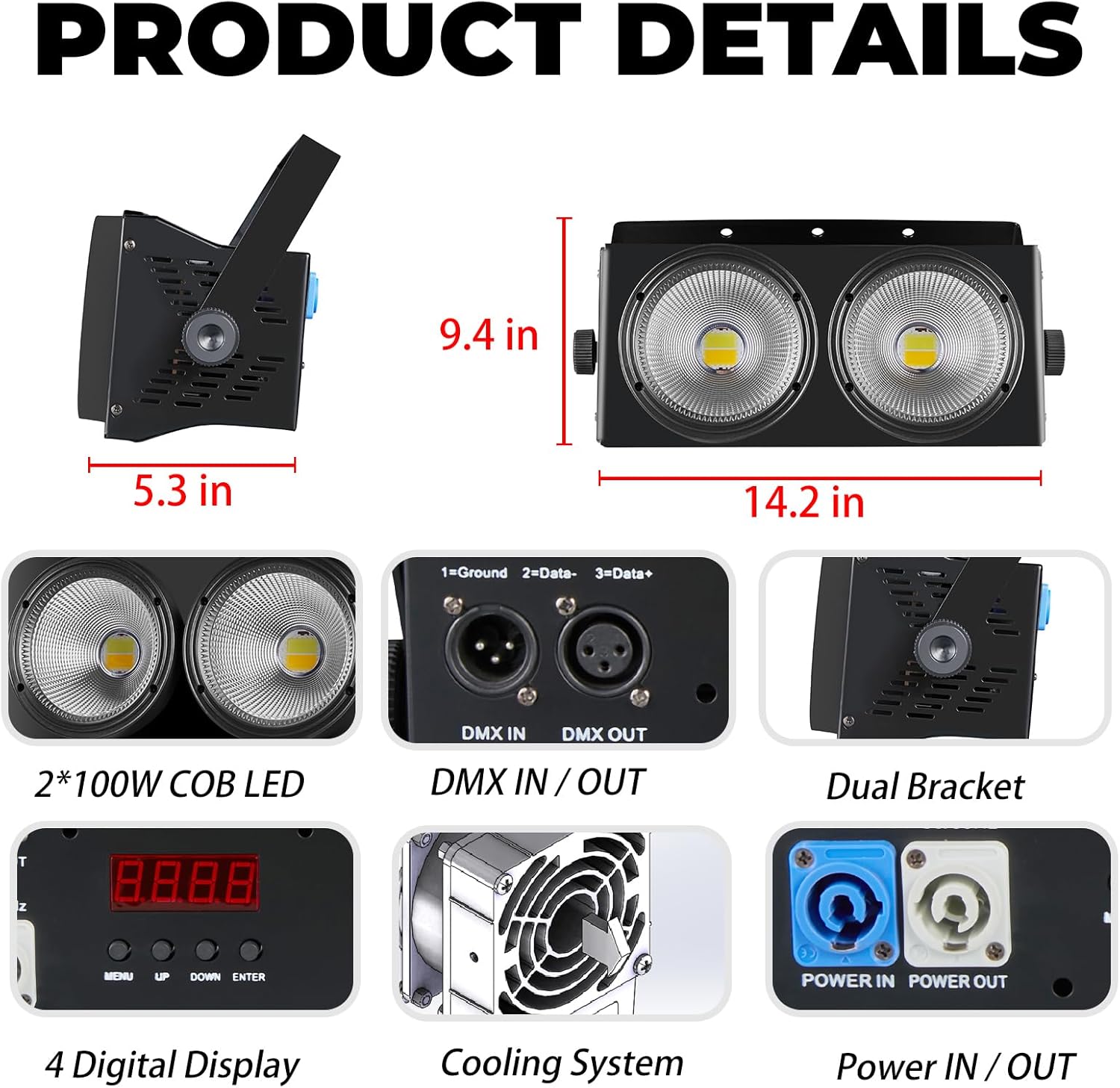
Image: A close-up of the product's rear panel, highlighting the DMX input/output ports, power input/output, digital display, and the cooling fan.
Иштөө режимдери
The DJXFLI COB Par Light offers several operating modes, selectable via the digital display on the rear panel.

Image: Icons representing the DMX, Sound Activated, Auto, and Master/Slave control modes, accompanied by examples of the light's output in various colors.
1. DMX512 Control Mode
This mode allows professional control over the fixture's functions using a DMX controller. Refer to the DMX channel chart (usually provided in a separate DMX manual or appendix) for specific channel assignments and values. The fixture can independently control individual light beads or set signal retention.
2. Master/Slave режими
Connect multiple fixtures using DMX cables. Set one fixture as the "Master" and the others as "Slave." The slave units will mimic the master unit's operations, allowing synchronized lighting effects without a DMX controller. The unit automatically recognizes master and slave functions.
3. Auto Mode
The fixture will cycle through pre-programmed internal lighting shows and color changes automatically. Use the digital display to select different auto programs or adjust speed.
4. Sound Activated Mode
In this mode, the light reacts to ambient sound or music, changing patterns and colors in sync with the audio input. Sensitivity can often be adjusted via the digital display.
Техникалык тейлөө
Regular maintenance ensures optimal performance and extends the lifespan of your COB Par Light:
- Тазалоо: Periodically clean the lenses and exterior housing with a soft, lint-free cloth. Do not use abrasive cleaners or solvents.
- Вентиляция: Ensure that the cooling vents are free from dust and obstructions. Use compressed air to clear dust if necessary.
- Текшерүү: Regularly check power cables, DMX cables, and mounting hardware for any signs of wear or damage. Replace damaged components immediately.
- Сактагыч: When not in use for extended periods, store the fixture in a dry, dust-free environment.
Проблемаларды чечүү
| Көйгөй | Мүмкүн себеп | Чечим |
|---|---|---|
| Күч жок | Power cord disconnected; no power from outlet; faulty power cord. | Check power connections; test outlet; replace power cord. |
| DMX көзөмөлү жок | Incorrect DMX address; faulty DMX cable; DMX controller issue; no DMX terminator. | Verify DMX address settings; check DMX cable integrity; ensure DMX terminator is used on the last fixture. |
| Жарык жыпылыктайт же туруксуз иштейт | Loose connection; DMX signal interference; overheating. | Check all connections; ensure DMX cables are properly shielded; ensure adequate ventilation. |
| Желдетүүчү ызы-чуу катуу | Dust accumulation in fan; fan malfunction. | Clean fan and vents; if noise persists, contact customer support. |
If you encounter issues not listed here or if the problem persists after attempting the solutions, please contact DJXFLI customer support.
Техникалык шарттар
| Өзгөчөлүк | Деталь |
|---|---|
| Модель номери | 2x100W RGBWAuv 6in1 |
| Жарык булагы | 2 x 100W COB LED (RGBWAuv 6-in-1) |
| Энергияны керектөө | 200 Вт (макс. 250 Ватт) |
| Тtage | AC 240 вольт |
| Ampөчүрүү | 1.04 Amps |
| Түс температурасы | 3200 Kelvin (Warm White component) |
| Башкаруу режимдери | DMX512, Master/Slave, Auto, Sound Activated |
| Турак жай материалы | Die Aluminium |
| Продукциянын өлчөмдөрү | 16"L x 8.8"W x 8.8"H |
| Элемент Салмагы | 7.88 фунт |
| Монтаж түрү | Pole Mount, Bracket Mount |
| UPC | 768477758533 |
Кепилдик жана колдоо
DJXFLI is committed to providing quality products and customer satisfaction. The strobe projection lamp has a high-quality cooling system to avoid damage to the LED lamp ашыкча ысып кеткендиктен.
If you have any questions or require assistance, please contact DJXFLI after-sales support via email. We aim to respond within 24 hours and assist in resolving any issues.
For further information or to explore other products, please visit the official DJXFLI store: DJXFLI Store


