Introduction
This manual provides detailed instructions for the safe installation, operation, and maintenance of your bimar Wi-Fi Ceiling Fan, Model 1 (Ø 132). Please read this manual thoroughly before using the product and retain it for future reference.
Колдонуу максаты: This high-performance ceiling fan is designed for ventilation in indoor domestic environments. Any other use is considered improper and potentially hazardous. The manufacturer cannot be held responsible for any damages resulting from improper use or repairs performed by unqualified personnel.
Маанилүү коопсуздук нускамалары
Өрт, электр шок же адамдардын жаракат алуу коркунучун азайтуу үчүн төмөнкүлөрдү сактаңыз:
- Вентиляторду орнотуудан мурун бардык көрсөтмөлөрдү окуп чыгыңыз.
- Орнотуу бардык жергиликтүү жана улуттук электр эрежелерине ылайык квалификациялуу электрик тарабынан аткарылышы керек.
- Ensure the installation site can support the fan's weight (approximately 6.2 kg).
- Орнотуудан же тейлөөдөн мурун ар дайым негизги автоматтык өчүргүчтөн электр кубатын өчүрүңүз.
- Желдеткичти электр шнурунун же сайгычтын бузулушу менен иштетпеңиз.
- Keep hands, hair, and clothing away from moving blades.
- Do not insert any objects into the fan blades while it is operating.
- Бул шайман физикалык, сезүү же акыл-эс жөндөмү начар же тажрыйбасы жана билими жок адамдар (анын ичинде балдар) үчүн, эгерде алардын коопсуздугуна жооптуу адам тарабынан көзөмөлсүз же шайманды колдонуу боюнча көрсөтмө болбосо, колдонууга арналбайт.
- Балдар шайман менен ойнобошу үчүн аларды көзөмөлгө алуу керек.
Кутуда эмне бар
Your bimar Wi-Fi Ceiling Fan package includes the following components:
- bimar Wi-Fi Ceiling Fan unit (with 3 blades)
- Алыстан башкаруу
- Монтаждоочу жабдыктар (буроолор, кашаалар ж.б.)
- Көрсөтмө (бул документ)

Image: The bimar Wi-Fi Ceiling Fan, featuring three light-colored wooden blades and a brushed metal motor housing and downrod.
Орнотуу жана орнотуу
1. желдеткич орнотуу
Квалификациялуу электриктин кесипкөй орнотуусу сунушталат. Ensure the ceiling structure can safely support the fan's weight and that all wiring complies with local electrical codes.
- Монтаждоо ордун даярдоо: Автоматтык өчүргүчтөн электр кубатын өчүрүңүз. Орнотуу кронштейнин шыптын устунуна же желдеткич менен жабдылган розетка кутучасына бекем бекитиңиз.
- Төмөнкү штанганы жана моторду чогултуңуз: Attach the downrod to the fan motor housing.
- Желдеткичти илиңиз: Желдетүүчү түзүлүштү кылдаттык менен көтөрүп, аны монтаждык кронштейнден илип коюңуз.
- Желдеткичке зым салуу: Connect the electrical wires (live, neutral, ground) from the ceiling to the fan's wiring, following the wiring diagram provided in the separate installation guide (if applicable).
- Бычактарды тиркөө: Securely fasten the three blades to the motor housing.
- Чатырды камсыз кылуу: Raise the canopy to cover the wiring and mounting bracket, securing it in place.

Сүрөт: каптал view of the bimar ceiling fan, illustrating the angle of the light wood blades and the connection to the downrod.
2. Wi-Fi жана тиркемелердин туташуусу
The bimar Wi-Fi Ceiling Fan is compatible with the Bimar Live Smart app for advanced control and scheduling.
- Колдонмону жүктөп алыңыз: Издөө "Bimar Live Smart" in your smartphone's app store (iOS or Android) and install it.
- Каттоо эсебин түзүү: Колдонмону ачып, жаңы колдонуучу каттоо эсебин түзүү үчүн экрандагы нускамаларды аткарыңыз же сизде мурунтан эле бар болсо кириңиз.
- Түзмөк кошуу: Power on the ceiling fan. In the Bimar Live Smart app, tap "Add Device" or the "+" icon. Select "Ceiling Fan" or the appropriate device type.
- Wi-Fi'га туташуу: Follow the app's instructions to put the fan into pairing mode (usually by pressing a button on the fan or remote for a few seconds). Connect the fan to your home 2.4GHz Wi-Fi network.
- Түзмөктүн аталышы: Once connected, you can name your fan for easy identification within the app.

Image: A modern living room featuring the bimar ceiling fan installed, with a smartphone displaying the Bimar Live Smart app interface, indicating Wi-Fi and voice control capabilities.
Иштөө нускамалары
Your bimar Wi-Fi Ceiling Fan offers multiple control options for convenience.
1. Алыстан башкаруу операциясы
The included remote control allows direct access to all fan functions.
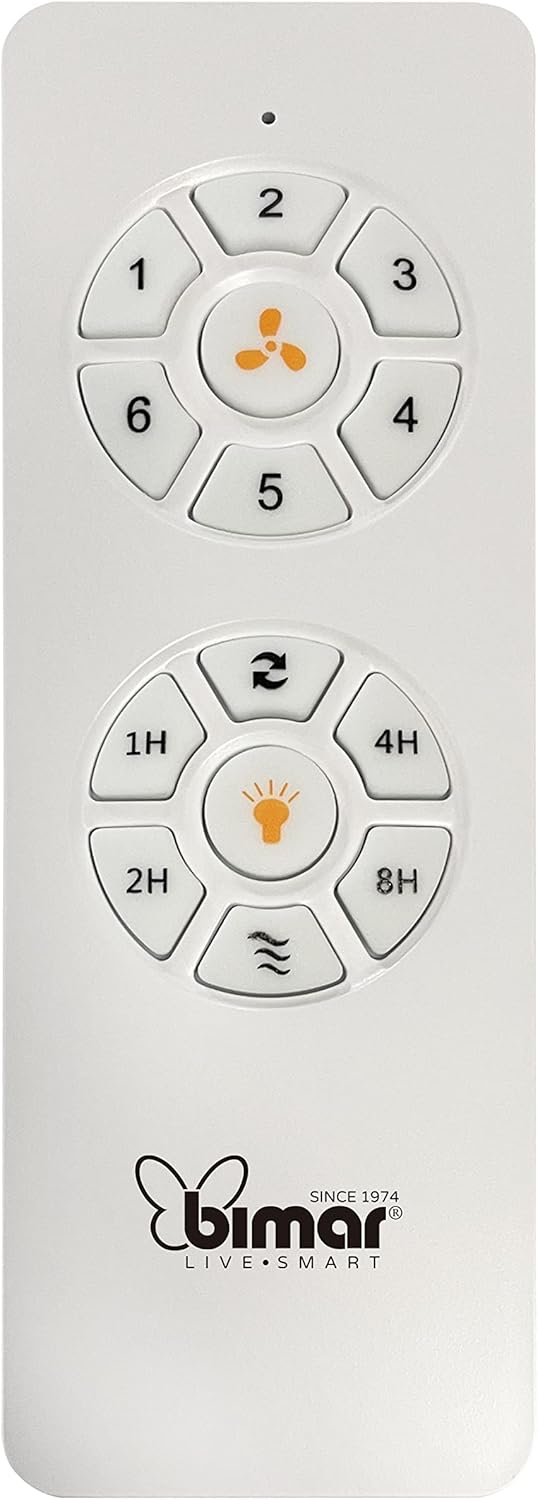
Image: The white remote control for the bimar ceiling fan, showing buttons for fan speed (1-6), fan on/off, timer (1H, 2H, 4H, 8H), mode selection, and reverse function.
- Күйгүзүү/өчүрүү: Желдеткичти күйгүзүү же өчүрүү үчүн желдеткичтин сүрөтчөсүн басыңыз.
- Ылдамдыкты жөндөө: Use buttons 1-6 to select one of the six available fan speeds.
- Таймер функциясы: Press 1H, 2H, 4H, or 8H to set the fan to automatically turn off after the selected duration.
- Режим тандоо: Use the mode button (often represented by waves or arrows) to cycle through Normal, Natural, Sleep, and Breeze modes.
- Жай/кышкы режими: The reverse button (often two arrows forming a circle) changes the blade rotation direction.
2. App Control (Bimar Live Smart)
Once connected to the Bimar Live Smart app, you can access enhanced features:
- Алыстан иштөө: Control all fan functions from anywhere with an internet connection.
- Пландаштыруу: Program daily and weekly on/off times for automated operation.
- Таймер: Adjust the timer from 1 to 8 hours.
- Mode and Speed Selection: Easily switch between the 6 speeds and 4 operating modes.
3. Үн менен башкаруу
The bimar Wi-Fi Ceiling Fan is compatible with popular voice assistants like Amazon Alexa and Google Assistant. After connecting the fan to the Bimar Live Smart app, link your Bimar account to your voice assistant app (e.g., Alexa app or Google Home app).
Example Үн буйруктары:
- "Алекса, шыптын желдеткичтерин күйгүзүңүз."
- "Окей Google, шыптын желдеткичинин ылдамдыгын 3ке кой."
- "Alexa, turn off the ceiling fan in 1 hour."
4. Operating Modes and Speeds
- 6 Ventilation Speeds: Adjust the airflow intensity to your preference.
- Кадимки режим: Тандалган ылдамдыкта абанын туруктуу агымы.
- Табигый режим: Вентилятордун ылдамдыгын өзгөртүү менен табигый желди туурайт.
- Уйку режими: Тынчсыз эс алуу үчүн төмөнкү, тынчыраак ылдамдыкта иштейт.
- Бриз режими: Provides a gentle, intermittent airflow.
5. Summer/Winter Function
The reversible blade function allows for year-round use:
- Жайкы режим (саат жебесине каршы айлануу): Төмөн карай аба агымын жаратып, муздатуучу желди пайда кылат.
- Кышкы режим (саат жебеси боюнча айлануу): Шыптын жанында кармалып калган жылуу абаны айландырып, өйдө карай аба агымын түзөт, жылытуунун натыйжалуулугун жогорулатат.

Image: A diagram illustrating the airflow patterns for summer (indirect ventilation, pushing air upwards) and winter (direct ventilation, pulling air downwards) modes of a ceiling fan.
Техникалык тейлөө
Үзгүлтүксүз тейлөө сиздин шыптын желдеткичиңиздин оптималдуу иштешин жана узак иштөөсүн камсыз кылат.
- Тазалоо: Before cleaning, ensure the fan is turned off and power is disconnected at the circuit breaker. Use a soft, damp cloth to wipe down the blades and motor housing. Do not use abrasive cleaners or solvents.
- Бычак текшерүү: Periodically check the blades for any signs of damage or warping. Ensure all blade screws are tight.
- Моторду майлоо: The fan's DC motor is designed for maintenance-free operation and does not require lubrication.
- бекиткичтерди бекемдөө: Over time, some fasteners may become loose. Check and tighten all screws and connections annually.

Сүрөт: жакын план view of the bimar ceiling fan's brushed metal motor housing and the attachment points for the light wood blades, highlighting areas for cleaning and inspection.
Проблемаларды чечүү
| Көйгөй | Мүмкүн себеп | Чечим |
|---|---|---|
| Күйөрман иштебейт | Электр менен камсыздоо жок; Алыстан башкаруу пультунун батареясы аз; Зымдар туура эмес туташтырылган. | Check circuit breaker and wall switch. Replace remote batteries. Verify wiring connections (consult electrician). |
| Күйөрман солкулдайт | Бош бычактар же бекитүүчү жабдыктар; Тең салмаксыз бычактар. | Ensure all blade screws and mounting screws are tight. Use a balancing kit (not included) if necessary. |
| Пульт иштебей жатат | Low battery; Obstruction between remote and receiver; Remote not paired. | Replace remote batteries. Ensure clear line of sight. Refer to pairing instructions in the full manual. |
| Wi-Fi туташуу маселелери | Туура эмес Wi-Fi сырсөзү; Маршрутизатор өтө алыс; 5 ГГц тармагы тандалды. | Verify Wi-Fi password. Move router closer or use a Wi-Fi extender. Ensure you are connecting to a 2.4GHz network. Reset fan and re-attempt pairing. |
| Желдетүүчү ызы-чуу | Loose screws; Blades hitting an obstruction; Motor issue. | Check and tighten all screws. Ensure nothing is obstructing the blades. If noise persists, contact customer support. |
Техникалык шарттар
| Өзгөчөлүк | Деталь |
|---|---|
| Бренд | бимар |
| Модель номери | 1 |
| Продукциянын өлчөмдөрү | 132 x 132 x 27.5 см (Диаметр x Диаметр x Бийиктик) |
| Салмагы | 6.2 кг |
| Blades саны | 3 |
| Материал | Жыгач |
| Түс | Black (Note: Blades are light wood finish as shown in images) |
| Мотор түрү | DC (Brushless, energy-saving) |
| Энергияны керектөө | 35 Вт |
| Контролдоо ыкмалары | Remote Control, Bimar Live Smart App, Voice Control (Amazon Alexa, Google Assistant) |
| Күйөрмандардын ылдамдыгы | 6 |
| Иштөө режимдери | Normal, Natural, Sleep, Breeze |
| Таймер | 1-8 саат |
| Кошумча функциялар | Silent operation, Summer/Winter mode (reversible blades) |
| Power Source | Электр |
| Орнотуу түрү | Шыпка орнотуу |

Image: The three light wood fan blades, detached and laid flat, showcasing алардын дизайны жана текстурасы.


Сүрөт: эки views of the bimar ceiling fan, illustrating different downrod lengths: one with a 25 cm downrod and another with a 13 cm downrod, affecting the overall height of the fan.
Кепилдик жана колдоо
For warranty information, technical support, or service inquiries, please refer to the warranty card included with your product or visit the official bimar webсайт. Кепилдик дооматтар үчүн сатып алганыңыздын далилин сактаңыз.
Өндүрүүчү: Bimar S.r.l.
Байланыш: Сураныч, келиңиз the bimar store on Amazon or the official bimar webбайланыш маалыматы үчүн сайт.


