Introduction
This user manual provides comprehensive instructions for the Arteck Surface Pro Keyboard Type Cover. Designed specifically for the latest Surface Pro 10, 9, 8, and X series, this ultra-slim, portable Bluetooth wireless keyboard enhances your tablet's functionality, transforming it into a versatile laptop experience. It features a responsive touchpad and a rechargeable battery for extended use.

Image: The Arteck Surface Pro Keyboard Type Cover magnetically attached to a Surface Pro tablet, showcasing анын ноутбук сыяктуу конфигурациясы.
Шайкештик
This keyboard is designed for specific Microsoft Surface Pro models. Please ensure your device is listed below for optimal performance.
- Шайкеш моделдер:
- Surface Pro 10 (13-inch) Latest
- Surface Pro 9 (13-inch) 2022
- Surface Pro 8 (13-inch) 2021
- Surface Pro X (13-inch) All Series (2019, 2020, 2021)
- Төмөнкүлөр менен шайкеш келбейт:
- Surface Pro 7 or earlier models
- Surface Go 10.5-inch
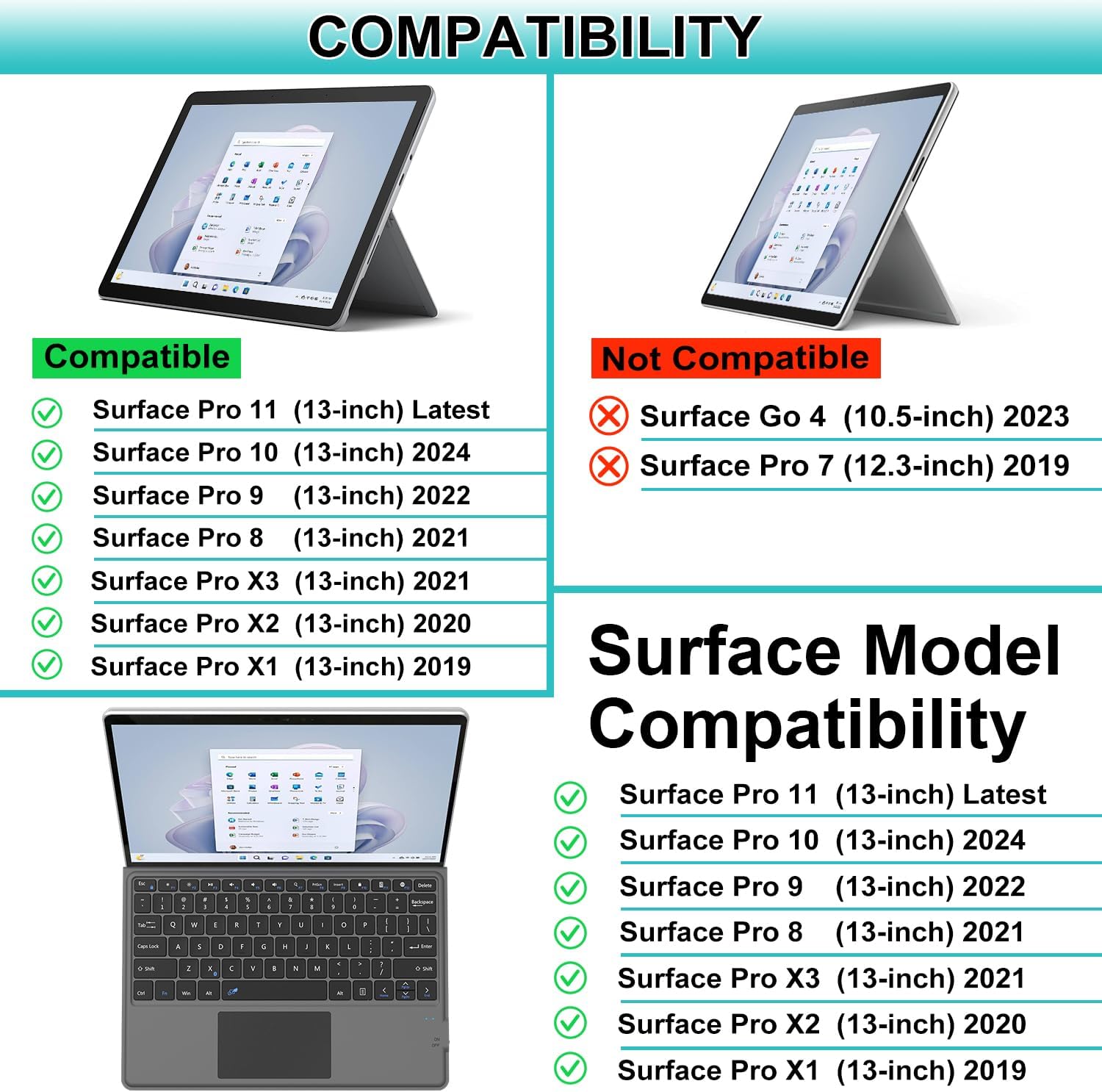
Image: A visual guide illustrating the compatibility of the Arteck keyboard with various Surface Pro models, clearly marking compatible and non-compatible devices.
Негизги өзгөчөлүктөрү
- Laptop-Like Experience: Transforms your Surface Pro into a functional laptop with mechanical keys and a large touchpad.
- Bluetooth байланышы: Provides a stable wireless connection for seamless typing and navigation.
- Магниттик тиркеме: Securely attaches to your Surface Pro, offering both functionality and protection.
- Functional Media Keys: Dedicated hotkeys for easy control of media playback and other functions.
- Extra-Large Touchpad: Allows for precise cursor control and supports multi-touch gestures, similar to a laptop.
- Кайра заряддалуучу батарея: Offers approximately 50 hours of uninterrupted use on a single 1-hour charge.
- Ultra-Slim дизайн: Maintains the thin and lightweight profile of your Surface Pro.

Сүрөт: деталдуу view of the keyboard's function keys and the extra-large touchpad, highlighting their accessibility and design.
Орнотуу колдонмосу
1. Кутудан чыгаруу жана баштапкы төлөм
Upon opening the package, you will find the Arteck Bluetooth keyboard for Surface Pro, a USB charging cable, and this user manual.
- Пакетке камтылган:
- Arteck Bluetooth Keyboard for Surface Pro
- USB заряддоо кабели
- User Manual
- Баскычтопту заряддоо:
- Locate the USB charging port on the side of the keyboard.
- Connect the provided USB charging cable to the keyboard and a power source (e.g., computer USB port, USB wall adapter).
- The charging indicator light will illuminate. A full charge typically takes about 1 hour.
- Толук заряддалгандан кийин индикатор жарыгы моделге жараша өзгөрүшү же өчүшү мүмкүн.

Сүрөт: үстүнкү view of the Arteck keyboard, displaying its full layout and the location of the charging port.
2. Магниттик тиркеме
The keyboard is designed to physically attach to your Surface Pro via magnets, providing a secure and stable connection.
- Align the magnetic connector on the keyboard with the corresponding port on the bottom edge of your Surface Pro.
- The magnets will snap the keyboard into place, creating a firm connection.
- The keyboard can be folded back to act as a protective cover for the screen when not in use.

Image: The Arteck keyboard securely attached to a Surface Pro, demonstrating the magnetic connection that transforms the tablet into a laptop-like device.
3. Bluetooth Жупташтыруу
The keyboard connects to your Surface Pro wirelessly via Bluetooth. Follow these steps for initial pairing:
- Ensure the keyboard is charged and turned on using the ON/OFF switch located on the side.
- Баскычтоптон басыңыз Fn менен бир убакта ачкыч C ачкыч (Fn+C) to put the keyboard into pairing mode. The Bluetooth indicator light on the keyboard will blink.
- Surface Pro түзмөгүңүзгө өтүңүз Орнотуулар > Bluetooth жана түзмөктөр (же Түзмөктөр > Bluetooth жана башка түзмөктөр).
- Turn on Bluetooth if it's not already enabled.
- чыкылдатыңыз Түзмөк кошуу or Bluetooth же башка аспапты кошуңуз.
- Тандоо Bluetooth варианттардан.
- Your Surface Pro will search for nearby Bluetooth devices. Select "Arteck Keyboard" or a similar name when it appears in the list.
- Follow any on-screen prompts to complete the pairing process. Once paired, the Bluetooth indicator light on the keyboard will stop blinking and remain solid or turn off.
Иштөө нускамалары
1. Баскычтопту колдонуунун негизги эрежелери
The Arteck keyboard features a standard physical keyboard layout, providing a familiar and comfortable typing experience. All standard keys function as expected.

Image: A close-up of the keyboard keys, illustrating the X-structure design for quiet and comfortable keystrokes.
2. Сенсордук тактанын функциялары
The extra-large touchpad allows for intuitive navigation and control of your Surface Pro. It supports various multi-touch gestures:
- пункт: Touch and slide one finger anywhere on the touchpad to move the on-screen pointer.
- Click: Press down on the touchpad or use the dedicated left/right click areas.
- Жылдыруу: Drag two fingers up or down to easily scroll through documents or web барактар.
- Чоңойтуу: Чоңойтуу же кичирейтүү үчүн эки манжаңыз менен эки манжаңыз менен бириктирип же алыстатып коюңуз.
- Оң чыкылдатуу: Tap with two fingers or press the right-click area.
3. Functional Media Keys
The top row of keys includes media hotkeys for quick access to common functions:
- Esc: Escape key.
- F1: Screen brightness down.
- F2: Screen brightness up.
- F3: Play/Pause media.
- F4: Mute volume.
- F5: Үндү азайтуу.
- F6: Үнүн жогорулатуу.
- F7: Издөө.
- F8: Басып чыгаруу экраны.
- F9: Киргизүү.
- F10: Lock screen.
- F11: Battery status.
- F12: Globe key (language/emoji input).
- Жок кылуу: Ачкычты жок кылуу.
Техникалык тейлөө
- Тазалоо: Бир аз жумшак, түксүз кездемени колдонуңуз dampened with water or a mild cleaning solution to wipe down the keyboard and touchpad surfaces. Avoid excessive moisture.
- Батареяга кам көрүү: Батареянын иштөө мөөнөтүн узартуу үчүн, клавиатураны тез-тез толук зарядсыздандырбаңыз. Аны үзгүлтүксүз кубаттап туруңуз, айрыкча, ал узак убакытка сакталса.
- Сактагыч: When not in use, attach the keyboard to your Surface Pro to protect the screen and keys. Store in a cool, dry place.
Проблемаларды чечүү
If you encounter issues with your Arteck Surface Pro Keyboard, please refer to the following common solutions:
- Клавиатура туташпай/жупташпай жатат:
- Баскычтоп толук кубатталганын текшериңиз.
- Make sure the keyboard's ON/OFF switch is in the "ON" position.
- Verify that Bluetooth is enabled on your Surface Pro.
- Put the keyboard back into pairing mode (Fn+C) and try re-pairing it with your Surface Pro.
- Surface Pro'ңузду да, клавиатураңызды да өчүрүп-күйгүзүңүз.
- If previously paired, try "forgetting" the device in your Surface Pro's Bluetooth settings and then re-pairing.
- Ачкычтар жооп бербейт:
- Батареянын деңгээлин текшерип, керек болсо заряддаңыз.
- Баскычтоптун Bluetooth аркылуу туура туташканын текшериңиз.
- Restart the keyboard and your Surface Pro.
- Сенсордук панел иштебей жатат:
- Баскычтоптун туташып турганын текшериңиз.
- Check if the touchpad has been accidentally disabled (some keyboards have a function key for this, though this model primarily uses the Fn key for media controls).
- Restart the keyboard and your Surface Pro.
- Кыска батареянын иштөө мөөнөтү:
- Колдонуудан мурун клавиатура толук заряддалганын текшериңиз.
- Батареяны үнөмдөө үчүн колдонулбай турганда клавиатураны өчүрүп коюңуз.
- Батареянын иштешине таасир эте турган экстремалдык температурадан качыңыз.
If these steps do not resolve the issue, please contact Arteck customer support for further assistance.
Техникалык шарттар
| Өзгөчөлүк | Деталь |
|---|---|
| Бренд | Arteck |
| Модель номери | SP-Compatible |
| Байланыш технологиясы | Bluetooth |
| Шайкеш түзмөктөр | Surface Pro 8, Surface Pro X, Surface Pro 9, Surface Pro 10 |
| Keyboard Description | Specific Surface Pro Bluetooth Keyboard |
| Өзгөчө өзгөчөлүк | Physical Magnetic Attachment and Touchpad |
| Түс | Кара |
| Ачкычтардын саны | 78 |
| Продукциянын өлчөмдөрү | 11.42"L x 8.82"W x 0.31"H |
| Элемент Салмагы | 0.035 унция |
| Батареялар | 1 литий-иондук батарейка талап кылынат (кошулган) |
| Өндүрүүчү | Arteck |
Кепилдик жана колдоо
The Arteck Surface Pro Keyboard Type Cover comes with a 24 айлык кепилдик сатып алынган күндөн тартып.
For warranty claims, technical support, or any product-related inquiries, please contact Arteck customer support:
- Электрондук почта: support@arteck.com
Please have your purchase details and product model number (SP-Compatible) ready when contacting support to ensure a quicker resolution.