Introduction
This manual provides comprehensive instructions for the Black Shark Sixgill K2 RGB Mechanical Gaming Keyboard. It covers setup, operation, maintenance, and troubleshooting to ensure optimal performance and longevity of your device. Please read this manual thoroughly before using the keyboard.

Image: The Black Shark Sixgill K2 RGB Mechanical Gaming Keyboard, showcasing анын толук схемасы жана жандуу RGB жарыгы.
Пакеттин мазмуну
Төмөндө тизмеленген нерселердин баары пакетиңизде бар экенин текшериңиз:
- 1 x Black Shark Sixgill K2 Mechanical Keyboard
- 1 x Баскыч капкагын тарткыч
- 1 х Колдонуучунун колдонмосу (бул документ)
Орнотуу нускамалары
Follow these steps to set up your Black Shark Sixgill K2 keyboard:
- Баскычтопту таңгактан чыгаруу: Баскычтопту жана бардык аксессуарларды таңгактан кылдаттык менен чыгарып алыңыз.
- Компьютерге туташуу: Plug the USB connector of the keyboard cable into an available USB port on your desktop PC.
- Драйверди орнотуу: The keyboard is plug-and-play and typically does not require additional drivers. Your operating system (Windows 7 / 8 / 10 / XP) will automatically detect and install the necessary drivers.
- Кошумча программалык камсыздоону орнотуу: For advanced customization of lighting effects and macro programming, download the official Black Shark software from the manufacturer's webсайт.

Image: The Black Shark Sixgill K2 keyboard in a typical desktop PC setup, demonstrating its wired connection.
Иштөө нускамалары
RGB жарык көзөмөлдөө
The Sixgill K2 keyboard features extensive RGB lighting customization:
- Арткы жарык эффекттери: Choose from 12 different backlight effects.
- Pre-set Gaming Modes: Utilize 5 pre-set gaming lighting modes, which can be re-customized.
- Sidelight Effects: Activate 3 distinct sidelight effects.
- Түс параметрлери: Select from 8 optional single colors.
- Жарыктык жана ылдамдык: Adjust the backlight brightness across 7 levels and modify the movement speed of dynamic effects.
Белгилүү бир баскыч айкалыштары (көбүнчө төмөнкүлөрдү камтыйт) Fn key) are used to cycle through modes, colors, brightness, and speed. Refer to the keyboard's keycap legends for these combinations.

Image: Illustration of the various RGB lighting effects available on the Black Shark Sixgill K2 keyboard, including backlight and sidelight options.
Key Functions and Features
- 104-Ачкыч жайгашуусу: The keyboard features a full 104-key layout, including a numeric keypad.
- Anti-Ghosting & N-Key Rollover: All 104 keys are conflict-free, ensuring accurate registration of simultaneous key presses, crucial for gaming and fast typing.
- Сызыктуу кызыл өчүргүчтөр: Equipped with Black Shark mechanical red switches, providing a linear, quiet click sound and responsive feedback. These switches are rated for up to 50 million keystrokes.
- Multimedia Key Combinations: Access 12 multimedia functions using the Fn key in combination with specific F-keys (e.g., Fn+F1 for media player, Fn+F2 for volume down).
- Win-Lock функциясы: The Win-Lock function (often Fn+Win key) disables the Windows key to prevent accidental presses during gameplay.

Image: The Black Shark Sixgill K2 keyboard, emphasizing its full anti-ghosting capability for all 104 keys.

Сүрөт: жакын план view of the linear red mechanical switches, demonstrating their design and placement beneath the keycaps.
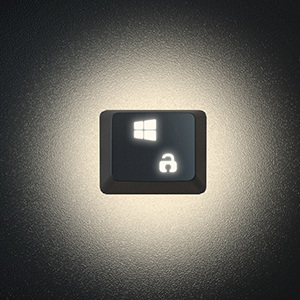
Image: A close-up of the Win-Lock key, indicating its function to disable the Windows key.
Programmable Keys and Macros
The Black Shark Sixgill K2 keyboard supports full programmability and macro creation:
- Key Reassignment: All keys can be reassigned to perform different functions.
- Макро түзүү: Create complex macros for effortless execution of multiple commands with a single key press.
- Программалык камсыздоону көзөмөлдөө: Utilize the dedicated Black Shark software for comprehensive lighting effect control and micro programming.

Image: The Black Shark software interface, illustrating options for lighting effect control and macro programming for the Sixgill K2 keyboard.
Дизайн жана куруу сапаты
- Ergonomic Arc Layout: Designed with an ergonomic arc layout and suspended keys for comfortable typing.
- Бүктөлүүчү стенддер: Integrated foldable stands allow adjustment of the typing angle.
- Узак металл панели: Features an aluminum alloy panel with a matte-finish texture, ensuring sturdiness and extended product lifespan.

Сүрөт: жакын план view of the durable aluminum alloy panel, highlighting the premium build quality of the keyboard.

Сүрөт: каптал view of the keyboard demonstrating its ergonomic angle, adjustable via foldable stands.
Техникалык тейлөө
Туура тейлөө сиздин клавиатураңыздын узак иштөөсүн жана иштешин камсыз кылат:
- үзгүлтүксүз тазалоо: Баскыч капкактарынын ортосундагы чаңды жана калдыктарды тазалоо үчүн жумшак щетка же кысылган абаны колдонуңуз.
- Клавиатураны тазалоо: For deeper cleaning, use the provided keycap puller to carefully remove keycaps. Clean them with a mild soap solution and a soft cloth, then ensure they are completely dry before reattaching.
- Бетти тазалоо: Wipe the keyboard's aluminum alloy panel with a damp, soft cloth. Avoid abrasive cleaners or solvents.
- төгүлүүнү алдын алуу: Avoid spilling liquids on the keyboard. In case of a spill, immediately disconnect the keyboard from your PC and allow it to dry completely before reconnecting.
Проблемаларды чечүү
If you encounter issues with your Black Shark Sixgill K2 keyboard, refer to the following common solutions:
- Баскычтоп жооп бербейт:
- USB кабели клавиатурага да, компьютерге да туташтырылганын текшериңиз.
- Баскычтопту компьютериңиздин башка USB портуна сайып көрүңүз.
- Компьютериңизди өчүрүп күйгүзүңүз.
- Keys Not Registering or Sticky:
- Clean around and under the affected keycap using compressed air or a keycap puller to remove debris.
- If a specific key is consistently unresponsive, it may indicate a switch issue.
- RGB жарыгы иштебейт/туура эмес:
- Клавиатура туура туташтырылганын текшериңиз.
- Cycle through lighting modes using the designated key combinations (e.g., Fn + specific keys).
- Check the Black Shark software for lighting settings and ensure they are correctly configured.
- Баскычтопту аныктабаган программа:
- Reinstall the Black Shark software.
- Иштөө тутумуңуз жаңыртылганын текшериңиз.
- Кедерги болушу мүмкүн болгон антивирус же брандмауэр программаларын убактылуу өчүрүңүз.
Техникалык шарттар
| Модель номери | K2 |
| Бренд | Black Shark |
| Байланыш технологиясы | Зымдуу (USB) |
| Которуу түрү | Mechanical Red Switches |
| Ачкыч саны | 104 Ачкычтар |
| Anti-Ghosting | Толук N-Key Rollover |
| Арткы жарыктандыруу | RGB (12 effects, 5 gaming modes, 3 sidelight effects, 8 single colors) |
| Шайкеш түзмөктөр | PC (Windows 7 / 8 / 10 / XP) |
| Материал | Aluminum Alloy Panel, ABS Keycaps |
| Элемент Салмагы | 2.44 фунт (болжол менен 1.11 кг) |
| Өлчөмдөрү (L x W x Y) | 17.72 x 4.96 x 1.46 дюйм (болжол менен 450 x 126 x 37 мм) |
| Сунушталган колдонуу | Оюндар |

Image: Technical drawing showing the dimensions of the Black Shark Sixgill K2 keyboard.
Кепилдик жана колдоо
For warranty information and technical support, please refer to the official Black Shark webсайтка же түздөн-түз кардарларды тейлөөгө кайрылыңыз. Продукт, адатта, материалдардагы жана жасалгадагы кемчиликтерди камтыган өндүрүүчүнүн кепилдиги менен келет.
Additional resources, including an electronic version of this manual, may be available on the Black Shark support page.
Кошумча жардам алуу үчүн, сиз иш сапары менен болот Amazon'догу Black Shark дүкөнү же кеңеш алыңыз Колдонуучунун колдонмосу (PDF).


