1. Киришүү
This manual provides instructions for the RETROSUN RMF-TX520U MG3-TX520U replacement remote control. This remote is designed to function as a direct replacement for your original Sony Bravia Smart TV or Google TV remote, offering voice control capabilities and dedicated quick access buttons.
2. Шайкештик
The RMF-TX520U MG3-TX520U remote control is compatible with various Sony Bravia Smart TV and Google TV models. Please verify your TV model against the list below:
- КД-43X80J
- КД-43X85J
- КД-50X80J
- XR-50X90J
- XR-50X94J
- XR-55A80J
- XR-55A84J


3. Орнотуу
3.1 Батареяны орнотуу
Алыстан башкаруу аппараты иштөө үчүн эки (2) AAA щелочтуу батарейканы талап кылат. Батареялар пульт менен кошо берилбейт.
- Пульттун артындагы батарея бөлүкчөсүнүн капкагын табыңыз.
- Бөлүмдү ачуу үчүн капкакты ылдый карай жылдырыңыз.
- Оң (+) жана терс (-) терминалдары бөлүмдүн ичиндеги белгилер менен туура дал келишин камсыз кылып, эки AAA батарейкасын салыңыз.
- Батарея бөлүкчөсүнүн капкагын бекем чыккыча ордуна жылдырыңыз.
3.2 Жупташтыруу боюнча көрсөтмөлөр
Before using the voice function or full remote capabilities, the remote control must be paired with your Sony Bravia Smart TV or Google TV. Follow these steps to pair the remote:
- Ensure your television is powered on. If it is off, press the power button on the remote or the TV itself to turn it on.
- басып, кармап туруңуз VOL- (Volume Down) key and the Google Жардамчы key (microphone icon) simultaneously for approximately 2 seconds. This action initiates the pairing process.
- A message indicating the pairing status will appear on your TV screen.
- Once the TV screen indicates successful pairing, press the OK button on the remote control to complete the process.

4. Иштөө нускамалары
4.1 Негизги функциялар
Алыстан башкаруу пульту телевизорду иштетүү үчүн стандарттуу баскычтар менен жабдылган:
- Кубат баскычы: Телевизорду күйгүзөт же өчүрөт.
- Сандар тактасы (0-9): Түз канал киргизүү үчүн.
- Үнүн жогорулатуу/төмөндөтүү (VOL+/-): Телевизордун үнүн тууралайт.
- Channel Up/Down (CH+/-): Телеканалдарды өзгөртөт.
- Үнсүз: Телевизордун үнүн өчүрөт же үнүн чыгарат.
- Навигация панели (Өйдө, Төмөн, Солго, Оңго, ОК): Менюда навигация жана тандоо үчүн.
- Артка: Мурунку экранга же менюга кайтат.
- Үй: Accesses the TV's home screen or main menu.
- Киргизүү: Киргизүү булактарын тандайт (HDMI, AV ж.б.).
- Play/Pause/Rec/Display: Медиа ойнотууну башкаруу.
4.2 Үн функциясы
The integrated microphone and Google Assistant key allow for voice commands to control your TV and search for content.
- басып, кармап туруңуз Google Жардамчы key (microphone icon) on the remote.
- Speak your command clearly into the microphone located on the remote control.
- бошотуңуз Google Жардамчы key when you have finished speaking.
Exampле буйруктар: "Find action movies," "Open YouTube," "What's the weather?"
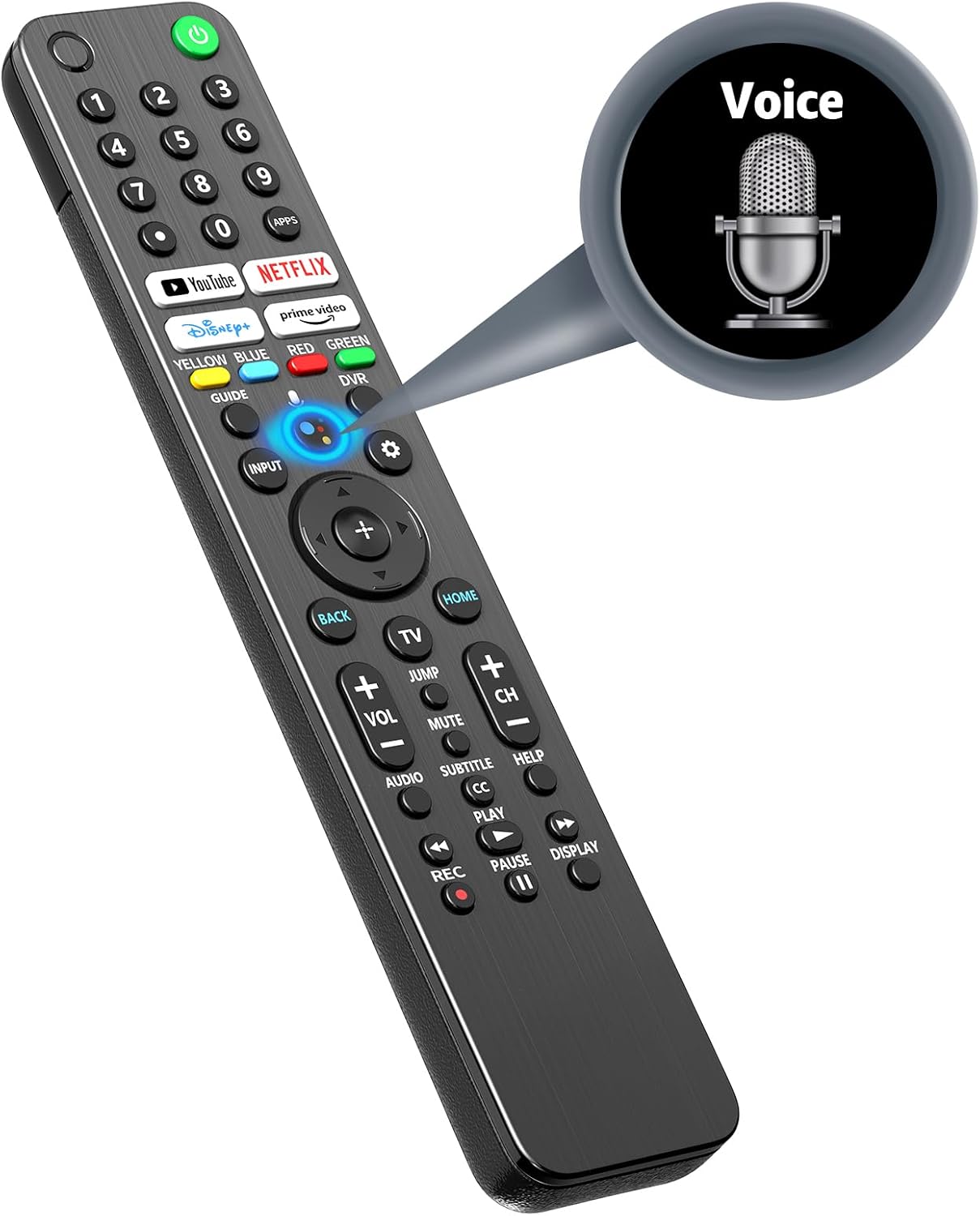


4.3 Тез жетүү баскычтары
The remote includes dedicated buttons for popular streaming services, allowing for quick access:
- YouTube
- Netflix
- Disney+
- Prime Video

5. Өзгөчөлүктөрү
5.1 Advanced Infrared Technology
The remote utilizes advanced infrared technology, providing reliable control over your television. It supports a long operating distance and wide-angle functionality.

5.2 Stable and Smart Signal
The remote is designed for stable and smart signal transmission, ensuring quick acceptance and reaction to your instructions while optimizing power consumption.

5.3 Эргономикалык дизайн
The remote control features an ergonomic design for a comfortable grip, sensitive buttons for responsive feedback, and an arc design for ease of use.

6. Кыйынчылыктарды
Эгерде сиз алыстан башкаруу пультуңуз менен көйгөйлөргө туш болсоңуз, төмөнкү кеңири таралган чечимдерди караңыз:
- Алыстан жооп бербейт:
- Батареялар туура салынганын жана жетиштүү заряддалганын текшериңиз. Зарыл болсо, батареяларды алмаштырыңыз.
- Алыстан башкаруу пульту менен телевизордун инфракызыл кабыл алгычынын ортосунда эч кандай тоскоолдуктар жок экенин текшериңиз.
- 3.2-бөлүмдө сүрөттөлгөндөй жупташтыруу процессин кайра аракет кылыңыз.
- Үн функциясы иштебейт:
- Confirm the remote is successfully paired with the TV.
- Ensure you are pressing and holding the Google Assistant key while speaking.
- Check your TV's settings to ensure the voice assistant feature is enabled.
- Delayed Response:
- Пульттун түз телевизорго багытталганын текшериңиз.
- Try replacing the batteries, as low battery power can sometimes affect response time.
- If the issue persists, it may indicate a compatibility or signal interference problem.
7. Техникалык шарттар
| Өзгөчөлүк | Спецификация |
|---|---|
| Модель номери | RMF-TX520U MG3-TX520U |
| Пакеттин өлчөмдөрү | 9.29 x 1.85 x 0.87 дюйм |
| Элемент Салмагы | 3.84 унция |
| Электр камсыздоо | 2 x AAA батарейкалар (киргизилген эмес) |
| Колдоого алынган түзмөктөрдүн максималдуу саны | 1 (Телевидение) |
| Өзгөчө өзгөчөлүк | Эргономикалык, Үн менен башкаруу |
| Түс | Кара |
8. Кепилдик жана колдоо
For any issues or questions regarding your RETROSUN RMF-TX520U MG3-TX520U remote control, please contact us via Amazon messenger. We are committed to resolving any problems within 24 hours.


