Introduction
The Closer Pets MiBowl Microchip Automatic Pet Feeder is designed to provide controlled access to food for your pets, especially in multi-pet households. Utilizing microchip technology, it ensures that only designated pets can access their meals, preventing food theft and allowing for regulated diets. This feeder is suitable for both wet and dry food and features a quiet operation and a design focused on pet comfort.

Image: The Closer Pets MiBowl Microchip Automatic Pet Feeder, showing its sleek design and transparent food bowl cover.
Негизги өзгөчөлүктөрү
- Microchip Access: Automatically detects your pet's microchip or RFID collar tag, granting exclusive access to their food.
- Көп үй жаныбарларына шайкештик: Can be programmed for up to 10 different pets, ideal for households with multiple animals or pets on special diets.
- Food Versatility: Suitable for both wet and dry pet food.
- Odor and Pest Control: The fully enclosed design helps keep food fresh and prevents pests from accessing the food.
- Тынч иштөө: Features an ultra-quiet lid mechanism for a peaceful feeding experience.
- Эргономикалык дизайн: Provides a natural feeding position, allowing pets to eat comfortably with paws on the ground.
- Adjustable Opening: Includes removable clips to adjust the opening width, accommodating smaller pets like kittens or puppies.

Image: Diagram illustrating key features of the MiBowl feeder, including the swing lid for pest control and the open base for increased pet comfort and access.
Орнотуу колдонмосу
1. Пакеттен чыгаруу жана батареяны орнотуу
Carefully remove all components from the packaging. The MiBowl feeder requires 4 x C-type batteries (not included). Locate the battery compartment, typically on the underside or rear of the unit. Insert the batteries, ensuring correct polarity as indicated.
2. Programming Your Pet's Microchip or RFID Tag
The MiBowl feeder can be programmed to recognize your pet's existing microchip or the supplied RFID collar tag. Follow these steps to pair your pet:
- Фидер күйгүзүлгөнүн текшериңиз.
- басып, кармап туруңуз 'PET' button (often indicated by a paw print icon) on the control panel until the indicator light flashes.
- Gently guide your pet's head into the feeder opening, allowing the feeder to scan their microchip. If using an RFID collar tag, кармаңыз tag near the front of the feeder.
- The indicator light will change (e.g., solid green) to confirm successful pairing.
- Repeat for up to 10 different pets if you have multiple animals.

Сүрөт: Жакын план view of the MiBowl control panel, showing the 'PET', 'TRAINING', battery indicator, 'OPEN', and 'CLOSE' buttons.

Image: Visual explanation of how the MiBowl works, showing that only paired pets can access the food, while unpaired pets are locked out.
3. Adjusting Opening Width (Optional)
For smaller pets, the MiBowl comes with removable clips that can be inserted to narrow the opening. This provides an extra shield and ensures comfortable access for kittens or small dogs.

Image: Comparison of the MiBowl's opening width with and without the optional clips installed, showing 3.5 inches with clips and 6 inches without.
Иштөө нускамалары
1. Фидерди толтуруу
Lift the transparent lid to access the food bowl. Fill the bowl with your pet's preferred wet or dry food. The bowl can hold up to 340g of food. Close the lid securely after filling.
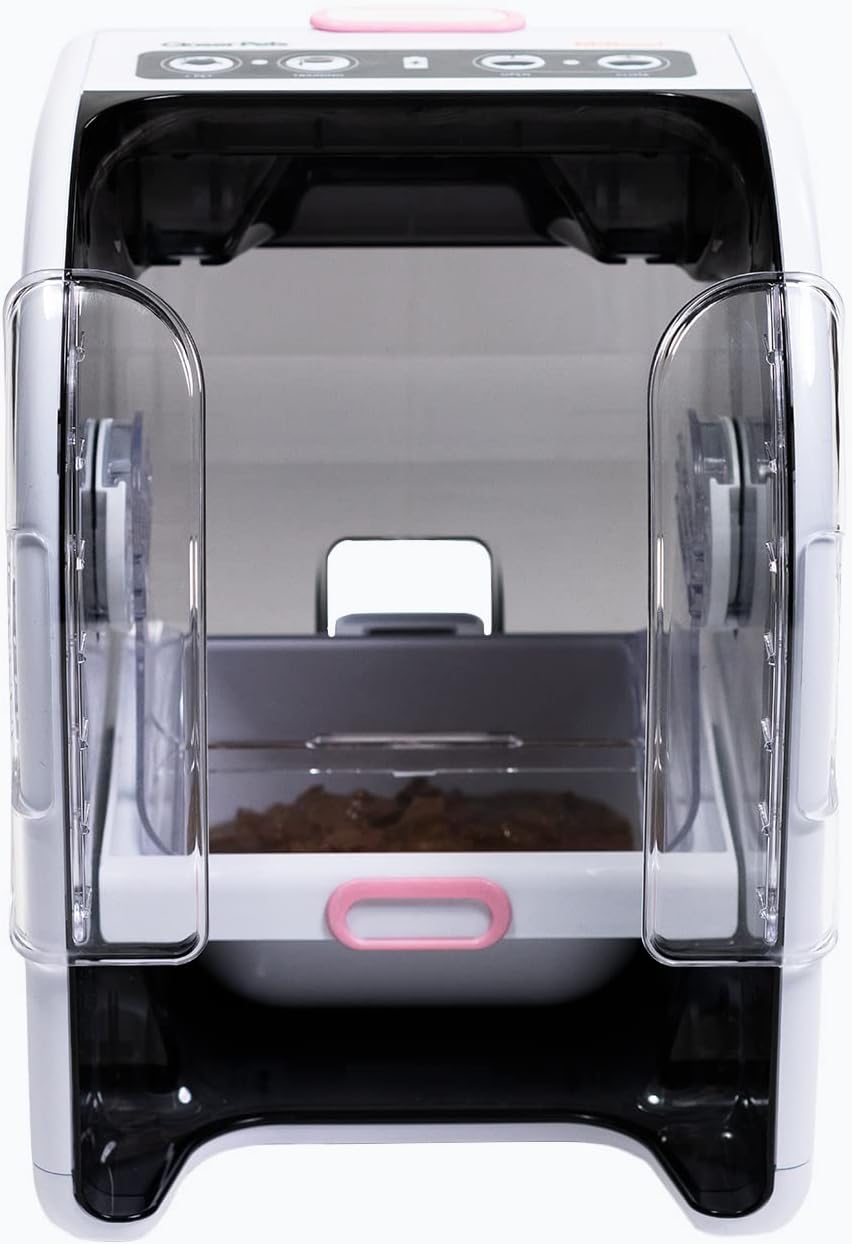
Image: The MiBowl feeder with its lid open, revealing the food bowl filled with pet food and the transparent side clips.
2. Automatic Feeding
Once a programmed pet approaches the feeder, the MiBowl will detect their microchip or RFID tag. The lid will automatically open, allowing the pet to access their food. After the pet moves away, the lid will quietly close, keeping the food fresh and secure.

Image: A black and white cat with its head inside the MiBowl feeder, demonstrating how the pet accesses the food when the lid is open.
3. Окутуу режими
For pets new to automatic feeders, the MiBowl includes a 'TRAINING' mode. Press the 'TRAINING' button (indicated by a graduation cap icon) to keep the lid open for a set period, allowing your pet to become accustomed to the feeder without the lid movement. Refer to the full manual for specific training program details.
4. Кол менен өзгөртүү
The control panel also features 'OPEN' and 'CLOSE' buttons, allowing you to manually open or close the lid as needed, for example, during cleaning or when introducing your pet to the feeder.
Техникалык тейлөө
Фидерди тазалоо
Regular cleaning is essential to maintain hygiene and ensure the longevity of your MiBowl feeder. The food bowl and lid components are designed for easy removal and cleaning.
- Remove any remaining food from the bowl.
- Carefully detach the food bowl and the transparent lid components.
- Wash these parts with warm, soapy water. Rinse thoroughly and dry completely before reassembling.
- Негизги блокту жарнама менен сүртүңүзamp кездеме. Негизги блокту сууга салбаңыз.
Батареяны алмаштыруу
When the battery indicator light on the control panel signals low power, replace all 4 x C-type batteries simultaneously to ensure optimal performance. Always use fresh, high-quality batteries.
Проблемаларды чечүү
| Көйгөй | Мүмкүн себеп | Чечим |
|---|---|---|
| Lid does not open for programmed pet. |
|
|
| Капкак толугу менен жабылбайт. |
|
|
| Unpaired pets can still access food. |
|
|
| Feeder is noisy during operation. |
|
|
Техникалык шарттар
| Өзгөчөлүк | Деталь |
|---|---|
| Модель номери | CP500 |
| Бренд | Жакын үй жаныбарлары |
| Өлчөмдөрү (L x W x Y) | 33 см x 22.1 см x 24.2 см (13 дюйм x 8.7 дюйм x 9.5 дюйм) |
| Салмагы | 1.4 кг (3.1 фунт) |
| Power Source | 4 x C-type Batteries (not included) |
| Тамак-аш кубаттуулугу | Up to 340g (dry or wet food) |
| Максаттуу түрлөр | Мышыктар, кичинекей иттер |
| Материал | Durable Pet Feeder Material |
| Өзгөчө өзгөчөлүк | Microchip Reader |

Image: Diagram showing the dimensions of the Closer Pets MiBowl feeder in centimeters.
Кепилдик жана колдоо
The Closer Pets MiBowl Microchip Automatic Pet Feeder is covered by a standard manufacturer's warranty. For specific warranty details, claims, or technical support, please refer to the warranty information provided with your product packaging or visit the official Closer Pets webсайт.
For general inquiries or assistance with your purchase, you may also contact the seller, Pet Mate Ltd., through the platform where the product was purchased.
Маанилүү коопсуздук маалыматы
- Бул шайман тиричиликте гана колдонууга арналган.
- Негизги блокту сууга же башка суюктуктарга салбаңыз.
- Колдонбогондо же тейлөө учурунда балдар жана үй жаныбарлары жетпеген жерде сактаңыз.
- Тамактандыргычтын туруктуу, тегиз бетке коюлганын текшериңиз.
- Use only the specified battery type (4 x C-type). Do not mix old and new batteries or different battery types.
- Колдонулган батарейкаларды жергиликтүү эрежелерге ылайык таштаңыз.
- Do not attempt to modify or repair the feeder yourself. Refer to qualified personnel for service.
Расмий продукт Videos
Бул колдонмого киргизүү үчүн сатуучунун эч кандай расмий продукт видеолору жеткиликтүү эмес.


