1. Орнотуу колдонмосу
This section provides instructions for the initial setup of your Logitech MX Mechanical Keyboard and MX Master 3S Mouse.
1.1 Кутудан чыгаруу жана компоненттер
Carefully remove all components from the packaging. You should find the MX Mechanical Keyboard, the MX Master 3S Mouse, and a Logi Bolt USB Receiver.

Image: The Logitech MX Mechanical Keyboard and MX Master 3S Mouse, as they appear in the bundle.
1.2 Түзмөктөрүңүздү туташтыруу
Your devices can be connected via the included Logi Bolt USB Receiver or Bluetooth Low Energy.
1.2.1 Using the Logi Bolt USB Receiver
- Plug the Logi Bolt USB Receiver into an available USB port on your computer.
- Ensure both the keyboard and mouse are powered on. The devices should automatically connect to the receiver.
1.2.2 Using Bluetooth Low Energy
- On the keyboard, press and hold one of the Easy-Switch keys (1, 2, or 3) until the LED blinks rapidly.
- On the mouse, press the Easy-Switch button on the bottom until the LED blinks rapidly.
- On your computer, navigate to Bluetooth settings and select the Logitech MX Mechanical Keyboard or MX Master 3S Mouse from the list of available devices to pair.
- Repeat for the other device.
For macOS users, if FileVault is enabled, you may need to use the Logi Bolt USB Receiver for password entry at start-up or reboot when connected via Bluetooth.
1.3 Logi Options+ программасын орнотуу
To unlock the full customization and advanced features of your devices, download and install the Logi Options+ software. This software is available for Windows and macOS.
- Logitechтин расмий веб-сайтына кириңиз webсайт: logitech.com/optionsplus
- Download and run the installer for your operating system.
- Орнотууну аяктоо үчүн экрандагы көрсөтмөлөрдү аткарыңыз.
2. Иштөө нускамалары
This section details the key features and functionalities of your Logitech MX Mechanical Keyboard and MX Master 3S Mouse.
2.1 MX Mechanical Keyboard Features
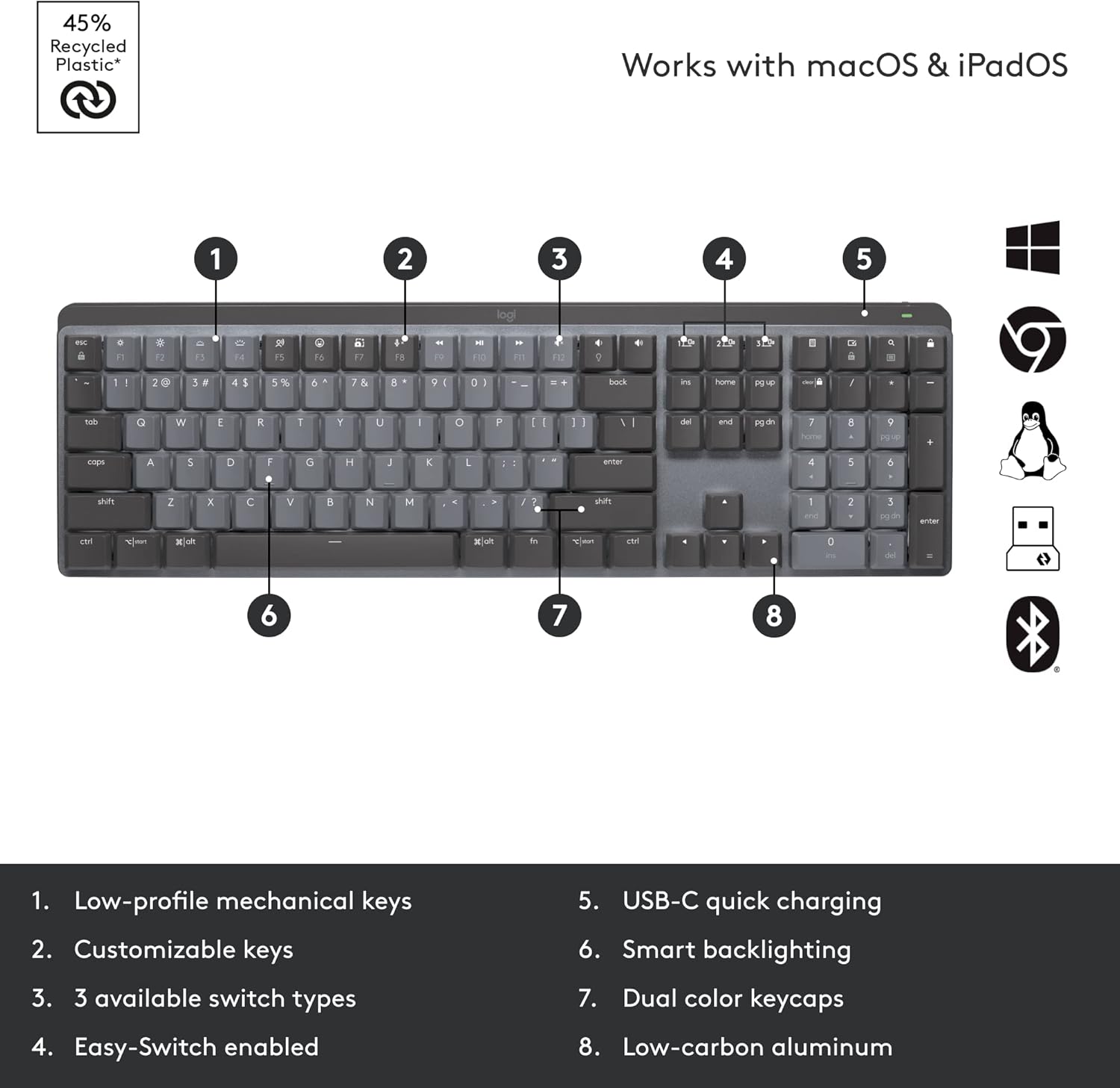
Image: A detailed diagram highlighting the key features of the MX Mechanical Keyboard.
- Төмөн профессионалfile Механикалык ачкычтар: Experience comfortable and precise typing with low-profile mechanical switches. This bundle includes the Tactile Quiet switch type.
- Ыңгайлаштырылган ачкычтар: Utilize Logi Options+ to reassign functions to various keys, including Fn-keys, to streamline your workflow.
- Smart Backlighting: The keyboard features intelligent backlighting that illuminates when your hands approach and adjusts brightness automatically based on ambient light conditions.
- Easy-Switch Enabled: Quickly switch between up to three connected devices (via Logi Bolt or Bluetooth) using the dedicated Easy-Switch keys (1, 2, 3).
- USB-C тез кубаттоо: Recharge the keyboard quickly using the USB-C port.
- Dual Color Keycaps: The keycaps feature a dual-color design for enhanced visibility and aesthetics.
- Low-carbon Aluminum: The keyboard is constructed with low-carbon aluminum for a premium and durable build.

Image: The MX Mechanical Keyboard displaying its smart backlighting feature in a low-light environment.
2.2 MX Master 3S Mouse Features

Image: A detailed diagram highlighting the key features of the MX Master 3S Mouse.
- MagSpeed Wheel: Experience ultra-fast and precise scrolling with the MagSpeed electromagnetic scroll wheel. Scroll 1,000 lines in a second or stop on a pixel.
- Бармак дөңгөлөк: The dedicated thumbwheel allows for horizontal scrolling, ideal for large spreadsheets or timelines.
- Ыңгайлаштырылган баскычтар: The mouse features 7 customizable buttons (Left/Right-click, Back/Forward, App-Switch, Wheel mode-shift, Middle click, Gesture button) that can be configured using Logi Options+.
- Track-anywhere Sensor: The Darkfield high precision sensor allows the mouse to track on virtually any surface, including glass (minimum 4mm thickness), with up to 8K DPI precision.
- USB-C заряддоо: Recharge the mouse quickly using the USB-C port.
- Easy-Switch Buttons: Similar to the keyboard, the mouse can connect to and switch between up to three devices.

Image: The MX Master 3S Mouse demonstrating its ability to track precisely on a glass surface.
2.3 Multi-Device and Multi-OS Functionality (Logitech Flow)
The MX Mechanical Keyboard and MX Master 3S Mouse are designed to work seamlessly across multiple devices and operating systems, including Windows, macOS, Linux, Chrome OS, iPadOS, and Android. With Logi Options+ software, you can enable Logitech Flow.

Image: An illustration of Logitech Flow, demonstrating the ability to seamlessly transfer text, images, and files between two different computers with a single keyboard and mouse.
Logitech Flow allows you to control multiple computers with a single MX keyboard and mouse, and even copy-paste text, images, and files between them. This feature requires Logi Options+ to be installed on all computers you wish to use with Flow.
3. Техникалык тейлөө жана кам көрүү
Proper care ensures the longevity and optimal performance of your Logitech devices.
3.1 Тазалоо боюнча нускамалар
- Баскычтоп: Бир аз жумшак, түксүз кездемени колдонуңуз dampсуу же жумшак тазалоочу эритме менен эритиңиз. Ашыкча нымдуулуктан алыс болуңуз. Тазалоочу каражаттарды түз эле клавиатурага чачпаңыз.
- Чычкан: Wipe the surface with a soft, dry cloth. For the sensor, use a cotton swab lightly dampened with isopropyl alcohol if necessary, ensuring no liquid enters the mouse.
- Абразивдүү тазалагычтардан, эриткичтерден же аэрозолдук спрейлерден качыңыз.
3.2 Батареяны заряддоо
Both the keyboard and mouse feature rechargeable Li-Po batteries. Connect them to a USB-C power source using the provided cables when the battery indicator shows low charge.
- MX механикалык баскычтобу: Rechargeable Li-Po (1500 mAh) battery. Battery life may vary based on user and computing conditions.
- MX Master 3S чычканы: Rechargeable Li-Po (500 mAh) battery. Battery life may vary based on user and computing conditions.
4. Кыйынчылыктарды
This section addresses common issues you might encounter with your devices.
4.1 Байланыш маселелери
- Түзмөк туташпай жатат: Ensure the devices are powered on and fully charged. Try re-pairing them via Bluetooth or re-inserting the Logi Bolt USB Receiver.
- Интерференция: Wireless range may vary depending on the operating environment and computer setup. Try moving the devices closer to the receiver or computer. Avoid placing them near other wireless devices that might cause interference.
- Logi Bolt Receiver not recognized: Try plugging the receiver into a different USB port. Ensure your computer's USB drivers are up to date.
4.2 Backlighting Problems (Keyboard)
- Backlight not turning on: Ensure the keyboard battery has sufficient charge. The smart backlighting feature may not activate in brightly lit environments. Check settings in Logi Options+.
- Backlight not adjusting: Verify that the ambient light sensor is not obstructed. Adjust brightness manually using the dedicated keys or through Logi Options+.
4.3 Mouse Tracking Inaccuracies
- Erratic tracking: Clean the mouse sensor area. Ensure the surface you are using is suitable for optical tracking. While the mouse tracks on glass, ensure the glass is at least 4mm thick.
- DPI тууралоо: Adjust the DPI sensitivity in Logi Options+ to suit your preference.
For further assistance, refer to the Logi Options+ software's help section or visit the Logitech support webсайт.
5. Техникалык шарттар
Detailed specifications for the Logitech MX Mechanical Keyboard and MX Master 3S Mouse.
5.1 MX Mechanical Keyboard Specifications
| Өзгөчөлүк | Спецификация |
|---|---|
| Dimensions (including keycaps) | 26.10 мм (H) x 433.85 мм (W) x 131.55 мм (D) |
| Салмагы | 828г |
| Батарея | Кайра заряддалуучу Li-Po (1500 мАч) |
| Байланыш | Bluetooth аз энергия керектөөчү, Logi Bolt USB кабыл алгычы |
| Операциялык системанын шайкештиги | Windows, macOS, Linux, Chrome OS, iPadOS, Android |
| Ачкыч түрү | Төмөн профессионалfile Mechanical (Tactile Quiet) |
| Арткы жарыктандыруу | Smart Lighting |
5.2 MX Master 3S Mouse Specifications
| Өзгөчөлүк | Спецификация |
|---|---|
| Өлчөмдөр | 51 x 84.3 x 124.9 мм (2 x 3.3 x 4.9 дюйм) |
| Салмагы | 141 г (4.97 унция) |
| Батарея | Кайра заряддалуучу Li-Po (500 мАч) |
| Sensor Technology | Darkfield жогорку тактык |
| DPI диапазону | 200дөн 8000 DPIге чейин (50 DPI кадамы менен жөнгө салынат) |
| Buttons | 7 баскыч (Сол/Оң баскычты чыкылдатуу, Артка/Алдыга, Колдонмону которуу, Дөңгөлөктүн режимин которуу, Ортоңку чыкылдатуу), Жылдыруу дөңгөлөгү, Баш бармак дөңгөлөгү, Жаңсоо баскычы |
| Зымсыз иштөө аралык | 10 м (33 фут) |
| Байланыш | Bluetooth аз энергия керектөөчү, Logi Bolt USB кабыл алгычы |
| Операциялык системанын шайкештиги | Windows, macOS, Linux, Chrome OS, iPadOS, Android |
5.3 Logi Bolt Receiver Specifications
| Өзгөчөлүк | Спецификация |
|---|---|
| Өлчөмдөр | 18.4 мм x 14.4 мм x 6.6 мм |
| Салмагы | 2g |
| Шайкештик | Not compatible with Logitech Unifying technology |
6. Кепилдик жана колдоо
Logitech products are designed for reliability and performance. For detailed warranty information, please refer to the warranty card included with your product or visit the official Logitech webсайт.
6.1 Продукциянын кепилдиги
Your Logitech MX Mechanical Keyboard and MX Master 3S Mouse bundle comes with a limited hardware warranty. This warranty covers defects in materials and workmanship under normal use. Specific terms and duration may vary by region.
6.2 Кардарларды колдоо
For technical support, troubleshooting, or warranty claims, please contact Logitech Customer Support through the following channels:
- Онлайн колдоо: Visit the Logitech support website for FAQs, troubleshooting guides, and driver downloads: support.logi.com
- Колдонуучунун колдонмосу (PDF): A downloadable PDF version of the user manual is available for your convenience: PDF колдонмосун жүктөп алыңыз


