1. Киришүү
The Guardo Fit Coach Explore is an advanced activity tracker designed to monitor various aspects of your health and fitness. This manual provides essential information for setting up, operating, and maintaining your device to ensure optimal performance and longevity.
2. Пакеттин мазмуну
Пакетиңизде бардык буюмдар бар экенин текшериңиз:
- Guardo Fit Coach Explore Activity Tracker
- Заряддоо кабели
- Колдонуучунун Колдонмосу (бул документ)
3. Орнотуу
3.1 Аппаратты заряддоо
Before first use, fully charge your Guardo Fit Coach Explore. Connect the charging cable to the charging port on the back of the device and plug the other end into a USB power source (e.g., computer, USB wall adapter). The device will display a charging indicator.

Сүрөт: Арткы view of the activity tracker highlighting the charging contacts and sensors, alongside a display showing blood pressure readings.
3.2 Колдонмону орнотуу жана жупташтыруу
- Download the official Guardo Fit Coach app from your smartphone's app store (compatible with Android operating systems).
- Смартфонуңузда Bluetooth иштетилгенин текшериңиз.
- Каттоо эсебин түзүү же кирүү үчүн колдонмону ачып, экрандагы нускамаларды аткарыңыз.
- Колдонмонун ичинен "Түзмөк кошуу" же "Жаңы түзмөктү жупташтыруу" дегенди тандаңыз.
- The app will search for your Guardo Fit Coach Explore. Select your device from the list to initiate pairing.
- Confirm the pairing request on both your smartphone and the activity tracker if prompted.

Image: The activity tracker worn on a wrist, showing a watch face with icons for different applications, indicating smartphone connectivity.
4. Иштөө нускамалары
4.1 Негизги навигация
The Guardo Fit Coach Explore features a touchscreen display for interaction. Swipe left, right, up, or down to navigate through menus and features. Tap to select an option or confirm an action. The device may also have physical buttons for specific functions like power on/off or returning to the home screen.

Image: The activity tracker's display showing a customizable watch face with a unique spiral graphic.
4.2 Receiving Notifications
Once paired with your smartphone, the activity tracker can display notifications for incoming calls, messages, and app alerts. Ensure notification permissions are granted in your smartphone's settings and within the Guardo Fit Coach app.

Image: The activity tracker's screen showing an incoming call notification with the caller's number and options to answer or reject the call.
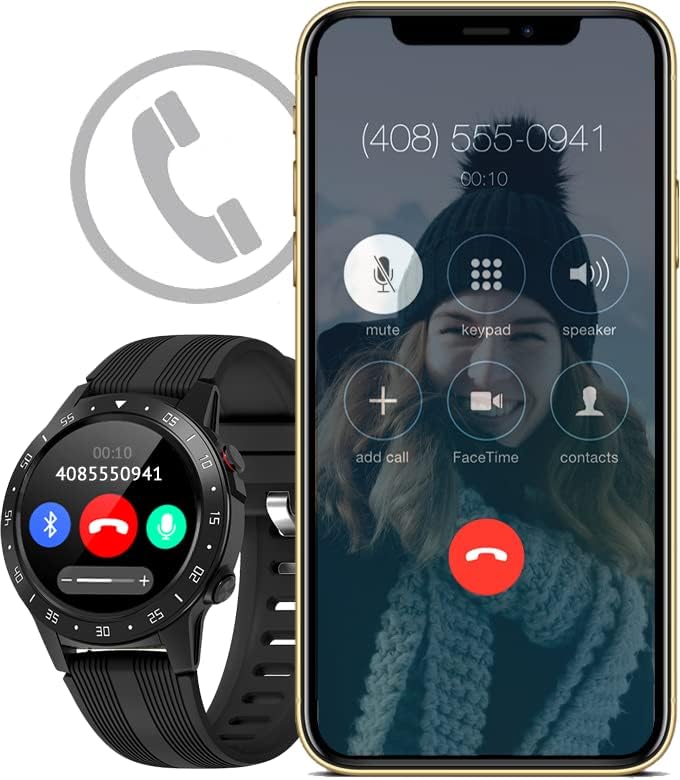
Image: The activity tracker and a smartphone side-by-side, both indicating an incoming call, demonstrating call notification synchronization.
4.3 Музыкалык башкаруу
Control music playback on your paired smartphone directly from your activity tracker. This feature allows you to play, pause, skip tracks, and adjust volume without needing to access your phone.

Image: The activity tracker and a smartphone displaying synchronized music playback interfaces, allowing remote control of audio.
5. Өзгөчөлүктөрү
The Guardo Fit Coach Explore offers a range of features to support your active lifestyle:
- Multisport Tracker: Track various activities such as indoor and outdoor sports, cycling, and climbing.
- Custom Activity Tracking: Monitor specific activities with tailored settings.
- GPS: Built-in GPS for accurate tracking of routes and distances during outdoor activities.
- Жүрөктүн кагышын көзөмөлдөөчү: Жүрөгүңүздүн кагышын тынымсыз көзөмөлдөп туруңуз.
- Кан басымы Монитор: Measure your blood pressure directly from the device.
- Эскертмелер: Чалуулар, билдирүүлөр жана колдонмо эскертмелери үчүн эскертүүлөрдү алыңыз.
- Компас: Integrated digital compass for navigation.
- Акселерометр: Measures movement and activity.
- Altimeter: Measures altitude, useful for hiking and climbing.
- Барометр: Measures atmospheric pressure, aiding in weather prediction and altitude accuracy.

Image: The activity tracker's display surrounded by icons symbolizing its diverse functionalities, including communication and utility features.

Image: The activity tracker's screen showing real-time GPS data, such as distance covered, pace, and heart rate, overlaid on a map.
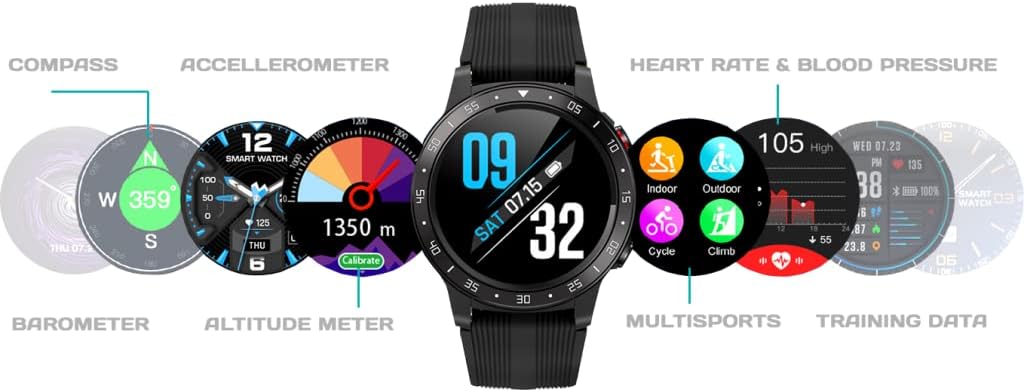
Сүрөт: комплекстүү view of the activity tracker's display, showcasing various data points from its integrated sensors, including environmental and health metrics.
6. Техникалык тейлөө
6.1 Тазалоо
Regularly clean your activity tracker to prevent skin irritation and maintain device functionality. Use a soft, damp, lint-free cloth to wipe the screen and strap. Avoid harsh chemicals or abrasive materials.
6.2 Батареяга кам көрүү
Батареянын иштөө мөөнөтүн узартуу үчүн, түзмөктү өтө жогорку температурага дуушар кылбаңыз. Түзмөктү үзгүлтүксүз кубаттап туруңуз, бирок аны толук заряддалган же толук түгөнгөн абалда калтырбаңыз.
7. Кыйынчылыктарды
7.1 Түзмөк күйбөй жатат
- Аппараттын толук заряддалганын текшериңиз. Аны заряддагычка кеминде 30 мүнөт туташтырыңыз.
- Press and hold the power button (if applicable) for 10-15 seconds to attempt a forced restart.
7.2 Жупташтыруу маселелери
- Смартфонуңузда Bluetooth иштетилгенин жана аппараттын диапазондо экенин текшериңиз.
- Restart both your smartphone and the activity tracker.
- Forget the device in your smartphone's Bluetooth settings and attempt to pair again through the Guardo Fit Coach app.
- Колдонмонун акыркы версиясына жаңыртылганын текшериңиз.
7.3 Туура эмес окуулар
- Ensure the device is worn snugly on your wrist, about one finger's width above your wrist bone.
- Clean the sensors on the back of the device.
- GPS үчүн, ачык жана тунук жерде экениңизди текшериңиз view асмандын.
8. Техникалык шарттар
| Өзгөчөлүк | Спецификация |
|---|---|
| Бренд | Гуардо |
| Модел | Изилдөө |
| Шайкеш түзмөктөр | Smartphone (Android OS) |
| Дисплей түрү | LCD |
| Screen Size | 40 Миллиметр |
| Зымсыз байланыш | Bluetooth |
| GPS | Камтылган GPS |
| Киргизүү түзмөк | Микрофон, сенсордук экран |
| Заряддалуучу батареялар камтылган | Ооба |
| Өзгөчөлүктөр | Custom activity tracking, Blood pressure monitor, GPS, Notifications, Multisport Tracker |
9. Коопсуздук маалыматы
- Аппаратты ачууга же ажыратууга аракет кылбаңыз.
- Аппаратты экстремалдык температурадан, тике күн нурунан жана нымдуулуктан алыс кармаңыз.
- This device is not a medical instrument. The data provided is for reference only and should not be used for medical diagnosis or treatment.
- Consult your doctor before starting any new exercise regimen or if you have any health concerns.
- Түзмөктү жана анын батарейкасын жергиликтүү эрежелерге ылайык жок кылыңыз.


