1. Киришүү
This manual provides detailed instructions for the installation, operation, and maintenance of your Imou Cruiser SE 2MP Outdoor Security Camera (Model IPC-S21FP). This camera is designed to provide comprehensive outdoor surveillance with features such as 1080P Full HD resolution, 360-degree pan and tilt capabilities, smart human detection, color night vision, and IP66 weather resistance. Please read this manual thoroughly before using the product to ensure proper setup and functionality.

Figure 1: Imou Cruiser SE 2MP Outdoor Security Camera
2. Продукт бүтүп калдыview
2.1 Негизги өзгөчөлүктөрү
- 1080P Full HD токтому: Так жана деталдуу видео foo камсыз кылатtage.
- 360° Coverage (Pan/Tilt): Offers a 355° horizontal and 90° vertical rotation range for comprehensive area monitoring.
- Smart Human Motion Tracking: Advanced AI algorithms differentiate human movement from other objects, reducing false alarms and automatically tracking detected subjects.
- Акылдуу түстүү түнкү көрүү: Built-in spotlights enable full-color imaging even in low-light conditions.
- Built-in Floodlight and Microphone: The floodlight activates upon human detection, and the integrated microphone allows for audio recording.
- IP66 аба ырайына туруктуу дизайн: Ensures reliable operation in various outdoor weather conditions, withstanding temperatures from -30°C to 60°C.
- Бир нече сактагыч параметрлери: Supports Micro SD card (up to 256GB), Network Video Recorder (NVR), and cloud storage for video recording.
- Өркүндөтүлгөн маалымат коопсуздугу: Complies with GDPR Data Protection Regulation and utilizes TLS encryption for privacy protection.
2.2 Пакеттин мазмуну
Пакетте бардык буюмдар бар экенин текшериңиз:
- Imou Cruiser SE 2MP Outdoor Security Camera (IPC-S21FP)
- Кубаттуу адаптер
- Монтаж шаблону
- Монтаждоо бурамалар жана дубал сайгычтар
- Waterproof Connector (for power cable)
- Quick Start Guide (not included in this manual, but typically provided)
3. Орнотуу колдонмосу
3.1 Орнотуу ордун тандоо
Каалаган жерди тандаңыз viewing angle and is within range of your Wi-Fi network. The camera is IP66 weatherproof, suitable for outdoor use.

Figure 2: Multiple Installation Options (Ceiling, Pole, Wall Mounted)
3.2 Камераны орнотуу
- Бетти даярдоо: Use the provided mounting template to mark drill holes on the desired surface (wall, ceiling, or pole).
- Бургулоо тешиктери: Drill holes according to the marks. Insert wall plugs if mounting on a masonry surface.
- Камераны коргоо: Attach the camera base to the surface using the provided screws. Ensure it is firmly secured.
- Туташуу кубаты: Connect the power adapter to the camera. Use the waterproof connector for outdoor installations to protect the power connection. The power cord is 3 meters long.
3.3 Initial Setup with Imou Life App
- Колдонмону жүктөп алуу: Download the "Imou Life" app from your smartphone's app store (available for Android and iOS).
- Эсеп түзүү: Колдонмону ачып, жаңы каттоо эсебин түзүңүз же учурдагы аккаунтка кириңиз.
- Түзмөк кошуу: Tap the "+" icon in the app to add a new device. Scan the QR code located on the camera or its packaging.
- Wi-Fi'га туташуу: Follow the in-app instructions to connect the camera to your 2.4G Wi-Fi network. Ensure your Wi-Fi signal is strong at the camera's location.
- Орнотууларды конфигурациялоо: Once connected, you can configure various settings such as motion detection zones, recording preferences, and notification alerts.
4. Иштөө нускамалары
4.1 Live View жана панорамалоо/кыйшайтуу башкаруусу
Түз эфирге кирүү view of your camera through the Imou Life app. Use the on-screen controls to remotely pan (355° horizontal) and tilt (90° vertical) the camera lens to monitor different areas.

Figure 3: Pan and Tilt Coverage
4.2 Smart Human Detection and Tracking
The camera uses advanced AI to detect human shapes, minimizing false alarms from pets or moving branches. When a human is detected, the camera can automatically track their movement and send instant alerts to your smartphone.

Figure 4: Human Detection and Spotlight Activation
You can define specific "Detection Regions" within the app to focus monitoring on critical areas and ignore others, further refining alert accuracy.

Figure 5: Configuring Detection Regions in the Imou Life App
4.3 Color Night Vision and Floodlight
The camera provides clear video during the day and offers full-color night vision. In low-light conditions, the built-in spotlights activate to illuminate the area, allowing the camera to capture color images. This feature enhances visibility and deterrence.
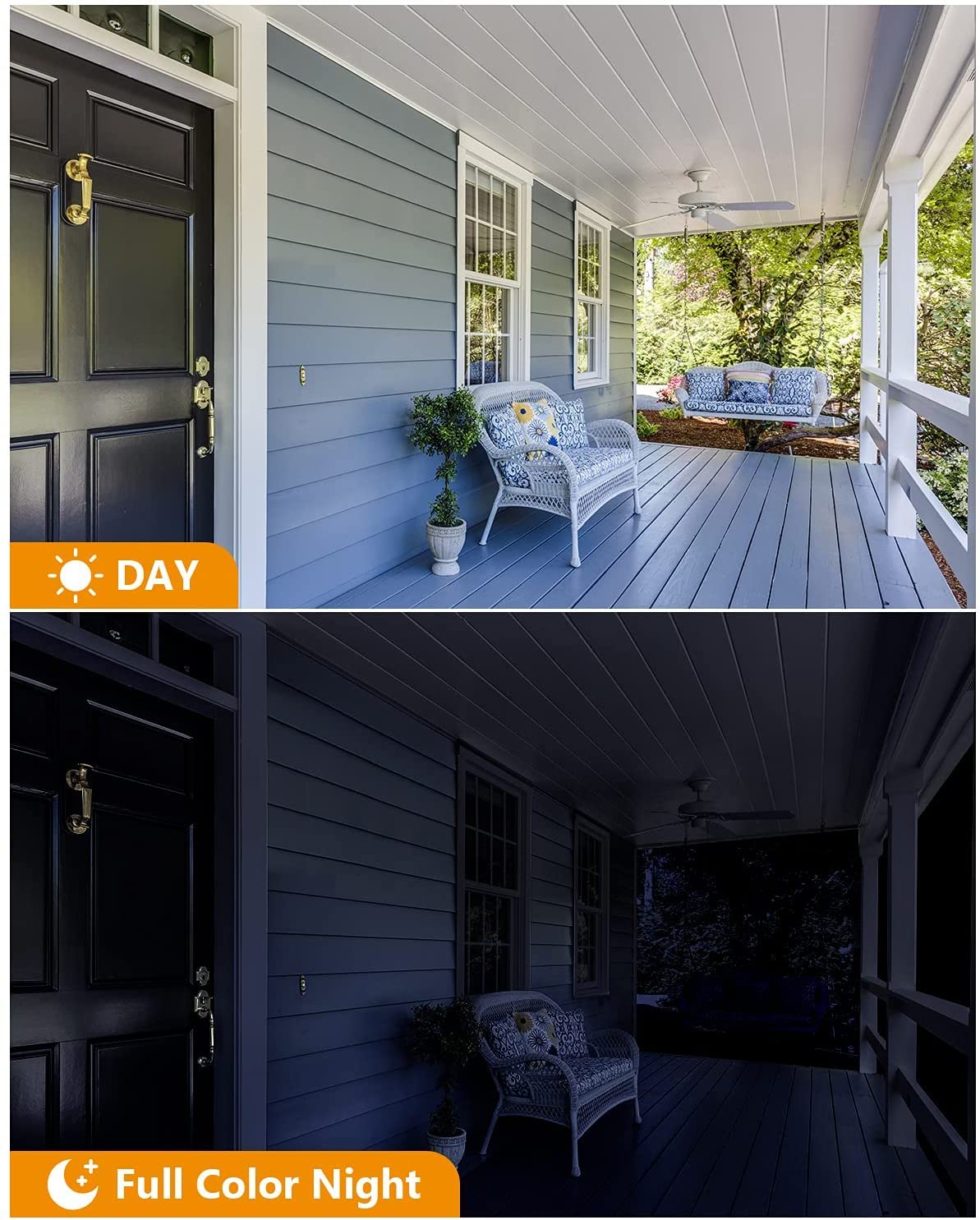
Figure 6: Day and Full Color Night Vision
4.4 Эки тараптуу сүйлөшүү
While the product description mentions a microphone, it does not explicitly state two-way talk functionality. However, many cameras with microphones also support two-way audio. If available, use the microphone icon in the Imou Life app to speak through the camera's speaker and listen to audio from the camera's microphone.
4.5 Видеону жазуу жана сактоо
The camera supports continuous recording or event-triggered recording (e.g., upon human detection). You have several options for storing your video footage:
- Micro SD картасы: Insert a Micro SD card (up to 256GB) into the camera's designated slot for local storage.
- Network Video Recorder (NVR): Connect the camera to a compatible NVR for centralized storage and management.
- Булуттагы сактагыч: Utilize the Imou cloud storage service (subscription may be required) for secure, remote storage of your recordings.

Figure 7: Video Recording Storage Options
5. Техникалык тейлөө
- Линзаны тазалоо: Periodically clean the camera lens with a soft, dry cloth to ensure clear image quality. Avoid abrasive cleaners.
- Турак жайды тазалоо: Камера корпусун жарнама менен сүртүңүзamp кирди жана калдыктарды тазалоо үчүн кездеме.
- Кабелдик текшерүү: Regularly check power and network cables for any signs of wear or damage, especially for outdoor installations.
- Программалык камсыздоонун жаңыртуулары: Keep the camera's firmware updated through the Imou Life app to ensure optimal performance and security.
- Сактагычты башкаруу: If using a Micro SD card, periodically check its status and manage recordings to prevent it from becoming full.
6. Кыйынчылыктарды
| Көйгөй | Мүмкүн себеп | Чечим |
|---|---|---|
| Камера күйбөй жатат | Power adapter issue, loose connection | Check power adapter and cable connections. Ensure the power outlet is functional. |
| Wi-Fi'га туташпай жатат | Incorrect Wi-Fi password, camera too far from router, 5GHz network selected | Verify Wi-Fi password. Move camera closer to the router or use a Wi-Fi extender. Ensure you are connecting to a 2.4GHz network. |
| Тез-тез жалган сигналдар | Sensitive motion detection, environmental factors (e.g., moving plants, insects) | Adjust motion detection sensitivity in the app. Define specific "Detection Regions" to exclude irrelevant areas. Ensure firmware is updated. |
| Түнкү көрүү сапаты начар | Dirty lens, insufficient ambient light, obstructions | Clean the camera lens. Ensure the built-in spotlights are not obstructed. Check for external light sources causing glare. |
| Видео жазуу көйгөйлөрү | Full SD card, faulty SD card, cloud storage subscription expired | Check SD card capacity and format if necessary. Replace faulty SD card. Verify cloud storage subscription status. |
7. Техникалык шарттар
| Өзгөчөлүк | Деталь |
|---|---|
| Модель аты | Imou Cruiser SE (IPC-S21FP) |
| Резолюция | 1080p (2MP) |
| Pan/Tilt диапазону | 355° Горизонталдык, 90° Вертикалдуу |
| Байланыш | 2.4G Wi-Fi, Ethernet |
| Аба ырайына каршылык | IP66 |
| Сактагыч параметрлери | Micro SD Card (up to 256GB), NVR, Cloud Storage |
| Өзгөчөлүктөр | HD Resolution, Motion Sensor, Night Vision (Color), Built-in Floodlight, Microphone |
| Операциялык система (тиркеме) | Android, iOS |
| Power Source | Corded Electric (Adapter included) |
| Элементтин өлчөмдөрү (LxWxH) | 20 x 15 x 10 сантиметр |
| Элемент Салмагы | 740 г |
| Өндүрүүчү | DAHUA (Imou) |
8. Кепилдик жана колдоо
For warranty information and technical support, please refer to the official Imou webсайтына кириңиз же алардын кардарларды тейлөө кызматына түз кайрылыңыз. Кепилдик мөөнөттөрү жана тейлөө жол-жоболору жөнүндө маалымат, адатта, сатып алуу документтериңизде берилет же онлайн режиминде жеткиликтүү.
кире аласыз Imou Store on Amazon кошумча продукт маалымат жана колдоо ресурстар үчүн.


