Introduction
This manual provides detailed instructions for the setup, operation, and maintenance of your RisoPhy 60% RGB Wireless Mechanical Keyboard. Designed for versatility and performance, this keyboard offers multiple connectivity options, customizable lighting, and a compact design suitable for various computing environments.
Негизги өзгөчөлүктөрү
- Үч режимдик байланыш: Supports 2.4G wireless, Bluetooth, and wired (Type-C) connections. Connect up to 5 devices simultaneously.
- Ыңгайлаштырылган RGB жарыктандыруусу: Over 20 backlight effects and single-color modes. Adjustable lighting speed and brightness.
- Low-Profile Blue Switches: Provides tactile feedback with a clicky sound, optimized for accuracy and quick response.
- Компакт 60% Макет: 68-key design with independent arrow keys, offering more desk space for mouse movement.
- Туруктуу курулуш: Features a super-light aluminum alloy panel with a matte-finish texture.
- Программалануучу ачкычтар: Utilize software to set macros, rebind key functions, and customize lighting (Windows and wired mode only).
- Кеңири шайкештик: Works with Windows 7/8/10/XP/VISTA/95/98/XP/2000/ME/VISTA, Mac OS, Xbox, Laptop, PC, Gaming Console, phone, and iPad.
- Integrated Volume Knob: Conveniently adjust volume and mute/unmute audio directly from the keyboard.
Пакеттин мазмуну
Кутучаны ачканда бардык буюмдардын бар экенин текшериңиз:
- RisoPhy 60% RGB Wireless Mechanical Keyboard
- USB Type-C кабели
- 2.4G USB кабыл алгыч
- User Manual
Орнотуу жана туташуу
Your RisoPhy keyboard supports three connection modes: 2.4G wireless, Bluetooth, and wired (USB Type-C).
1. Wired Mode (USB Type-C)
- Берилген USB Type-C кабелин клавиатуранын Type-C портуна туташтырыңыз.
- Кабелдин экинчи учун компьютериңиздеги USB портуна туташтырыңыз.
- Баскычтоп автоматтык түрдө зымдуу режимге өтүп, кубаттай баштайт.
2. 2.4G зымсыз режим
- Адатта клавиатуранын арткы жагындагы бөлүмдө сакталган 2.4G USB кабыл алгычын табыңыз.
- 2.4G USB ресиверди компьютериңиздеги жеткиликтүү USB портуна сайыңыз.
- On the back of the keyboard, slide the switch to the '2.4G' position.
- Баскычтоп автоматтык түрдө туташуу керек. Болбосо, басыңыз Fn + Q жупташууну баштоо.

Figure 1: RisoPhy 60% RGB Wireless Mechanical Keyboard with 2.4G USB receiver.
3. Bluetooth режими
Баскычтоп үчкө чейин Bluetooth түзмөктөрүн (BT1, BT2, BT3) колдойт.
- Баскычтоптун арткы бетиндеги которгучту "BT" абалына жылдырыңыз.
- Басып кармап туруңуз Fn + E (BT1 үчүн), Fn + R (BT2 үчүн), же Fn + T (for BT3) for 3-5 seconds until the corresponding key (E, R, or T) flashes rapidly. This indicates pairing mode.
- On your device (PC, Mac, iPad, phone), enable Bluetooth and search for available devices.
- Select 'RisoPhy Keyboard' (or similar name) from the list to connect. The flashing light on the keyboard will become solid once connected.
- Жупташтырылган Bluetooth түзмөктөрүнүн ортосунда которулуу үчүн басыңыз Fn + E/R/T кыскача.

Figure 2: The RisoPhy keyboard supports multiple connection modes for various devices.
Video 1: Demonstrates the RisoPhy Wireless Mechanical Keyboard's features, including connectivity options and RGB lighting.
Иштөө нускамалары
RGB арткы жарыкты башкаруу
The keyboard features over 20 preset RGB backlight effects and adjustable settings.
- Арткы жарык режимин өзгөртүү: Басыңыз Fn + Backspace to cycle through different RGB lighting effects.
- Жарыктыкты жөндөө: Басыңыз Fn + Өйдө жебе жарыктыгын жогорулатуу үчүн, Fn + Төмөн жебе жарыктыгын азайтуу үчүн.
- Ылдамдыкты жөндөө: Басыңыз Fn + Сол жебе to slow down the effect, Fn + Оңго жебе to speed up the effect.
- Бир түстүү режим: Specific software (Windows only) allows for selection of any single color.
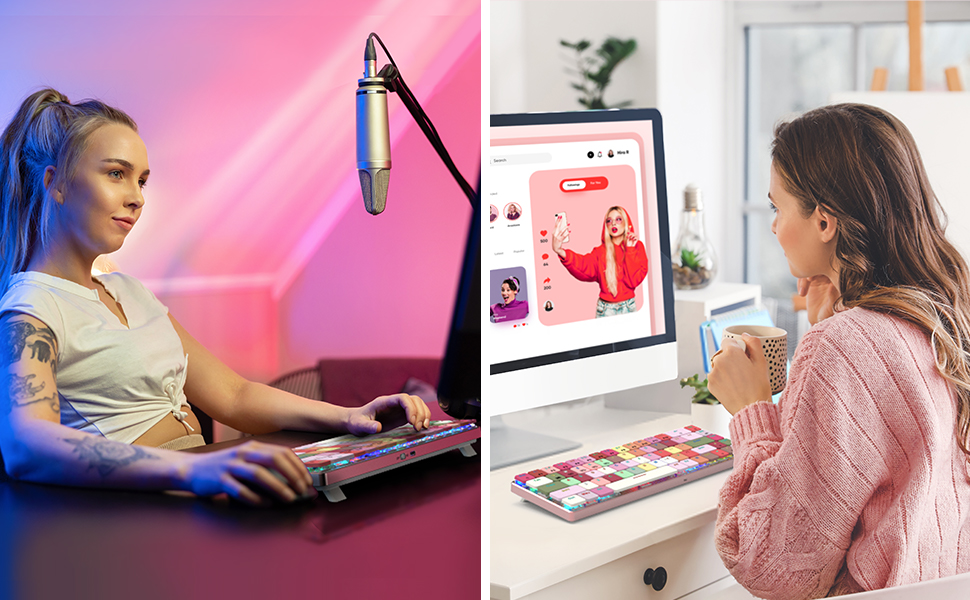
Figure 3: Immersive RGB lighting enhances the typing experience and desktop aesthetics.
Video 2: Demonstrates the RGB lighting effects and typing experience of the keyboard.
Үн башкаргыч баскычы
The dedicated metal knob on the top right corner provides quick audio control:
- Саат жебеси боюнча айлантуу: Үнүн жогорулатуу.
- Сааттын жебесине каршы айландыруу: Үнүн азайтуу.
- Төмөн басыңыз: Аудионун үнүн басуу/ачуу.
Негизги функциялар жана айкалыштар
Many keys have secondary functions accessible via the Fn key. Refer to the keycaps for specific markings.
- Fn + Q/W/E/R/T: Switch between 2.4G wireless (Q) and Bluetooth devices (E, R, T) or wired mode (W).
- Fn + F1-F12: Access multimedia controls and system functions (e.g., volume, play/pause, browser).
- Fn + Win: Оюн учурунда кокусунан басылып калбашы үчүн Windows баскычын кулпулаңыз/ачыңыз.

Figure 4: The keyboard features low-profile blue switches for a comfortable typing experience.
Video 3: Demonstrates the typing sound and feel of the RisoPhy PC430 keyboard, highlighting its linear mechanical red switches.
Программалык камсыздоону ыңгайлаштыруу
For advanced customization, including macros, key remapping, and detailed RGB lighting adjustments, dedicated software is available. This software is compatible with Windows operating systems and functions when the keyboard is in wired mode.
- Макро түзүү: Assign complex sequences of commands to a single key.
- Ачкычты кайра түзүү: Change the function of any key to suit your workflow or gaming style.
- Advanced RGB Control: Fine-tune lighting effects, colors, and patterns beyond the onboard presets.
Өндүрүүчүсүнө кайрылыңыз webпрограммалык камсыздоону жүктөп алуу жана орнотуу боюнча көрсөтмөлөрдү алуу үчүн сайт.

Figure 5: Customize your keyboard with dedicated software for personalized settings.
Техникалык шарттар
| Атрибут | Нарк |
|---|---|
| Бренд | RisoPhy |
| Модел | 60% RGB Wireless Mechanical Keyboard |
| Байланыш технологиясы | Bluetooth, 2.4G Wireless, USB Type-C Wired |
| Которуу түрү | Low-Profile Clicky Blue Switch |
| Баскычтоптун жайгашуусу | 68 баскыч (60% компакттуу) |
| Арткы жарыктандыруу | RGB (20+ modes, 16.8 Million Colors via software) |
| Материал | Aluminum, Metal, Polybutylene Terephthalate (PBT Keycaps) |
| Батарея | 1 литий-полимердик батарейка талап кылынат (3000 мАч) |
| Продукциянын өлчөмдөрү | 11.42 x 3.66 x 0.79 дюйм |
| Элемент Салмагы | 1.12 фунт |
| Шайкеш түзмөктөр | PC, Laptop, Mac, iPad, Gaming Console, Xbox, Phone |
Техникалык тейлөө
To ensure the longevity and optimal performance of your RisoPhy keyboard, follow these maintenance guidelines:
- Тазалоо: Клавиатуранын бетин жумшак, кургак чүпүрөк менен сүртүңүз. Тереңирээк тазалоо үчүн, баскычтоп капкактарынын ортосундагы чаңды жана таштандыларды кетирүү үчүн кысылган абаны колдонуңуз. Катуу химиялык заттарды же абразивдүү материалдарды колдонуудан алыс болуңуз.
- Батареяга кам көрүү: Charge the keyboard using the provided USB Type-C cable. Avoid fully draining the battery frequently to prolong its lifespan.
- Сактагыч: Узак мөөнөткө колдонулбаганда, клавиатураны салкын, кургак жерде, тике күндүн нурунан жана өтө температурадан алыс сактаңыз.
Проблемаларды чечүү
If you encounter issues with your keyboard, please try the following solutions:
- Баскычтоп жооп бербейт:
- Баскычтоп кубатталганын текшериңиз.
- Check the connection mode switch (2.4G, BT, Wired) on the back of the keyboard.
- 2.4G үчүн, USB кабыл алгыч бекем сайылганын текшериңиз.
- For Bluetooth, ensure your device's Bluetooth is enabled and the keyboard is paired correctly. Try re-pairing if necessary.
- Try connecting the keyboard in wired mode to rule out wireless issues.
- RGB Lights Not Working/Incorrect:
- Баскычтоп күйгүзүлгөнүн текшериңиз.
- Басыңыз Fn + Backspace режимдер аркылуу айлануу үчүн.
- жардамы менен жарыктыгын тууралаңыз Fn + Өйдө/Төмөн жебе.
- If using customization software, ensure it is running and settings are applied.
- Баскычтар катталбай жатат/Кош терүү:
- Баскычтоптун таза жана клавиатуранын астындагы таштандылардан таза экенин текшериңиз.
- If using wireless mode, try moving closer to the receiver/device to reduce interference.
- Test in wired mode to determine if the issue is connectivity-related.
Кепилдик жана колдоо
RisoPhy offers lifetime product care for your mechanical keyboard. If you experience any issues with your product, you are eligible for a refund or a new replacement. Please contact our customer support team for assistance.
Байланыш маалыматы: Please refer to the contact details provided on the product packaging or the official RisoPhy webсайт.