1. Киришүү
The GALAYOU Indoor Security Camera 2K, Model G2, is designed to provide comprehensive home surveillance with advanced features for monitoring pets, babies, elders, or general home security. It offers 2K super HD live streaming, 360-degree coverage, intelligent motion detection, enhanced night vision, and two-way audio communication. This manual will guide you through the setup, operation, and maintenance of your G2 camera.
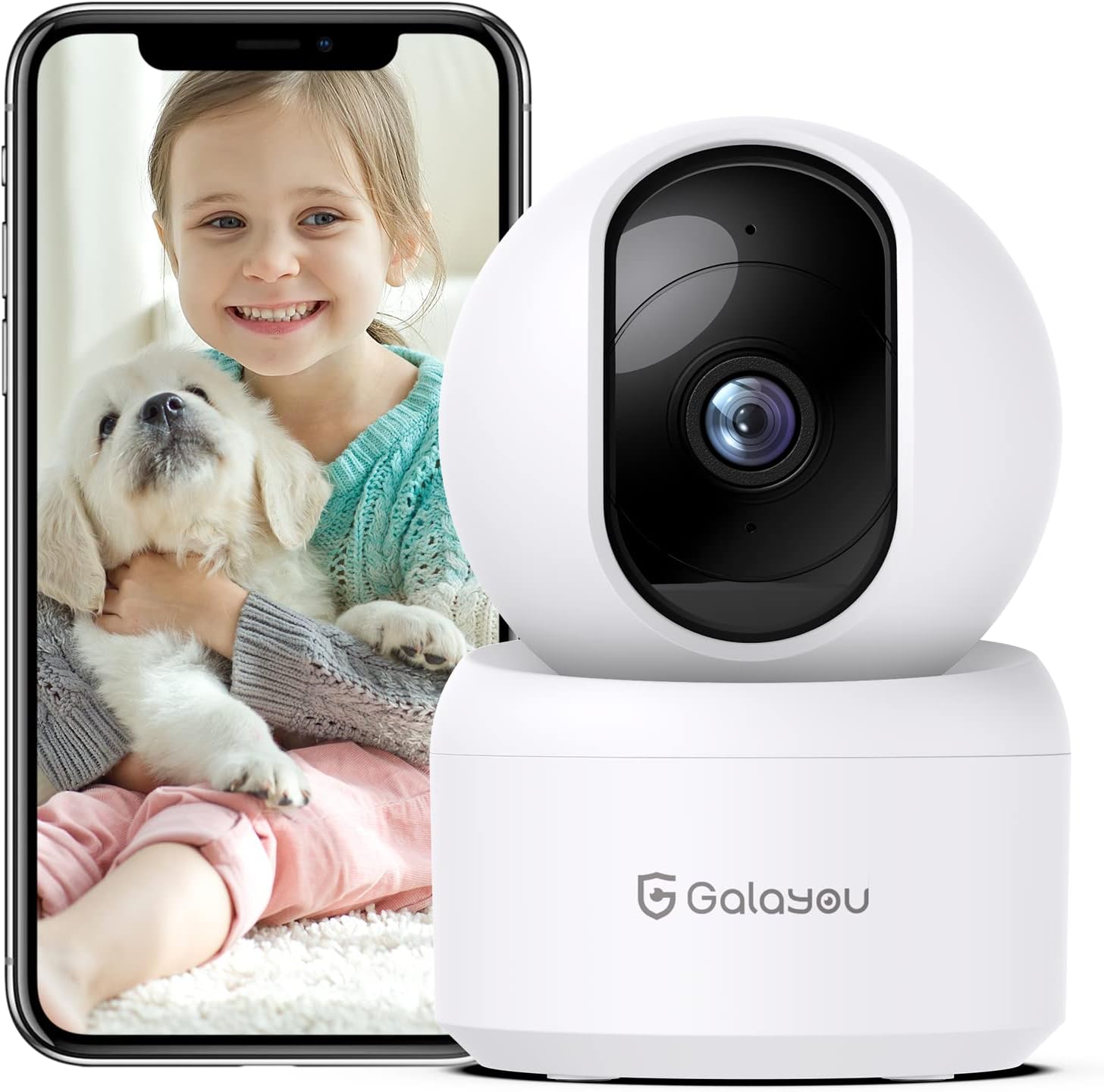
Image: The GALAYOU G2 Indoor Security Camera, a white dome-shaped device, shown next to a smartphone displaying a live feed of a child holding a puppy, illustrating its use for pet and baby monitoring.
2. Пакеттин мазмуну
Пакетиңизде бардык буюмдар бар экенин текшериңиз:
- Camera body (GALAYOU G2)
- Type-C Cable + USB Adapter
- Монтаждоо бурамалар
- Орнотуу боюнча колдонмо
3. Продукт бүтүп калдыview
The GALAYOU G2 camera features a compact design with advanced functionalities for indoor security.
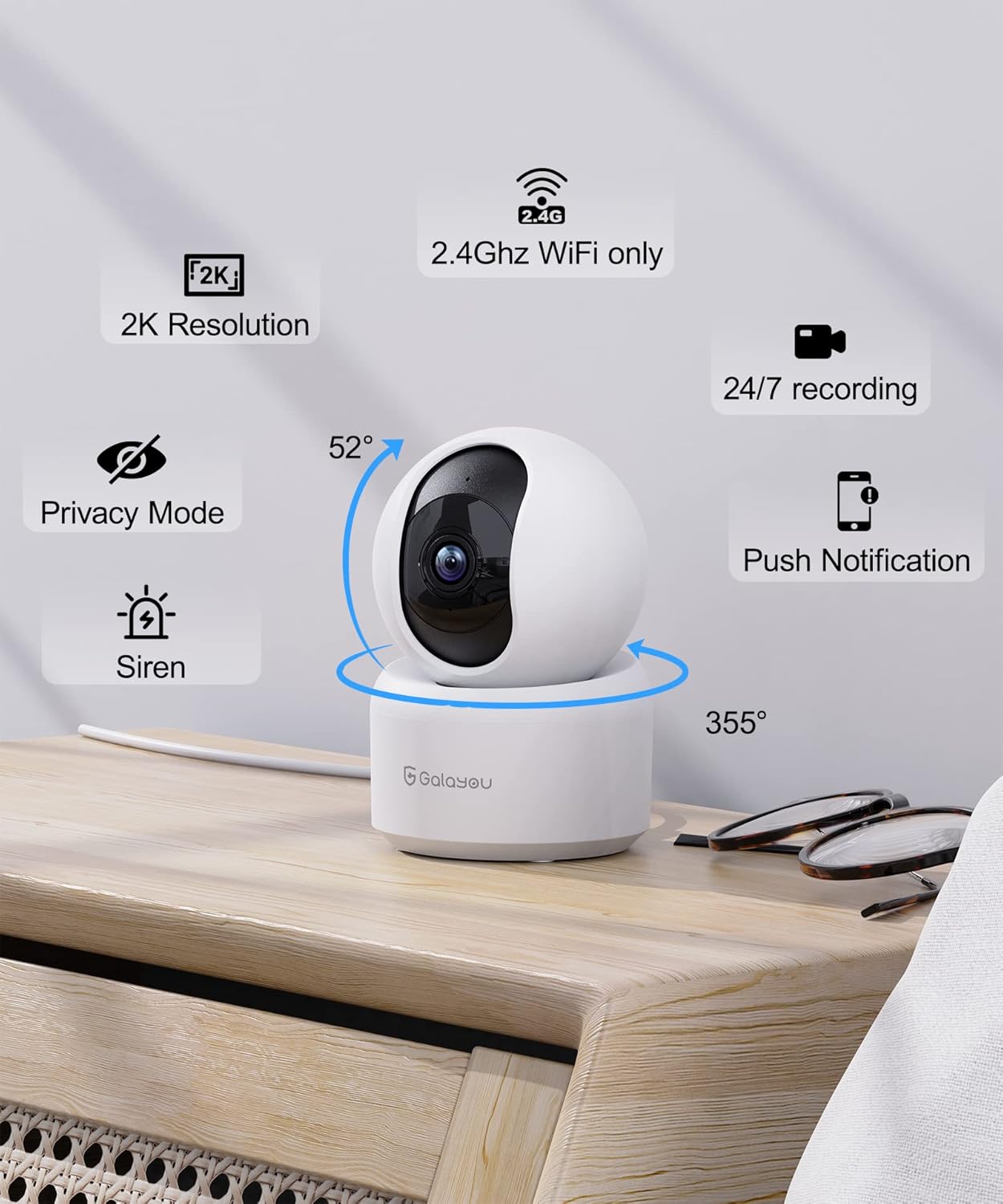
Сүрөт: деталдуу view of the GALAYOU G2 camera on a wooden surface, with icons illustrating its key features: 2K Resolution, 2.4GHz WiFi compatibility, 24/7 recording, Privacy Mode, Siren, Push Notifications, and its 355° horizontal and 52° vertical rotation capabilities.
Негизги өзгөчөлүктөрү:
- 2K чечилиши жана 360° камтуусу: Provides super HD live stream with 355° horizontal and 52° vertical rotation for full room coverage.
- Intelligent Motion Detection & Siren Alarm: Sends instant alerts and records 10-second video clips upon motion detection, with an optional siren to deter intruders.
- Enhanced Night Vision & Two-Way Audio: Equipped with 4pcs 940nm infrared lights for clear night vision up to 32ft, and a built-in microphone and speaker for two-way communication.
- Optional Cloud & 24/7 SD Card Storage: Supports local storage via SD card (up to 128GB, not included) and a 30-day trial cloud storage for continuous recording and data safety.
- Көп түзмөк Viewмаалымат алуу жана бөлүшүү: Allows adding multiple cameras to the app and viewing up to 4 live feeds simultaneously. Share access with up to 3 other devices.
- Үн жардамчысы интеграциясы: Compatible with Amazon Alexa and Google Assistant for convenient voice control.
4. Техникалык шарттар
| Өзгөчөлүк | Деталь |
|---|---|
| Модель аты | G2 |
| Ички/тышкы колдонуу | Indoor |
| Power Source | Электр зымдары (5 вольт, 2.5 ватт) |
| Connectivity Protocol | Wi-Fi (2.4 ГГц гана) |
| Controller Type | Amazon Alexa/Google Жардамчысы |
| Монтаж түрү | Дубалга орнотуу |
| Видео тартуунун резолюциясы | 1296p (2K) |
| Түс | Ак |
| Өлчөмдөрү (L x W x Y) | 2.83 x 2.83 x 4.29 дюйм |
| Элемент Салмагы | 10.8 унция (0.31 килограмм) |
| Viewing Angle (Lens) | 95 градус |
| талаасы View (Pan/Tilt) | 360 градус |
| Түнкү көрүү диапазону | 10 метр (32ft) |
| Frame Rate | 15 кадр/сек |
| Сууга туруктуулук деңгээли | Сууга чыдамдуу эмес |
| Фото сенсор технологиясы | CMOS |
| Видео тартуу форматы | MPEG-4 |
| Башкаруу ыкмасы | Колдонмо |
| Өзгөчө өзгөчөлүк | Сирена |
5. Орнотуу колдонмосу
Follow these steps to set up your GALAYOU G2 camera and connect it to your Wi-Fi network.
5.1 Download the Wansview Булут колдонмосу
- Scan the QR code provided in the Quick Installation Guide or search for "Wansview Cloud" in the Google Play Store (for Android) or Apple App Store (for iOS).
- "Wans" жүктөп алып, орнотуңузview Cloud" application on your smartphone.

Image: A visual guide demonstrating the steps for quick installation, including downloading the Wansview Cloud app, registering an account, plugging in the camera, and completing Wi-Fi configuration.
5.2 Register and Log In to Your Account
- Wans ачыңызview Булут колдонмосу.
- Tap on "Sign up" to create a new account.
- Enter your email address and create a strong password (8-16 characters, including digits, uppercase letters, lowercase letters, and special characters).
- You will receive a verification code via email. Enter this code into the app to complete registration.
- Once registered, log in to your new Wansview Булут эсеби.
Video: A tutorial demonstrating how to download the Wansview Cloud App, register an account, and log in. This video guides users through the initial setup process for the camera's accompanying application.
5.3 Wi-Fiга туташуу
- Plug in your GALAYOU G2 camera using the provided Type-C cable and USB adapter. The camera will power on.
- Ensure your smartphone is connected to a 2.4GHz Wi-Fi network. The G2 camera does not support 5GHz Wi-Fi.
- Ванс шаарындаview Cloud app, tap the "+" icon to add a new device.
- Follow the on-screen instructions in the app to complete the Wi-Fi configuration. This typically involves scanning a QR code displayed on your phone with the camera lens.
6. Иштөө нускамалары
Once your camera is set up, you can utilize its various features through the Wansview Булут колдонмосу.
6.1 Live View жана панорамалоо/кыйшайтуу башкаруусу
- Wans ачыңызview Cloud app and select your G2 camera from the device list to access the live view.
- Use the directional controls within the app to remotely pan (355° horizontal) and tilt (52° vertical) the camera lens, allowing you to view different areas of your room.
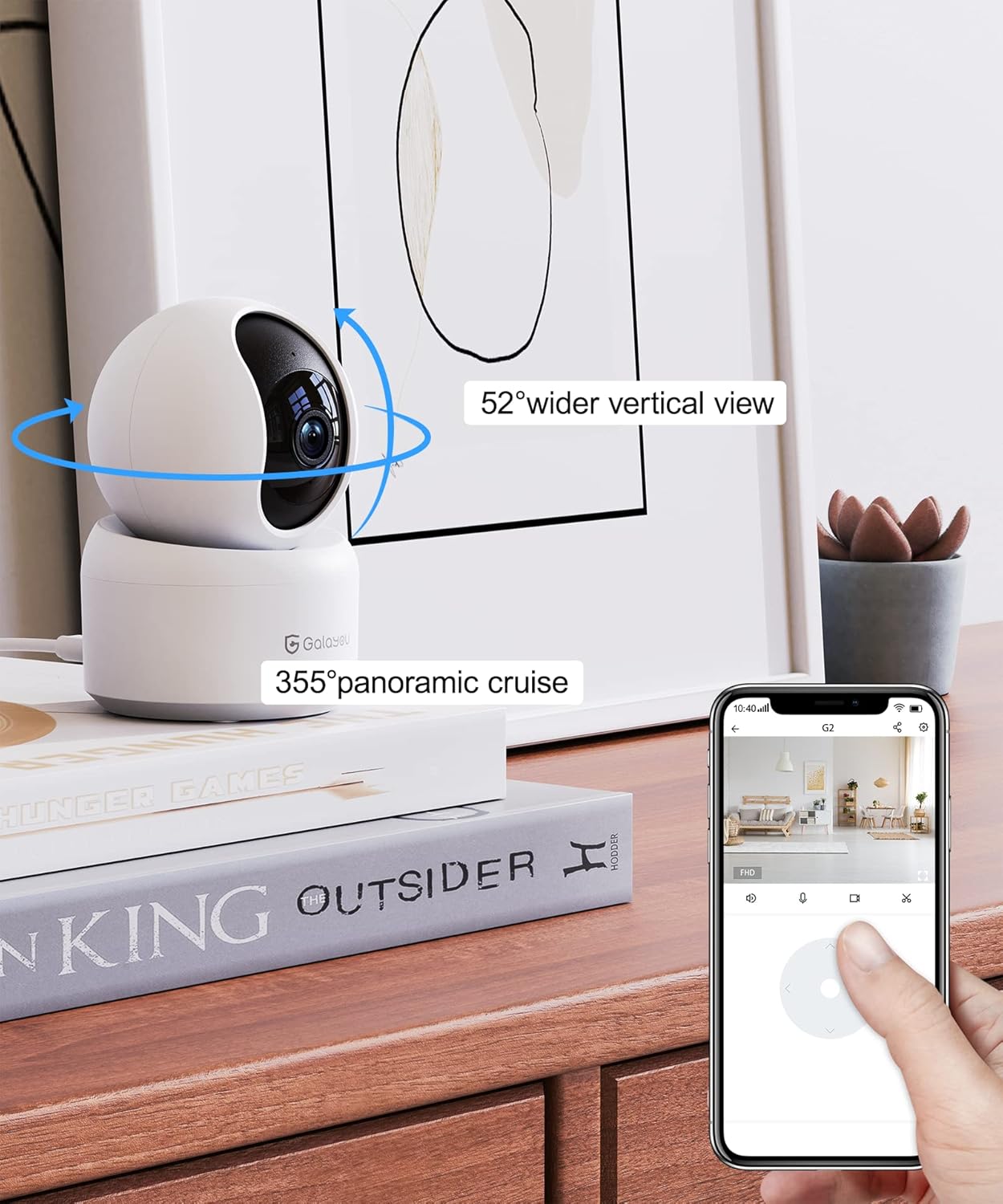
Image: A smartphone screen displaying the Wansview Cloud app's controls for the GALAYOU G2 camera, demonstrating its 355° panoramic cruise and 52° wider vertical view мүмкүнчүлүктөр.
Сүрөт: Панорамалык көрүнүш view of a modern living space, illustrating the extensive coverage provided by the GALAYOU G2 camera's 355° pan and 52° tilt viewжөндөмдүүлүктөрүн.
6.2 Motion Detection and Siren Alarm
- Enable motion detection in the app settings to receive instant alert notifications on your phone when movement is detected.
- The camera will automatically record 10-second video clips of detected motion and save them to the app.
- Activate the siren feature through the app to emit an audible alarm when motion is detected, serving as a deterrent.

Image: A smartphone screen displaying a "Motion alarm" notification from the Wansview Cloud app, overlaid on a scene of a child in a crib, indicating real-time alerts for motion in customized areas.

Image: An illustration of the camera's siren feature, showing an intruder being startled by the camera's alarm, highlighting its deterrent capability.
6.3 Жакшыртылган түнкү көрүнүш
- The camera automatically switches to night vision mode in low-light conditions, providing clear black and white images up to 32 feet (10 meters).

Image: A dark room scene with a child sleeping, demonstrating the camera's enhanced night vision capabilities and two-way audio feature, allowing communication even in low light.
Image: A clear, black and white image of a baby sleeping in a crib at night, demonstrating the camera's ability to provide clear visuals in low-light conditions.
6.4 Эки тараптуу аудио
- Use the built-in microphone and speaker to communicate with family members or pets through the camera from anywhere.

Image: A scene depicting a puppy in a living room, with speech bubbles indicating two-way audio communication between a user and the pet via the camera.
6.5 Сактоо параметрлери
- SD карта сактагычы: Insert a Micro SD card (up to 128GB, not included) into the camera's slot for 24/7 continuous recording.
- Булуттагы сактагыч: Utilize the 30-day trial cloud storage service to securely save alert videos and access them anytime, anywhere.

Image: The GALAYOU G2 camera positioned with a hand inserting an SD card, illustrating local storage. Above, a cloud icon with an arrow points upwards, representing the encrypted 30-day trial cloud storage option.

Image: A graphic illustrating the flow of video data from the camera to both local SD card storage (up to 128GB) and cloud storage, emphasizing the 30-day trial experience.
6.6 Multi-Device Viewокуу жана бөлүшүү
- Add multiple GALAYOU cameras to your Wansview Cloud app to monitor different areas simultaneously. The app supports displaying up to 4 live video feeds at once.
- Share access to your camera's live feed and recordings with up to 3 other devices, allowing family members to view.
Image: A smartphone screen showing the Wansview Cloud app interface with multiple camera feeds displayed simultaneously, demonstrating the multi-device viewжөндөмдүүлүгү.

Image: A visual representation of the device sharing feature within the Wansview Cloud app, showing how users can invite others to view the camera feed, enabling shared monitoring.
6.7 Үн жардамчысын интеграциялоо
- Connect your GALAYOU G2 camera with Amazon Alexa or Google Assistant for hands-free control.
- Use voice commands such as "Alexa, show me the living room camera" to view шайкеш келген акылдуу дисплейлердеги түз эфир.

Image: The GALAYOU G2 camera positioned next to an Amazon Echo Show, demonstrating its compatibility with Alexa. A speech bubble shows a user asking Alexa to display the living room camera.

Image: A woman in a kitchen interacting with an Amazon Echo Show, which displays the camera feed, illustrating the convenience of voice control with Alexa for monitoring.
7. Техникалык тейлөө
- Тазалоо: Камера линзасын жана корпусун жумшак, кургак чүпүрөк менен акырын сүртүңүз. Суюк тазалоочу каражаттарды же абразивдүү материалдарды колдонуудан алыс болуңуз.
- Программалык камсыздоонун жаңыртуулары: Вандарды үзгүлтүксүз текшерип туруңузview Cloud app for available firmware updates to ensure optimal performance and security.
- Жайгашкан жери: Камераны туруктуу, кургак имараттын ичинде, түз күн нурунан, жылуулук булактарынан жана күчтүү электромагниттик талаалардан алыс коюңуз.
- Электр камсыздоо: Камерага зыян келтирбөө үчүн берилген кубат адаптерин гана колдонуңуз.
8. Кыйынчылыктарды
Жалпы маселелер жана чечимдер:
- Камера оффлайн:
- Камера күйгүзүлгөнүн жана кубат адаптери ишенимдүү туташтырылганын текшериңиз.
- Ensure your Wi-Fi router is working correctly and the camera is within range.
- Verify that your Wi-Fi network is 2.4GHz. The camera does not support 5GHz networks.
- Камераны жана роутериңизди өчүрүп күйгүзүңүз.
- Wi-Fi'га туташуу мүмкүн эмес:
- 2.4 ГГц Wi-Fi тармагына туташып жатканыңызды ырастаңыз.
- Ensure the Wi-Fi password entered in the app is correct.
- Place the camera closer to the router during initial setup.
- Reset the camera (refer to the Installation Guide for reset instructions) and try the setup process again.
- Видеонун сапаты начар:
- Интернет байланышыңыздын ылдамдыгын текшериңиз. 2K форматында агым берүү үчүн туруктуу жана тез байланыш талап кылынат.
- Камера объективинин таза жана чаң же тактар жок экенин текшериңиз.
- Adjust the camera's position to optimize lighting conditions.
- Кыймылды аныктоо иштебей жатат:
- Verify that motion detection is enabled in the Wansview Cloud app settings.
- Кыймылды аныктоо сезгичтигинин жөндөөлөрүн тууралаңыз.
- Камераны тоскон эч кандай тоскоолдуктар жок экенин текшериңиз view in the detection zone.
9. Кепилдик жана колдоо
GALAYOU products typically come with a manufacturer's warranty. Please refer to the original packaging or the official GALAYOU webатайын кепилдик шарттары жана шарттары үчүн сайт.
For technical support, troubleshooting assistance, or any inquiries regarding your GALAYOU G2 camera, please contact GALAYOU customer service through their official channels. You may find contact information on the product packaging, the Wansview Cloud app, or the GALAYOU brand webсайт.
Өндүрүүчү: GALAYOU
Бренд Webсайт: Visit the GALAYOU Store on Amazon


