1. Киришүү
Thank you for choosing the HXSJ X50 Wireless Game Mouse. This manual provides detailed instructions for setting up, operating, and maintaining your new wireless mouse. Please read this manual thoroughly before use to ensure optimal performance and longevity of your device.
Пакеттин мазмуну:
- HXSJ X50 Wireless Game Mouse
- USB кабыл алгыч

Image 1.1: The HXSJ X50 Wireless Game Mouse and its USB receiver.
2. Коопсуздук маалыматы
- Чычканды сууга же ашыкча нымдуулукка дуушар кылбаңыз.
- Чычканды түшүрүүдөн же катуу соккулардан сактаныңыз.
- Аппаратты экстремалдуу температурадан алыс кармаңыз.
- Чычканды өз алдынча бөлүүгө же оңдоого аракет кылбаңыз. Керек болсо квалификациялуу тейлөө кызматкерлерине кайрылыңыз.
- Батареяларды жергиликтүү эрежелерге ылайык жок кылыңыз.
3. Орнотуу
3.1 Батареяны орнотуу
The HXSJ X50 Wireless Game Mouse requires batteries for operation. Please ensure you have the necessary batteries (typically 1x AA battery, not included) before proceeding.
- Чычкандын астыңкы жагындагы батарея бөлүкчөсүн табыңыз.
- Батарея уясынын капкагын ачыңыз.
- Insert the battery, ensuring correct polarity (+/-).
- Батарея уясынын капкагын бекем жабыңыз.
3.2 USB кабылдагычты туташтыруу
- Компьютериңизден жеткиликтүү USB портун табыңыз.
- Insert the USB receiver into the USB port. Your computer should automatically detect and install the necessary drivers.
3.3 Күйгүзүү
Slide the power switch, located on the underside of the mouse, to the 'ON' position. The mouse is now ready for use.
4. Иштөө нускамалары
4.1 Баскыч функциялары
The HXSJ X50 mouse features 6 buttons for enhanced functionality:
- Сол чыкылдатуу баскычы: Primary function, selection.
- Оң баскычты чыкылдатуу: Secondary function, context menus.
- Жылдыруу дөңгөлөгү: Өйдө/төмөн сыдырыңыз, ортоңку чыкылдатыңыз.
- DPI жөндөө баскычы: DPI жөндөөлөрү аркылуу айланышат.
- Page Forward Button: Алга карай жылдырат web браузерлер же file изилдөөчүлөр.
- Page Backward Button: Артка карай багыт алат web браузерлер же file изилдөөчүлөр.

Сүрөт 4.1: Каптал view showing the ergonomic design and side buttons.
4.2 DPI жөндөө
Press the DPI adjustment button (located behind the scroll wheel) to cycle through the available sensitivity settings: 1000DPI, 1200DPI, 1600DPI, and 2400DPI. Select the DPI that best suits your preference and task.
4.3 Электр үнөмдөө
The mouse features a power switch on its underside. To conserve battery life, slide the switch to the 'OFF' position when the mouse is not in use for extended periods.
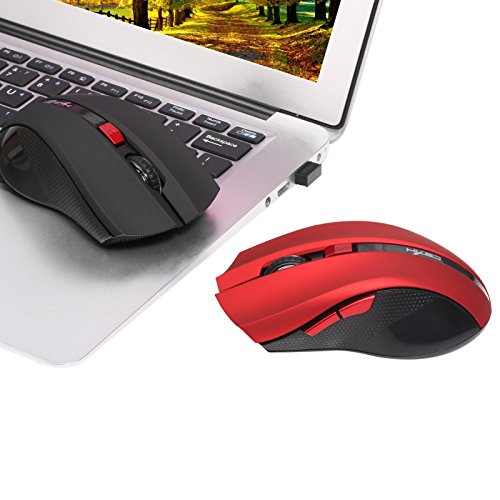
Image 4.2: The HXSJ X50 mouse in use with a laptop.
5. Техникалык тейлөө
5.1 Тазалоо
To clean the mouse, gently wipe its surface with a soft, dry cloth. For stubborn dirt, slightly dampчүпүрөктү суу менен. Катуу химиялык заттарды же абразивдүү тазалагычтарды колдонуудан алыс болуңуз.
5.2 Сактоо
When not in use, store the mouse and USB receiver in a dry, cool place, away from direct sunlight and extreme temperatures. If storing for an extended period, it is recommended to remove the battery.
6. Кыйынчылыктарды
- Чычкан жооп бербей жатат:
Ensure the mouse is powered on. Check if the USB receiver is securely plugged into a working USB port. Replace the battery if it is low or depleted. - Курсордун туура эмес кыймылы:
Clean the optical sensor on the underside of the mouse. Ensure the surface you are using the mouse on is clean and non-reflective. - Туташуу маселелери:
Try plugging the USB receiver into a different USB port. Move the mouse closer to the receiver to rule out interference. - Каптал баскычтар иштебей жатат:
Ensure your operating system and applications support the forward/backward functions. Some software may require specific drivers or settings.
7. Техникалык шарттар
| Өзгөчөлүк | Деталь |
|---|---|
| Бренд | HXSJ |
| Модел | X50 |
| Байланыш | Зымсыз (USB кабыл алгыч) |
| Зымсыз диапазон | 10-15 метрге чейин |
| Кыймылды аныктоо | Оптикалык |
| DPI орнотуулары | 1000, 1200, 1600, 2400 (Жөнгө салынуучу) |
| баскычтардын саны | 6 (Сол, Оң, Айлантуу дөңгөлөгү, DPI, Алдыга, Артка) |
| Power Source | Battery (1x AA, not included) |
| Батареянын иштөө мөөнөтү (орточо) | 6 ай |
| Колдун багыты | Эки тараптуу |
| Материал | Пластик |
| Элемент Салмагы | 80 г |
| Шайкеш OS | Windows 98/ME/2000/XP/Vista/7/8, Linux |
8. Кепилдик жана колдоо
For warranty information or technical support, please refer to the documentation provided with your purchase or contact the retailer/manufacturer directly. Keep your proof of purchase for warranty claims.


