1. Продукт бүтүп калдыview
The Kuephom Portable CD Player (Model PM11-Black) is a versatile audio device designed for personal and multi-user listening. It features a built-in speaker, rechargeable battery, and anti-skip protection, making it suitable for various environments including home, car, and travel. The player supports multiple audio formats and offers adjustable playback speed for learning purposes.

Image 1.1: Kuephom Portable CD Player and accessories.
Негизги өзгөчөлүктөрү:
- Кайра заряддалуучу батарея: Integrated 1500mAh battery provides up to 8 hours of playback with earphones or 5 hours with the built-in speaker on a 4-hour charge.
- Камтылган динамик: Allows direct listening without external headphones or speakers.
- Өткөрүп жиберүүгө каршы коргоо: Ensures uninterrupted audio playback during movement or light shocks.
- Memory Playing: Resumes playback from the last played track when the device is turned on again.
- Кеңири шайкештик: Supports CD, CD-R, CD-RW, MP3, and WMA formats.
- Бир нече туташуу параметрлери: Includes 3.5mm AUX input/output, USB port, and headphone jack.
- Adjustable Playback Speed: Useful for language learning or musical practice.
2. Орнотуу колдонмосу
2.1 Аппаратты заряддоо
Before initial use, fully charge the CD player. The device features a built-in rechargeable battery, eliminating the need for disposable AA batteries.
- Locate the charging port on the side of the CD player.
- Connect the provided USB charging cable to the player and a compatible USB power source (e.g., wall charger, power bank, car charger, computer USB port).
- Заряддоо индикаторунун жарыгы күйөт. Толук кубаттоо, адатта, болжол менен 4 саатты талап кылат.

Image 2.1: Charging options for the CD player.
2.2 Loading a CD
The CD player supports standard CD, CD-R, CD-RW, MP3, and WMA disc formats.
- Locate the 'OPEN' switch on the side of the player.
- Slide the switch to the 'OPEN' position to release the lid.
- Gently place the CD onto the central spindle with the label side facing up. Ensure the CD is securely seated.
- Капкакты бекем жабыңыз, ал ордунан чыккыча.
Video 2.2: Demonstrates the basic functions and usage scenarios of the Kuephom Portable CD Player, including loading a CD and identifying ports.
2.3 Тышкы түзмөктөрдү туташтыруу
- Наушник: Plug the included earbuds or your preferred 3.5mm headphones into the headphone jack (blue port).
- AUX туташуусу: Use the provided 3.5mm audio cable to connect the player's AUX port (green port) to external speakers or a car's AUX input.
- USB ойнотуу: Insert a USB flash drive into the USB port to play compatible audio files (MP3, WMA).

Image 2.3: Connecting the CD player to a car's audio system.
3. Иштөө нускамалары
3.1 Күйгүзүү/өчүрүү
Locate the power switch on the side of the player. Slide it to the 'ON' position to power on the device. Slide it to 'OFF' to power off.
3.2 Негизги ойнотууну башкаруу
The control panel on the top of the player features intuitive buttons:
- Play/Pause (►▮): Ойнотууну баштоо же тындыруу үчүн басыңыз.
- Мурунку трек (◀◀): Press once to go to the beginning of the current track. Press twice to go to the previous track.
- Кийинки трек (►►): Кийинки трекке өтүү үчүн басыңыз.
- Үнүн жогорулатуу (+): Үнүн көбөйтөт.
- Үнүн төмөндөтүү (-): Үнүн азайтат.
3.3 Advanced Playback Functions
- Кайталоо (КАЙТАЛОО): Cycles through repeat modes (e.g., repeat one, repeat all, random).
- Режим (MODE): Switches between different playback modes (e.g., CD, USB, AUX).
- A-B Repeat (A-B): Allows repeating a specific segment of audio.
- Программа (PROG): Enables programming a custom playback order for tracks.
- Speed Adjustment (SPEED +/-): Adjusts the playback speed, useful for language learning or transcribing audio.

Image 3.1: The adjustable playback speed feature is beneficial for learning.
3.4 Anti-Skip and Memory Functions
- Өткөрүп жиберүүгө каршы коргоо: This function is automatically activated when the player is turned on, providing a buffer against minor shocks and vibrations to ensure continuous playback.
- Memory Playing: The device remembers the last played track and position, resuming from that point when powered on again.
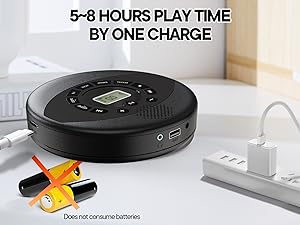
Image 3.2: Anti-shock protection for active use.
4. Техникалык тейлөө
4.1 Cleaning the CD Player
- Use a soft, dry cloth to clean the exterior of the player.
- For the lens, use a specialized CD lens cleaning kit. Do not touch the lens directly.
- Абразивдүү тазалагычтарды же эриткичтерди колдонуудан алыс болуңуз.
4.2 Батареяга кам көрүү
- Батареянын иштөө мөөнөтүн узартуу үчүн, бат-баттан батарейканы толук зарядсыздандырбаңыз.
- Аппаратты узак убакыт бою колдонбогондо салкын, кургак жерде сактаңыз.
- Charge the device at least once every three months if unused to prevent deep discharge.
4.3 CDге кам көрүү
- Манжа издерин жана чийиктерди болтурбоо үчүн CDлерди четтеринен кармаңыз.
- CD дисктерди жумшак, мамыксыз чүпүрөк менен ортосунан сыртка карай сүртүп тазалаңыз.
- Чаңдан жана бузулуудан коргоо үчүн компакт-дисктерди өз кутуларында сактаңыз.
5. Кыйынчылыктарды
| Көйгөй | Мүмкүн себеп | Чечим |
|---|---|---|
| Ойноткуч күйбөйт. | Батарея түгөндү. Кубат өчүргүч өчүк. | Charge the battery. Ensure the power switch is in the 'ON' position. |
| Үн жок. | Volume is too low. Headphones/AUX cable not connected properly. CD/USB not playing. | Increase volume. Check connections. Ensure CD/USB is playing and not paused. |
| CD ойнотулбай жатат же ойнотулбай жатат. | CD is dirty or scratched. CD is not properly seated. Incorrect CD format. | Clean the CD. Re-seat the CD. Ensure the CD format (CD, CD-R, CD-RW, MP3, WMA) is supported. |
| USB ойнотуу иштебей жатат. | USB drive not properly inserted. Incompatible file формат. | Ensure USB drive is fully inserted. Check if files are MP3 or WMA format. |
6. Продукттун спецификациялары
| Өзгөчөлүк | Деталь |
|---|---|
| Модель номери | PM11-Black |
| Продукциянын өлчөмдөрү | 5.7 x 5.7 x 1.2 дюйм |
| Элемент Салмагы | 1.01 фунт |
| Батарея түрү | 1 Литий Полимердик батарейка (кошулган) |
| Байланыш | Көмөкчү, USB |
| Өзгөчөлүктөр | Anti-Skip Protection, Portable, Programmable Memory, Rechargeable |
| Камтылган компоненттер | CD player X 1, Earbuds X 1, Audio cable X 1, Charging cable X 1, Pouch X 1 |
| Колдоого алынган форматтар | CD, CD-R, CD-RW, MP3, WMA |
7. Кепилдик жана колдоо
For warranty information and customer support, please contact Kuephom directly. Details regarding product warranty periods and service procedures are typically provided with your purchase documentation or can be found on the official Kuephom webсайт.
If you encounter any issues not covered in this manual, please reach out to Kuephom customer service for assistance.


