1. Киришүү
This manual provides essential information for the safe and efficient operation of your Lubluelu SG60 Robot Vacuum Cleaner and Mop. Please read it thoroughly before using the device and retain it for future reference.
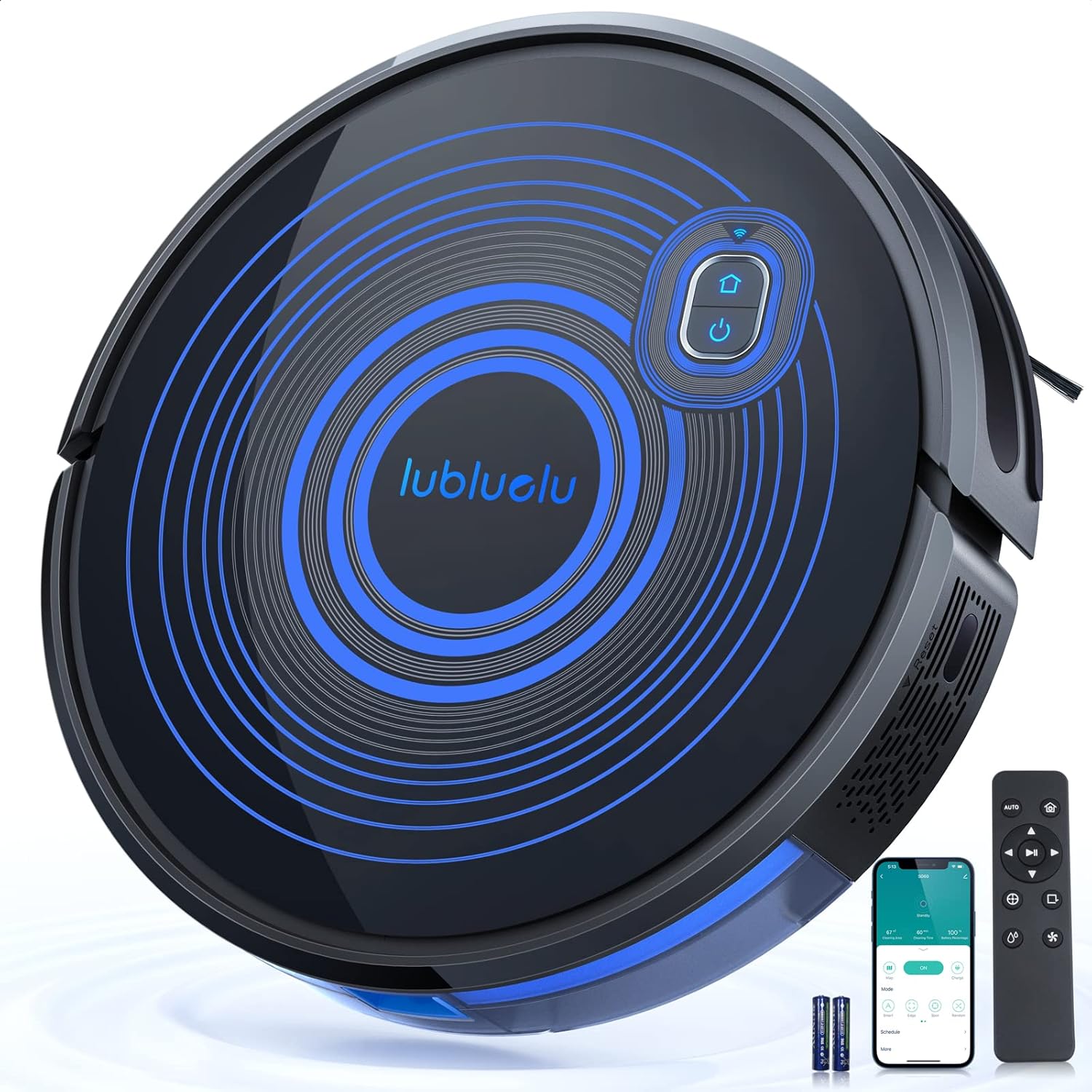
Image: The Lubluelu SG60 Robot Vacuum Cleaner and Mop, showcasing its sleek design, along with its charging dock, remote control, and a smartphone displaying the control app.
2. Коопсуздук нускамалары
Аппаратка зыян келтирбөө үчүн ар дайым төмөнкү коопсуздук чараларын сактаңыз:
- Балдарга же үй жаныбарларына роботту иштетүүгө уруксат бербеңиз.
- Кубаттоочу док дубалга тегиз, тегиз жерде жайгашканын текшериңиз.
- Keep the robot away from water and wet surfaces.
- Do not use the robot to clean liquids, burning objects, or sharp objects.
- Оптималдуу иштеши үчүн щеткаларды жана сенсорлорду дайыма тазалаңыз.
- Unplug the robot from the power outlet before cleaning or performing maintenance.
3. Пакеттин мазмуну
Пакетте бардык компоненттер бар экенин текшериңиз:
- Lubluelu SG60 Robot Vacuum Cleaner and Mop
- Заряддоо док
- Кубаттуу адаптер
- Алыстан башкаруу (батареялар менен)
- Каптал щеткалары (2 жуп)
- Негизги щетка
- Таштанды челек (600 мл сыйымдуулукта)
- Швабра менен суу куюлган бак
- Жогорку натыйжалуу чыпка
- Boundary Strips (2m)
- User Manual


Image: Various components included with the Lubluelu SG60, such as the robot itself, the dustbin/water tank, side brushes, filter, and main brush.
4. Продукциянын схемасы жана компоненттери
Familiarize yourself with the main parts of your robot vacuum.

Сүрөт: Жогорку view of the Lubluelu SG60 robot vacuum, highlighting the power button and Wi-Fi indicator light.

Сүрөт: Төмөнкү view of the Lubluelu SG60 robot vacuum, illustrating the main brush, side brushes, driving wheels, and various sensors.
5. Орнотуу
5.1 Preparing the Robot
- Remove all protective films and packaging materials from the robot and charging dock.
- Каптал щеткаларды орнотуңуз, аларды тийиштүү мамыларга алар ордуна чыкмайынча басып коюңуз.
- Ensure the dustbin and filter are correctly installed inside the robot.
5.2 Кубаттоочу докту орнотуу
- Place the charging dock against a wall in an open area, ensuring there are no obstacles within 1 meter (3 feet) to the front and 0.5 meters (1.5 feet) to the sides.
- Кубат адаптерин кубаттоочу докко туташтырыңыз жана аны розеткага сайыңыз.
- Кубаттоочу доктогу кубат индикатору күйүп турганын текшериңиз.

Image: The robot vacuum automatically returning to its charging dock, indicating low battery.
5.3 Алгачкы заряддоо
Place the robot onto the charging dock, ensuring the charging contacts align. The robot will automatically begin charging. For first-time use, fully charge the robot for at least 6 hours.
5.4 App Connection (Smart Life App)
- Смартфонуңуздун колдонмолор дүкөнүнөн "Smart Life" тиркемесин жүктөп алыңыз.
- Smart Life аккаунтуңузга катталыңыз же кириңиз.
- Add the device by following the in-app instructions. Ensure your phone is connected to a 2.4GHz Wi-Fi network.
- The robot's Wi-Fi indicator will flash during pairing and become solid once connected.

Image: A smartphone screen showing the Smart Life app interface, demonstrating remote control capabilities for the robot vacuum.
6. Иштөө нускамалары
6.1 Тазалоону баштоо/тындыруу
Press the power button on the robot or the "Clean" button on the remote control/app to start or pause cleaning.
6.2 Тазалоо режимдери
The Lubluelu SG60 offers multiple cleaning modes:
- Автоматтык тазалоо: Робот акылдуу түрдө багыт алып, бүтүндөй полду тазалайт.
- Zigzag Clean: For efficient cleaning of large, open areas.
- Edge Clean: Робот дубалдарды жана эмеректердин четтерин тазалайт.
- Таза так: Concentrated cleaning in a specific dirty area.
- Тынч режим: Lower suction for quieter operation (600Pa).
- Стандарттык режим: Balanced suction for daily cleaning (1500Pa).
- Күчтүү режим: Maximum suction for deep cleaning (2700Pa).

Image: Visual representation of the different cleaning modes available, including Zigzag, Edge, Spot, and Auto Clean, along with suction power levels.
6.3 Чыпкалоо функциясы
Чыпкалоо функциясын колдонуу үчүн:
- Fill the water tank with clean water. Do not use cleaning solutions that may clog the nozzle.
- Швабра кездемесин суу сактагычка бекем бекитиңиз.
- Insert the filled water tank into the robot until it clicks into place.
- The robot will automatically switch to mopping mode when the water tank is detected.

Image: The combined dustbin and water tank module, showing how it integrates into the robot for both vacuuming and mopping functions.
6.4 Boundary Strips
Use the included boundary strips to create virtual walls that the robot will not cross. Place them flat on the floor in areas you wish to restrict.

Image: The robot vacuum approaching a boundary strip, demonstrating its ability to detect and avoid restricted areas.
6.5 Башкаруу параметрлери
- Колдонмону башкаруу: Use the Smart Life app for full control, including scheduling, mode selection, and real-time mapping.
- Алыстан башкаруу: Use the provided remote for basic functions like starting, pausing, returning to dock, and changing modes.
- Үн менен башкаруу: Handsfree иштөө үчүн Amazon Alexa же Google Assistant менен интеграцияланыңыз.
- Сенсордук башкаруу: The main button on the robot allows for starting/pausing and returning to the charging dock.

Image: A composite image illustrating the multiple ways to control the Lubluelu SG60: via the mobile app, voice commands through smart assistants, the included remote control, and direct touch on the robot's button.
7. Техникалык тейлөө
Үзгүлтүксүз техникалык тейлөө оптималдуу иштешин камсыздайт жана робот чаң соргучуңуздун иштөө мөөнөтүн узартат.
7.1 Чаң челек жана чыпка
- Таштанды кутусун бошотуу: Press the release button to remove the dustbin. Open the dustbin cover and empty its contents after each cleaning cycle.
- Фильтрди тазалоо: Tap the filter to remove loose dirt. The filter can be rinsed with water, but ensure it is completely dry before re-installing. Replace the filter every 3-6 months depending on usage.

Сүрөт: жарылган view diagram illustrating the three-layer filtration system within the dustbin, designed to capture fine dust and allergens.
7.2 кисти
- Негизги щетка: Remove the main brush cover and lift out the brush. Use the cleaning tool to remove hair and debris tangled around the brush. Re-install the brush, ensuring it clicks into place. Clean weekly.
- Каптал щеткалар: Pull the side brushes upwards to remove them. Clean any hair or debris. If brushes are worn or damaged, replace them. Clean monthly or as needed.

Image: A comparison showing the V-shape roller brush system on the left, indicating 100% suction power, versus a brushless system on the right, indicating only 30% suction power, highlighting the efficiency of the SG60's brush design.
7.3 Сенсорлор жана заряддоо контакттары
Wipe all sensors (cliff sensors, wall sensor) and charging contacts on both the robot and the charging dock with a clean, dry cloth. Dirty sensors can affect navigation and charging.

Image: The robot vacuum detecting a drop-off, illustrating its anti-drop sensor functionality.
8. Кыйынчылыктарды
| Көйгөй | Мүмкүн себеп | Чечим |
|---|---|---|
| Робот күйбөйт. | Батареянын аздыгы; Кубат өчүрүү. | Роботту кубаттаңыз; Кубат которгучу күйүк экенин текшериңиз. |
| Робот заряддай албайт. | Заряддоо контакттары кир; Заряддоочу док-станция кубатталбайт. | Clean charging contacts; Ensure charging dock is plugged in. |
| Соруу күчү начар. | таштанды челек толгон; Фильтр тыгылып калган; Негизги щетка чаташып калган. | бош таштанды челек; Чыпканы тазалоо/алмаштыруу; Таза негизги щетка. |
| Робот бат-баттан тыгылып калат. | Too many obstacles; Dirty sensors. | Таза тоскоолдуктар; Таза сенсорлор. |
| Wi-Fi/Колдонмого туташуу мүмкүн эмес. | Incorrect Wi-Fi band (only 2.4GHz supported); Incorrect password; Robot too far from router. | Ensure 2.4GHz network; Re-enter password; Move robot closer to router. |
9. Техникалык шарттар
- Модел: SG60
- Бренд: Лублулу
- Соруу күчү: 3500Па чейин
- Таштанды урнасынын сыйымдуулугу: 600мл
- Ызы-чуу деңгээли: 50 дБ
- Батарея сыйымдуулугу: 2600mAh
- Иштөө убактысы: Up to 130 minutes (Quiet mode)
- Өлчөмдөрү: 30.5L x 30.5W x 7.6H см
- Салмагы: 4.54 кг
- Навигация: LIDAR Laser D-ToF
- Контролдоо: App (Smart Life), Remote Control, Voice Control (Alexa, Google Assistant), Touch Button
10. Кепилдик жана колдоо
Lubluelu products come with a standard manufacturer's warranty. For specific warranty terms and conditions, please refer to the warranty card included in your package or visit the official Lubluelu webсайт.
For technical support, troubleshooting assistance, or spare parts, please contact Lubluelu customer service through the contact information provided in your product documentation or on their official webсайт.
Official Lubluelu Store: Visit Lubluelu Store on Amazon


