1. Киришүү
The LDNIO 65W GaN USB C Charger is a versatile and compact power adapter designed for fast charging multiple devices simultaneously. Utilizing advanced Gallium Nitride (GaN) technology, this charger offers high power output in a smaller form factor, ensuring efficient and safe charging for your laptops, tablets, and smartphones.
It features one Power Delivery (PD) USB-C port and two Quick Charge (QC) USB-A ports, allowing intelligent power distribution for up to three devices at once. The removable plug design enhances portability, making it an ideal companion for home, office, and travel.

Figure 1.1: The LDNIO 65W GaN Charger efficiently charging a MacBook Pro and an iPhone 13 Pro Max, demonstrating its high-speed capabilities for multiple devices.
2. Орнотуу
Follow these steps to set up your LDNIO 65W GaN USB C Charger:
- Attach the Removable Plug: The charger comes with a removable US plug. Align the plug with the corresponding slot on the charger body and slide it firmly until it clicks into place. Ensure it is securely attached.
- Розеткага туташуу: Plug the assembled charger into a standard 110V wall outlet. The charger is designed to be compact and should not obstruct adjacent outlets.
- Жабдууларды даярдоо: Ensure your devices (laptops, tablets, smartphones, etc.) are ready for charging and have the appropriate USB cables.
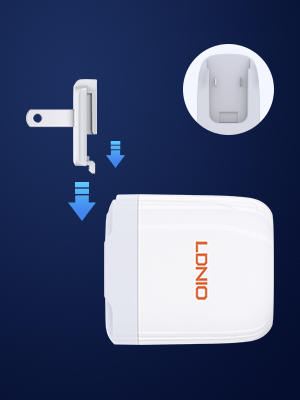
Figure 2.1: The LDNIO charger featuring a removable US plug, highlighting its modular design for easy attachment and detachment.
3. Иштөө нускамалары
The LDNIO 65W GaN Charger intelligently distributes power across its ports to optimize charging speed for connected devices.
- Жалгыз порт кубаттоо:
- USB-C1 (PD): Up to 65W Max for laptops (e.g., MacBook Air 45W), tablets, or fast-charging smartphones (e.g., iPhone 20W).
- USB-A1 (QC): Up to 18W Max for Quick Charge compatible devices.
- USB-A2 (QC): Up to 18W Max for Quick Charge compatible devices.
- Multi-Port Charging:
When multiple devices are connected, the charger dynamically adjusts power output. For exampле:
- USB-C1 + USB-A1: USB-C1 provides 45W Max, USB-A1 provides 18W Max.
- USB-C1 + USB-A2: USB-C1 provides 45W Max, USB-A2 provides 18W Max.
- USB-A1 + USB-A2: Both USB-A ports share 18W total.
- USB-C1 + USB-A1 + USB-A2: USB-C1 provides 45W Max, while USB-A1 and USB-A2 share 20W total.
- Жалпы шайкештик: This charger supports various fast charging protocols including USB PD 3.0/2.0, QC 3.0/2.0, PPS, AFC, and FCP, ensuring broad compatibility with virtually all USB-powered devices.

Figure 3.1: Dynamic power adjustment of the LDNIO 65W charger, showing optimized power distribution for various charging configurations.

Figure 3.2: The charger's broad compatibility with various devices, from laptops to smartwatches, and their respective charging wattages.
Video 3.1: An official product video from the seller demonstrating the LDNIO 65W USB C Charger's functionality with an iPhone and MacBook, highlighting its multi-device charging capability.
4. Техникалык тейлөө
To ensure the longevity and optimal performance of your LDNIO 65W GaN USB C Charger, follow these maintenance guidelines:
- Тазалоо: Disconnect the charger from the power outlet and all devices before cleaning. Use a soft, dry cloth to wipe the exterior. Avoid using liquid cleaners, aerosols, or abrasive materials, as these can damage the charger.
- Сактагыч: Store the charger in a cool, dry place away from direct sunlight, extreme temperatures, and humidity. When traveling, detach the removable plug to protect the prongs and prevent scratching other items.
- Коопсуздук чаралары: This charger is UL certified, indicating it meets high safety standards. However, always ensure proper ventilation during use and avoid covering the charger. Do not attempt to disassemble or repair the charger yourself. If any damage occurs, discontinue use and contact customer support.
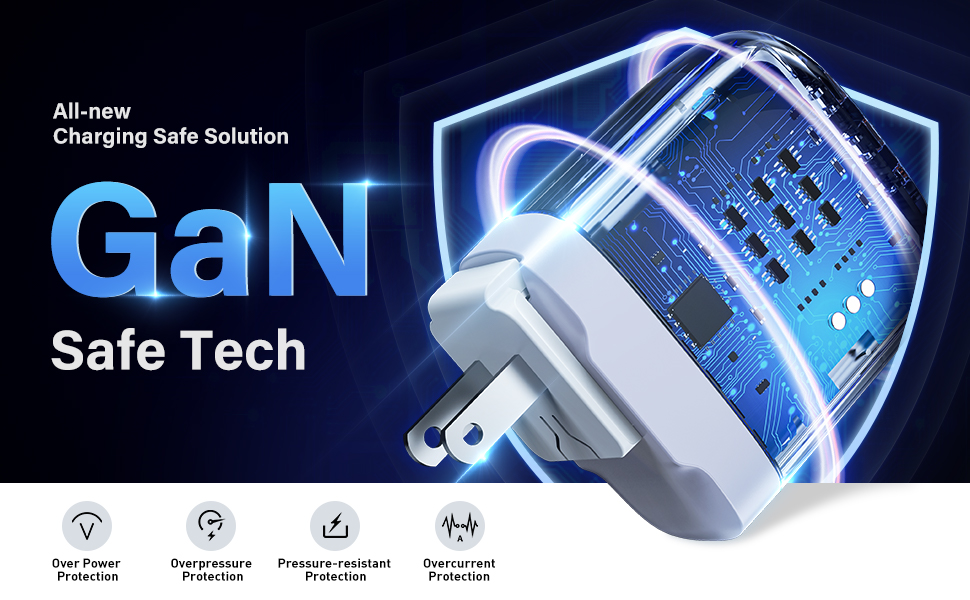
Figure 4.1: The internal design of the LDNIO GaN charger, showcasing its GaN Safe Tech which provides multiple layers of protection for secure operation.
5. Кыйынчылыктарды
If you encounter any issues with your LDNIO 65W GaN USB C Charger, refer to the following common troubleshooting tips:
- Түзмөк кубатталбай жатат:
- Заряддоочу розеткага бекем сайылганын текшериңиз.
- Кубаттоочу кабелдин кубаттагычка да, түзмөгүңүзгө да туура туташканын текшериңиз.
- Кабель көйгөйлөрүн жокко чыгаруу үчүн башка кубаттоочу кабелди колдонуп көрүңүз.
- Заряддоочу түзүлүштүн иштешин ырастоо үчүн заряддагычты башка аспап менен сынап көрүңүз.
- Check if the removable plug is correctly and firmly attached to the charger body.
- Жай кубаттоо:
- Confirm that your device supports fast charging protocols (PD, QC, PPS) and that you are using a compatible cable.
- If multiple devices are connected, the power output is shared. Disconnecting other devices may increase charging speed for a single device.
- Ensure the USB-C port is used for high-power devices like laptops, as it provides the maximum 65W output.
- Заряддагычтын ысып кетиши:
- It is normal for the charger to feel warm during operation, especially under heavy load.
- If it becomes excessively hot, disconnect it immediately. Ensure it is used in a well-ventilated area and not covered.
- Avoid charging in direct sunlight or enclosed spaces.
Бул кадамдарды жасагандан кийин маселе чечилбесе, кошумча жардам алуу үчүн кардарларды колдоо бөлүмүнө кайрылыңыз.
6. Техникалык шарттар
| Өзгөчөлүк | Деталь |
|---|---|
| Бренд | ЛДНИО |
| Модель номери | A3511Q |
| Пакеттин өлчөмдөрү | 5.59 x 3.19 x 1.65 дюйм |
| Элемент Салмагы | 5.6 унция |
| Байланыш технологиясы | USB |
| Туташтыргыч түрү | USB түрү C |
| Киргизүү көлөмүtage | 110 вольт |
| Өзгөчө өзгөчөлүк | Тез заряддоо |
| Түс | Ак |
| Өндүрүүчү | GuangDong LDNIO Electronic Technology Co.,Ltd |
| Биринчи жеткиликтүү күн | 7-июнь, 2022-жыл |
Кутуда эмне бар:
- 1 * LDNIO 65W USB C Charger
- 1 * Removable Plug (US)
- 1 * Type-C to Type-C Charging Cable
7. Кепилдик жана колдоо
The LDNIO 65W GaN USB C Charger is UL certified, ensuring adherence to high safety and quality standards. For any product-related inquiries, technical support, or warranty claims, please refer to the official LDNIO brand store or contact their customer service directly.


