1. Киришүү
Welcome to the user manual for your new Avtex W195TS Smart TV. This television is specifically designed for mobile living, offering versatile power options (12V, 24V, and 240V) and a range of smart features, including Wi-Fi, Bluetooth, and an integrated Freesat satellite decoder. This manual provides essential information for setting up, operating, maintaining, and troubleshooting your device to ensure optimal performance and enjoyment.
2. Коопсуздук маалыматы
Телевизорду колдонуудан мурун бардык коопсуздук нускамаларын кунт коюп окуп чыгыңыз. Бул колдонмону келечекте маалымат алуу үчүн сактаңыз.
- Электр камсыздоо: туура томду камсыз кылууtage is used (12V, 24V DC or 240V AC). Do not overload power outlets.
- Вентиляция: Вентиляция тешиктерин жаап албаңыз. Тийиштүү аба агымы үчүн сыналгынын айланасында жетиштүү орун калтырыңыз.
- Суу жана ным: Телевизорду жамгырга же нымга тийгизбеңиз. Сыналгыга суюктук толтурулган нерселерди койбоңуз.
- Тазалоо: Тазалоодон мурун сыналгыдан ажыратыңыз. Жумшак, кургак чүпүрөктү колдонуңуз. Суюк тазалагычтарды же аэрозоль тазалагычтарды колдонбоңуз.
- Жайгашкан жери: Place the TV on a stable, flat surface or mount securely to a wall/bracket. Avoid direct sunlight or heat sources.
- Тейлөө: Бул продуктту өзүңүз тейлөөгө аракет кылбаңыз. Бардык тейлөөнү квалификациялуу тейлөө кызматкерлерине тапшырыңыз.
3. Пакеттин мазмуну
Before setup, please check that all items are present in the box:
- Avtex W195TS Smart TV
- Батареялар менен алыстан башкаруу
- 12V/24V DC Power кабели
- 240V AC кубат адаптери
- Стол стенди (эгер бар болсо)
- Колдонуучунун Колдонмосу (бул документ)
4. Продукт бүтүп калдыview
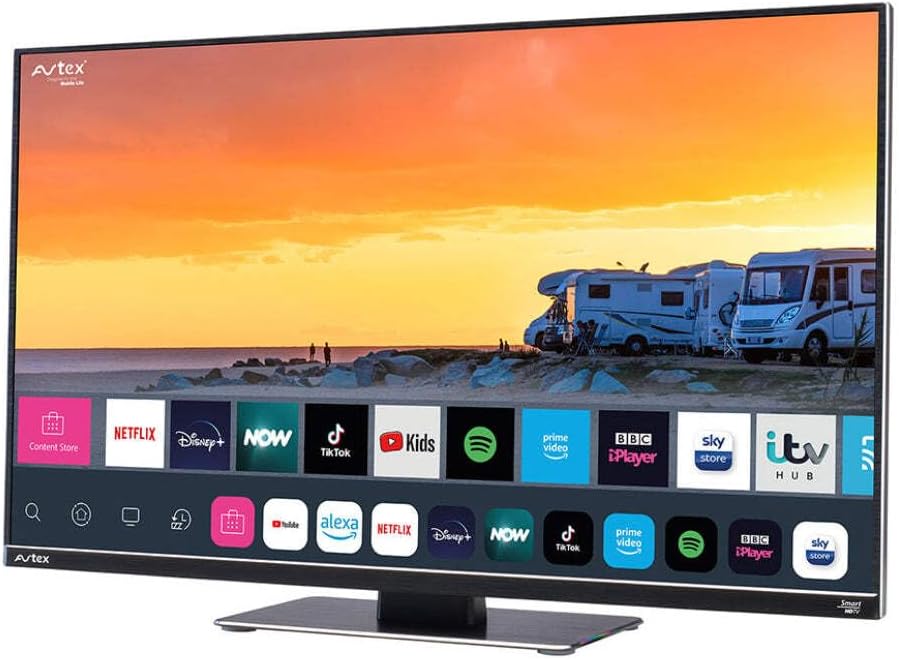
Figure 4.1: Avtex W195TS Smart TV Front View
This image shows the Avtex W195TS Smart TV from a slight angle, highlighting its slim design and the vibrant display. The screen shows a user interface with icons for popular streaming services like Netflix, Disney+, Now, TikTok, Kids, Spotify, Prime Video, BBC iPlayer, Sky Store, and ITV Hub. The background on the screen depicts a scenic view of motorhomes parked near a beach at sunset. The Avtex logo is visible on the top left and bottom left of the TV frame.
4.1. Порттар жана байланыштар
- HDMI порттору: For connecting external devices like Blu-ray players, game consoles, or set-top boxes.
- USB порттору (2): For media playback from USB drives or connecting USB accessories.
- Антенна киргизүү: For connecting a terrestrial TV antenna.
- Спутник киргизүү: For connecting a satellite dish for Freesat or other satellite services.
- Туруктуу кубат киргизүү: For 12V/24V DC power connection.
- AC кубаттуулугун киргизүү: For 240V AC power connection via adapter.
- Ethernet порту: Зымдуу тармак туташуусу үчүн.
- Аудио чыгаруу: Тышкы аудио тутумдарды же кулакчындарды туташтыруу үчүн.
5. Орнотуу
5.1. Тирөөчтү орнотуу (милдеттүү эмес)
- Экранга зыян келтирбөө үчүн телевизорду кылдаттык менен жумшак, таза бетке ылдый караңыз.
- Стендди телевизордун астындагы монтаждоо тешиктери менен тууралаңыз.
- Берилген бурамалар менен стендди бекитиңиз.
5.2. Power Connection
The Avtex W195TS supports multiple power inputs:
- 12V/24V DC: Connect the supplied 12V/24V DC power cable to the DC input on the TV and to your vehicle's 12V or 24V power outlet.
- 240V AC: Connect the supplied 240V AC power adapter to the AC input on the TV, then plug the adapter into a standard 240V AC wall socket.
Эскертүү: Do not connect both DC and AC power simultaneously.
5.3. Antenna/Satellite Connection
- Terrestrial TV: Connect your aerial cable to the 'ANTENNA IN' port.
- Satellite TV (Freesat): Connect your satellite dish cable to the 'SATELLITE IN' port.
5.4. Алгачкы күйгүзүү жана биринчи жолу орнотуу
- Connect the TV to power and press the power button on the remote control or TV.
- The First-Time Setup Wizard will appear. Follow the on-screen prompts to select your language, country, and time zone.
- Perform an automatic channel scan for both terrestrial and satellite channels.
- Тармактын атын тандап, сырсөздү киргизүү менен Wi-Fi тармагыңызга туташыңыз.
6. Иштөө
6.1. Алыстан башкаруу функциялары
Familiarize yourself with the remote control buttons for easy navigation and control of your TV's features.
- Кубат баскычы: Телевизорду күйгүзөт/өчөт.
- Булак баскычы: Selects input sources (HDMI, USB, TV, Satellite).
- Көлөм +/-: Үн деңгээлин тууралайт.
- Канал +/-: Телеканалдарды өзгөртөт.
- Чабыттоо баскычтары (өйдө/төмөн/сол/оң/ОК): Менюда навигация жана тандоо үчүн.
- Smart Hub/Home Button: Smart TV интерфейсине жетет.
- Колдонмо баскычтары: Dedicated buttons for popular streaming apps (if available).
6.2. Smart TV өзгөчөлүктөрү
Your Avtex W195TS is equipped with smart TV capabilities:
- App Store: Download and install various applications for streaming, news, and entertainment.
- Агым кызматтары: Access pre-installed or downloaded apps like Netflix, Disney+, Prime Video, BBC iPlayer, etc. (subscription may be required).
- Web Браузер: Интернетти түздөн-түз сыналгыдан карап чыгыңыз.
- Экранды чагылдыруу: Connect your smartphone or tablet to display content on the TV screen (compatibility may vary).
6.3. Bluetooth байланышы
Pair Bluetooth devices such as headphones or external speakers for enhanced audio experience.
- Сыналгынын орнотуулар менюсуна өтүңүз.
- Select 'Bluetooth' or 'Connected Devices'.
- Enable Bluetooth and put your device into pairing mode.
- Жупташтыруу үчүн тизмеден түзмөгүңүздү тандаңыз.
6.4. USB аркылуу медиа ойнотуу
Insert a USB drive into one of the USB ports to view сүрөттөрдү тартыңыз, видеолорду ойнотуңуз же музыка угуңуз.
- The TV will usually prompt you to open the media player.
- Сиздин аркылуу чабыттоо files алыстан башкаруу пультун колдонуп жатат.
7. Техникалык тейлөө
7.1. Телевизорду тазалоо
- Экран: Экранды жумшак, түксүз чүпүрөк менен акырын сүртүңүз. өжөр белгилери үчүн, бир аз гampкездемени суу же экранга арналган тазалоочу эритме менен сүртүңүз (экранга түз чачпаңыз).
- Casing: Телевизорду сүртүү үчүн жумшак, кургак чүпүрөктү колдонуңуз casinг. Абразивдүү тазалагычтардан же эриткичтерден качыңыз.
7.2. Программалык камсыздоону жаңыртуу
Periodically check for software updates to ensure your TV has the latest features and bug fixes. Updates can usually be found in the TV's settings menu under 'System' or 'Software Update'.
8. Кыйынчылыктарды
If you encounter issues with your Avtex W195TS, refer to the following common problems and solutions:
| Көйгөй | Мүмкүн себеп | Чечим |
|---|---|---|
| Күч жок | Электр кабели туташтырылган эмес; розеткадан кубат жок. | Check power cable connection; test outlet with another device; ensure correct voltage (12V/24V/240V). |
| Сүрөт жок, бирок Үн бар | Туура эмес киргизүү булагы тандалды; бузулган кабель. | Press the 'Source' button on the remote to select the correct input; check HDMI/antenna cables. |
| Үн жок, бирок Сүрөт бар | Үндүн үнү өчүрүлгөн же өтө төмөн; тышкы аудио системасынын маселеси. | Unmute volume or increase level; check connections to external audio devices. |
| Wi-Fi'га туташпай жатат | Туура эмес сырсөз; роутер маселеси; Телевизор роутерден өтө алыс. | Re-enter Wi-Fi password; restart router; move TV closer to router or use an extender. |
| Пульт иштебейт | Батареялар түгөнүп калган; тоскоолдук; жупташтыруу көйгөйү. | Replace batteries; remove obstructions; re-pair remote if it's a Bluetooth remote. |
9. Техникалык шарттар
| Өзгөчөлүк | Спецификация |
|---|---|
| Бренд | Avtex |
| Модель номери | AVTEX W195TS |
| Screen Size | 19.5 дюйм |
| Резолюция | 1080p (Full HD) |
| Аспект катышы | 16:9 |
| Байланыш технологиясы | Bluetooth, HDMI, Wi-Fi |
| Жалпы USB порттору | 2 |
| Тtage | 12 Вольт, 24 Вольт, 240 Вольт |
| Элемент Салмагы | 2.5 килограмм |
| Модель жылы | 2018 |
10. Кепилдик жана колдоо
Your Avtex W195TS Smart TV comes with a manufacturer's warranty. Please refer to the warranty card included in your product packaging for specific terms and conditions, including warranty period and coverage details. Keep your proof of purchase for warranty claims.
For technical support, troubleshooting assistance beyond this manual, or warranty inquiries, please contact Avtex customer service through their official website or the contact information provided with your product. When contacting support, please have your model number (AVTEX W195TS) and serial number ready.


