1. Киришүү
The javiscam G106 is a compact and versatile wireless indoor security camera designed for home surveillance. It features 1080p HD video recording, AI motion detection, and infrared night vision for comprehensive monitoring. With its long-lasting battery and flexible storage options, the G106 provides reliable security for various indoor environments.

Figure 1.1: Key features of the javiscam G106 camera, including 2K UHD resolution, 2.4G WiFi connectivity, a 2800mAh battery, AI motion detection, night vision up to 5 meters, a 140-degree wide-angle lens, and support for loop recording.
2. Орнотуу колдонмосу
Follow these steps to set up your javiscam G106 camera for optimal performance.
2.1 Камераны заряддоо
Before initial use, fully charge the camera. The G106 features a 2800mAh battery, providing up to 150 days of standby battery life on a single charge, depending on usage and motion detection frequency.

Figure 2.1: The javiscam G106 camera's internal battery, emphasizing its 2800mAh capacity and extended standby time of up to 150 days.
2.2 Колдонмону орнотуу жана Wi-Fi туташуусу
The camera is controlled via a dedicated mobile application. Download the app to your smartphone (compatible with Android devices). Ensure your Wi-Fi network is 2.4G, as the camera does not support 5G Wi-Fi.
- Download and install the official javiscam app from your device's app store.
- Каттоо же өз эсебиңизге кирүү.
- Follow the in-app instructions to add your G106 camera. This typically involves scanning a QR code on the camera or manually entering its ID.
- Connect the camera to your 2.4G Wi-Fi network as prompted by the app.

Figure 2.2: The javiscam G106 camera shown alongside its mobile application interface, demonstrating real-time viewing and event logging.
2.3 Камераны орнотуу
The G106 camera is designed for indoor use and can be wall-mounted or placed on a flat surface. It comes with a versatile mount for flexible positioning.

Figure 2.3: Different installation scenarios for the javiscam G106 camera, showcasing its adaptability for various indoor placements and confirming 2.4G Wi-Fi support.
3. Иштөө нускамалары
This section details the various functions and settings of your javiscam G106 camera.
3.1 Notification Management
You can easily enable or disable motion detection notifications directly from the app's device list. Look for the bell icon next to your camera's live view.
3.2 Cloud Storage Free Trial
New customers are eligible for a 30-day free trial of cloud storage. To activate, navigate to the camera's settings within the app, select 'Cloud service', and then click 'Free trial'.
3.3 Түнкү көрүү режими
The 'Scene mode' setting in the app allows you to control the camera's night vision. 'Normal' enables adaptive mode, where night vision triggers automatically based on light conditions. 'Night vision mode' forces the camera to always record with infrared.

Figure 3.1: Visual representation of the camera's night vision capability, showing clear images in low-light conditions using 2MP infrared technology.
3.4 Motion Detection & Sensitivity
Adjust the 'Detection sensitivity' in the app settings to turn motion detection on or off, and to set its sensitivity level. Higher sensitivity records more motions but consumes more power.
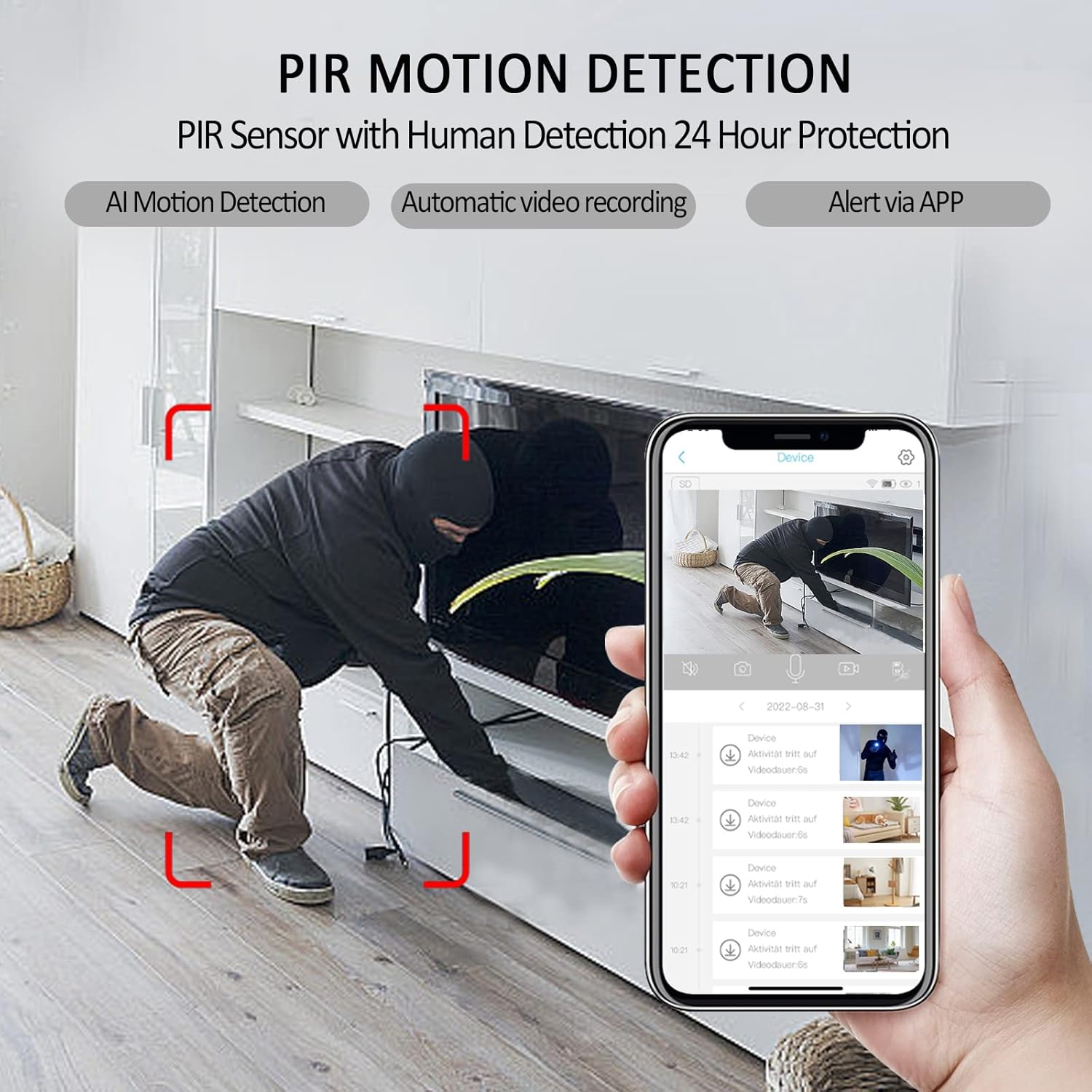
Figure 3.2: The camera's PIR motion detection feature, illustrating how it detects human movement and triggers automatic video recording and app alerts.
3.5 Motion Detection Schedule
Under 'Arming setting', you can set a daily schedule for when motion detection should be active. This allows you to customize monitoring times to suit your needs.
3.6 Motion Detection Video Length
The 'Sleep delay' setting controls the length of each recorded video clip triggered by motion. The default is a minimal 5 seconds. You can extend this duration using the provided options. If set to 'Always', the camera will continue recording until manually stopped or power is off.

Figure 3.3: Advanced security features accessible via the mobile app, including family sharing, continuous loop recording, full-length video capture, and customizable motion detection schedules.
3.7 Wide Angle View
The G106 camera features a 140-degree wide-angle lens, providing a more extensive surveillance area and allowing you to see more detail within the room.

Figure 3.4: A visual comparison highlighting the superior coverage and detail provided by the camera's 1080P Full HD and 140-degree wide-angle lens compared to a standard 720P camera.
3.8 Important Settings Video Guide
For a visual guide on important settings, including notification control, cloud storage activation, night vision, motion detection sensitivity, scheduling, and video length, please refer to the official video below.
Video 3.1: Official guide demonstrating important settings for the javiscam G106 camera, including notification on/off, cloud storage free trial activation, night vision mode, motion detection sensitivity, arming schedule, and sleep delay for video length.
4. Техникалык тейлөө
To ensure the longevity and optimal performance of your javiscam G106 camera, follow these maintenance guidelines:
- Тазалоо: Камера линзасын жана корпусун тазалоо үчүн жумшак, кургак чүпүрөктү колдонуңуз. Абразивдүү тазалоочу каражаттарды же эриткичтерди колдонбоңуз.
- Батареяга кам көрүү: Recharge the camera regularly, especially if it's not in continuous use, to maintain battery health. Avoid extreme temperatures.
- Программалык камсыздоонун жаңыртуулары: Periodically check the app for available firmware updates to ensure your camera has the latest features and security enhancements.
5. Кыйынчылыктарды
If you encounter issues with your javiscam G106 camera, refer to the following common problems and solutions:
- Камера оффлайн:
- Check your Wi-Fi connection. Ensure it's a stable 2.4G network.
- Verify the camera's battery level.
- Restart the camera and your Wi-Fi router. - Кыймылды аныктоо эскертүүлөрү жок:
- Ensure notifications are enabled in the app (check the bell icon).
- Adjust 'Detection sensitivity' to a higher level.
- Verify the 'Arming setting' schedule is correctly configured. - Видеонун сапаты начар:
- Check your Wi-Fi signal strength at the camera's location.
- Камера объективинин таза жана эч кандай тоскоолдуктар жок экендигин текшериңиз. - Батарея бат эле түгөнөт:
- Reduce motion detection sensitivity or frequency.
- Shorten the 'Sleep delay' video length.
- Ensure the camera is not in an area with constant motion, triggering frequent recordings.
Кошумча жардам алуу үчүн кардарларды колдоо бөлүмүнө кайрылыңыз.
6. Техникалык шарттар
| Өзгөчөлүк | Деталь |
|---|---|
| Бренд | javiscam |
| Модель номери | G106 |
| Ички/тышкы колдонуу | Indoor |
| Байланыш технологиясы | Wireless (Wi-Fi 2.4G) |
| Видео тартуунун резолюциясы | 2K (1080p HD) |
| Frame Rate | 30 кадр/сек |
| Өзгөчөлүктөр | Кыймыл сенсору, Түнкү көрүү |
| Батареянын күчү | 2200 mAh (Note: Product images indicate 2800mAh, using provided spec) |
| Башкаруу ыкмасы | Колдонмо |
| Монтаж түрү | Дубалга орнотуу |
| Эл аралык коргоо рейтинги | IP65 |
| Элемент Салмагы | 10.2 унция |
| Пакеттин өлчөмдөрү | 5.59 x 3.54 x 1.65 дюйм |
7. Кепилдик жана колдоо
Your javiscam G106 camera is manufactured by JAVISCAM. For any product-related inquiries, technical support, or warranty claims, please contact our customer service team.
Кардарларды тейлөө электрондук почтасы: support@javis-cam.com
Сураныч, кепилдик максаттары үчүн сатып алганыңыздын далилин сактап коюңуз.


