1. Продукт бүтүп калдыview
The javiscam Wireless Indoor Security Camera (Model B7) is a compact and versatile device designed for indoor surveillance. It features 2K enhanced clarity, 1080p effective resolution, AI motion detection, night vision, and flexible storage options, providing comprehensive monitoring for your home or office.

Image: The javiscam B7 camera, showcasing its compact size when held in hand. A smartphone screen displays a live feed, demonstrating its monitoring capabilities. Another camera unit with a stand is also visible, indicating mounting options.
Негизги өзгөчөлүктөрү:
- 2K Enhanced Clarity & 1080p Effective Resolution: Provides clear and detailed video streaming.
- Өркүндөтүлгөн түнкү көрүнүш: Жарык аз шарттарда көрүнүүнү камсыз кылат.
- Кыймылды аныктоо: Жасалма интеллект Intelligent alerts for detected movement.
- 150° кең бурчтуу объектив: Кеңири чөйрөнү сунуштайт view ар тараптуу камтуу үчүн.
- Cloud & SD Card Storage: Supports up to 128GB SD card for local storage and cloud storage options.
- Long Standby Battery Life: Up to 100 days standby with a 2800mAh rechargeable battery.
- Зымсыз туташуу: Connects via 2.4G Wi-Fi (does not support 5G Wi-Fi).

Image: A detailed diagram illustrating the multifunctionality of the javiscam B7 camera, highlighting features such as 2K resolution, 12 Megapixel image capture, night vision, motion detection, a 150-degree wide-angle lens, the ability to record while charging, loop recording, and support for up to 128GB storage.
2. Баштоо: Орнотуу
2.1 Кутуда эмне бар
- javiscam B7 Camera Body (1 unit)
- Charging Cable (not explicitly listed but implied for battery)
- Mounting Accessories (implied by "Wall Mount" and images)
- Колдонуучунун Колдонмосу (бул документ)
2.2 Камераны заряддоо
Before initial use, fully charge the camera. The camera is equipped with a 2800mAh rechargeable Lithium Polymer battery. Connect the camera to a power source using the provided charging cable. A full charge ensures optimal performance and standby time of up to 100 days.

Image: The javiscam B7 camera positioned near a large 2800mAh battery, visually representing its extended battery life and low power consumption technology.
2.3 App Installation and Account Creation
To operate the camera and access its features, you need to download the dedicated mobile application. The app is compatible with Android smartphones.
- Издөө the "javiscam" app (or specified app name in product packaging) on your smartphone's app store (Google Play Store for Android).
- Тиркемени жүктөп алып, орнотуңуз.
- Колдонмону ачып, жаңы каттоо эсебин түзүү үчүн экрандагы нускамаларды аткарыңыз же сизде мурунтан эле бар болсо кириңиз.
2.4 Wi-Fiга туташуу
The javiscam B7 camera connects to your home network via 2.4G Wi-Fi. Please note that it does not support 5G Wi-Fi networks.
- Смартфонуңуз 2.4G Wi-Fi тармагына туташып турганын текшериңиз.
- Open the javiscam app and select "Add Device" or similar option.
- Follow the in-app instructions to pair the camera with your Wi-Fi network. This typically involves scanning a QR code generated by the app with the camera, or entering your Wi-Fi credentials.
- Once connected, the camera's indicator light will change, and you will receive a confirmation in the app.

Image: A visual representation of the app and Wi-Fi connection process, showing users interacting with the javiscam app on a smartphone to access live streaming and real-time motion alerts.
2.5 Камераны орнотуу
The camera is designed for indoor use and can be wall-mounted or placed on a flat surface. Its compact dimensions (1.5 x 2 x 1.5 inches) allow for discreet placement.
- Дубалга орнотуу: Use the provided mounting accessories to securely attach the camera to a wall or ceiling. Ensure the camera has a clear line of sight to the area you wish to monitor.
- Беттик жайгаштыруу: The camera can also be placed on shelves, desks, or other flat surfaces.

Image: Various indoor mounting scenarios for the javiscam B7 camera, including ceiling, shelf, and wall placements, demonstrating its versatility. The image also reiterates support for 2.4G Wi-Fi and non-support for 5G Wi-Fi.
3. Камераны иштетүү
3.1 Live View жана Мониторинг
Once connected, you can access the live video feed from your camera anytime, anywhere, through the javiscam app. The camera provides 2K enhanced clarity for detailed viewing.
- Open the javiscam app on your smartphone.
- Select your camera from the device list to view түз агым.
- You can pan, tilt, and zoom (digital) within the app to adjust your view, though the camera itself has a fixed 150° wide-angle lens.
3.2 Кыймылды аныктоо жана эскертүүлөр
The camera features intelligent AI motion detection with a PIR sensor for human detection, providing 24-hour protection. When motion is detected, the camera can automatically record video and send alerts to your app.
- Кыймылды аныктоону иштетүү: Navigate to the camera settings within the app and ensure motion detection is enabled.
- Сезгичтикти тууралоо: You can typically adjust the motion detection sensitivity to minimize false alarms.
- Эскертмелерди алуу: When motion is detected, you will receive a push notification on your smartphone.
- Review Жазуулар: Detected motion events are recorded and can be reviewколдонмонун ойнотуу бөлүмүндө.
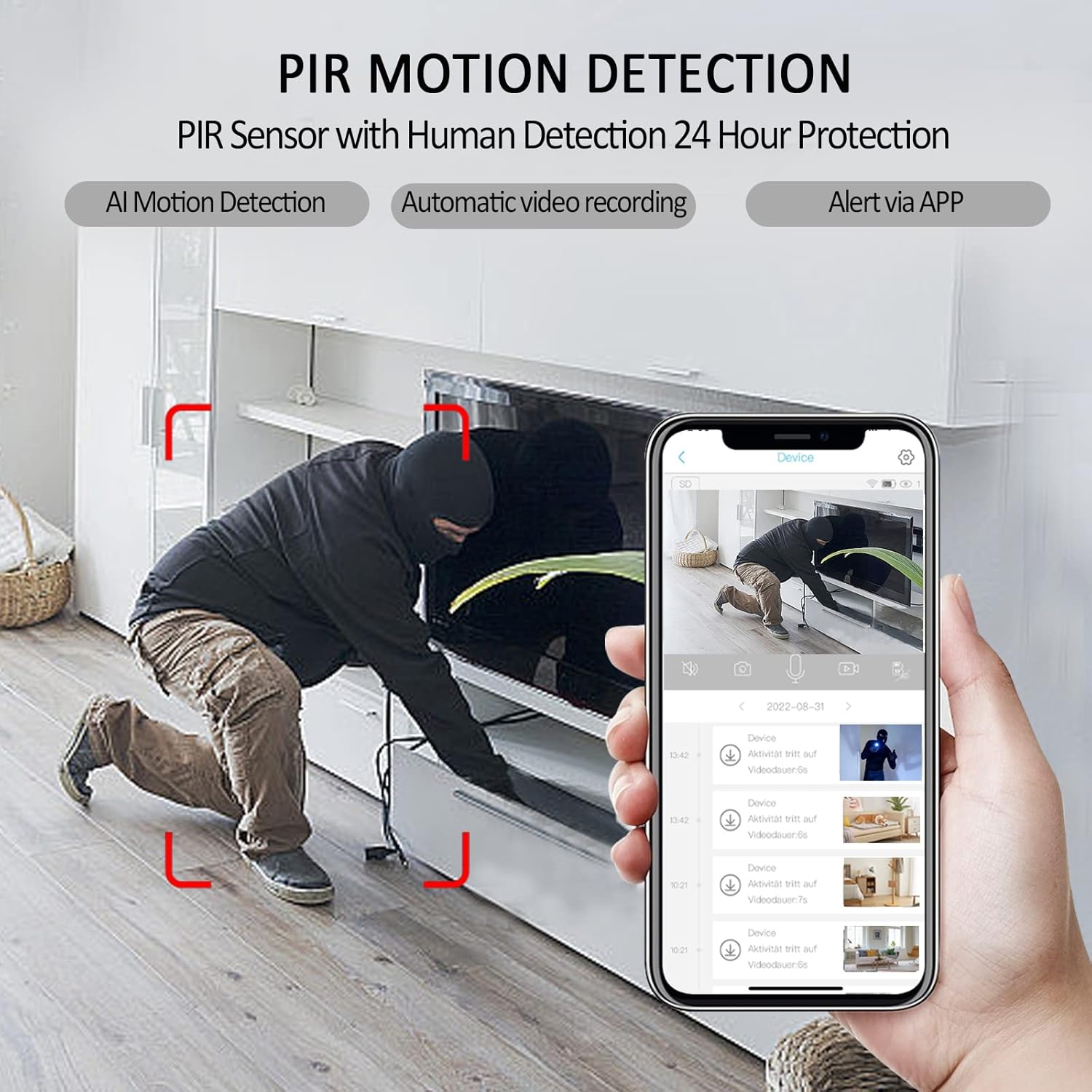
Image: A smartphone displaying the javiscam app interface, illustrating how PIR motion detection works with human detection. The image shows a person in a room with red boxes indicating detected motion, alongside a list of video recordings triggered by alerts.
3.3 Түнкү көрүнүш
The camera is equipped with advanced night vision technology, allowing it to capture clear video even in complete darkness. The night vision mode activates automatically in low-light conditions.
3.4 Видеону жазуу жана сактоо
The javiscam B7 camera supports both local storage via an SD card and cloud storage options.
- SD карта сактагычы: Insert a microSD card (up to 128GB, not included) into the camera's designated slot. The camera supports loop recording, meaning older footage will be overwritten when the card is full. Video is recorded in AVI format at 1080 pixels effective resolution and 30 frames per second.
- Булуттагы сактагыч: Refer to the app for available cloud storage plans and subscription details. Cloud storage provides off-site backup of your recordings.
- Record While Charging: The camera can continue to record video even while it is connected to a power source and charging.
3.5 Camera Sharing
You can share access to your camera's live feed and recordings with other users through the app, allowing multiple family members or authorized individuals to monitor the same location simultaneously.
- In the app, navigate to the camera settings and look for a "Share Device" or "User Management" option.
- Follow the instructions to invite other users, typically by entering their account ID or scanning a QR code.
- Shared users will be able to view the camera feed and access certain features based on the permissions you grant.
4. Техникалык тейлөө
4.1 Камераны тазалоо
To ensure optimal performance and image clarity, periodically clean the camera lens and body.
- Камеранын корпусун сүртүү үчүн жумшак, кургак, түксүз чүпүрөктү колдонуңуз.
- For the lens, use a lens cleaning cloth or a microfiber cloth specifically designed for optics. Avoid abrasive materials or harsh chemicals.
- Тазалоодон мурун камеранын өчүк экенин текшериңиз.
4.2 Батареяга кам көрүү
The camera's built-in Lithium Polymer battery is designed for long life. To maximize battery longevity:
- Avoid exposing the camera to extreme temperatures (very hot or very cold).
- If storing the camera for an extended period, charge it to about 50% before storage.
- Use only the recommended charging cable and power adapter.
5. Кыйынчылыктарды
Жалпы маселелер жана чечимдер:
| Көйгөй | Мүмкүн себеп | Чечим |
|---|---|---|
| Камера күйбөйт. | Батарея аз же заряддоо кабели туура эмес. | Ensure the camera is fully charged. Try a different charging cable and power adapter. |
| Wi-Fi'га туташпай жатат. | Incorrect Wi-Fi password, 5G Wi-Fi network, or camera too far from router. | Verify Wi-Fi password. Ensure you are connecting to a 2.4G Wi-Fi network. Move the camera closer to the router. Reset the camera and try pairing again. |
| Кыймылды аныктоо боюнча эскертүүлөр жок. | Motion detection disabled, sensitivity too low, or app notifications blocked. | Check app settings to ensure motion detection is enabled and sensitivity is appropriate. Verify app notification permissions on your smartphone. |
| Видеонун сапаты начар. | Dirty lens, poor Wi-Fi signal, or low light conditions. | Clean the camera lens. Ensure strong Wi-Fi signal. Night vision should activate automatically in low light. |
| SD card not recording. | SD card full, corrupted, or not inserted correctly. | Check SD card status in the app. Format the SD card (this will erase data). Reinsert the SD card. Ensure it's a compatible card (up to 128GB). |
6. Техникалык шарттар
| Өзгөчөлүк | Деталь |
|---|---|
| Модель номери | B7 |
| Бренд | javiscam |
| Ички/тышкы колдонуу | Indoor (Note: IP65 rating indicates some dust and water resistance, but primarily designed for indoor environments.) |
| Байланыш технологиясы | Зымсыз (Wi-Fi) |
| Wi-Fi жыштыгы | 2.4G Wi-Fi (Does not support 5G Wi-Fi) |
| Power Source | Батарея менен иштейт (1 литий полимердик батарейка камтылган) |
| Батарея сыйымдуулугу | 2800mAh (approximate, based on image) |
| Күтүү режиминдеги батареянын иштөө мөөнөтү | 100 күнгө чейин |
| Видео тартуунун резолюциясы | 1080p (Effective Pixels), 2K Enhanced Clarity |
| Frame Rate | 30 кадр/сек |
| Видео тартуу форматы | AVI |
| Field Of View | 150 градус |
| Түнкү көрүнүш | Yes (Low light technology: Night Color) |
| Motion Detection | AI Motion Detection, PIR Sensor with Human Detection (Alert Type: Motion Only) |
| Сактагыч параметрлери | Cloud Storage, MicroSD Card (up to 128GB Flash Memory Installed Size) |
| Шайкеш түзмөктөр | Smartphone (Controller Type: Android) |
| Монтаж түрү | Дубалга орнотуу |
| Өлчөмдөрү (L x W x Y) | 1.5 x 2 x 1.5 дюйм |
| Элемент Салмагы | 7.4 унция |
| Түс | Кара |
| Камтылган компоненттер | Камера корпусу |
| Эл аралык коргоо рейтинги | IP65 |
| UPC | 607535889003 |
7. Кепилдик жана колдоо
7.1 Кепилдик маалыматы
Specific warranty details for the javiscam B7 camera are not provided in this manual. Please refer to the product packaging, the official javiscam webсайтына же сатып алуу пунктуңузга кайрылып, толук кепилдик шарттары жана эрежелери менен таанышыңыз.
7.2 Кардарларды колдоо
For technical assistance, troubleshooting, or any inquiries regarding your javiscam B7 camera, please contact javiscam customer support through their official channels. You may find contact information on the javiscam brand store on Amazon or their official webсайт.
Visit the javiscam Store: https://www.amazon.com/stores/Javiscam/page/1636DFA1-B903-4A72-86FD-5075537A55E2


