Introduction
Thank you for choosing the ErGear Small Height Adjustable Electric Standing Desk. This manual provides essential information for the setup, operation, and maintenance of your new desk. Designed for comfort and productivity, this desk allows you to seamlessly switch between sitting and standing positions, promoting a healthier work environment.

Image: The ErGear Electric Standing Desk in a home office setup, showcasing its spacious black desktop and sturdy black legs.
Негизги өзгөчөлүктөрү
- Мыкты туруктуулук: Features a sturdy solid steel frame with aerospace-grade lifting column connectors, ensuring stability and security even after extensive use (tested 100,000 times).
- Жылмакай бийиктикти жөндөө: Freely select desk height from 28.35 inches to 46.46 inches. Save up to three favorite settings for quick and smooth transitions.
- Жаңыртылган мотор: Equipped with a powerful motor for efficient lifting performance and reliable long-term operation (tested 50,000 times).
- Коопсуз Төмөн VOC материалдары: АКШнын федералдык жана штаттык коопсуз аба стандарттарына жооп берген формальдегидди жана башка VOC эмиссияларын кескин азайтуучу материалдардан жасалган.

Image: A man working at the standing desk with a dog leaning on it, illustrating the desk's ultimate stability.
Орнотуу (монтаждоо нускамалары)
For detailed assembly instructions, please refer to the official Installation Manual (PDF) provided with your product. The desk is designed for straightforward assembly, typically requiring one person.
Жалпы Ассамблеянын кеңештери:
- Бардык компоненттерди таңгактан чыгарып, колдонмодогу бөлүктөрдүн тизмесине ылайык текшериңиз.
- Follow the step-by-step instructions carefully. Avoid using power drills for screwing into the desktop to prevent stripping holes; a hand screwdriver is recommended.
- Колдонуудан мурун бардык туташуулардын коопсуздугун камсыз кылыңыз.

Image: Various components of the ErGear standing desk, including the desktop pieces, legs, and control panel, ready for assembly.
Иштөө нускамалары
Сиздин ErGear Electric Туруктуу үстөлүңүз бийиктикти оңой жөнгө салуу жана эстутум орнотуулары үчүн интуитивдик башкаруу панелин камтыйт.
Бийиктигин тууралоо:
- колдонуу Өйдө (▲) жана Төмөн (▼) arrow buttons on the control panel to manually adjust the desk height. The current height is displayed on the digital screen.
- The desk adjusts smoothly and quietly, allowing for seamless transitions between sitting and standing positions.
Эстутум алдын ала орнотуулары:
- To save a preferred height, adjust the desk to your desired level, then press the 'S' баскычын басыңыз, андан кийин номерленген алдын ала коюлган баскычтардын бири (1, 2 же 3). The height will be saved to that number.
- To recall a saved height, simply press the corresponding numbered preset button (1, 2 же 3). Үстел автоматтык түрдө сакталган абалга жылат.

Сүрөт: деталдуу view of the desk's control panel, showing the digital height display and buttons for manual adjustment and memory presets.
Smart Anti-Collision System:
- The desk is equipped with a smart anti-collision system that automatically stops and slightly reverses if it encounters an obstacle during height adjustment, preventing damage to the desk or other objects.
Handy Features:
- Integrated cable access holes help manage wires for a clean and organized workspace.
- Two included storage hooks provide convenient places to hang headphones or bags.
Video: An official ErGear video demonstrating the smooth and quiet height adjustment of the standing desk, showcasing its functionality in a home office setting.
Техникалык тейлөө
To keep your ErGear Electric Standing Desk in optimal condition, follow these simple maintenance guidelines:
- Тазалоо: Үстөлдүн беттерин жарнама менен сүртүңүзamp cloth, then dry thoroughly with a clean, dry cloth. Avoid harsh chemicals or abrasive cleaners.
- Үзгүлтүксүз текшерүүлөр: Мезгил-мезгили менен бардык бурамалар менен байланыштарды текшерип туруңуз, алар бекем жана бекем бойдон калууда.
Проблемаларды чечүү
Эгерде сиз ErGear электрдик туруп иштөөчү үстөлүңүз менен кандайдыр бир көйгөйлөргө туш болсоңуз, төмөнкү кеңири таралган чечимдерди караңыз:
| Көйгөй | Мүмкүн болгон себеп / Чечим |
|---|---|
| Үстел солкулдап же туруксуз. | Ensure all assembly screws are tightened. Check that the adjustable feet are evenly balanced on the floor. |
| Motor makes humming noise or is not responding. | Unplug the desk from the power outlet for a few minutes, then plug it back in. This can reset the motor. Ensure all cables are securely connected. |
| Desktop holes are stripped during assembly. | Avoid using power drills for assembly, especially when attaching the desktop. Use a hand screwdriver and do not overtighten screws. |
| Desk does not lift or lowers with heavy items. | Ensure the total weight on the desk does not exceed the maximum weight recommendation of 176 pounds. |
Техникалык шарттар
| Спецификация | Деталь |
|---|---|
| Бренд | ErGear |
| Модель номери | EGESD4B |
| Продукциянын өлчөмдөрү | 24"D x 40"W x 46.46"H |
| Түс | Кара |
| Стиль | Заманбап |
| Негизги материал | Эритме болот |
| Аяктоо түрү | Болот |
| Өзгөчө өзгөчөлүк | Sit and Standing Desk |
| Сунушталган Колдонуулар | Иштөө, чийүү, жазуу, ички, оюн |
| Монтаж түрү | Floor Mount |
| Максималдуу салмак боюнча сунуш | 176 фунт |
| Үстөлдүн калыңдыгы | 0.67 дюйм |
| Максималдуу бийиктик | 46.46 дюйм |
| Минималдуу бийиктик | 28.35 дюйм |
| Бийиктик орундарынын саны | 3 |
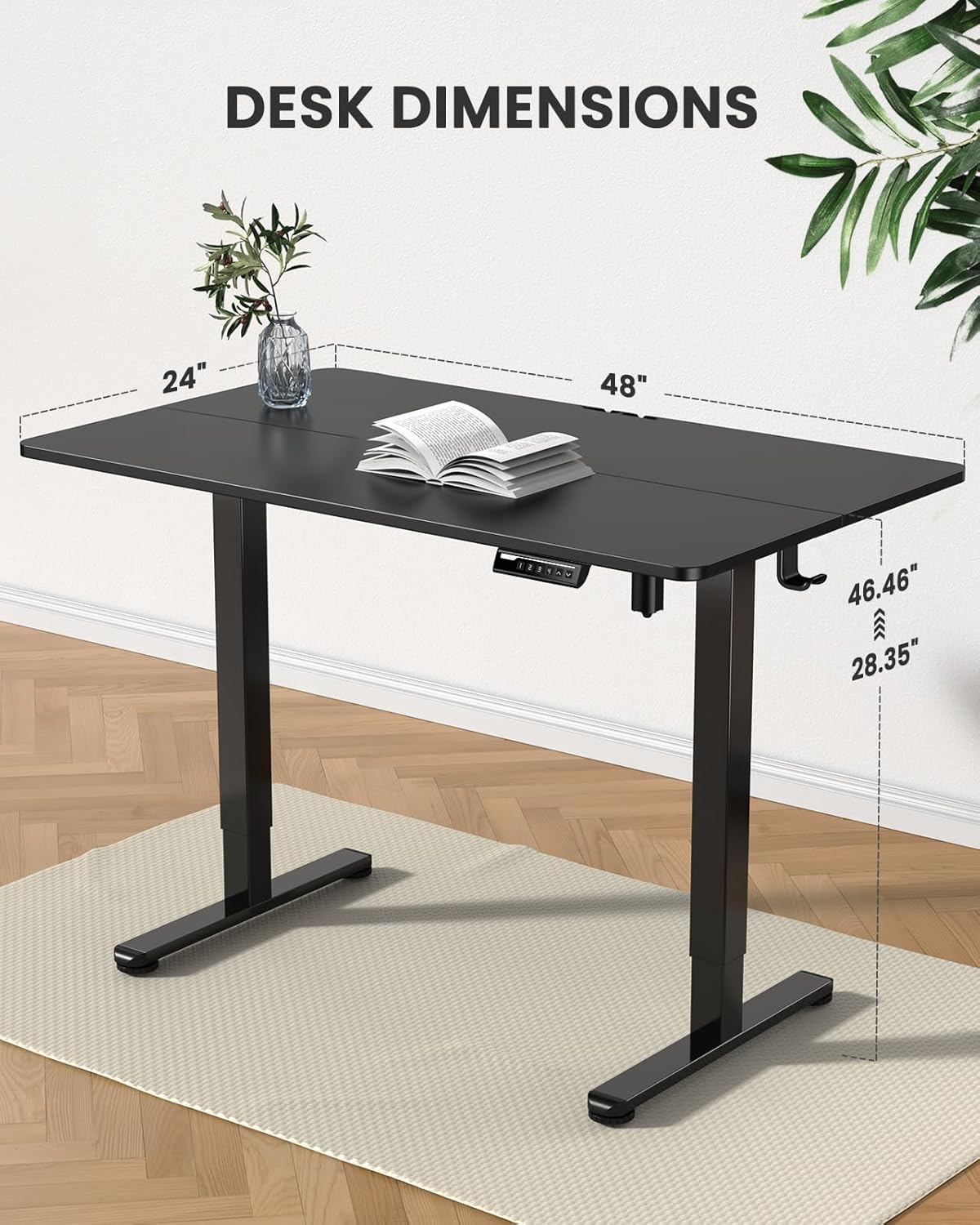
Image: A visual representation of the desk's dimensions, including height range and desktop size.
Коопсуздук маалыматы
Please adhere to the following safety guidelines to ensure safe operation and longevity of your desk:
- Ensure proper assembly as per the instruction manual.
- 176 фунт максималдуу салмак чегинен ашпаңыз.
- Manage cables securely to prevent tripping hazards and ensure smooth movement of the desk.
- Keep children and pets away from the moving parts of the desk during operation.
Кепилдик жана колдоо
The ErGear Electric Standing Desk comes with a Limited Warranty. For specific terms and conditions, please refer to the warranty information included with your purchase.
For further assistance, technical support, or to access the full installation manual, please refer to the official PDF document:
For any other inquiries, please contact ErGear customer support.


