Introduction
The ANCEL LD700 is an advanced all-systems diagnostic scan tool specifically designed for Land Rover and Jaguar vehicles. It provides comprehensive diagnostic capabilities across all available control modules, allowing users to quickly identify and resolve vehicle issues. This manual provides detailed instructions for setting up, operating, maintaining, and troubleshooting your device.
Key features include OE-level full system diagnostics, over 14 professional reset functions, powerful OBDII functions, a user-friendly interface, and lifetime free updates.

Figure 1: ANCEL LD700 Diagnostic Scan Tool
The ANCEL LD700 diagnostic scan tool features a compact design with a clear display and intuitive button layout for ease of use.
Жайгашуу
1. Пакеттин мазмуну
Бардык компоненттердин бар экенин текшериңиз:
- ANCEL LD700 Main Unit
- OBDII диагностикалык кабели
- USB кабели (жаңыртуулар үчүн)
- Колдонуучунун Колдонмосу (бул документ)

Figure 2: ANCEL LD700 Physical Components and Dimensions
The device includes the main unit, an OBDII diagnostic cable for vehicle connection, and a USB cable for computer connectivity and software updates. The unit measures approximately 10.24 x 7.48 x 1.97 inches.
2. Баштапкы орнотуу жана туташуу
- Унаанын OBDII портун табыңыз (адатта аспаптар тактасынын астында).
- Connect the diagnostic cable from the LD700 to the vehicle's OBDII port. The device will power on automatically.
- Select your preferred language from the 'Tool Setup' menu. The device supports 12 languages including English, French, German, Spanish, and Italian.
3. Программаны жаңыртуу
To ensure optimal performance and access to the latest vehicle data, it is recommended to update the device software regularly. Updates are free for life.
- Расмий ANCEL сайтына кириңиз webсайт: www.anceltech.com.
- Navigate to the 'Download' section and select the LD700 model.
- Download the latest upgrade software to your computer.
- Connect the LD700 to your computer using the provided USB cable.
- Run the update tool on your computer and follow the on-screen instructions to complete the update. Ensure the device remains connected and powered during the entire process.
Video 1: How to download the latest version for LD700
This video demonstrates the step-by-step process of downloading and installing the latest software updates for your ANCEL LD700 diagnostic tool from the official webсайт.
Иштөө нускамалары
1. Жалпы навигация
The LD700 features a 2.8-inch full-color LCD display and flexible keypads for easy navigation. Use the arrow keys to move between options and the 'OK' button to confirm selections. 'ESC' returns to the previous screen.
2. OE-Level Full System Diagnostics for JLR
The LD700 provides in-depth diagnostics for almost all available systems and modules in Land Rover and Jaguar vehicles. This allows for quick identification of problems across various systems.
- Кыймылдаткыч системасы: Detects faults, clears engine lights, and helps with emissions tests.
- Трансмиссия системасы: Troubleshoots transmission-related fault codes.
- ABS (блокировкага каршы тормоз системасы): Reads and clears ABS codes, performs live data streams for critical ABS systems.
- SRS (Airbag System): Retrieves, reads, and clears SRS system issues.
- TPMS (шина басымын көзөмөлдөө системасы): Monitors tire conditions and performs resets after tire or sensor replacement.
- Башка системалар: Includes Fuel System, EPB, Headlight, Chassis, ESP, DPF, and more.

Figure 3: All-System Diagnosis for JLR Group Vehicles
The diagnostic tool supports comprehensive scanning of various vehicle systems, including Engine, Transmission, ABS, TPMS, Fuel System, SRS, EPB, Headlight, Chassis, ESP, and DPF.
3. Professional Reset Functions for JLR
The LD700 supports over 14 popular reset functions to assist with common maintenance tasks:
- Майды калыбына келтирүү: Май алмаштырылгандан кийин майдын тейлөө жарыгын баштапкы абалга келтирет.
- Дроссельди адаптациялоо: Re-learns and adapts throttle sensor position after cleaning or repair.
- Battery Registration/BMS Reset: Registers new batteries and clears fault codes from the dashboard.
- EPB баштапкы абалга келтирүү: Performs maintenance of electronic parking brake systems, including brake pad reset.
- Steering Angle Reset (SAS Calibration): Calibrates the steering angle sensor to clear fault memories.
- ABS кан агуу: Bleeds the brake system when ABS contains air.
- DPF Regeneration/Reset: Manages Diesel Particulate Filter functions.
- Инжектор коддоо: Writes new injector codes to the ECU after replacement.
- Transmission Adaptation: Allows the automatic transmission to learn and adapt to driving patterns.

Figure 4: Multiple Advanced Reset Functions for JLR
The device offers a wide array of reset functions, including Battery Registration, Oil Reset, EGR Reset, Transmission Adaptation, DPF Regeneration, Injector Coding, TPMS Reset, Throttle Position Learning, EPB Reset, Steering Angle Reset, and ABS Bleed.
4. Powerful OBDII Functions
The LD700 provides essential OBDII functions for all OBDII compliant vehicles (after 1996 for US, European, and Asian vehicles):
- Окуу коддору: Retrieves current, permanent, and pending diagnostic trouble codes (DTCs).
- Коддорду тазалоо: Clears DTCs and turns off the Check Engine Light (CEL).
- Live Data Stream: Displays real-time vehicle sensor data in text and graphic format.
- I/M даярдык монитору: Provides a quick 5-second check of the car's engine status for emissions tests.
- EVAP системасы сыноо: Performs a leak test for the vehicle's EVAP system.
- Retrieve VIN: Automatically identifies vehicle information such as make, year, and model.
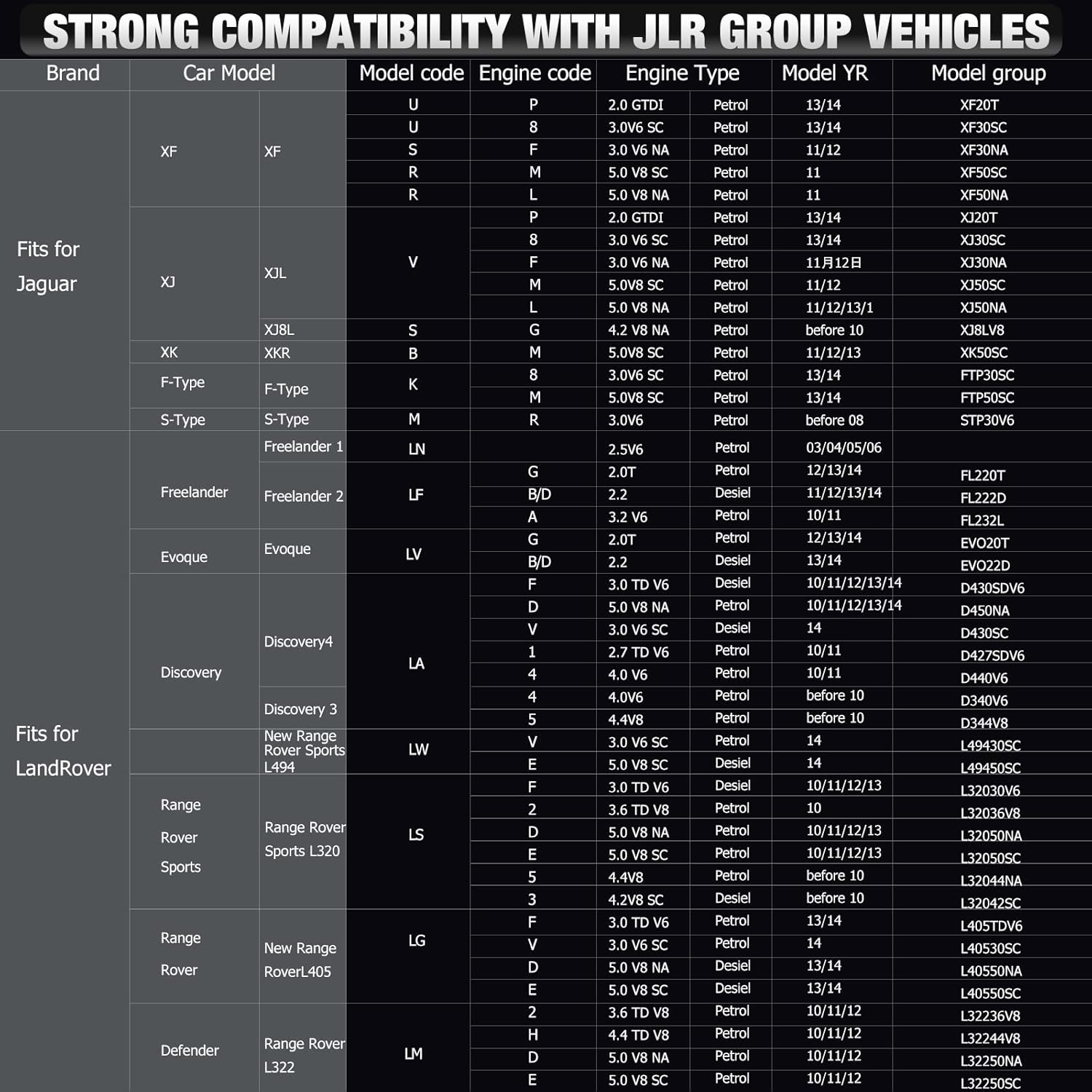
Figure 5: Powerful OBD Functions
The device supports core OBDII functions such as reading and erasing коддору, viewing data streams, I/M readiness monitoring, EVAP system tests, and VIN retrieval.
Техникалык тейлөө
1. Өмүр бою акысыз жаңыртуулар
The ANCEL LD700 comes with lifetime free software updates, ensuring your device always has the latest vehicle coverage and diagnostic capabilities. Refer to the 'Setup' section for detailed update instructions.
2. Online Feedback
If you encounter any issues that cannot be resolved during the diagnostic process, you can report them directly to ANCEL's technical team using the feedback feature on the device.
Video 2: ANCEL OBD scanner Feedback Function operation video
This video illustrates how to use the feedback function on your ANCEL OBD scanner to report issues directly to the technical support team, facilitating quicker resolution.
Проблемаларды чечүү
The LD700 is designed to help diagnose and clear various vehicle issues. Here are common scenarios and how the tool assists:
- Кыймылдаткычты текшерүү жарыгы (CEL) күйүп турат: Use 'Read Codes' to identify the fault, then 'Erase Codes' after repairs to turn off the CEL.
- 'Service Required' Message: After an oil change, use the 'Oil Reset' function to clear this message.
- Батареяны алмаштыруу: After replacing the car battery, use the 'Battery Registration' or 'BMS Reset' function to ensure the vehicle's battery management system is updated.
- Electronic Parking Brake Issues: Use 'EPB Reset' for maintenance or to clear related fault codes.

Figure 6: User-Friendly Design showing DTC and I/M Readiness
The intuitive interface allows for easy reading of Diagnostic Trouble Codes (DTCs) and quick monitoring of I/M Readiness status, aiding in efficient troubleshooting.
Техникалык шарттар
| Өзгөчөлүк | Description |
|---|---|
| Модел | LD700 |
| Дисплей | 2.8'' Full-Color LCD |
| Display Resolution | 320x240 пиксел |
| Элемент Салмагы | 15.5 унция |
| Продукциянын өлчөмдөрү | 10.24 x 7.48 x 1.97 дюйм |
| Колдоого алынган тилдер | 12 (English, French, German, Spanish, Italian, Russian, Portuguese, Finnish, Polish, Danish, Swedish, Norwegian) |
| Жаңыртуулар | Өмүр бою акысыз жаңыртуу |
Кепилдик маалымат
The ANCEL LD700 comes with lifetime free software updates, ensuring continuous support and functionality for your diagnostic tool. For specific warranty details, please refer to the product's purchase documentation or contact ANCEL support directly.
Колдоо
For technical assistance or any inquiries regarding your ANCEL LD700, please utilize the following resources:
- Расмий колдонуучу колдонмо (PDF): A detailed PDF version of the user manual is available for download at https://manuals.plus/m/a086310523b26a09b5ed0a4a1bca696f230c2016f94d5ad9764f532503db1935.
- Онлайн пикир: Use the device's built-in feedback function to report issues directly to the technical team (refer to 'Maintenance' section).
- Электрондук почта колдоо: Contact ANCEL technical support via email at support@anceltech.com.
Video 3: How to contact technical support for LD700
This video provides guidance on how to reach out to ANCEL's technical support for any assistance with your LD700 diagnostic tool.


