Introduction
This user manual provides detailed instructions for the installation, operation, and maintenance of your EUKI Wireless Outdoor 2K Solar Security Camera System. Designed for outdoor surveillance, this camera features 2K resolution, 360° Pan-Tilt-Zoom (PTZ) capabilities, a built-in spotlight and siren, color night vision, PIR motion detection, and two-way audio communication. Its solar panel ensures continuous power, making it a wire-free solution for your security needs. Please read this manual thoroughly before use to ensure proper setup and optimal performance.
Пакеттин мазмуну
- EUKI Wireless Outdoor Security Camera
- Solar Panel with 10-ft (3-meter) Cable
- Кронштейн орнотуу
- Монтаждоо бурамдары жана дубал анкерлери
- USB заряддоо кабели
- Колдонуучунун Колдонмосу (бул документ)
- Quick Start Guide
Продукт бүттүview
Familiarize yourself with the components of your EUKI security camera system.

1-сүрөт: The EUKI Wireless Outdoor 2K Solar Security Camera system, showing the camera unit, solar panel, and a smartphone displaying the live feed. This image illustrates the complete setup and remote viewжөндөмдүүлүгү.
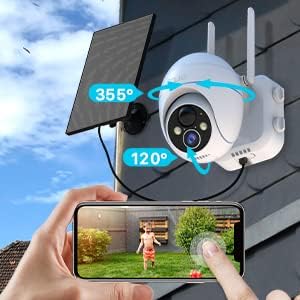
2-сүрөт: Illustration of the camera's flexible Pan-Tilt capabilities, indicating 355° horizontal rotation and 120° vertical rotation. A hand on a smartphone screen demonstrates how to control the camera's movement remotely.

3-сүрөт: The solar panel connected to the camera, highlighting the 3-meter (approximately 10-ft) cable length for flexible installation. This setup ensures optimal solar charging for continuous operation.
Орнотуу колдонмосу
1. Баштапкы заряддоо
Before initial use, fully charge the camera's built-in battery using the provided USB cable and a 5V/2A power adapter (not included). A full charge typically takes 8-10 hours. The indicator light will turn solid blue when fully charged.
2. Колдонмону орнотуу
жүктөп алып, орнотуңуз "CloudEdge" app from the App Store (iOS) or Google Play Store (Android). Register an account and log in.
3. Camera Pairing and Wi-Fi Connection
- Open the CloudEdge app and tap the "+" icon to add a device.
- Select "Battery Camera" or "Solar Camera" from the device list.
- Follow the on-screen instructions to power on the camera. Ensure the camera's indicator light is flashing blue, indicating it's ready for pairing.
- Connect your smartphone to a 2.4GHz Wi-Fi тармагыКамера 5 ГГц Wi-Fi колдобойт.
- Enter your Wi-Fi network password in the app.
- The app will generate a QR code. Position your phone approximately 6-8 inches (15-20 cm) in front of the camera lens until you hear a prompt sound, indicating successful scanning.
- Once connected, the camera's indicator light will turn solid blue. You can then name your camera and begin live viewing.
4. Камераны жана күн панелин орнотуу
Choose a suitable location for mounting the camera and solar panel. Ensure the camera has a clear view of the area you wish to monitor and the solar panel receives direct sunlight for most of the day.
- Use the provided mounting bracket, screws, and wall anchors to securely attach the camera to a wall or eave.
- Mount the solar panel in an unshaded area, ideally facing south (in the Northern Hemisphere) or north (in the Southern Hemisphere) to maximize sun exposure.
- Күн батареясынын кабелин камеранын кубаттоо портуна туташтырыңыз.

4-сүрөт: Мурункуample of the solar panel installation, showing the panel mounted on a roof and connected to the camera via a 10-ft long cable. This setup ensures optimal solar charging for continuous operation.
Иштөө нускамалары
1. Түз эфир View жана PTZ Control
Түз эфирге кирүү үчүн CloudEdge колдонмосун ачып, камераңызды тандаңыз view. Use the on-screen joystick or swipe gestures to control the camera's Pan (355° horizontal) and Tilt (120° vertical) movements. You can also use the digital zoom feature to get a closer look.
2. Эки тараптуу аудио
Түз эфирде микрофон сүрөтчөсүн басыңыз view to enable two-way audio. You can speak through your phone, and your voice will be projected through the camera's speaker. Similarly, you can hear audio from the camera's surroundings.

5-сүрөт: Depiction of the real-time two-way audio feature, showing a child playing in a yard and a speech bubble indicating communication from the camera. This highlights the ability to interact with people near the camera.
3. Кыймылды аныктоо жана эскертүүлөр
The camera utilizes Passive Infrared (PIR) motion detection to identify human-like movement, reducing false alarms. When motion is detected, the camera will:
- Send instant alert notifications to your smartphone (within 0.2-2 seconds).
- Видео жаздырууну баштооtage.
- Activate the built-in spotlight and siren (if enabled in settings).
You can customize motion detection settings in the app, including sensitivity levels (1-10), alarm plans, and alarm intervals.

6-сүрөт: An illustration of the intelligent PIR motion detection system, showing a person walking past the camera and a smartphone notification for "CloudEdge Notification". This demonstrates the camera's ability to detect motion and send instant alerts.
4. Түнкү көрүнүш
The camera features 4 IR lights and a 1/3 CMOS color sensor, providing clear 2K/3MP images and videos even in low light conditions. It automatically switches to color night vision mode, with a monitoring distance of up to 50ft (15m).

7-сүрөт: A visual representation of the camera's night vision capabilities, showing a clear image of a garage at night. The text indicates "Clearer and Longer Night Vision Distance: 65 Feet", highlighting its effectiveness in low-light environments.
5. Жаздыруу жана сактоо
The camera supports local storage via a Micro SD card (up to 128GB, not included) and optional cloud storage. Recorded events can be accessed and played back through the CloudEdge app.
- To install an SD card, power off the camera, locate the SD card slot (usually under a rubber cover), and insert the card until it clicks.
- Format the SD card via the app settings for optimal performance.
6. Group Sharing
You can easily share camera access with family members or friends through the CloudEdge app by scanning a QR code. This allows multiple users to view түз эфирде көрүңүз жана эскертмелерди алыңыз.
Техникалык тейлөө
- Тазалоо: Камера линзасын жана күн панелин жумшак, d менен үзгүлтүксүз сүртүп туруңузamp Көрүүнү так жана күн энергиясы менен натыйжалуу кубаттоо үчүн кездеме колдонуңуз. Абразивдүү тазалоочу каражаттардан алыс болуңуз.
- Батарея башкаруу: While the solar panel provides continuous charging, in periods of prolonged cloudy weather or low sunlight, the camera's battery may deplete. If the battery level is critically low, you may need to manually charge the camera using the USB cable.
- Программалык камсыздоонун жаңыртуулары: Periodically check the CloudEdge app for available firmware updates. Keeping the firmware updated ensures optimal performance, new features, and security enhancements.
- SD Card башкаруу: If using an SD card for storage, regularly review жана маанилүү азык-түлүктөрдүн камдык көчүрмөсүн сактооtage. The camera will typically overwrite the oldest footagкарта толгондо.
Проблемаларды чечүү
| Көйгөй | Мүмкүн болгон себеп / Чечим |
|---|---|
| Камера Wi-Fi'га туташпай жатат. |
|
| Батарея бат эле түгөнөт. |
|
| False motion alerts. |
|
| No night vision or poor night vision. |
|
| Cannot hear two-way audio or audio is unclear. |
|
| Alarm/Siren not activating. |
|
Техникалык шарттар
| Өзгөчөлүк | Деталь |
|---|---|
| Бренд | EUKI |
| Модель номери | 1 |
| Байланыш технологиясы | Зымсыз (Wi-Fi 2.4 ГГц гана) |
| Power Source | Батарея менен иштейт, Күн |
| Видео тартуунун резолюциясы | 2K (макс. 3MP) Webкамеранын сүрөтүнүн чечилиши) |
| Pan / Tilt / Zoom | 355° Горизонталдык, 120° Вертикалдык, 4X Digital Zoom |
| Түнкү көрүү диапазону | Up to 50 Feet (15m) / 65 Feet (20m) (Color Night Vision) |
| Motion Detection | PIR Motion Detection (Human-like recognition) |
| Аудио | Эки тараптуу сүйлөшүү |
| Сактагыч параметрлери | Micro SD картасы (128 ГБ чейин, кошулган эмес), булут сактагычы |
| Аба ырайына каршы рейтинг | IP66 |
| Иштөө температурасы | −25°C – 60°C (-13°F – 140°F) |
| Өлчөмдөрү (L x W x Y) | 6.3 x 10.24 x 11.81 дюйм |
| Элемент Салмагы | 2.57 фунт |
| Шайкеш түзмөктөр | Смартфон (CloudEdge колдонмосу аркылуу) |
Кепилдик жана колдоо
For warranty information, technical support, or further assistance, please refer to the official EUKI webсайтына кириңиз же алардын кардарларды тейлөө кызматына түз кайрылыңыз. Байланыш маалыматтары, адатта, продуктунун таңгагында же өндүрүүчүнүн дарегинде көрсөтүлгөн webсайт.
Бул колдонмого киргизүү үчүн сатуучунун эч кандай расмий продукт видеолору жеткиликтүү эмес.


