1. Продукт бүтүп калдыview
The Baseus Metal Gleam Series 8-in-1 USB-C Hub is a versatile docking station designed to expand the connectivity of your USB-C enabled devices. It integrates multiple essential ports, including USB 3.0, HDMI, USB-C Power Delivery (PD), and microSD/SD card readers, into a single compact unit. This hub is ideal for enhancing productivity by connecting various peripherals, external displays, and charging your device simultaneously.

The Baseus Metal Gleam Series 8-in-1 USB-C Hub is presented in its retail box, showcasing the product and its key features on the packaging.
2. Негизги өзгөчөлүктөрү
- 8-ин-1 туташуусу: Provides comprehensive port expansion for modern USB-C devices.
- Triple USB 3.0 Ports: Offers high-speed data transfer up to 5Gbps for peripherals like external hard drives, keyboards, and mice.
- Dual HDMI Outputs: Supports dual-display ultra-clear expansion, enabling connection to two external monitors for enhanced multitasking.
- USB-C Power Delivery (PD): Allows for fast charging of your host device with up to 100W power pass-through.
- MicroSD/SD Card Readers: Facilitates quick access to photos and videos from memory cards.
- Компакт жана портативдик дизайн: Metal gleam series design ensures durability and easy portability.
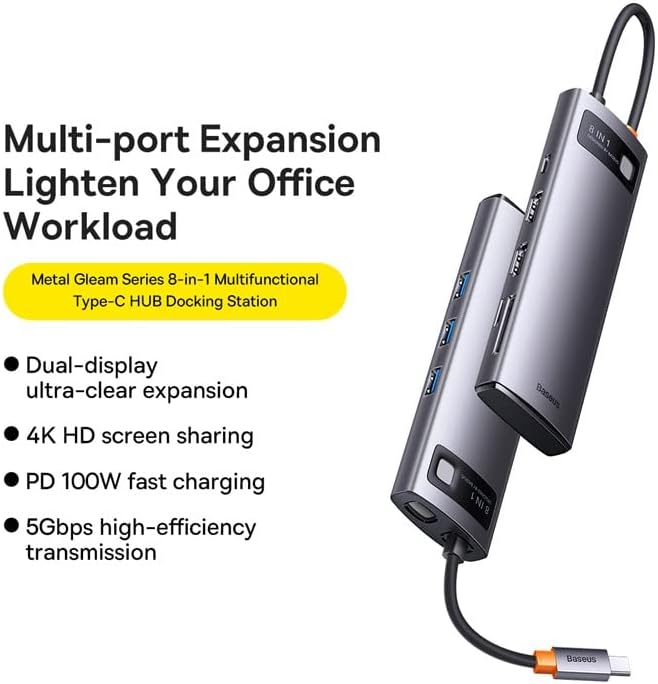
This graphic highlights the multi-port expansion capabilities of the Baseus Metal Gleam Series 8-in-1 USB-C Hub, emphasizing its ability to lighten office workload with features like dual-display, 4K HD screen sharing, PD 100W fast charging, and 5Gbps high-efficiency transmission.
3. Пакеттин мазмуну
- 1 x Baseus Metal Gleam Series 8-in-1 USB-C Hub
- 1 x User Manual
4. Орнотуу нускамалары
- Хост түзмөккө туташуу: Plug the USB-C connector of the hub into the USB-C port of your laptop, tablet, or smartphone. Ensure the connection is secure.
- Перифериялык түзүлүштөрдү туташтыруу: Connect your USB devices (e.g., mouse, keyboard, external hard drive) to the USB 3.0 ports on the hub.
- Туташуу дисплейлери: Use HDMI cables to connect your external monitors to the HDMI ports on the hub.
- Электр кубатын жеткирүү (милдеттүү эмес): If your host device requires charging, connect your original USB-C power adapter to the USB-C PD port on the hub. This will charge your device while using the hub.
- Эстутум карталарын салыңыз: Insert your microSD or SD cards into the corresponding slots for data access.

This image provides an angled perspective of the Baseus Metal Gleam Series 8-in-1 USB-C Hub, highlighting its sleek design and the three accessible USB 3.0 ports on its side.
5. Иштөө нускамалары
5.1. USB 3.0 Маалыматтарды өткөрүү
Connect USB devices such as flash drives, external hard drives, or other USB peripherals to the USB 3.0 ports. The hub supports data transfer speeds of up to 5Gbps.
5.2. HDMI Display Output
Connect your monitors using HDMI cables. The hub supports dual HDMI output. For optimal performance, ensure your display settings on your computer are configured correctly for extended or mirrored displays.
- Windows системалары: Supports triple-display (A+B+C) at 1080P@60Hz in expansion mode, and (A+A+A) at 1080P@60Hz in mirroring mode.
- Apple OS Systems: Supports dual-display (A+B+B) at 4K@30Hz in expansion mode, and (A+A+A) at 4K@30Hz in mirroring mode.

This visual guide demonstrates the dual-display functionality of the Baseus Metal Gleam Series 8-in-1 USB-C Hub, showing both expansion and mirroring modes for Windows systems (1080P@60Hz) and Apple OS systems (4K@30Hz).
5.3. USB-C Power Delivery
The USB-C PD port allows you to charge your host device (laptop, tablet) while simultaneously using the hub's other functions. Connect your device's original USB-C power adapter to this port. The hub supports up to 100W power pass-through.
5.4. SD/MicroSD Card Reader
Insert your SD or microSD cards into the designated slots. The hub will allow your device to read and write data to these cards.
6. Техникалык тейлөө
- Тазалоо: Хабдын бетин тазалоо үчүн жумшак, кургак чүпүрөктү колдонуңуз. Суюк тазалоочу каражаттарды же абразивдүү материалдарды колдонуудан алыс болуңуз.
- Сактагыч: Түздөн-түз күндүн нурунан жана экстремалдык температурадан алыс салкын, кургак жерде борборду сактаңыз.
- Колдонуу: Avoid dropping the hub or subjecting it to strong impacts. Do not attempt to disassemble the device.

An exploded diagram of the Baseus Metal Gleam Series 8-in-1 USB-C Hub illustrates its internal electronic components and sophisticated circuit board design.
7. Кыйынчылыктарды
- Дисплей чыгышы жок:
- Ensure the HDMI cables are securely connected to both the hub and the monitor.
- Verify that your monitor input source is set to the correct HDMI port.
- Check your computer's display settings to ensure the external monitor is detected and configured.
- Компьютериңизди өчүрүп күйгүзүп көрүңүз.
- Devices Not Recognized (USB/SD/MicroSD):
- Ensure the hub's USB-C connector is fully inserted into your host device.
- Түзмөктүн өз алдынча иштей турганын текшерүү үчүн аны компьютериңиздин USB портуна түз туташтырып көрүңүз.
- Компьютериңизди өчүрүп-күйгүзүп, хабды кайра туташтырыңыз.
- Энергия жеткирилбейт/заряддалбайт:
- Ensure your USB-C power adapter is connected to the hub's PD port and is functioning correctly.
- Хост түзмөгүңүз USB-C Power Delivery колдой турганын текшериңиз.
- Үзгүлтүксүз туташуу:
- Бардык байланыштар бекем жана туруктуу экенин текшериңиз.
- Хабды күчтүү электромагниттик тоскоолдук булактарынын жанына коюудан алыс болуңуз.
8. Техникалык шарттар
| Атрибут | Нарк |
|---|---|
| Продукциянын өлчөмдөрү | 3.94 x 1.97 x 1.18 дюйм |
| Элемент Салмагы | 5.3 унция |
| Элемент моделинин номери | WKWG050113 |
| Аппараттык интерфейс | USB 3.0, HDMI, USB-C, SD, MicroSD |
| Өзгөчө өзгөчөлүк | Portable |
| Шайкеш түзмөктөр | USB-C порту бар түзмөктөр |
| Жалпы USB порттору | 8 (3x USB 3.0, 2x HDMI, 1x USB-C PD, 1x MicroSD, 1x SD) |
| HDMI Resolution | Up to 4K@30Hz (Apple OS), 1080P@60Hz (Windows) |
| USB-C PD киргизүү | 100 Вт чейин |
| Маалыматтарды өткөрүү ылдамдыгы | 5 Гбит/сек чейин (USB 3.0) |
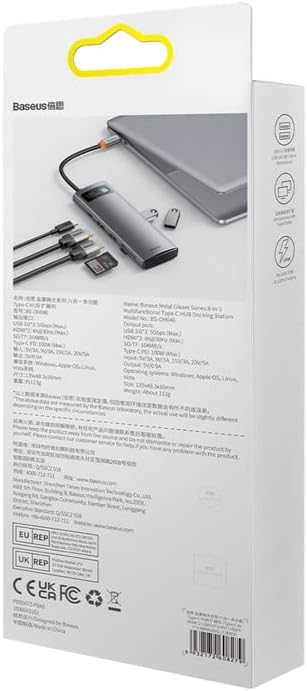
арткы view of the product packaging displays detailed technical specifications and compliance information for the Baseus Metal Gleam Series 8-in-1 USB-C Hub.
9. Кепилдик жана колдоо
For warranty information, technical support, or further inquiries, please visit the official Baseus webсайтка же кардарларды тейлөөгө кайрылыңыз. Кепилдик дооматтар үчүн сатып алуу дүмүрчөгүңүздү сактаңыз.
Расмий Baseus Webсайт: www.baseus.com


