1. Introduction and Overview
The Technical Pro TPRX4CH is a powerful 1600-watt, 4-channel Bluetooth receiver designed for home audio systems, home theaters, and karaoke setups. It offers versatile connectivity options including RCA, USB, SD Card, and AUX inputs, along with two microphone inputs. Featuring a fluorescent display and comprehensive playback controls, this receiver provides high-quality amplified audio for up to eight speakers.

Figure 1.1: Front Panel of the TPRX4CH Receiver
2. Негизги өзгөчөлүктөрү
- 1600 Ватт жогорку кубаттуулугу: Delivers 120W RMS for high-quality amplified audio, suitable for home theater and karaoke.
- 4-канал чыгаруу: Supports up to 8 speakers simultaneously with dedicated volume control for each channel.
- Bluetooth байланышы: Wireless range of up to 30 feet, compatible with smartphones, tablets, and laptops.
- Бир нече киргизүү: Includes RCA, USB, SD Card, and AUX inputs for diverse audio sources.
- Кош микрофон кириштери: Features 1/4" mic inputs with independent volume, echo, and delay controls, plus a Mic Priority switch.
- EQ Controls: Rotary knobs for Treble, Bass, and Master Volume adjustments.
- Digital VFD Display: Built-in display with AM/FM radio tuner.
- Алдыңкы башкаруу панели: Intuitive buttons and rotary controls with blue LED illumination for high visibility.
- Гарнитура уячасы: Dedicated headphone output with volume control.
- Коргоо өзгөчөлүктөрү: Integrated over-current, short-circuit, and over-voltage коргоо.

2.1-сүрөт: Негизги өзгөчөлүктөр бүттүview
3. Пакеттин мазмуну
Сураныч, төмөнкү нерселер үчүн кутучаны белгилеңиз:
- Technical Pro 1600W 4-Channel Bluetooth Receiver (TPRX4CH)
- Алыстан башкаруу
- FM антеннасы
4. Орнотуу жана байланыштар
4.1 Арткы панелдин үстүндөview

Figure 4.1: Rear Panel of the TPRX4CH Receiver
4.2 Динамиктерди бириктирүү
The TPRX4CH receiver supports up to 8 speakers across 4 channels (A, B, C, D). Connect your speakers to the corresponding speaker terminals on the rear panel. Ensure correct polarity (positive to positive, negative to negative) for optimal sound quality. Each channel (A, B, C, D) has dedicated terminals for two speakers (e.g., Speaker A+ and Speaker A-).
4.3 Аудио булактарын туташтыруу
- RCA Inputs (DVD/LINE): Use RCA cables to connect external audio devices such as DVD players, CD players, or other line-level audio sources to the 'INPUT' section on the rear panel.
- USB/SD карта: Insert a USB flash drive or SD card into the respective slots on the front panel for digital audio playback.
- AUX киргизүү: Connect portable audio devices using a 3.5mm AUX cable to the 'AUX IN' jack on the front panel.
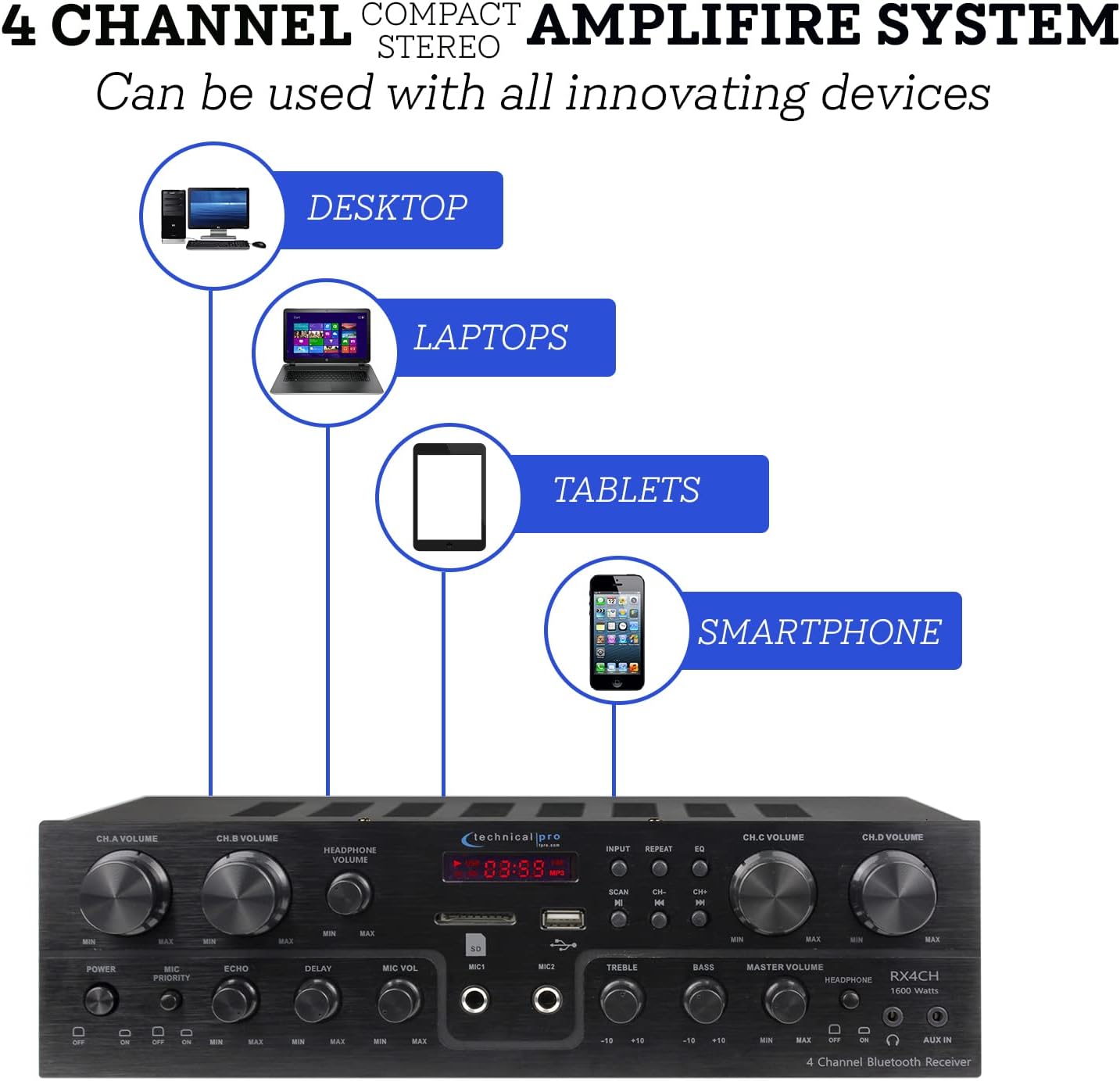
Figure 4.2: Device Connectivity Options
4.4 Микрофондорду туташтыруу
Plug 1/4" microphone cables into the 'MIC1' or 'MIC2' jacks on the front panel.
4.5 Кубат туташтыруу
Voltage selector on the rear panel is set to the correct voltage for your region (110V/60Hz or 230V/50Hz). Connect the power cord to the AC inlet on the rear panel and then to a suitable power outlet.
5. Иштөө нускамалары
5.1 Күйгүзүү/өчүрүү
Press the 'POWER' button on the front panel to turn the unit on or off. The fluorescent display will illuminate when the unit is powered on.
5.2 Киргизүүнү тандоо
Use the 'INPUT' button on the front panel to cycle through available audio sources: Bluetooth, USB, SD, AUX, and RCA (DVD/LINE).
5.3 Volume and EQ Controls
- Channel Volume (CH.A, CH.B, CH.C, CH.D): Adjust the individual volume for each speaker channel using the dedicated rotary knobs.
- Негизги том: Control the overall output volume of the system using the 'MASTER VOLUME' knob.
- Жогорку/бас: Adjust the high and low frequency response using the 'TREBLE' and 'BASS' knobs to fine-tune your sound.
- Наушниктин үнү: Adjust the volume for connected headphones using the 'HEADPHONE VOLUME' knob.
5.4 Bluetooth жупташтыруу
Select 'Bluetooth' as the input source. On your mobile device (smartphone, tablet, laptop), search for available Bluetooth devices and select 'Technical Pro' or similar from the list. Once paired, you can stream audio wirelessly to the receiver.
5.5 USB/SD картаны ойнотуу
Insert a USB drive or SD card with audio files into the respective slot. The receiver will automatically switch to USB/SD mode. Use the 'PLAY/PAUSE', 'PREVIOUS', and 'NEXT' buttons to control playback.
5.6 Microphone Functions (Karaoke)
- Микрофондун үнү: Adjust the volume of the connected microphones using the 'MIC VOL' knob.
- Echo/Delay: Use the 'ECHO' and 'DELAY' knobs to add effects to the microphone audio for a richer vocal performance.
- Микрофон приоритети: Activate the 'MIC PRIORITY' switch to automatically lower the background music volume when a microphone is in use, ensuring vocals are clear and prominent.

Figure 5.1: Built-in Microphone Talk-Over Function
5.7 AM/FM радиосу
Extend the FM antenna connected to the rear panel for better reception. Select 'Tuner' or 'Radio' as the input source. Use the 'SCAN' button to automatically search for and save radio stations. Use the 'CH-' and 'CH+' buttons to navigate through saved stations.
6. Техникалык тейлөө
- Тазалоо: Кабылдагычтын сыртын тазалоо үчүн жумшак, кургак чүпүрөктү колдонуңуз. Суюк тазалоочу каражаттарды же аэрозольдорду колдонбоңуз.
- Вентиляция: Ensure the receiver is placed in a well-ventilated area to prevent overheating. Do not block the ventilation openings.
- Сактагыч: Эгерде түзмөктү узак убакытка сактап койсоңуз, аны электр тармагынан сууруп, салкын, кургак жерде сактаңыз.
7. Кыйынчылыктарды
| Көйгөй | Мүмкүн себеп | Чечим |
|---|---|---|
| Күч жок | Power cord not connected; Power outlet faulty; Unit fuse blown | Check power cord connection; Try a different outlet; Contact service for fuse replacement |
| Үн чыгышы жок | Туура эмес киргизүү тандалды; Динамиктин зымдары бош/туура эмес туташтырылган; Үнү өтө төмөн; Үнсүз режим иштетилген | Select correct input; Check speaker connections and polarity; Increase Master Volume; Deactivate mute if applicable |
| Ызы-чуу | Ground loop issue; Interference from other electronics; Faulty cable | Ensure proper grounding; Move unit away from other electronics; Try different audio cables |
| Bluetooth туташпай жатат | Device too far; Bluetooth not enabled on device; Receiver not in pairing mode | Move device closer to receiver; Enable Bluetooth on your device; Ensure receiver input is set to Bluetooth |
| USB/SD ойнотуу көйгөйлөрү | Колдоого алынбайт file формат; Бузулган fileс; Диск/карта туура эмес салынган | камсыз кылуу files are in supported format (e.g., MP3); Reformat drive/card; Reinsert drive/card firmly |
8. Техникалык шарттар
| Өзгөчөлүк | Спецификация |
|---|---|
| Модель номери | TPRX4CH |
| Эң жогорку кубаттуулук | 1600 Ватт |
| RMS Power Output | 120 Ватт |
| Каналдар | 4 Channel (supports 8 speakers) |
| Байланыш технологиясы | Bluetooth, RCA, USB 2.0, SD Card, AUX |
| Bluetooth диапазону | 30 метрге чейин |
| Микрофон кириштери | 2 x 1/4" Jacks |
| Аудио чыгаруу режими | Стерео |
| Өзгөчөлүктөр | Equalizer, Fluorescent Display, Mic Priority |
| Продукциянын өлчөмдөрү | 13 x 7.3 x 3.5 дюйм |
| Элемент Салмагы | 1.54 фунт |
| Түс | Кара |
| Өндүрүүчү | Technical Pro |
| Биринчи жеткиликтүү күн | 16-июнь, 2022-жыл |

Сүрөт 8.1: Продукциянын өлчөмдөрү
9. Кепилдик жана колдоо
For warranty information and technical support, please refer to the documentation included with your purchase or visit the official Technical Pro website. You may also contact Technical Pro customer service directly for assistance with product setup, operation, or troubleshooting beyond the scope of this manual.
Technical Pro Store: Visit the Technical Pro Store on Amazon


