Introduction
The Korg Pa5X 61-key Arranger Workstation is a professional musical instrument designed for musicians who demand high-quality sounds, versatile accompaniment styles, and intuitive control. This manual provides essential information to help you set up, operate, maintain, and troubleshoot your Pa5X 61, ensuring you get the most out of its extensive features.
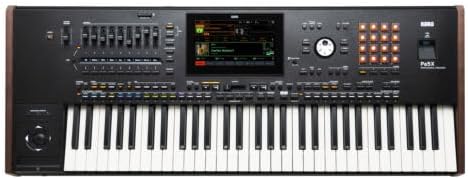
Key features include over 2000 sounds, 500+ Styles, 400+ Keyboard Sets, an 8-inch high-resolution tiltable touchscreen, and smooth sound transitions for seamless performance.

Сүрөт 1: Алдыңкы view of the Korg Pa5X 61-key Arranger Workstation.
Жайгашуу
1. Таңгактан чыгаруу жана алгачкы текшерүү
Carefully remove the Pa5X 61 from its packaging. Ensure all components listed in the packing list are present and inspect the unit for any signs of damage. Keep the original packaging for future transport or storage.
2. Power Connection
Connect the supplied AC adapter to the DC IN jack on the rear panel of the Pa5X 61. Plug the other end of the adapter into a suitable power outlet. Ensure the power switch is in the OFF position before connecting to power.
3. Аудио байланыштары
The Pa5X 61 offers various audio input and output options. For standard stereo output, connect your audio cables to the LEFT/MONO and RIGHT main output jacks. For connecting external microphones or instruments, use the dedicated input jacks.

Figure 2: Detail of the audio input ports, including Mic, Guitar, and Line inputs.
4. MIDI and USB Connections
The Pa5X 61 supports MIDI and USB connectivity for integration with other musical equipment and computers. Use the USB DEVICE port for connection to a computer and USB HOST ports for external storage devices.
Сүрөт 3: Арткы панель view showing USB and HDMI connectivity options.
5. Баштапкы күйгүзүү
Once all connections are secure, switch on the power. The 8-inch high-resolution touchscreen will illuminate. You can adjust the tilt of the screen for optimal viewбурч.
Иштөө нускамалары
1. Сенсордук экран интерфейсинде багыт алуу
The intuitive 8-inch tiltable touchscreen is the primary interface for controlling the Pa5X 61. Tap icons and menus to access various functions, sounds, and styles. Swipe gestures can be used for quick navigation.

Figure 4: Close-up of the Pa5X's main touchscreen display during operation.
2. Sound and Style Selection
Access the vast library of over 2000 sounds and 500+ Styles directly from the touchscreen. Sounds are categorized for easy browsing. Styles provide professional-quality backing tracks that can be customized in real-time.

Figure 5: ашыкview of the physical controls and faders for sound and style manipulation.
3. Real-time Performance Controls
Utilize the assignable faders, buttons, and joystick for dynamic real-time control over your performance. Adjust volume levels, effects, and other parameters on the fly. The Smooth Sound Transition feature ensures seamless changes between sounds, songs, and keyboard sets without abrupt cuts.
Техникалык тейлөө
1. Тазалоо
To clean the exterior of the Pa5X 61, use a soft, dry cloth. For the touchscreen, use a microfiber cloth specifically designed for electronic displays. Avoid using abrasive cleaners, solvents, or excessive moisture, as these can damage the finish or internal components.
2. Программалык камсыздоону жаңыртуу
Расмий Korg'ту мезгил-мезгили менен текшерип туруңуз website for firmware and software updates. Updates can provide new features, improved performance, and bug fixes. Follow the instructions provided with each update carefully to ensure proper installation.
3. Сактоо
When not in use, store the Pa5X 61 in a cool, dry place away from direct sunlight, extreme temperatures, and high humidity. If storing for an extended period, it is recommended to use a dust cover or the original packaging to protect the instrument.
Проблемаларды чечүү
| Көйгөй | Мүмкүн себеп | Чечим |
|---|---|---|
| Үн чыгышы жок | Volume is too low; incorrect audio connections; internal settings. | Check master volume and individual track volumes. Verify all audio cables are securely connected to the correct input/output jacks. Reset audio settings if necessary. |
| Сенсордук экран жооп бербейт | Убактылуу программалык камсыздоонун катасы; экранды калибрлөө маселеси. | Restart the unit. If the problem persists, refer to the full manual for screen calibration procedures. |
| Ачкычтар жооп бербейт | Local control off; MIDI settings issue; damaged key. | Ensure local control is enabled in global settings. Check MIDI routing. If only specific keys are affected, contact Korg support for service. |
| Түзмөк күйбөй жатат | Электр кабели ажыратылган; туура эмес электр адаптери. | Verify power cable is securely connected to the unit and outlet. Test the power adapter with another compatible device if possible. Contact Korg support if the issue persists. |
For more detailed troubleshooting steps, please refer to the comprehensive online manual available on the Korg webсайт.
Техникалык шарттар
- Модель аты: PA5X61
- Ачкычтардын саны: 61
- Максимум полифония: 160 voices with 24 Stereo Oscillators
- Дисплей: 8 inch high-resolution tiltable touchscreen
- Үндөр: 2000+
- Стилдер: 500+
- Keyboard Sets: 400+
- Байланыш: MIDI USB, Auxiliary, HDMI
- Кубат булагы: AC адаптер
- Элемент Салмагы: 33.2 фунт (15.1 килограмм)
- Продукциянын өлчөмдөрү: 14.74 x 40.2 x 4.99 дюйм
- Түсү: Кара
Кепилдик жана колдоо
For detailed warranty information and to register your Korg Pa5X 61, please visit the official Korg website. Warranty terms and conditions may vary by region. Keep your proof of purchase for warranty claims.
For technical support, product inquiries, or service requests, please contact Korg customer support through their official website or authorized service centers. Links to support resources can typically be found in the 'Support' or 'Contact Us' sections of the Korg webсайт.
Korg Official Webсайт: www.korg.com


