1. Киришүү
The NovaStar VX16s is an advanced all-in-one controller designed for LED display systems. It seamlessly integrates video processing, video control, and LED screen configuration into a single unit. This device supports Ultra HD 4K×2K@60Hz image processing and sending capabilities, managing up to 10.4 million pixels. When used with NovaStar's V-Can video control software, the VX16s facilitates rich image mosaic effects and streamlined operations. This manual provides essential information for the proper installation, operation, and maintenance of your VX16s unit.
2. Коопсуздук маалыматы
Жаракат алуунун же бузулуунун алдын алуу үчүн түзмөктү иштетүүдөн мурун бардык коопсуздук көрсөтмөлөрүн окуп чыгып, түшүнүп алыңыз. Бул колдонмону келечекте колдонуу үчүн сактап коюңуз.
- электр менен жабдууну камсыз кылуу voltage matches the device's requirements (AC 100~240V).
- Аппаратты жамгырдын, нымдуулуктун же экстремалдык температуранын таасиринде калтырбаңыз.
- Ашыкча ысып кетүүнүн алдын алуу үчүн вентиляция тешиктерин жабуудан качыңыз.
- Өндүрүүчүлөр көрсөткөн аксессуарларды гана колдонуңуз.
- Бардык тейлөөлөрдү квалификациялуу кызматкерлерге тапшырыңыз.
- Тазалоодон же тейлөөдөн мурун электр энергиясын өчүрүңүз.
3. Пакеттин мазмуну
Carefully unpack the box and verify that all items listed below are included. If any items are missing or damaged, contact your supplier.

3.1-сүрөт: NovaStar VX16s Package Contents. This image shows the VX16s unit, a power cord, DVI cable, HDMI cable, USB cable, Ethernet cable, and a Quick Start Guide, all neatly packed in the box.
- NovaStar VX16s Unit
- Электр кабели
- DVI кабели
- HDMI кабели
- USB кабели
- Ethernet кабели
- Quick Start Guide
4. Продукт бүтүп калдыview
4.1 алдыңкы панели
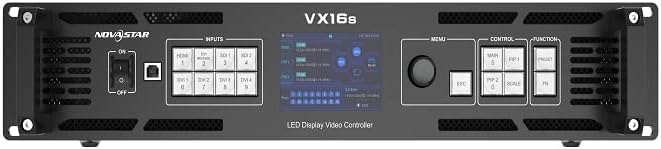
4.1-сүрөт: NovaStar VX16s Front Panel. The front panel features an ON/OFF switch, input selection buttons (HDMI, DVI, SDI), a central display screen, a menu control knob, and dedicated function buttons for MAIN, PIP1, PIP2, ESC, SCALE, and FN.
The front panel provides access to essential controls and indicators for real-time operation and monitoring.
- Кубат которгучу: Аппаратты күйгүзөт же өчүрөт.
- Киргизүү баскычтары: Selects the active input source (HDMI, DVI, SDI).
- Дисплей экраны: Shows current status, menu options, and configuration details.
- Башкаруу баскычы: Менюларды иштетет жана параметрлерди тууралайт.
- Функция баскычтары:
- НЕГИЗГИ: Controls the main layer.
- PIP1/PIP2: Controls Picture-in-Picture layers.
- ESC: Exits current menu or cancels an operation.
- Шкаласы: Accesses image scaling options.
- FN: Ыңгайлаштырылуучу функция баскычы.
4.2 Арткы панель

4.2-сүрөт: NovaStar VX16s Rear Panel. This image details the rear panel, featuring Ethernet ports (1-16), Control ports (Ethernet, RS232, USB), Input ports (DVI 1-4, HDMI 2.0, 3G-SDI 1-2), an Output Monitor port (HDMI), and the AC power input.
The rear panel houses all input, output, and control connections.
- Киргизүү туташтыргычтары:
- 2x 3G-SDI
- 1x HDMI 2.0
- 4x SL-DVI
- Ethernet Output Ports: 16 ports for LED screen connection, supporting up to 10,400,000 pixels.
- Башкаруу порттору: Ethernet, RS232, USB for V-Can software connection and device control.
- Монитордун чыгышы: HDMI port for monitoring the output signal.
- AC кубаттуулугун киргизүү: Электр шнурын туташтыруу үчүн.
5. Орнотуу
5.1 Физикалык орнотуу
The VX16s is designed for rack mounting. Ensure adequate ventilation around the unit.
- Mount the device securely in a standard 19-inch equipment rack.
- Ensure sufficient space for cable connections and airflow.
- Connect the power cord to the AC power input on the rear panel and then to a grounded power outlet.

5.1-сүрөт: NovaStar VX16s Dimensions. This diagram shows the top-down view of the VX16s unit with its physical dimensions in millimeters, useful for rack installation planning.
5.2 Киргизүү/чыгарма байланыштары
Connect your video sources and LED display panels to the appropriate ports on the rear panel.
- Видео киргизүү: Connect your video sources (e.g., media players, cameras) to the HDMI, DVI, or 3G-SDI input ports.
- LED Display Outputs: Connect the Ethernet output ports (1-16) to your LED display panels using standard Ethernet cables.
- Монитордун чыгышы: Connect an external monitor to the HDMI MONITOR output for real-time preview of the processed video.
- Control Connection: Connect a computer running NovaStar V-Can software to the CONTROL Ethernet port or USB port for advanced configuration and control.
6. Иштөө нускамалары
6.1 Күйгүзүү/өчүрүү
To power on the device, flip the power switch on the front panel to the 'ON' position. The display screen will illuminate. To power off, flip the switch to 'OFF'.
6.2 Киргизүү булагын тандоо
Press the corresponding input button on the front panel (HDMI, DVI, SDI) to select your desired video source. The active input will be indicated on the display screen.
6.3 Layer Management (Main and PIPs)
The VX16s supports 3 independent layers: one 4K×2K main layer and two 2K×1K Picture-in-Picture (PIP) layers (PIP 1 and PIP 2). Use the MAIN, PIP1, and PIP2 buttons on the front panel to select and configure each layer. Layer priorities are adjustable via the menu.
6.4 Image Scaling
басыңыз ТАРАП button to access image scaling options. The VX16s offers three scaling modes:
- Pixel-to-Pixel: Displays the input source at its native resolution without scaling.
- Толук экран: Scales the input source to fill the entire LED display area.
- Custom Scaling: Allows for manual adjustment of resolution and position.
6.5 3D Display Function
The device supports 3D display effects on the LED screen. To enable this function, navigate through the menu using the control knob. Эскертүү: When the 3D function is enabled, the device's output capacity will be halved.
6.6 DVI Mosaic
Up to four DVI inputs can be combined to form a single, independent input source, known as DVI Mosaic. This feature is configured via the V-Can software or the device's menu.
6.7 Алдын ала коюлган башкаруу
The VX16s allows you to save up to 10 presets for various display configurations. This enables quick recall of frequently used setups. Presets can be saved and loaded via the device's menu or V-Can software.
6.8 EDID башкаруу
The device supports both custom EDID and standard EDID management, allowing for optimized communication between the video sources and the processor. This can be configured in the system settings.
6.9 Device Backup
The VX16s includes a device backup design to ensure system stability and data integrity. Consult the full user manual for detailed instructions on utilizing backup features.
7. Техникалык тейлөө
Regular maintenance ensures optimal performance and extends the lifespan of your VX16s.
- Тазалоо: Түзмөктүн сыртын тазалоо үчүн жумшак, кургак чүпүрөктү колдонуңуз. Суюк же аэрозоль тазалагычтарды колдонбоңуз.
- Вентиляция: Periodically check that all ventilation openings are clear of dust and obstructions.
- Программалык камсыздоонун жаңыртуулары: Check the NovaStar official website for the latest firmware updates to ensure compatibility and access to new features.
8. Кыйынчылыктарды
Бул бөлүм сиз кабылышы мүмкүн болгон жалпы көйгөйлөрдү карайт. Татаал көйгөйлөр үчүн техникалык колдоо менен байланышыңыз.
| Көйгөй | Мүмкүн себеп | Чечим |
|---|---|---|
| Күч жок | Power cable disconnected; Power switch off; Power outlet fault. | Check power cable connection; Ensure power switch is ON; Test power outlet with another device. |
| No video output on LED screen | Incorrect input selected; Output cables disconnected; LED screen not configured correctly. | Verify active input source; Check Ethernet cable connections to LED panels; Ensure LED screen configuration (resolution, mapping) is correct via V-Can software. |
| Image distortion or incorrect colors | Incorrect EDID settings; Cable issues; Scaling issues. | Adjust EDID settings; Replace video cables; Check image scaling options. |
| V-Can software cannot connect to device | Ethernet/USB cable disconnected; Network settings incorrect; Firewall blocking connection. | Check control cable connections; Verify IP address settings; Temporarily disable firewall for testing. |
9. Техникалык шарттар
Technical specifications for the NovaStar VX16s 4K LED Video Processor.
- Модел: VX16s
- Киргизүү көлөмүtage: AC 100~240V
- Max Loading Capacity: 10,400,000 пиксел
- Киргизүү туташтыргычтары:
- 2x 3G-SDI
- 1x HDMI 2.0
- 4x SL-DVI
- Чыгуу порттору: 16x Ethernet output ports
- Катмарлар: 3 independent layers (1x 4K×2K main, 2x 2K×1K PIPs)
- Сүрөттү иштетүү: Ultra HD 4K×2K@60Hz
- Decimal Frame Rate Support: 23.98 Гц, 29.97 Гц, 47.95 Гц, 59.94 Гц, 71.93 Гц, 119.88 Гц
- 3D Display: Supported (output capacity halved when enabled)
- Scaling Options: Pixel-to-pixel, full screen, custom scaling
- DVI Mosaic: Up to 4 DVI inputs can form an independent source
- Алдын ала орнотуулар: Up to 10 configurable presets
- Контролдоо: V-Can software, front panel controls
- Шайкеш түзмөктөр: Monitor, Television, Projector (as output/monitoring)
- Түсү: Кара
10. Кепилдик жана колдоо
For warranty information and technical support, please refer to the warranty card included with your product or visit the official NovaStar webсайт. Сатып алуу квитанциясын кепилдик дооматтары үчүн сатып алуунун далили катары сактаңыз.
- Онлайн колдоо: Visit the NovaStar official webКөп берилүүчү суроолор, программалык камсыздоону жүктөп алуу жана байланыш маалыматы үчүн сайт.
- Техникалык жардам: Contact NovaStar customer service for assistance with setup, troubleshooting, or operational questions.