1. Киришүү
The Novastar TB40 is a next-generation multimedia player designed for LED displays. It integrates playback and sending functions, allowing users to manage programs and control LED screens via various terminals such as PCs, mobile phones, and tablets. The TB40 also supports cloud publishing and monitoring platforms for efficient cross-regional cluster management of LED displays. This device is engineered for safety, stability, simplicity, and intelligent control, making it suitable for a wide range of commercial LED display applications.
2. Коопсуздук маалыматы
Түзмөктү иштетүүдөн мурун бардык коопсуздук көрсөтмөлөрүн окуп чыгып, түшүнүп алыңыз. Бул көрсөтмөлөрдү аткарбоо электр тогуна урунууга, өрткө же продуктунун бузулушуна алып келиши мүмкүн.
- электр менен жабдууну камсыз кылуу voltage matches the device's requirements (100-240V, 50/60Hz).
- Аппаратты сууга же ашыкча нымдуулукка дуушар кылбаңыз.
- Аппаратты жылуулук булактарынын жанына же тике күн нуруна коюудан алыс болуңуз.
- Аппаратты ачпаңыз casinг. Бардык тейлөөлөрдү квалификациялуу кызматкерлерге тапшырыңыз.
- Өндүрүүчү тарабынан көрсөтүлгөн кошумча жабдууларды гана колдонуңуз.
- Чагылган бороондордо же көпкө колдонулбаганда электр энергиясын өчүрүңүз.
3. Пакеттин мазмуну
Пакетте бардык буюмдар бар экенин текшериңиз:
- Novastar TB40 Multimedia Player Unit
- Кубаттуу адаптер
- Колдонуучунун Колдонмосу (бул документ)

Figure 3.1: Contents of the Novastar TB40 package, showing the main unit, power adapter, and documentation.
4. Продукт бүтүп калдыview
4.1 алдыңкы панели
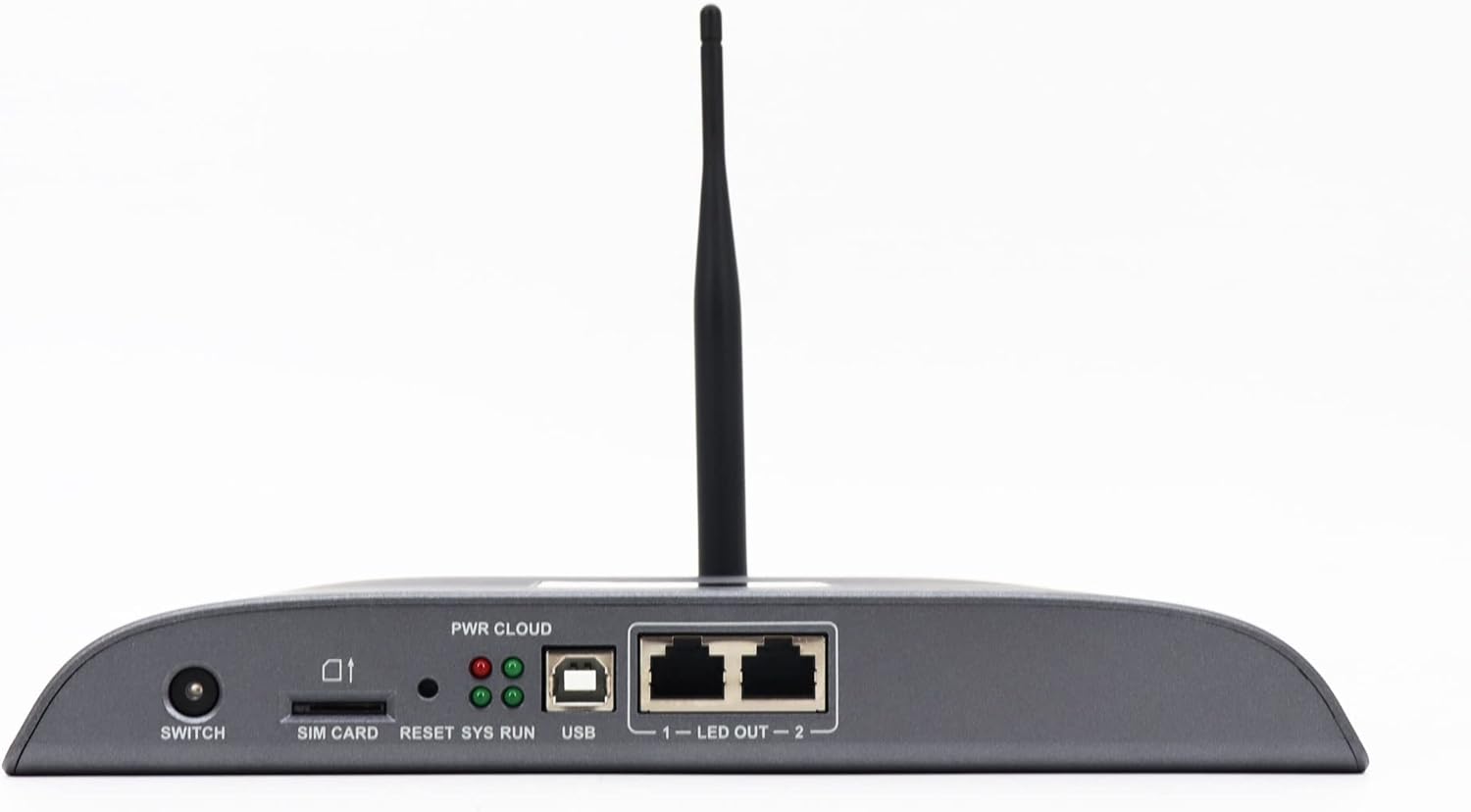
Figure 4.1: Front panel of the Novastar TB40, detailing the various ports and indicator lights.
- ӨЧҮРҮҮ: Түзмөк үчүн кубат которгучу.
- SIM КАРТА: Slot for inserting a 4G SIM card (if 4G module is installed).
- КАЛТЫРУУ: Түзмөктү баштапкы абалга келтирүү баскычы.
- SYS RUN: System running indicator light.
- PWR CLOUD: Power and Cloud connection indicator light.
- USB: USB port for connecting external devices or for system updates.
- LED OUT 1-2: Two Gigabit Ethernet output ports for connecting to LED display receiving cards.
4.2 Арткы панель

Figure 4.2: Rear panel of the Novastar TB40, showing the power input, audio, USB, and network ports.
- 12V 2A: Кубат киргизүү порту.
- АУДИО ЧЫГЫШ: 3.5mm audio output jack.
- COM 1, COM 2: Serial communication ports.
- USB 3.0: High-speed USB 3.0 port.
- ЭТЕРНЕТ: Gigabit Ethernet input port for network connection.
- HDMI IN: HDMI киргизүү порту.
- HDMI OUT: HDMI чыгаруу порту.
- ЧЫГЫШ: Additional output ports (likely for specific control signals).
5. Орнотуу
5.1 Кубатты туташтыруу
- Берилген кубат адаптерин туташтырыңыз 12V 2A power input port on the rear panel of the TB40.
- Кубат адаптерин ылайыктуу электр розеткасына сайыңыз.
- басыңыз SWITCH button on the front panel to power on the device. The PWR CLOUD indicator should light up.
5.2 Тармактык туташуу
The TB40 supports both wired Ethernet and optional 4G connectivity.
- Зымдуу Ethernet: Тармак роутериңизден же коммутаторуңуздан Ethernet кабелин туташтырыңыз Ethernet арткы панелдеги порт.
- 4G (милдеттүү эмес): If a 4G module is installed, insert a valid SIM card into the SIM КАРТА slot on the front panel. Ensure the antenna is securely attached.
5.3 Connecting to LED Display
- Connect one or two Ethernet cables from the LED ЧЫГУУ 1 жана LED ЧЫГУУ 2 ports on the front panel to the receiving cards of your LED display.
- Ensure the LED display is powered on and configured correctly to receive signals from the TB40.
5.4 Перифериялык түзүлүштөрдү туташтыруу
- Аудио: Connect speakers or an audio system to the AUDIO OUT порт.
- USB түзмөктөрү: USB сактагыч түзмөктөрүн же башка перифериялык түзүлүштөрдү туташтырыңыз USB or USB 3.0 порттор.
- HDMI киргизүү: If using an external video source, connect it to the HDMI-IN порт.
6. Иштөө нускамалары
The Novastar TB40 can be controlled and managed through various user terminals and cloud platforms.
6.1 Баштапкы конфигурация
Upon first power-on or after a factory reset, the device may require initial network and display configuration. Refer to the Novastar software documentation (e.g., NovaLCT-Mars or ViPlex Express) for detailed steps on setting up network parameters, screen resolution, and display mapping.
6.2 Program Release and Playback
Content for your LED display can be created and scheduled using Novastar's dedicated software applications. These applications allow you to upload videos, images, text, and other media to the TB40 for playback.
- Жергиликтүү башкаруу: Connect a PC to the same network as the TB40 or directly via USB for local program management and updates.
- Mobile/Tablet Control: Use the Novastar mobile application (e.g., ViPlex Handy) to manage content and settings wirelessly.
- Булут платформасы: For cross-regional management, connect the TB40 to the Novastar cloud publishing and monitoring platform. This enables remote content updates, scheduling, and device status monitoring.
The TB40 supports 1080P video hardware decoding and 4K*2 output, ensuring high-quality content delivery to your LED display.
6.3 Жарыктыкты жөндөө
The device includes a brightness sensor interface, supporting automatic and timed dual-mode intelligent brightness adjustment. This feature helps optimize display visibility and power consumption based on ambient light conditions or predefined schedules.
7. Техникалык тейлөө
- Тазалоо: Аппараттын сыртын тазалоо үчүн жумшак, кургак чүпүрөктү колдонуңуз. Суюк тазалагычтарды же аэрозолдорду колдонбоңуз.
- Вентиляция: Ашыкча ысып кетүүнүн алдын алуу үчүн түзмөктүн айланасында жетиштүү желдетүүнү камсыз кылыңыз. Желдетүүчү тешиктерди жаппаңыз.
- Программалык камсыздоонун жаңыртуулары: Periodically check the Novastar official webОптималдуу иштөөнү жана жаңы функцияларга жетүүнү камсыз кылуу үчүн микропрограммалык камсыздоону жаңыртуу сайты. Жаңыртуулар учурунда берилген көрсөтмөлөрдү кылдаттык менен аткарыңыз.
- Сактагыч: If storing the device for an extended period, disconnect power and store it in a cool, dry place away from direct sunlight.
8. Кыйынчылыктарды
| Көйгөй | Мүмкүн себеп | Чечим |
|---|---|---|
| Түзмөк күйбөйт. | Кубат адаптери туташкан эмес же бузук; розеткада көйгөй бар. | Check power adapter connection. Try a different power outlet. Ensure the power switch is ON. |
| No display on LED screen. | LED OUT cables disconnected; incorrect display configuration; LED screen not powered. | Verify Ethernet cable connections to LED display. Check display settings in Novastar software. Ensure LED screen is powered and functional. |
| Network connection drops frequently (Wi-Fi/4G). | Weak signal; interference; incorrect network settings; faulty module. | Ensure the device is within range of the Wi-Fi router or has good 4G signal. Check network settings. If using 4G, verify SIM card is active. Consider a wired Ethernet connection for stability. |
| Мазмун ойнотулбай же жаңыртылбай жатат. | Network connectivity issue; incorrect content schedule; insufficient storage. | Verify network connection. Check content schedule and upload status in the control software. Ensure sufficient storage space on the device. |
If the problem persists after attempting these solutions, please contact Novastar technical support.
9. Техникалык шарттар
| Модель аты | TB40 |
| Процессор | 1.8GHz A55 Four-core Processor |
| Видеону чечмелөө | Support for 1080P Video Hardware decoding |
| Operating Memory | 1 ГБ |
| Сактагычтын эс тутуму | 16 ГБ |
| Output Resolution | 4K*2 output |
| Жүктөө жөндөмдүүлүгү | 1,300,000 pixels (max width 4096, max height 4096) |
| Тармак порттору | 2 x 1000M Ethernet output, 1 x 1000M Ethernet input |
| Байланыш технологиясы | USB, Ethernet, 4G (optional module) |
| Power Input | 100-240V AC, 50/60Hz |
| Максималдуу энергия керектөө | 18 Вт |
| Өлчөмдөрү (L*W*H) | 274 мм * 139 мм * 40 мм |
| Салмагы | 1250г |
| Өзгөчөлүктөр | Brightness sensor interface, automatic/timed brightness adjustment, multi-screen synchronous playback |
10. Кепилдик жана колдоо
For warranty information and technical support, please refer to the official Novastar webсайтына кириңиз же ыйгарым укуктуу сатуучуга кайрылыңыз. Кепилдик талаптары үчүн сатып алуунун далили катары сатып алуу дүмүрчөгүңүздү сактап коюңуз.
Novastar Official Webсайт: www.novastar.tech


