1. Киришүү
This manual provides essential information for the safe and efficient operation of your Powertech MB3904 8 Step Intelligent Lead Acid and Lithium Battery Charger. Please read this manual thoroughly before use and retain it for future reference.
2. Коопсуздук маалыматы
Ар дайым төмөнкү коопсуздук чараларын сактаңыз:
- Батареяга туташтыруудан же аны үзүүдөн мурун, заряддагычтын электр тогунан ажыратылганын текшериңиз.
- Заряддоо түзүлүштү жакшы желдетилген жерлерде гана колдонуңуз.
- Тоңуп калган батареяларды заряддоодон алыс болуңуз.
- Заряддагычты жамгырга же ашыкча нымдуулукка дуушар кылбаңыз.
- Балдар жетпеген жерде сактаңыз.
- This charger is designed for 6V or 12V Lead Acid or LiFePO4 batteries only. Do not use with other battery types.
3. Пакеттин мазмуну
Пакетте бардык буюмдар бар экенин текшериңиз:
- Powertech MB3904 8 Step Intelligent Battery Charger Unit
- Батарея Clamp Connectors (Red and Black)
- Ring Terminal Connectors
- AC Power Cord
- Колдонуучунун Колдонмосу (бул документ)
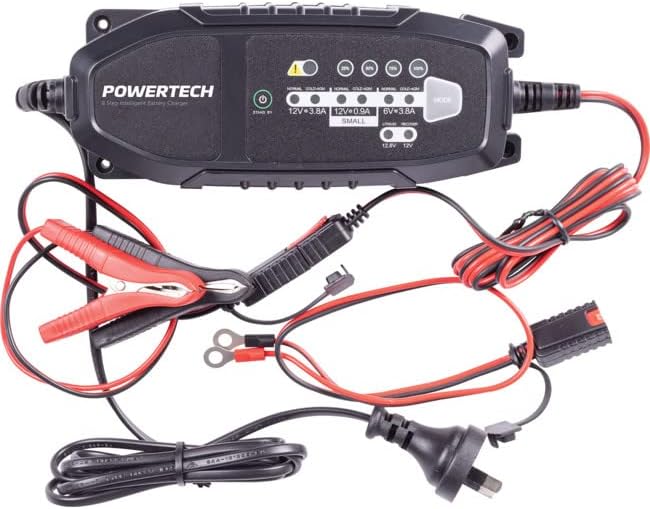
Image: The Powertech MB3904 battery charger unit shown with its various included accessories, including battery clamps, ring terminals, and the AC power cord.
4. Продукциянын өзгөчөлүктөрү
The Powertech MB3904 charger offers advanced features for optimal battery maintenance:
- 8-Step Charging Process: Ensures thorough and efficient charging for various battery types.
- Мульти-томtage Шайкештик: Suitable for both 6V and 12V lead acid and LiFePO4 batteries.
- Комплекстүү коргоо: Includes overload, short circuit, reverse polarity, safety timer, and wrong battery protection.
- Интуитивдик LED көрсөткүчтөрү: Clearly display charge status and selected mode.
- Режим тандоо баскычы: Allows easy switching between charging modes.
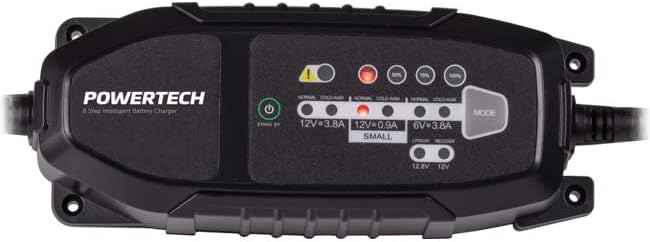
Сүрөт: жогорудан ылдыйга view of the Powertech MB3904 charger, highlighting the LED indicators for charge status and the 'MODE' button for selecting charging programs.
5. Орнотуу
- Жайгашкан жери: Place the charger on a stable, flat surface in a well-ventilated area, away from direct sunlight or heat sources.
- Батарея туташуу: Ensure the battery terminals are clean. Connect the red (+) clamp/ring terminal to the positive (+) battery terminal and the black (-) clamp/ring terminal to the negative (-) battery terminal. Ensure a secure connection.
- Кубат туташуу: Plug the AC power cord into a suitable wall outlet. The charger will enter standby mode.
6. Иштөө нускамалары
6.1. Кубаттоо режимин тандоо
After connecting the battery and power, press the РЕЖИМ button to cycle through the available charging programs. The corresponding LED will illuminate to indicate the selected mode:
- 12V 3.8A (Normal): Standard charging for 12V lead acid batteries.
- 12V 3.8A (Cold/AGM): For charging 12V lead acid batteries in cold conditions or AGM batteries.
- 12V 0.9A (Small): For charging smaller 12V lead acid batteries.
- 6V 3.8A: For charging 6V lead acid batteries.
- Lithium (12.8V/12V): For charging 12V LiFePO4 batteries.
- Оңдоо: A special mode for desulfation of deeply discharged lead acid batteries.
6.2. Заряддоо процесси
Once a mode is selected, the charger will automatically begin the 8-step charging process. The progress LEDs (25%, 50%, 75%, 100%) will illuminate sequentially to indicate the battery's charge level. When the 100% LED is solid, the battery is fully charged.
6.3. Заряддоочу түзүлүштү ажыратуу
- AC шнурду розеткадан сууруп алыңыз.
- Кара (-) clamp/ring terminal from the negative (-) battery terminal.
- Кызыл (+) clamp/ring terminal from the positive (+) battery terminal.
7. Техникалык тейлөө
- Тазалоо: Clean the charger casing жумшак, кургак чүпүрөк менен. Абразивдүү тазалагычтарды же эриткичтерди колдонбоңуз.
- Сактагыч: Заряддоо түзүлүштү колдонбогондо салкын, кургак жерде сактаңыз.
- Кабелдик текшерүү: Periodically inspect the power cord and battery cables for any signs of damage. Do not use the charger if cables are damaged.
8. Кыйынчылыктарды
| Көйгөй | Мүмкүн себеп | Чечим |
|---|---|---|
| Заряддоочу түзүлүш күйбөй жатат. | розеткадан электр энергиясы жок; бош байланыш. | электр розеткасын текшерүү; электр шнурунун бекем сайылганын текшериңиз. |
| Ката светодиод күйүп турат. | Reverse polarity; short circuit; wrong battery type. | Check battery connections for correct polarity; inspect cables for shorts; ensure battery type matches selected mode. |
| Батарея заряддалбай жатат. | Battery deeply discharged/damaged; incorrect mode selected. | Try "Repair" mode for lead acid batteries; test battery with a multimeter; ensure correct charging mode is selected. |
9. Техникалык шарттар
- Модел: MB3904
- Киргизүү көлөмүtage: 220-240V AC, 50/60Hz
- Output Voltage: 6V / 12V DC
- Заряддоо агымы: 0.9A / 3.8A
- Батареянын түрлөрү: Lead Acid (WET, MF, CA, EFB, GEL, AGM), LiFePO4
- Коргоо: Overload, Short Circuit, Reverse Polarity, Safety Timer, Wrong Battery
- Өлчөмдөрү: Болжол менен 20.4 x 7.4 x 4.8 см
- Салмагы: Болжол менен 534 г
- Шайкештик: CE
10. Кепилдик жана колдоо
This Powertech product is covered by a standard manufacturer's warranty. For specific warranty terms and conditions, please refer to the warranty card included with your purchase or contact your retailer.
For technical support or service inquiries, please contact Jaycar Electronics customer service or visit their official webсайт. Кепилдик дооматтар үчүн сатып алганыңыздын далилин сактаңыз.
Jaycar Electronics Webсайт: www.jaycar.com.au


