Introduction
The Ebitcam 4G LTE Cellular Security Camera (Model S40) provides robust and flexible surveillance for locations without traditional Wi-Fi or electrical power. This wireless outdoor camera features 2K resolution, 360° live view capabilities, and color night vision, making it ideal for monitoring farms, ranches, jobsites, cabins, and other remote areas. It operates on 4G LTE networks and is equipped with a solar panel for continuous power.

Figure 1: Ebitcam 4G LTE Cellular Security Camera with included solar panel, 32GB memory card, and SIM card.
Кутуда эмне бар
Пакетти ачканда, төмөнкү компоненттердин бардыгы камтылганын текшериңиз:
- 1 x 4G Security Camera
- 1 x EIOTCLUB SIM Card
- 1 x 32GB Micro Memory Card
- 1 x 5W Күн панели
- 1 x User Manual
- Монтаждоо бурамалар жана дубал анкерлери
- USB заряддоо кабели
- SIM картаны алып салуу куралы

Figure 2: Contents of the Ebitcam S40 package, including the camera, solar panel, and various accessories.
Орнотуу колдонмосу
Follow these steps to set up your Ebitcam 4G LTE Cellular Security Camera:
1. Insert SIM Card and Memory Card
The camera comes with a pre-installed EIOTCLUB SIM card and a 32GB Micro Memory Card. If you wish to use your own SIM card, carefully remove the pre-installed one using the provided tool and insert your compatible Nano SIM card. Ensure the memory card is properly seated for local storage of recordings.

Figure 3: Location of the SIM card and memory card slots on the camera. The provided SIM card can be replaced with your own.
2. Charge the Camera and Connect Solar Panel
Before initial use, fully charge the camera's built-in 10400mAh rechargeable battery using the provided USB cable. Once charged, connect the 6W solar panel to the camera. The solar panel is designed to provide continuous power, eliminating the need for frequent manual recharging, especially with at least 3 hours of direct sunlight daily.

Figure 4: The camera connected to its solar panel, illustrating the continuous power solution.
3. Download and Configure the UBox App
Download the UBox app from your smartphone's app store (iOS or Android). Follow the in-app instructions to add your camera. This typically involves scanning a QR code on the camera or its packaging. The app will guide you through connecting the camera to the 4G LTE network.

Figure 5: The camera's ability to function using a 4G LTE cellular signal, eliminating the need for Wi-Fi.
The camera supports 4G LTE networks from Verizon, T-Mobile, and AT&T in the U.S. The included EIOTCLUB SIM card provides 300MB of trial data for the first month, after which you can choose an unlimited data plan or switch to your own compatible SIM card.
Камераны иштетүү
1. Түз эфир View жана панорамалоо/кыйшайтуу башкаруусу
Access the live 2K video feed through the UBox app. The camera offers a 360° live view with 355° pan and 100° tilt capabilities, allowing you to remotely adjust the camera's viewing angle from your smartphone. Utilize the 4x digital zoom for closer inspection of details.

Figure 6: Illustration of the camera's pan (355°) and tilt (100°) range for comprehensive coverage.
2. Кыймылды аныктоо жана эскертүүлөр
The camera is equipped with a highly sensitive PIR motion sensor to detect movement and minimize false alarms. When motion is detected, the camera will send instant alerts to your phone. All motion-activated video and snapshots are saved locally to the 32GB memory card (included) or can be backed up to the cloud (30-day trial available).
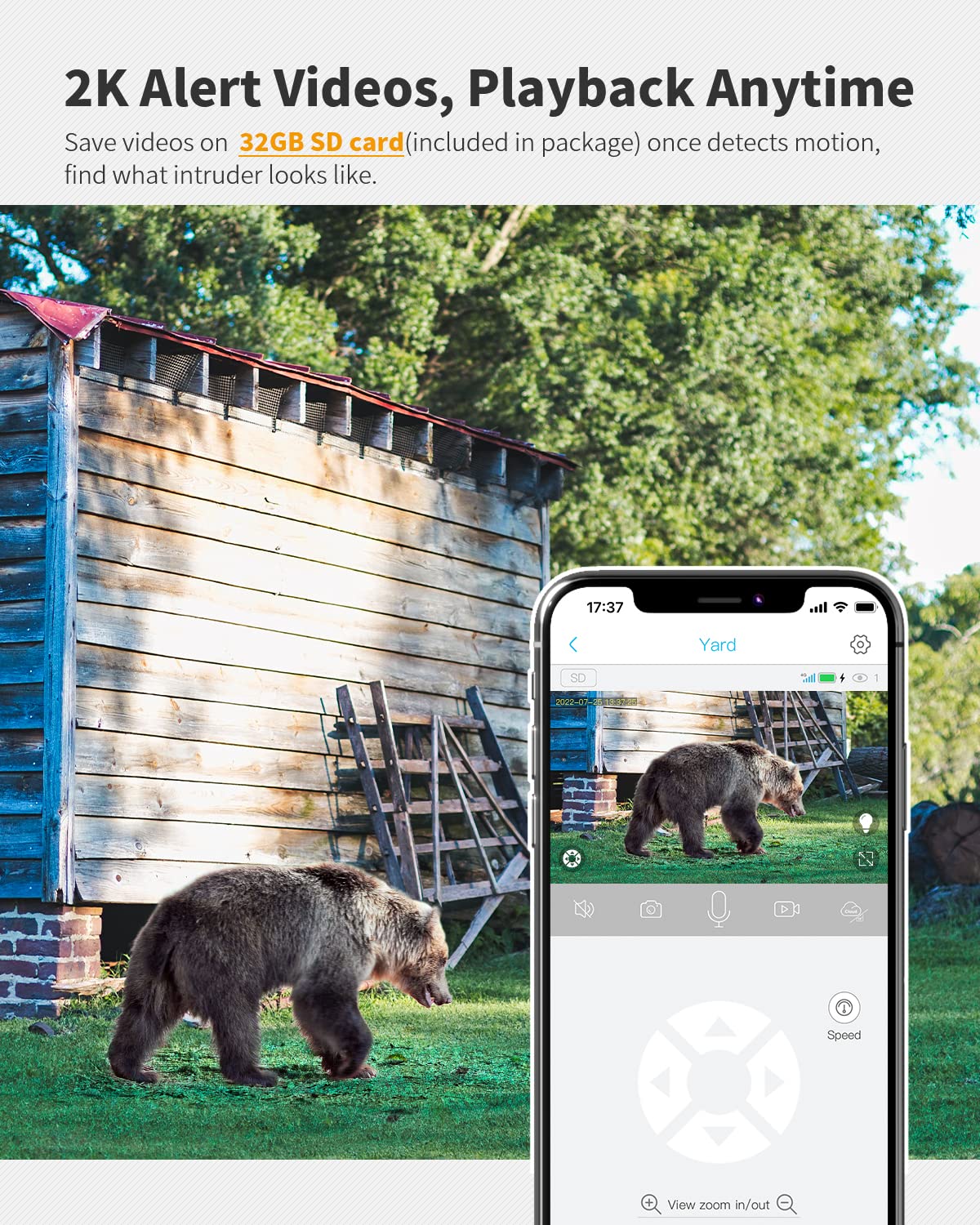
Figure 7: The camera's motion detection feature, capturing and saving video footage upon detecting activity.
3. Night Vision and Spotlight
The camera provides clear 2K video day and night. For enhanced visibility in low-light conditions, it features color night vision. A built-in spotlight can be activated manually via the app or configured to turn on automatically when motion is detected, illuminating the area and capturing detailed color video.

Figure 8: Comparison of night vision with the spotlight off (black and white) and on (color), demonstrating enhanced detail.
4. Эки тараптуу аудио
The camera supports two-way audio communication, allowing you to listen to the environment around the camera and speak through its built-in speaker using the UBox app. This feature is useful for deterring intruders or communicating with visitors remotely.
Техникалык тейлөө
- Күн панелин тазалоо: Күн панелинин бетин дайыма жумшак, г менен сүртүңүзamp cloth to remove dust, dirt, or debris. A clean panel ensures optimal sunlight absorption and efficient battery charging.
- Аба ырайынын туруктуулугу: The camera has an IP65 weather-resistant rating, protecting it from dust and water splashes. Ensure all port covers are securely closed to maintain this protection.
- Батареянын ден соолугу: While the solar panel provides continuous power, it is recommended to occasionally check the battery level via the UBox app, especially during prolonged periods of low sunlight.
Проблемаларды чечүү
| Маселе | Мүмкүн себеп | Чечим |
|---|---|---|
| Камера 4G тармагына туташпай жатат | No SIM card, incorrect SIM card, poor signal, expired data plan. | Ensure SIM card is correctly inserted and activated. Check 4G signal strength in the camera's location. Verify data plan status. Try restarting the camera. |
| Батарея заряддалбай жатат | Insufficient sunlight, dirty solar panel, faulty connection. | Relocate solar panel to an area with more direct sunlight. Clean the solar panel surface. Check the connection cable between the camera and solar panel. |
| Кыймыл эскертүүлөрү жок | PIR sensor blocked, sensitivity too low, app notifications disabled. | Ensure nothing is obstructing the PIR sensor. Adjust motion detection sensitivity in the UBox app. Enable notifications for the UBox app in your phone settings. |
| Видеонун сапаты начар | Lens dirty, low light, network bandwidth issues. | Clean the camera lens. Ensure adequate lighting for optimal image quality. Check 4G signal strength for better streaming. |
For further assistance, please refer to the full Колдонуучунун колдонмосу (PDF) or contact Ebitcam customer support.
Техникалык шарттар
| Өзгөчөлүк | Деталь |
|---|---|
| Модель аты | S40 |
| Ички/тышкы колдонуу | Сыртта |
| Connectivity Protocol | Уюлдук байланыш (4G LTE) |
| Power Source | Батарея менен иштейт, күн энергиясы менен иштейт |
| Батарея сыйымдуулугу | 10400mAh |
| Күн панели Wattage | 5W |
| Видео тартуунун резолюциясы | 2K |
| Pan/Tilt диапазону | 355° Пан, 100° Тилт |
| Түнкү көрүнүш | Түнкү көрүнүш |
| Сактагыч | 32GB Micro Memory Card (included), Cloud Storage (30-day trial) |
| Motion Detection | PIR Кыймыл сенсору |
| Суу өткөрбөйт рейтинги | IP65 |
| Өлчөмдөрү (L x W x Y) | 5.71 x 2.76 x 4.72 дюйм |
| Элемент Салмагы | 2.35 фунт |
| Compatible Networks (US) | Verizon, T-Mobile, AT&T |
Кепилдик жана колдоо
Ebitcam products are designed for reliability and performance. For information regarding product warranty, please refer to the warranty card included in your product packaging or visit the official Ebitcam website. For technical support, troubleshooting assistance, or any inquiries, please contact Ebitcam customer service through the contact information provided on their official website or within the UBox application.
Additional resources, including the full user manual, can be found at: Ebitcam S40 User Manual PDF.


